🔑 Unlock effortless control — your garage, your rules.
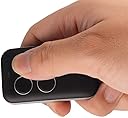
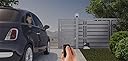
This Universal Garage Door Opener Remote combines cutting-edge Intellicode security with broad compatibility, allowing you to control up to four different garage doors or gates from one ultra-compact device. Designed for quick wireless programming and keychain convenience, it supports cloning of fixed and rolling code remotes across multiple frequencies, making it the ultimate all-in-one solution for modern homeowners seeking streamlined access and enhanced security.


| ASIN | B07BWFFDSG |
| Batteries | 1 CR2032 batteries required. |
| Batteries Required? | No |
| Batteries included? | No |
| Battery description | Lithium |
| Colour | Black-01 |
| Customer Reviews | 3.8 3.8 out of 5 stars (1,152) |
| Date First Available | 3 April 2018 |
| Item Package Quantity | 1 |
| Item Weight | 18.1 g |
| Item model number | DRMT-00A |
| Manufacturer | XINDA |
| Part Number | 43239-194855 |
| Product Dimensions | 5.59 x 3.81 x 0.76 cm; 18.14 g |
| Special Features | Universal, Wireless |
J**A
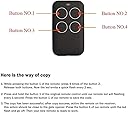
This remote is great for copying other garage door remotes especially those that don't have dip switches to copy into a regular remote. I can be programmed with four signals for each of the four buttons. You just put this device in program mode and send the signal from the other remote and if successful it copies the signal. it works with allot of remotes but not all. I used it to copy a Genie remote, Linear Remote and a Multicode. The instructions where a little difficult and the numbering of the buttons (see pix) is not what you would expect so here is how it worked for me. NOTE: When you press a button on this new duplicating remote the light typically turns blue so you know it is sending a signal. 1) On this new duplicating remote, hold the #3 button down and as your doing so, quickly press the #2 button three times. Let go of the buttons. The blue light will turn RED and blink slowly. If you don't get the slowly blinking red light then repeat this step. The red light indicates its ready to receive a signal to duplicate. 2} As soon as that red blinking light appears, hold the remote you want to copy close to this duplicating remote (not more than a couple of inches away) and press the button as if your opening your door/gate/whatever. Keep pressing the button until the red light on the duplicating remote stops flashing 3) If duplicating was successful you will now see a blinking BLUE light on the new duplicating remote. This indicates it copied the signal and is waiting for you to choose a button to store it. If no light appears after the flashing red light you may have to try a few more times to get it to work. This is not uncommon. If it still does not copy the signal it may not be compatible for copying. There is a list on the back of the instruction sheet that shows compatibility. (see attached pix) 4) Now press one of the four buttons on this new remote where you want to store that signal and keeping pressing it until the light turns off indicating it has been stored. NOTE: It may take a couple of tries
K**.
I bought this remote to replicate a community gate remote. I would have to agree with the previous reviews that it's a great remote, if you can persevere. I actually had bought a chamberlain garage remote control first that needed the syncing from the gate opener (not remote) itself. But when the security guard wouldn't let me link the gate to remote, I had to try a different option to buy a remote "copier", like this one. It took me about 15 minutes to actually copy the remote successfully, for the reason that there are multiple instructions included with the remote (depending on which type of garage door/gate types are), and I didn't know which type my community gate was. I ended up trying every instruction until I got the correct one. But once the remote was copied, the remote worked and works flawlessly. A neighbor, who bought another copier off of another seller, had failed to copy the remote and was surprised that I got this one working. He said he was going to place an order for this as well. So clearly, our gate isn't the best to copy remotes, but apparently Xinda remote was able to work it through. One recommendation that I found useful from previous reviews was that when copying the signal, try to put two remotes at different angles. 90 degrees, 45 degrees, 180 degrees, lay on table, etc. I forgot which one worked, but one worked better than the other. This is probably because of the signal angle of the original remote is coming off from different angle, which would differ by the manufacturer. Just on a side note, I kinda like the rubbery texture of the remote, which makes the remote look more luxurious, as well as the small form factor of it. But overall, I'm just glad I was able to copy an "impossible to copy" remote. If you are having trouble copying garage door/gated remotes, I would highly recommend to try this one.
P**.
Good little remote. I’ve had it for a couple of days and it seems to be doing the job, there are just a few annoying things that dropped 2 stars for me: 1. When I was ordering, the photo (which has been updated now) showed a sleek little plain black remote. When it arrived I was surprised to see the enormous, hideous logo added to the face just under the buttons. It’s actually bigger than shown in the photos and really ruins the look of the whole thing. 2. The instructions are incredibly over-complicated and poorly worded with pointless tables and diagrams. Programming the remote is simple: The buttons are numbered 1 through 4 horizontally (top left is 1, top right is 2, bottom left is 3, bottom right is 4). Place the this remote and the remote you’re copying on a table a few inches apart, pointed at one another. While holding down button 3, triple click button 2. When the LED flashes red release button 3. The remote is now in “learning mode.” Click and hold the button on the original remote continuously in 1-2 second intervals until the flashing LED on the new remote changes to blue. This signifies that it has collected/learned the signal. To finish the job, press the button (1 through 4) which you’d like that specific code programmed to. That’s it. If it doesn’t work the first time, just repeat it once or twice and it’ll get it. 3. I wish it had an optional removable visor clip. Keep in mind that this remote probably won’t be any “stronger” than the remote you already have. If you’re having signal reception issues with your garage door opener, then you need to upgrade the receiver, not the remote.
C**N
Purchased 2 years ago and used it as neighborhood parking gate opener. Works fine until I tried to duplicate code for my garage door. My garage opener is a pretty old model of Bluemax, 12 dip code pared with a really crappy Genie remote. I tried to duplicate directly from the Genie remote, failed can't open the door. I tried to re-program the opener with only 1-10 passcode, duplicated and again failed. So I made my call that this may not work with the opener. Just a reminder to everyone else who may have the same situation. Other than that, the instruction is very confusing if this is the first time for you to use this kind of device. The instruction included in the package said press and hold button 1 and press button 2 multiple times to enter into learn mode, yet after Youtubing I found people press and hold button 3 and press button 2 to make it work, and this was what I did with success. I would still like to see a formal, correct user manual instead of only a piece of paper with several words printed. Kudos, this fob is tiny, easy to carry, and honestly way better looking than Genie products. Overall a good one to buy.
E**.
I purchased the XINDA 2020 Universal Garage Door Opener Remote and it was exactly what I was looking for. I have 3 garage doors and a gate that all have separate remotes. I was able to program all of them into this single remote. Each of these garage doors and gate are from different manufactures, different generations of openers with different coding schemes. The XINDA worked with all of them and was easy to program. You just put it in the learn mode. Place the old remote next to it and press the button on the old remote that you want to copy until the LED turns blue. Then press the button on XiNDA that you want to assign it to. Done! After you finish, you may need to pair the new remote to the opener if it is a rolling code type. It works great with every opener I have. I like the compact design. It fits comfortably in my pocket or can attach to my key ring. I like the construction of the remote with the rubberized housing. It doesn’t feel like cheap plastic. I would recommend this product to anyone that is looking for a good compact universal opener remote that is easy to program. I give it 5 stars.
Trustpilot
1 month ago
3 weeks ago