Desert Online General Trading LLC
Dubai, United Arab Emirates
Desert Online General Trading LLC
Dubai, United Arab Emirates


⚡ Dominate the game with speed and style — your victory starts here!
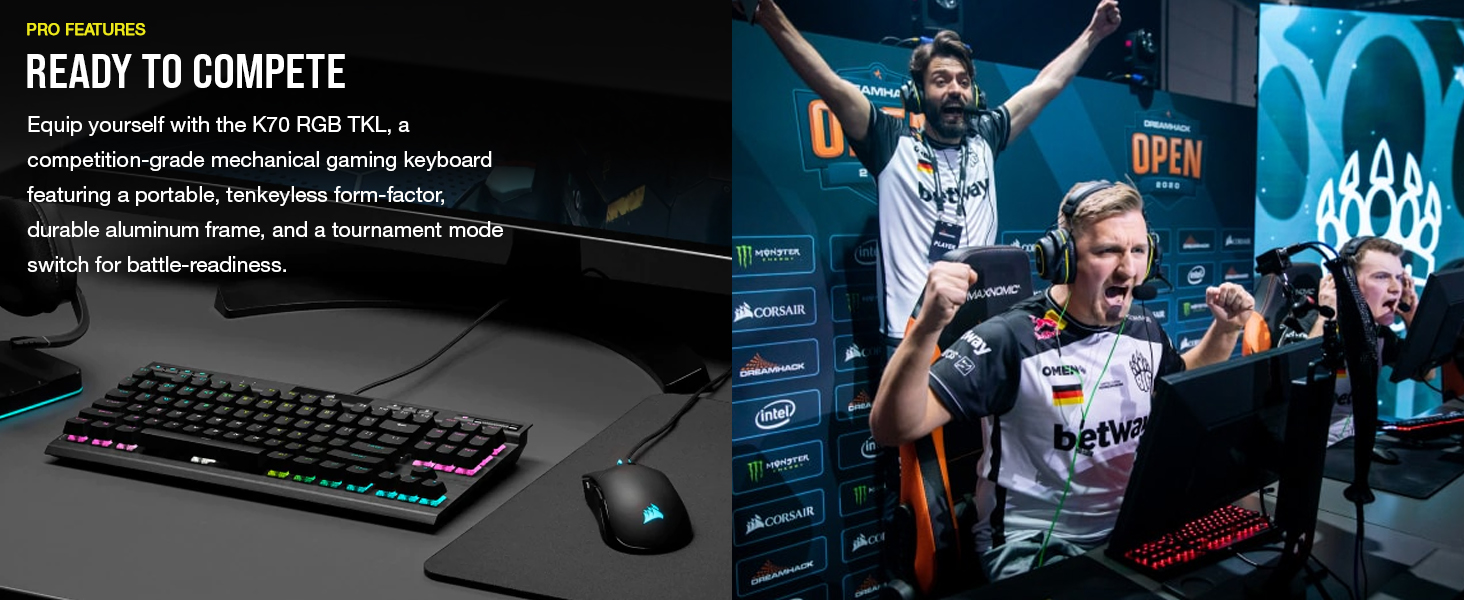
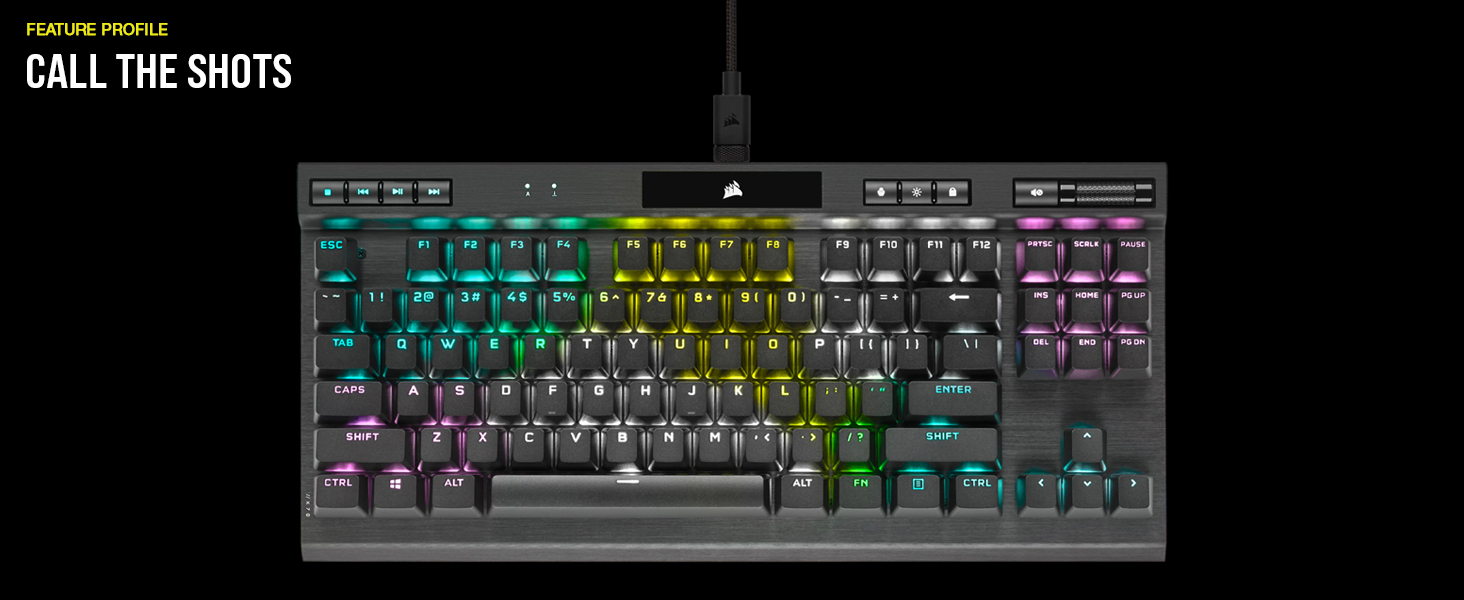
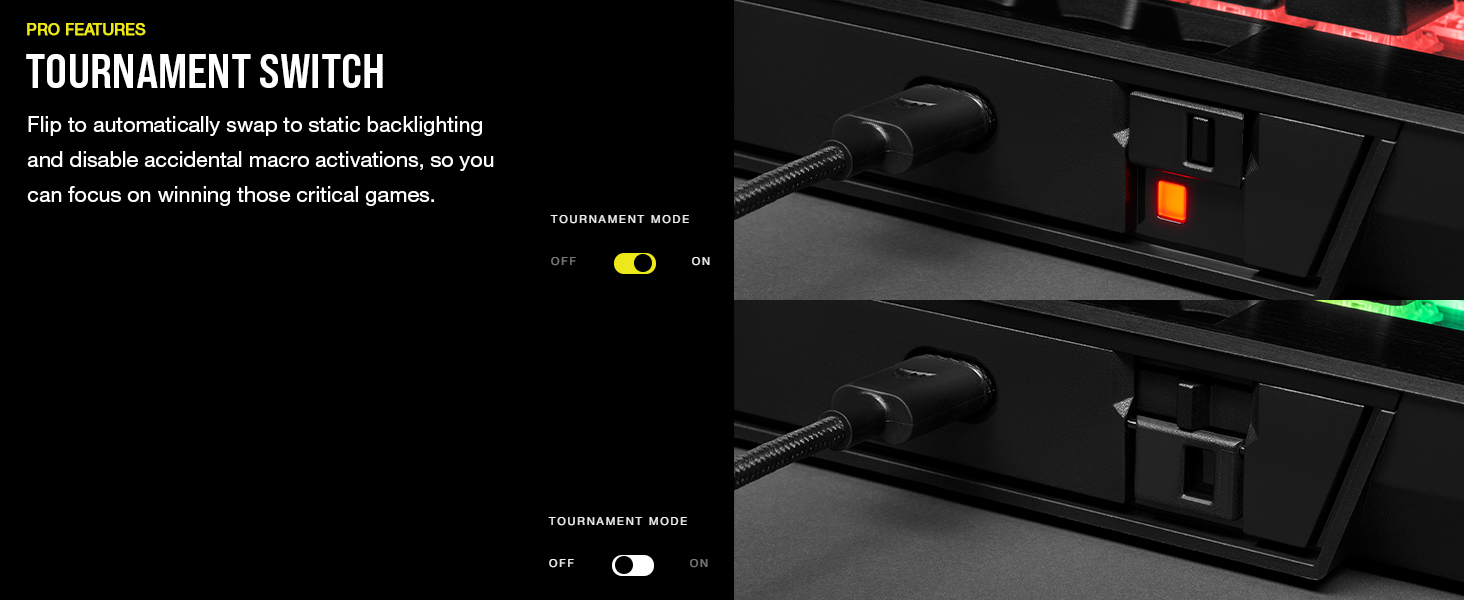
The CORSAIR K70 RGB Tenkeyless Mechanical Gaming Keyboard combines pro-grade CHERRY MX SPEED switches with ultra-fast 8,000Hz AXON hyper-polling technology, housed in a sleek aluminum frame. Its compact tenkeyless design and detachable USB-C cable make it perfect for esports pros and serious gamers seeking precision, durability, and customizable per-key RGB lighting. Tournament mode ensures distraction-free focus during critical moments.
| Brand | Corsair |
| Item model number | CH-9119014-NA |
| Hardware Platform | PC |
| Item Weight | 1.98 pounds |
| Product Dimensions | 14.17 x 6.46 x 1.57 inches |
| Item Dimensions LxWxH | 14.17 x 6.46 x 1.57 inches |
| Color | Black |
| Power Source | Corded Electric |
| Manufacturer | Corsair |
| Language | English |
| ASIN | B08W2DY46Q |
| Date First Available | April 8, 2021 |
A**R
Great for gamimg
My previous keyboard was a aorus x7 red mx cherry. I loved it but during repeated cleaning the keys didn't hold up too well which was fine cause I just put a little glue on them. my left shift switch ended up dying and then I bought the k70. I love the keyboard. Its amazing for gaming. The only down fall so far is that the silver switches are super sensitive so when using the board for typing ive been having to delte extra characters pretty often but im sure ill get used to it. The USB c port is recessed into the keyboard about a half inch so I wouldn't be worried the port being damaged. The raised switches are definitely a bonus for easy cleaning and not having dust and grim build up under the keys like my aorus. Oh and there's no goofy retention springs across rhe shift,enter or space bars which have fail on my other boards. Lighting is amazing and has everything I need in a board. Complements my dark core as well!
M**S
Great feel, but extremely sensitive.
Awesome keyboard! Per-key RGB looks incredible, but is a little confusing to set up with the iCUE software.Key presses are super smooth with a low-pitched and light thunk bottoming out. Actuation point is super high up and smooth, and the weight is super light akin to Cherry MX Reds, so I've noticed just resting my hands on the keys a little too hard can easily press them accidentally, but wasn't too difficult to get used to.Got mine on sale, and would definitely recommend it, but is still well worth the full price if you're looking for a solid feeling, and QUIET mechanical keyboard.
K**R
Great mechanical keyboard for travel, easily cleaned
I've got half a dozen corsair keyboards, so they are definitely a favorite. The LEDs stop working after a while, but that's to be expected. The keyboards themselves are great, the key action is awesome, and the best thing is that the keys are mounted above the surface of the keyboard, making the entire setup easy to clean. I use this one for the workplace, and the cherry reds are good for that as they are more quiet than the cherry blue keyboards which I do prefer, but which I limit to home use.
B**.
Good built quality, be careful though super sensitive!
This keyboard is awesome, I love it. It has this really nice hard plastic that looks like metal and everything is customizable down to each key. Be careful though, this keyboard is very touchy. As someone who often makes typos this keyboard can be brutal as it picks up on every little touch. I would say this is amazing for gaming, not as good for my work! Lastly, while I love everything about this keyboard, the tournament switch is dumb. That is all, would definitely recommend this thing best keyboard I have ever owned.
T**O
Excellent hardware... Abysmal software
From the start, let me state that the keyboard itself is a great piece of kit. It's solidly built, has fantastic linear switches and adequately stable key-caps. And those key-caps are double-shot PBT with a nicely textured finish and good backlight uniformity.Simply put, it's a dream to type on and I couldn't be happier with the hardware. If you're looking for a quality programmable TKL keyboard and don't want to pay boutique prices or roll your own with a kit, I'm not sure that a better option exists. The software however, is another story entirely.To program key assignments or define a custom lighting profile (the later of which is understandable), you must use the Corsair iCue software package. To my knowledge and according to all of the documentation I could find, there is no way to program remaps or macros vis the keyboard alone. A real shame.Now I'm no stranger to using "gamer" software for configuring devices but iCue rises to a whole new level of terrible. The first, and probably most egregious offense is the fact that installing iCue also installs no less than four services that are configured to run automatically at boot. Add this to the iCue UI and you now have five programs running at all times... just to use a keyboard! Ridiculous.Okay so now we know that we have to either a) disable all of the extraneous services or b) uninstall iCue once we've configured the keyboard to our liking so let's hop to it shall we. For some reason I cannot fathom, Corsair decided that key assignments (i.e. remaps and macros), as well as lighting profiles that you want to store on the keyboard, and those controlled by software, must be mutually exclusive. Why?!You can't even reuse the library of macros or lighting layers; they must duplicated! So you may be thinking, if you know in advance that you aren't going to use the software moving forward, just configure everything the "hardware" sections from the beginning. A sound theory, which is exactly what I did however... hardware key assignments do not work while iCue is running!That's right, when you configure a hardware remap or macro, it won't actually work until you terminate the iCue process (e.g. exit the program rather than simply close the window). Since there is nothing in iCue to make the user aware of this fact, I naturally assumed that the function simply didn't work and proceeded to configure everything via the non-hardware interface (it doesn't explicitly state that it's software only FYI).But wait, there's more! The software allows you to save profiles to the keyboard -- sometimes, stay tuned -- even though nothing has been configured in the hardware sections of iCue, with no mention of the fact that you are basically saving an empty profile. So upon finally getting all of my profiles set up and saved to the keyboard I excitedly shut down iCue to see my handiwork and what do I get... unicorn vomit and defaults all around! Nothing worked.Let's take a detour for a minute to touch upon the process of saving profiles to the keyboard. It's a crapshoot! Sometimes it works, sometimes it doesn't. When it doesn't, the only way to get it working again is to unplug the keyboard, restart the services, close iCue, then reconnect the keyboard, relaunch iCue and try again. It usually works... ONCE, then you have to repeat the process to save again. Nightmare usability.So, why didn't I just pack the thing up, ship it back and move on? Well, I was about to but when I decided to try a little troubleshooting. During which I discovered that the hardware key assignments DO work, but only after iCue is terminated. After this revelatory discovery, I replicated all of my key assignments and lighting customizations in their respective hardware sections then fought with iCue to eventually get all of my profiles saved to the keyboard.Upon testing that everything was functioning as expecting without iCue running, I promptly disabled everything related to this steaming pile of garbage software. Done and done. The keyboard itself is just so darn good that I had to keep it. The only thing that is disappointing from a hardware perspective is the included USB cable. It's just too short! A meter longer would be perfect and more in line with the stack of keyboards I have stored away.Final thoughts... If Corsair fixes their terrible software and reduces its sheer bloat, this is absolutely a 5-star product. Until then 3.5 rounded up to 4 since the hardware is just so good.
A**R
Best Keyboard I've Owned To Date
I am VERY pleased with this keyboard.Pros: Perfect click from the keys (I have the Cherry MX Speed), optimally sized, great button features at the top of the keyboard, great RGB effects if RGB is your thing.Cons: I haven't experienced any cons with this keyboard, but I will put it here just to cover bases, the click of the keys may not appeal to you. If you want to have a reduced clicking sound maybe try the Cherry MX Silent instead. It's all down to preference really!
M**T
Great Keyboard
Came from a Red dragon Kb for about 40-50 to this and really like it the premium materials like metal special key caps scroll knob can’t miss with this one
V**R
Great gift for my friend
Great gift for my friend.
Trustpilot
3 weeks ago
2 weeks ago