⚡ Power, Ports & Performance — Dock Like a Pro!
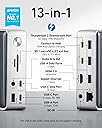
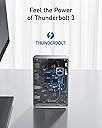
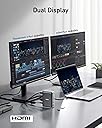
The Anker 577 Thunderbolt Docking Station is a premium 13-in-1 hub designed for Thunderbolt 3/4 laptops, delivering 85W laptop charging, 18W phone charging, and dual 4K@60Hz display support. With a comprehensive port selection including dual Thunderbolt 3, USB-C, USB-A, HDMI, Ethernet, and SD card slots, it transforms your workspace into a streamlined productivity powerhouse. Ideal for professionals seeking high-speed data transfer and multi-display setups, this compact dock balances power and portability with Anker’s trusted reliability.


| ASIN | B087219P5J |
| Brand | Anker |
| Color | Silver |
| Colour | Silver |
| Compatible Devices | Card Readers, Laptops |
| Compatible devices | Card Readers, Laptops |
| Customer Reviews | 4.0 out of 5 stars 1,378 Reviews |
| Hardware Interface | Ethernet, HDMI, Thunderbolt, USB |
| Hardware interface | Ethernet, HDMI , Thunderbolt , USB |
| Item Dimensions L x W x H | 12.6L x 8.9W x 4.2H centimeters |
| Item Weight | 1.08 Pounds |
| Manufacturer | Anker |
| Mfr Part Number | A8396141 |
| Model Number | A8396141 |
| Number of Items | 1 |
| Number of Ports | 13 |
| Product dimensions | 12.6L x 8.9W x 4.2H centimeters |
| Total Number of HDMI Ports | 1 |
| Total USB ports | 6 |
| Total Usb Ports | 6 |
| UPC | 194644031848 |
| Wattage | 85 watts |
G**R
Slowing down performance of the Laptop
I decided to purchase this product based on the brand's reputation and my need for a powerful dock that would reduce wire clutter and free up ports on my XPS15 2019 laptop, which is one of the most powerful work laptops on the market. As an artist, I use a Wacom screen tablet with 1080p resolution for work and have an additional 4K 27-inch LG C type connectivity screen. However, after using the dock for a few days, I noticed that my screen tablet and system performance were a bit laggy. Despite changing the wires of input and output ports, the performance remained affected. The dock tends to heat up quite a bit if all ports on the back are in use, but this is a standard warning on the product and is normal. When I removed the dock and went back to connecting all devices directly to my laptop, the performance was normal again. This suggests that the dock was unable to handle all the data through a C-type cable in my laptop. Unfortunately, I had exhausted my 7-day replacement period while testing various combinations to maximize performance. As a result, I am now stuck with a 50K purchase with no way of getting a refund or replacement. Anker support was unable to assist me because the product was purchased from Amazon and Amazon does not offer any warranty assistance. Although I'm not entirely sure if it was my laptop or the dock that was unable to handle the data, my laptop works fine when all the same devices are connected directly. Therefore, I caution potential buyers to be careful before making this purchase.
L**G
Solved intermittent USB-C connection issues on M1 MacBook Pro
I was fighting with intermittent connection issues using an Anker USB-C hub. Tried several things, but no luck. This, while substantially more expensive, has been rock solid in the 2 days I’ve used it (with the old set up, I’d have seen the monitor flicker a dozen times a day!!). I just wish it supported displaylink to permit a second monitor (obviously it would also need a second hdmi port)
L**S
Great Dock!
This dock fits my needs perfectly. Other reviewers have said that the Caldigit Ts3 has better port selection and thats probably because they have a display port monitor, but i have an ultrawide 1440p usb-c monitor and a 4k hdmi monitor so this dock works great. The usb ports in the back are great for plugging in my mouse dongle and 256gb usb drive and the ports in the front are the powered ports, which are great for charging my other devices. I am running this on a 2017 macbook pro (Catalina) and it charges it great. It does get pretty hot, but the casing is metal and its not hot enough to cause any issues. I love that it has a power button as this is a MAJOR plus for me. At the end of the day i can sleep my macbook and just press the power button on the dock and now I don't have to worry about my macbook waking and turning on the monitors or keyboards etc in the middle of the night (which is an issue that i had before). The only thing i could not get to work was the triple monitors as advertised which was kind of disappointing. I have a Caldigit thunderbolt 3 minidock which splits one usbc into two hdmis that i use for two additional 1080p monitors. I tried to connect that to the dock along with the 4k on the hdmi and i could never get more than two monitors working out of the dock. So now i just connect the two monitors and the hdmi thunderbolt hub directly to my macbook and now i am able to get all four monitors to work. Other that that issue it does everything else i could want it to do, it looks great on my desk, and i would buy this again even though I really wish it was just a little bit cheaper.
A**Y
Excellent solution for those regularly swapping laptops.
I’ve been considering a device like this for my 2019 15 inch MacBook Pro for some time but couldn’t bring myself to pull the trigger. I was relying on an Anker USB c hub and all four thunderbolt ports on my Mac to accommodate two external displays, Ethernet, two external drives and so on. Not the tidiest solution but it got the job done. However once I took delivery of a Dell laptop from my office, switching between my Mac and the Dell became quite annoying, and even more convoluted. My employer agreed to pay for a dock, so the purchase become a no brainer. The Anker 13-1 checked all the boxes for both my personal Mac and employer issued Dell. Now I only need to manage one Thunderbolt cable when I switch between laptops. Everything works as it should. The unit runs quite hot, but after 4 months of daily use there does not appear to be any issues. My work space is considerably less cluttered now, and only having to worry about one cable connected to either laptop really is a gamer changer. As for value, well it is rather expensive, but competitively priced. The build quality appears to be excellent. Highly recommended.
M**M
A nice looking and functional Thunderbolt 3 Dock
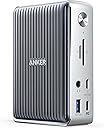
The Good: A small thunderbolt 3 dock by Anker. The concept of a small dock seems to be mostly avoided but has been tackled by Anker in a good looking, compact package. The Bad: Poor description of specifications for the dock make it hard to find out if this is a good solution for you. The bottom Line: While it is hard to check if this product is for you, this is a Thunderbolt 3 hub with the Anker badge on it. If it doesn't fit your needs, its easy to return. If it breaks (within warranty), top notch customer service will care for you. What comes in the box: The dock A Thundebolt 3 USB C cable (Interfaces with dock and Thunderbolt device) A power brick (Interfaces with dock and power cable) A Power cable (Interfaces with outlet and power brick) The number one thing that has kept me from purchasing a Thunderbolt 3 hub is the lack of reliability, compatibility, or longevity that tends to be associated with this technology. We all have setups of varying complexity and I am hoping this helps someone with similar needs as mine. For starters, from the instruction manual, these are the listed ports and some specs: Front Pannel 1. SD 4.0 Card Slot 2. Micro SD Card Slot 3. Top USBC 10GB/s, 5V/0.9A (4W) 4. Bottom USBC 10GB/s, 5V/3A (15W), 9V/2A (18W) 5. 3.5mm Jack 6. USBA 5GB/s, 5V/1.5A (7.5W) Back Pannel 1. Top, USBC Thunderbolt 3 port, Downstream 5V/3A max, daisy chain up to 5 devices. 2. Bottom, USBC Thunderbolt 3 port, Upstream [5V/3A (15W), 9V/3A(27W), 15V/3A (45W), 20V/4.25A (85W)] 3. HDMI 2.0 4k60 4. 3x USBA 5B/s 5. Ethernet 10/100/1000 Mbps Speed: 40 GB/s Input: 20V/9A (180W) Compatable with OSX and WinOS 4.9 x 3.5, 1.6 in; 17.3Oz 125.8 x 88.5 x 41.9 mm; 490g Context: 61W draw from a MacBook Pro, 2560 x 1440 monitor, mechanical keyboard, occasional SD card, 3.5mm Jack, USBC charge usage, USBA peripheral/storage use. Some things I have noticed regarding front panel ports: The most interesting thing comes in the form of the top (3) and bottom (4) USBC outs. They both have the same data rate, however, the power provided is different. If you want to charge your device, use the bottom USBC port and a cable capable of handling the power delivery. Using the 3.5mm Jack (5) means that you have to switch your output device. This is something that must be specified in your OS and had to learn about mid zoom meeting. Some things I have noticed regarding back panel ports: If you are using the downstream (1) port, make sure your device is actually making use of the Thunderbolt protocol, otherwise, this will only work at USB 2.0 data speeds, effectively invalidating the reason for purchasing this dock. I used this port for my USBC to Display port connection and it works flawlessly. The power draw from the upstream (2) port is probably using the 45W protocol since my device is limited to 61W charging. However, my usage does not seem to prevent my device from charging faster than it discharges. The USBA ports (4) do not have a power rating associated with them. However, they supply enough power to run my mechanical keyboard with backlight without issue. The ethernet (5) connector is Gigabit. The connector does not have any specifications attached to it for Power over Ethernet (PoE) or any kind of IEEE 802.3 apart from speeds achievable. Overall, this is a great Thunderbolt hub for a simple user like myself and I hope that it remains simple as I add more monitors in the future. I enjoy the convenience and simplicity of the hub and how plug and play my computer has become. I also like the small footprint of the dock, taking minimal desk space especially compared with those large hubs that seem to have a horizontal support. I will make an effort to update this as things pop and longevity milestones are hit.
Trustpilot
2 weeks ago
2 weeks ago