Desertcart purchases this item on your behalf and handles shipping, customs, and support to EGYPT.
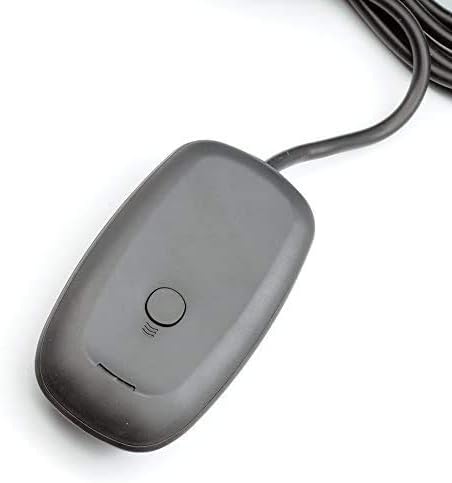
🎮 Elevate your PC gaming with wireless precision and squad-ready power!
The QUMOX Xbox 360 Wireless USB Gaming Receiver Adapter transforms your Windows PC into a wireless gaming hub, supporting up to four controllers and headsets with a robust 30-foot range. Compatible with Windows 7, Vista, XP, and with manual driver setup on Windows 10, it plugs into any USB 2.0 port to deliver authentic Xbox 360 wireless gaming experiences on your PC or laptop.
| ASIN | B00LUJTK3I |
| Brand | QUMOX |
| Color | grey |
| Colour | grey |
| Compatible Devices | Laptop |
| Compatible devices | Laptop |
| Connector Type | USB |
| Connector type | USB |
| Customer Reviews | 4.0 out of 5 stars 1,119 Reviews |
| Finish | Matte |
| Finish type | Matte |
| Global Trade Identification Number | 04895187120551 |
| Item Weight | 0.09 Kilograms |
| Manufacturer | QUMOX |
| Mfr Part Number | L106U |
| Model Number | L106U_SML |
| Number of Ports | 2 |
| Package Quantity | 1 |
| Power Plug Type | No Plug |
| Specific Uses For Product | PC |
| Specific uses for product | PC |
| Unit Count | 1.0 Count |
M**S
Works perfectly with windows 10, Xbox 360 wireless steering wheel
I got this to work with the Xbox 360 wireless steering wheel. I followed the YouTube video for installing the drivers. Windows 10 device manager. Properties. Update driver. Choose the one that’s selecting manually. It took you to a screen that’s a little different now than what you see in the YouTube video but you will be presented with a list of something like Xbox 360 peripherals. The driver is as of March 2019 this year. It plugs in and pairs instantly. I haven’t tried it with a 360 regular controller yet but it connects the racing wheel perfectly. It’s just unfortunate certain games don’t support it like forza. But dirt rally works perfectly Update : feb 2010 I have since used this with the 360 wireless. I have been using a dell optiplex 7010 gaming system with a 4k 60hz tv to play rocket league and it works great. The only complaint I have and it’s most likely with my computers barely functioning USB ports is whenever I plug the adapter back in, I have to goto device manager and manually update the driver each time. It isn’t a big deal because I’ve gotten good at remembering how to do that. If your not experienced with working on computers and trouble shooting them I won’t recommend this route to you, you would probably give this a 1 star rating. But if you can remember those few extra steps it works great and haven’t had a problem. It’s only when I skip those steps is when I have a problem with it.
R**S
Funcional, usuarios avanzados!
Excelente aparato receptor, para Windows 10 se ha de instalar manualmente el Dirver. 1.- Copia el contenido del cd al escritorio. 2.- busca el dispositivo en administrador de dispositivos, saldrá como desconocido. 3.- Clic derecho y elige actualizar, buscar controladores en el equipo y marca la ruta a la carpeta del escritorio y selecciona elegir controlador de una lista. 4.- En la lista buscar xbox360 controller. 5.- Elige el controlador para xbox360 y listo, a disfrutar!
D**S
Günstige Alternative
Funktioniert einwandfrei über mehrere Meter und auch wenn etwas im Weg ist und hat keinerlei Verzögerung oder Ausfälle bei den inputs. Auch ist die Verarbeitung überraschend gut und das Kabel sehr lang und dick genug; Ich hatte bei dem günstigen Preis mit deutlich schlechterer Qualität gerechnet. Die Installation ist etwas komplizierter, als man es heutzutage gewohnt ist. In vielen anderen Bewertungen auf dieser Seite ist die Installation jedoch sehr schön schrittweise beschrieben. Einmal installiert, funktioniert der Receiver auch sehr gut und erfüllt seinen Zweck. PC Spiele mit 360 Controller Support erkennen den Controller dann auch direkt als solchen - Erfolgreich getestet mit Skyrim, Euro Truck Sim, Mortal Kombat 9 und einigen Emulatoren. Als Alternative für den offiziellen Xbox Wireless Receiver von Microsoft würde ich persönlich diese günstige Variante vorziehen. Einfach, weil dieser Receiver exakt die gleiche Funktion erfüllt und ich mir nichts vorstellen kann, was das Microsoft Pendant besser machen könnte. Laut anderen Rezensionen hat diese günstige Variante sogar eine längere Lebensdauer. Also abschließend: 5 Sterne weil der Receiver einwandfrei seinen Zweck erfüllt und einen Vergleich mit dem überteuertem Microsoft Produkt nicht scheuen braucht. Die Installation ist in anderen Rezensionen einfach erklärt und kann sogar ein Nostalgie-Trip sein für Anwender, die sich an Windows 95 Soundkarten- oder Modeminstallationen erinnern. ;)
D**N
Works fine with Windows 10
Just got this today so this isn't a long-term experience review. I just thought it would be worth adding a counterpoint to the "it doesn't work" reviews. I plugged it in, went to device manager, right-clicked on the unknown device and selected update drivers, chose "Browse Computer" then "Let Me Pick From Available Driver", found the XBox360 Wireless driver and installed it -- OKing past the warning. My controller connected to it just fine and it all worked for a 30 minute play session. Either the people saying it doesn't work have had a duff unit or they've forgotten that they need to press the little wireless sync button on the back of their controller to pair with a new receiver.
A**E
Product works great
Solid product, needs a driver update from the control panel (youtube videos are great for instructions) and just tap the button on the receiver once to connect and hold the bluetooth connection button down. Connected super quickly.
Trustpilot
2 days ago
3 days ago