
DOWNLOAD THE APP


Customer Services
Copyright © 2025 Desertcart Holdings Limited
DOWNLOAD THE APP

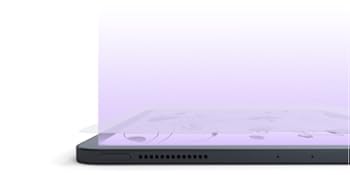
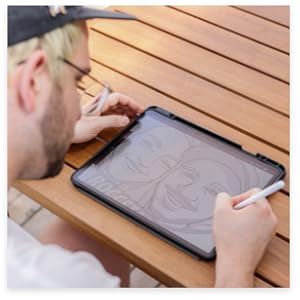
✍️ Transform your iPad Mini into a digital sketchpad that feels just like paper!
Paperlike 2.0 for iPad Mini 8.3" (2021) is a matte screen protector designed to replicate the tactile feel of paper for drawing, writing, and note-taking. Featuring 2H hardness for scratch resistance, Nanodots technology for anti-glare and color accuracy, and compatibility with Apple Pencil 1 & 2, it enhances precision and reduces wear on stylus tips. The package includes two protectors and a full installation kit, making it a must-have for professionals and students seeking a premium, paper-like digital experience.



| ASIN | B09HKL7R2W |
| Best Sellers Rank | 58,533 in Computers & Accessories ( See Top 100 in Computers & Accessories ) 1,222 in Tablet Screen Protectors |
| Brand | Paperlike |
| Brand Name | Paperlike |
| Clarity | 1 |
| Compatible Devices | Tablet |
| Compatible Phone Models | iPad Mini2021 |
| Compatible devices | Tablet |
| Compatible phone models | iPad Mini2021 |
| Country of Origin | China |
| Customer Package Type | FFP |
| Customer Reviews | 4.2 out of 5 stars 25,324 Reviews |
| Finish Type | Matte |
| Global Trade Identification Number | 04260470099300 |
| Included Components | Alignment Tool |
| Item Dimensions L x W | 13L x 9.3W centimetres |
| Item Hardness | 2H |
| Item Weight | 10 Grams |
| Item hardness | 2H |
| Item height | 0.5 inches |
| Manufacturer | Paperlike |
| Manufacturer Contact Information | Paperlike GmbH, Hamburg, Germany. |
| Material | Plastic |
| Model Name | Paperlike 2.0 |
| Model Number | 8.3 Inch |
| Number of Items | 2 |
| Product dimensions | 13L x 9.3W centimetres |
| Screen Size | 8.3 Inches |
| Screen Surface Description | Matte |
| Special Features | Anti Glare, Anti-Fingerprint, Scratch Resistant, Touch Sensitive |
| Unit Count | 2.0 Count |
| Water Resistance Level | Water Repellent |
N**T
Really great for drawing and note taking - exactly what I needed.
I wanted this specifically for use with my new iPad and Apple Pencil since I bought everything with the express purpose of drawing and note taking. For this the screen protector is perfect. The feeling is like drawing with a Biro on a single sheet of paper laid on a hard surface. As a comparison, the texture is the same as a PC drawing tablet, but the glass makes it a much firmer drawing experience. I bought this for an iPad Pro 11” and installed it before turning the iPad on so I can only speak for the post-installation quality. I don't notice any feathering on a white screen as some YouTubers have tried to emphasise (honestly, I don't see it in their videos either, so I'm unsure what they are trying to illustrate). To me the screen now looks like a high-quality Kindle. The glare reduction is remarkable. Dark images, such as when reading an e-book in dark mode, have no issues with reflections and feel like just reading a paper page. I would say though that if you value the screen quality, I am in no doubt this protector dulls the colours and introduces a very slight noise filter to your screen. I do mean VERY slight; I can only see the noise when looking for it and when bringing the iPad right up to my face. You may not want this protector if you're doing professional video editing, or photo editing. Installation was easy for me, but again, this was a freshly opened iPad out of the sealed box, so no grease, dust or micro-scratches to speak of. The instructions were clear, and the package includes everything you need except a firm card to ease out any air which does manage to find its way between the screen and protector. I have had no problems with screen scratches, as other reviews here have shown - I might suggest this is more an issue with the stylus than the protector since the screen protector is designed to absorb sharp interactions with the screen. This screen protector is only going to protect the screen from scratches, but it is quite soft so it will likely show scratches from sharp objects quite easily on itself. If you want a sturdy protector for your iPad, this is not it, however if you're looking to draw on something with a bit more texture than the smooth glass screen then this is perfect.
O**E
Brilliant pen feel, otherwise ordinary and a bit pricey.
Bought for a 12.9 Gen2 iPad Pro Receiving 2 screen protectors and fitting kits makes this reasonable value. In relative terms I haven’t tried other products out there but given the price of iPad I wasn’t inclined to skimp a few pounds on a cheapo screen cover. The fitting video is helpful, the process is as well conceived as you could expect and the method works quite well. Like others here I got bubbles. I don’t blame the manufacturer, it’s a fact of life and it’s a skill to fit any screen protector without them. I got rid of most and they don’t impact the quality of the experience ... but they are irritating. The drawing experience is outstanding. It transforms the iPad. If you draw or take notes I just can’t recommend it enough. It’s a bit of a weird change of experience for typing, surfing and games. Is it worse? I don’t know and it’s a matter of opinion but it doesn’t feel better. I’m also a bit worried about how the improved friction on the screen with deal with my 6yr olds tomato sauce fingers. I suppose the key here is the variety of uses you have for your iPad. Screen clarity and brightness is down a fraction, but not enough that it’s a game changer. Added weeks later: The writing experience really is making up for everything else BUT I have massive battery drain on the iPad, even with the Bluetooth (for pencil) turned off. I’m not suggesting that a screen protector is impacting battery life but I’m using the iPad the same way and the battery is draining 10x faster, the screen saver is the only thing that has changed.
G**G
Nice texture, pricey, could be tricky to install
I got this product for my iPad Pro 11”. I use it mainly for university, I write a great amount of notes with the Apple Pencil and the screen protector plays a huge factor. Pros: - Package came in good condition, nothing missing (card with the message was a nice touch), delivered 2 days early - Pretty great with its anti-glare function, I do work outdoors sometimes and I find this as a game changer (this is the only matte screen protector I’ve tried so far) - Writing feels far more accurate, gives you a realistic feel - No issues with the touch screen, provides no loss of sensitivity - Works well with the Apple Pencil, I don’t write very hard nor light so I don’t have any problems with the tip wearing off. Although I would expect this given the texture, I personally think the same applies for all other similar products out there - Minimises finger prints on the screen which gives it a cleaner look Cons: - I find it quite pricey compared to the other similar products in the market, I obviously haven’t tried the others and I think this one could be pretty much hyped up - Installing this is not easy. When I watched the instructional video in YouTube, I thought the process was straight forward. I struggled in the part when I was peeling off the cover of the sticky side and applying it to the screen, I though I got rid of all the dust but there are still some that got trapped. The good thing was that I managed to get all the bubbles out. I did waste the other piece though (product comes in 2 pcs) - It could be a little bit noisy when writing, you can hear the friction. But I guess it is like this for other paper-like screen protectors
W**R
A step above, but not the only option.
Last week I smashed my iPad Pro. It had a paper-like, but not Paperlike, screen protector on and that is what saved me from little tiny shards of glass going absolutely everywhere. Once I had got over the one-two punch of my Insurer refusing to pay out and Apple charging me £490 for a replacement, I was back in the market for a new screen protector, the only thing that hadn't failed me in this whole ordeal. The entire reason I couldn't live without my iPad is because of how good notation and drawing is on the 11" iPad Pro when there is a paper-like (again, not Paperlike) screen protector. But, previous to this, I had opted for one of the much, much cheaper protectors available. I was content with it. The feeling other protectors give is quite grainy, as if writing on recycled paper. Quite satisfying resistance, and that borderline ASMR sound of pencil on paper. But, they are ever-so-slightly translucent that made it feel like the bright and beautiful screen of the iPad Pro was suddenly as dull as a cheap tablet. So I made the jump this time to a Paperlike, despite the exorbitant cost, and I'm pretty glad I did. The packaging was much nicer with fewer useless leaflets and a QR code that pushes you to a well produced video on how to install the cover - a process no different really to any other. Once its on though, the real difference is apparent. Whereas the cheaper protectors feel quite rough, the Paperlike is incredibly soft and smooth to the touch. It also dulls the screen significantly less. If you've used no protector or a cheaper paper-like cover, a bit of recalibration is necessary when you put Apple Pencil to Paperlike. It doesn't quite have the resistance of pencil on paper, more like a rollerball on paper. It's nice, but it takes some getting used to. Now that I've got used to it, I probably wouldn't go back to a cheaper cover. While I think I did prefer the writing feel of the cheaper protectors, the quality of the product is enough to justify the price tag. And to be honest, if you've dropped the money to buy an iPad Pro, you can stretch to another £30. Just make sure you don't sit on it.
L**A
Feels good to use with apple pencil
Purchased these as I draw almost every day on my iPad. Easy to install when you follow the video. My only dislike is that the scratches left behind from the pencil which can be annoying as my eye is drawn to them when I’m drawing. I did send an email to the company and they did reply but wasn’t very helpful! They did say that my pressure with the pencil may be too much but I can’t help how I create art! I didn’t have this problem with glass screen protectors. It’s a shame as I do like the feel of the paper like. May try a different brand next time as these are not cheap
O**.
Best Screen Protector Out There
I was a little nervous about purchasing the iPad mini version as it seems to get low reviews on Amazon, mainly around installation issues. I do already have the iPad Pro version and had no problems with bubbles or markings so went for it anyway. As expected, the screen protector is perfect. Not only is it great for writing on and even sounding like you’re scribbling away, it’s also super easy to install. There’s not much in terms of instructions in the packaging, but it does give you a QR code or link to watch an amusing video on how to do it. I actually messed up my first try, the protector didn’t go straight with the iPad edges, but I just peeled back a little, readjusted and let it gently adhere. No scuffs or dust and hardly any bubbles. And those bubbles were quickly swept away just using my palm. One thing to note is definitely do this in the cleanest, distraction free and calm environment. You won’t want aircon on blowing dust right onto your freshly cleaned screen as you stick it on. It’s too early to tell if it’s as good as the iPad Pro version, but I can’t see why it wouldn’t be!
K**.
Amazing customer service and a great product
The five star review is mostly for the amazing customer service, nevertheless the product itself is great too. Although, I had a slight problem with applying the first screen protector (it didn't leave me with the matte paperlike finish) and I had to use the second screen protector in the pack, everything was quickly resolved with the cusomer service. I would suggest you watch the video supercarefully and possibly see if your screen protector has three layers by carefully peeling off a tiny piece of the corner on both sides. My explanation might not make sense now but when you have the product in your hand and see it, it should make sense then. I use my iPad for taking notes on a GoodNotes and a Note Shelf app and the writing looks much smoother and neat with paperlike, as the paperlike cover makes the surface less slippery. I use it on iPad pro 10.5'' (2017) and it still works well and I didn't want to upgrade to the new iPad pro (on which the writting feels way more plesant and natural) yet. And I think paperlike was the perfect purchase.
D**E
Underwhelming poor drop in quality
I’ve used paperlike for years and never had issues. However this is the first time purchasing from Amazon instead directly from Paperlike. Either the quality in the past years has dropped or the Amazon stock has been stored poorly. The pack comes with 2 screen protectors, both of which had markings on the coners as if they had been bent. Which results in bubbles that cannot be removed as the screen protectors are not completely flat. Secondly, the pack itself inside is incredibly dusty and full of white flakes. So no matter how dust free your workspace is, or how well you clean your ipad, when you peel the layers whilst installing, dust and white flakes go flying everywhere. Complete waste of time and money. Honestly the quality is so poor that you’d be shocked paying a few quid let alone the hefty Paperlike pricetag. Very disappointing.
Trustpilot
1 month ago
2 weeks ago