
Buy anything from 5,000+ international stores. One checkout price. No surprise fees. Join 2M+ shoppers on Desertcart.
Desertcart purchases this item on your behalf and handles shipping, customs, and support to EGYPT.
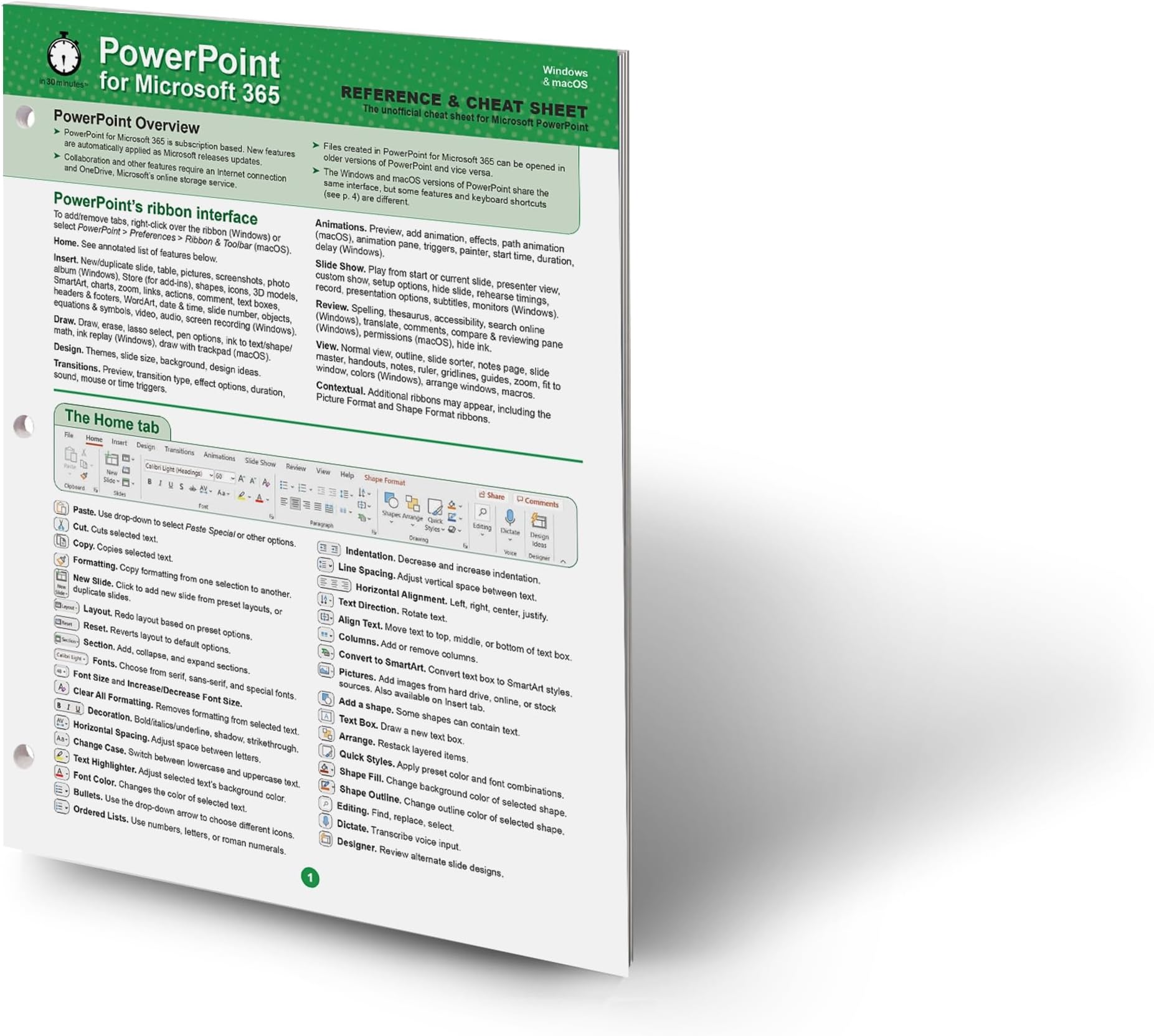
Master the art of visual storytelling with the PowerPoint for Microsoft 365 Reference and Cheat Sheet . This comprehensive, four-panel guide is a vital resource for business professionals, educators, and students who need to create high-impact presentations using the latest Microsoft 365 features or require a reliable refresher when transitioning from older versions of Office. Designed for seamless use across both Windows PCs and macOS , this high-quality reference is structured to provide immediate answers to common slide-building and delivery questions. By providing clear, fact-dense instructions, this guide ensures that users of all skill levels can find the technical solutions they need to build professional decks efficiently. Core Presentation Design & Delivery Guidance This guide offers a structured breakdown of the Microsoft PowerPoint interface , focusing on the tools most essential for building professional slide decks. Key educational topics include: Interface Navigation: Includes an annotated list of the PowerPoint 365 Home ribbon buttons , allowing you to find essential formatting tools without delay. Dynamic Content Creation: Step-by-step instructions for inserting images, shapes, and videos to keep your audience engaged. Visual Effects: Professional guidance on adding transitions and animations to create smooth, polished movement between slides. Workflow Efficiency: Best practices for creating, saving, and launching presentations to ensure a glitch-free delivery. Layout & Design: Technical tips on changing slide layouts and working effectively with MS PowerPoint templates for consistent branding. Distribution & Portability: Instructions on exporting PPT files as PDFs and professional settings for printing a presentation for handouts. Cross-Platform Productivity: A dedicated section for PowerPoint keyboard shortcuts optimized for both Windows and Mac users. Technical Specifications & Compatibility While optimized for the latest Microsoft 365 features, almost all instructions, shortcuts, and examples remain fully applicable to PowerPoint 2024 and PowerPoint 2019 , making this a versatile tool for various Office environments. Premium Construction: Printed on 8.5 x 11-inch high-quality card stock , designed for durability on desks, walls, or presentation lecterns. Binder Ready: Includes pre-punched holes for three-ring binders , making it easy to integrate into corporate training manuals or student folders. Readability Focus: Features a high-contrast, clean layout designed for rapid information retrieval during live presentation sessions. Sustainable Materials: This guide is fully recyclable and printed on high-grade materials to support environmental standards. Expertly Developed for Presenters The PowerPoint for Microsoft 365 Reference and Cheat Sheet was created by the award-winning publisher of the IN 30 MINUTES guide series and is based on the best-selling title, PowerPoint Basics In 30 Minutes . Please note that this specific reference focuses on desktop versions of PowerPoint and does not cover mobile apps for tablets and phones or advanced programmatic features. Review: Computer technology - Good summary Review: Fabulous - Worth it


| Best Sellers Rank | #187,157 in Books ( See Top 100 in Books ) #8 in Microsoft PowerPoint Guides #10 in Presentation Software Books #35 in Software Suite Books |
| Customer Reviews | 4.5 out of 5 stars 168 Reviews |
A**T
Computer technology
Good summary
D**.
Fabulous
Worth it
R**S
a very usable and highly summarized four page reference/cheatsheet for Microsoft PowerPoint
I would like to thank i30 Media Corporation for providing an electronic review copy of their “PowerPoint Microsoft 365 REFERENCE & CHEAT SHEET” for Windows and macOS. This was a fun item to review since I use Microsoft Excel, Word, and PowerPoint professionally on a daily basis. My primary goal was to see if I could learn something useful and determine if this is something I could recommend to friends and co-workers. This product is exactly as claimed. It is a very usable and highly summarized four page reference/cheat sheet for Microsoft PowerPoint. It accurately covers key functionality and procedures that most users would use. Although most of this content seems to be already available to a good internet sleuth, there is certainly value to having this information formatted and summarized on paper without having to fumble with a web browser to refer to. For those that would like to see exactly what they get before purchasing, at the time of this writing, all four pages are included as product images on Amazon. I was impressed that this included transition and animation effects. Those are two areas I do not use enough. I also realized that I should pay more attention to the shortcuts. Especially, the keystrokes to immediately start a presentation could be quite useful, since I usually spend the first 5-10 seconds of every presentation trying to figure out where Microsoft has hidden the “start presentation” button. As mentioned before this is good reference material. But for me, since I do not need to refer to content like this frequently, I’m not sure if I would purchase it at full value, but it would certainly be appreciated if included with a reference book, or perhaps purchased at a discount as a set.
L**N
Great info
Get your readers on font is so tiny. Otherwise good
V**N
No where did it say I was buying a used product.
I thought I was buying new cheat sheets for MS365. I paid the same price as new. The ones I received (I bought the sheets for Word, Excel and Power Point) look "well" used. They are stained, bent and one is even torn. You can see the bent corner in the photo.
C**R
Awful
Not a good product. Cheaply made. I would not recommend this.
I**E
La calidad y contenido del producto
Buen producto
U**R
PowerPoint for Microsoft 365 Reference and Cheat Sheet
This is the third item in this series that I have been privileged to review. Like others in the series it assumes some familiarity with PowerPoint - either from a prior version or from training in MS 365 Powerpoint. It contains four pages of useful hints based on the various menus provided by the program. It also includes a page of keyboard shortcuts for both the PC and the Mac. It does not explicitly cover versions of Powerpoint for MS 365 available for tablets or on-line. These strengths also echo this tool’s weaknesses. Given that much of the four pages echo the main menu, it does not offer much detail about other features that lie below the main menus. Similarly, since it covers both PCs and Macs, many users will consider the unneeded OS as wasted space that could have included more useful details. I am less familiar with Powerpoint compared to Word and Excel, so I found this reference sheet personally more useful than earlier ones in the series. I give it 4-stars. ______________ This review is based on a free electronic copy provided by the publisher for the purpose of creating this review. The opinions expressed are mine alone.
Trustpilot
2 weeks ago
2 months ago