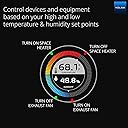
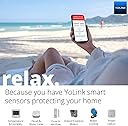
🌡️ Stay cool, stay connected — never miss a beat in your environment!
The YoLink Smart Wireless Temperature & Humidity Sensor delivers precise, real-time monitoring across an extensive temperature range (-22°F to 158°F). Featuring ultra-fast 500ms response and LoRa wireless connectivity, it empowers professionals to safeguard freezers, fridges, and greenhouses with instant alerts and detailed data tracking via a user-friendly app.


| ASIN | B085HTZRRR |
| Age Range Description | Adult |
| Age range (description) | Adult |
| Best Sellers Rank | 881,765 in Home & Kitchen ( See Top 100 in Home & Kitchen ) 290 in Fridge Thermometers |
| Brand | YoLink |
| Colour | white |
| Connectivity Technology | LoRa |
| Customer Reviews | 4.6 out of 5 stars 1,637 Reviews |
| Display Type | Lcd |
| Included Components | 2 x AAA batteries, mounting bracket (derived) |
| Included components | 2 x AAA batteries, mounting bracket (derived) |
| Indoor Outdoor Usage | Outdoor |
| Inner Material | Plastic |
| Item Length | 6.3 Centimetres |
| Manufacturer | SNUNGPHIR |
| Manufacturer Part Number | YS8003 |
| Model Name | Smart thermometer and hygrometer |
| Model Number | YS8003 |
| Number of Batteries | 2 AAA batteries required. (included) |
| Outer Material | Plastic |
| Outer material | Plastic |
| Power Source | Battery Powered |
| Product Care Instructions | Wipe Clean |
| Resolution | 0.1 degree |
| Response Time | 500 Milliseconds |
| Reusability | Single Use |
| Special Features | High accuracy, quick reading system |
| Special feature | High accuracy, quick reading system |
| Specification Met | No Specific Certification |
| Style Name | Contemporary |
| UPC | 750258361841 850024791442 |
| Unit Count | 1.0 count |
| Upper Temperature Rating | 50 Degrees Celsius |
J**S
Pig to set up!
The hub is an absolute pig to set up but once you have done then it’s a great piece of kit for ensuring that I’m notified if the freezer out in the garage fails. I’m using the other sensor to keep an eye on the temperature in the freezer in the house. * important to note that it will initially tell you that no internet has been found - just ignore it and carry on with the set up*
D**L
Works well as a warning system for monitoring your freezer temperature
Bought this to use in my freezer as an early warning system for loss of power or a freezer failure. It was simple to install and integrate with the free app. You can setup alerts to send email or SMS messages if the temperature goes above or below the thresholds you set. It also records the data so you can see over time how the temperature fluctuates which was interesting to see how much the temperature changes just by opening the freezer door for just a few seconds.
L**A
Needs a hub to work with the app
Very disappointed that there was no mention of needing a hub in the advert … needed this for a freezer in a garage so it had to work with an app. Returned. The refund was quick and efficient though!
N**L
Highly recommend
We have tested various devices for a few weeks. I have to say that we are very pleased. The first thing we noticed when unpackaging was that everything seem to be designed and made with attention to detail and care. That was a little surprising for us. Many times you get cheap packaging and apps that look like they were created in a single afternoon. Not so in this case. We had to double check to verify that this is a start up company. By all outward indications, it feels like it’s a well polished company that has been in business for quite some time. All manuals and set up information is available online. Do not expect much in the box. We had a little difficulty finding the information we needed at first but we were grateful, and still are, for the fast response from the company. Since we mentioned the company, we have to note that any kind of support request is answered promptly, even at odd hours of the night. That was surprising. But they have always been friendly and helpful, even when we should have checked product documentation first. The initial set up was a little challenging with Wi-Fi. But that is not due to product limitations. It is due to limitations on the wireless routers we used. The wireless routers we used did not allow us to separate the 2.4 GHz and 5 GHz networks. This system uses the 2.4 GHz network, which is needed in order to have the range. In the end, which simply hooked up the network hub to the router using the provided ethernet cable. Everything has been pretty much smooth sailing. Again. The system requires a 2.4 GHz Wi-Fi network. If you have trouble getting it to connect wirelessly, the issue is almost certainly your wireless router failing to separate the two networks or failing to allow the device onto the 2.4 GHz only. It’s not a product limitation or defect. Our recommendation is just to hook it up with the ethernet cable since the range is very long, anyway. Before using the system, we recommend updating the firmware on all devices manually. Depending upon how long it has been sitting in the Amazon warehouse, you may have an older version of firmware and might experience a few bugs. That was our case. We had a few problems with erroneous notifications that were rectified as soon as the firmware updated. The update, you find the firmware version in the device and tap it. The firmware does update automatically. But if it’s your first time setting up, it’s good to manually update the devices. We would love to see a way in the app to review the firmware status of all devices on one screen and manually trigger a firmware update for all devices from that same screen with a single click. But this is merely a want, not a flaw. Do not forget to edit the alarm strategy before you start using the system. It appears to default in the app to multiple strategies, which can mean getting an app notification, an email notification, and or text message notification each time something is opened or motion is detected. That might be something to look into on the app development side as far as prompting you during set up to choose your desired preferences. We have had no difficulties with the devices maintaining contact with the network hub. The network hub has reported itself going offline once or twice overnight, but this appears to be momentary and related to a firmware update automatically applying and automatically rebooting the device. Battery life so far appears to be really good. We are surprised by the quality of the 3M self adhesive tape on each one. There is no alcohol wipes provided, but we used simple rubbing alcohol and a cloth to clean the surfaces prior to sticking the devices on. You can do similar or just make sure that it’s really clean. As a test, we applied some of the devices to a surface that was not prepared/cleaned ahead of time. those devices have no problem sticking to the surface and have not fallen down. They appear to be well secured when we try to tug on them. We would love to see the adhesive strips offered as a replacement item for purchase. We can see down the road people moving devices around, say if they’ve changed their minds about location or if they move. We had also thought about having an extra mount for the motion sensor so we could move the motion sensor between different locations at different times. This was because we were only able to buy a limited quantity due to inventory at that time. But that is something that others might be interested in purchasing at a later date. The motion sensors have been updated to include sensitivity adjustment. They can be pretty sensitive, detecting slight movement even in the dark. We have no complaints. The range and spread appear to be great. The door/window sensor performs equally well. it can be mounted in virtually any orientation and still function so long as the sensor portion of each piece is within about 1/2 of an inch to the other. so you could even mount one of them at a 90° angle to the other. So long as they are within that distance to each other, they still function perfectly. We found this to be necessary with one door where we had a proper clearance on the door but did not have proper clearance on the frame. The products integrate seamlessly with IFTTT. We would love if the temperature/humidity sensor had the option to show more frequently than one hour on the history graph in the app. But the graph is clean, uncluttered and easy to read. We will soon be testing additional products. We are adding additional door sensors and motion sensors to the system, which will then have approximately 20 devices connected. We are also going to be testing for the first time the garage door motion sensor (ordered). We were originally going to test the motion sensor/ garage door opener combo, but none of the garage door openers we have available appear to be compatible. Afterwards, we will test additional devices on our “wish list.“ We have found zero indication of user data tracking, analytics tracking, or communication with ad servers on the app. It really does appear to be simply designed to do what it is supposed to do and nothing more. It’s refreshing. So to summarize, we can’t really find anything wrong. We have struggled to find anything to critique with the devices or the app. Everything works as intended and we are extremely pleased.
T**T
Simplicity and excellent value for home monitoring!
I was looking for a system to monitor my home while I was away. After doing hours of research I selected the YoLink solution because, for my needs, it offered the best combination of available functionality and simplicity/reliability. The system connects to the internet using a small hub device. The *many* available monitors and sensors connect wirelessly to the hub using LoRa wireless technology, The LoRa wireless operates on a different frequency than home wifi and offers greater range. It easily penetrates walls and floors. All of my monitor/sensor wireless connections located in 3 levels of my home and garage are rock-solid. Setup is unbelievably simple. First install the phone app. Then setup the hub which can be connected to your home network wireless or hard wired. To add devices to the system, simply scan the QR code label on each sensor using the app and it will be added to your home's system. That's it! I am currently using this for temperature/humidity monitoring, water leak detection and garage door (open-closed) status right out of the box. I haven't yet tried "programming" which can add additional functionality. Using the app's notification features I can get alerts,etc on my phone and even on my Apple watch over the cellular network. I get all of this for a reasonable price. BTW, for video monitoring, I use Blink cameras. Using both systems is not cumbersome or inconvenient.
N**K
Easy to setup and works exceptionally well!
I put the hub and two sensors on my Christmas list and finally set them up. The setup was so simple and they work so well, I should have done this a long time ago. I ordered two more sensors, so I have four now. They seem to be very accurate and are showing me exactly how my freezers are working. I was able to turn three of my four freezers down significantly because they were way too cold, so the sensors will pay for themselves over time with the electricity savings. I have the hub plugged directly into one of my mesh routers, so I can't vouch for the ease of the WIFI setup. The wired connection setup was fast and easy. The hub is in the detached garage with two freezers and the other two sensors are in the house. They all connected to the hub easily and never lost connection due to range. The app is super simple to use and very intuitive. My only recommendation would be on the alarm range settings for the high and low temp alerts. The slider is so sensitive it is impossible to set exactly where you want it. If I'm trying to set a low temp alarm at -10 degrees, just lifting my finger off the slider jumps it up or down by a couple degrees. Having an option to type in a temp or an up/down button that increments by 0.1 degrees once you get it close with the slider would be really helpful. Overall, very impressed with the product and will be buying more sensors!
J**.
Wow! What else is there to say?
I've bought a few of these devices. Never had to use them any farther than 150ft. Have always performed super. Used them In fridges, freezers, sheds, garage, safe, etc. and have decent accuracy and great range. But today WOW! Mrs. went with a group of relatives to a hotel while I remained. They took one of the devices to place in hotel fridge. The hub remained at home. The room was on the second floor and the hub at home was on the far side of the house, from the direction of the hotel, about waist high. As the crow files, it was a little over six miles? I could literally see the temp dropping every few minutes on the app! It reached to just under 40° - Shut my mouth!
R**E
Awesome products!
In this age of cheap Chinese garbage, Amazon junk listings, fly-by-night companies, and generally low quality products, it was a REAL TREAT to come across this company and its products. In fact, this product exceeded my expectations by so much that I was half-expecting something terrible to happen, like it bursting on fire or something similar. Firstly, every one of the products I bought, (shut-off valve, hub, 3 water leak sensors, 2 outdoor temp sensors for freezers, and 2 indoor temp sensors for environmental control), are SOLIDLY MADE. You can feel it in your hand, and it's a feeling that's getting rarer and rarer these days for consumer goods. They're well-made and just SOLID, with absolutely nothing feeling cheap at all. All of the devices went into my freezers, attic, and garage without issue. When I got to the software, that's where I really expected there to be problems, since many of these "smart" companies aren't very smart at all, and they don't seem to test their apps for user-friendliness before releasing them. However I was amazed at how simple it all really was. Getting the hub online, adding devices to it, creating rooms, configuring alarms, etc, all of it was quick and absolutely painless. The only real quibble I could have, (and it isn't much of one at all), is that the alarm section took a moment to figure out. But within a ridiculously short time I had all the devices added and their operating parameters set. Perhaps another helpful note - when you turn on a device for the first time, give it a full minute to link up to the hub. If you don't, the device will add to the hub but it will show as offline, and won't appear to ever come online. After doing that twice, (adding the device within a few seconds of turning it on), I then waited a few for the rest and they added without issue. All of my testing, (temperatures turning on fans and heaters, water leaks activating the valve, etc), all passed with flying colors. All in all, this just feels like money well spent, and YoLink has become one of my favorite companies. Highly recommend.
Trustpilot
1 month ago
2 weeks ago