Desert Online General Trading LLC
Dubai, United Arab Emirates
Desert Online General Trading LLC
Dubai, United Arab Emirates


🔇 Own your meetings with a tap—mute mastery at your fingertips!
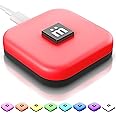
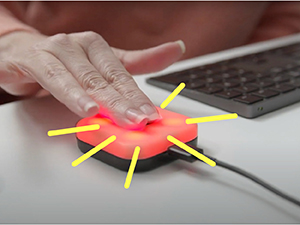
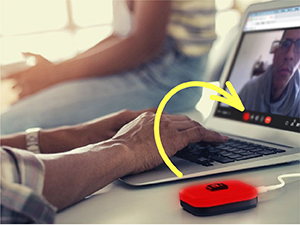
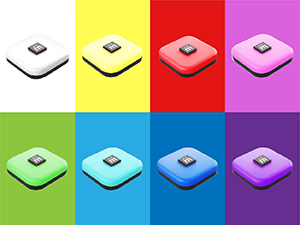
The Mutesync USB Mute Button is a physical, lighted external mute control designed for seamless integration with Zoom, Teams, and Google Meet. Compatible with both Mac and PC, it features a customizable LED indicator that stays in sync with your meeting app’s mute status. The included USB-C cord and free mütesync app make setup quick and easy, empowering remote professionals to mute and unmute instantly without disrupting workflow.


M**S
Does one job, and does it perfectly.
I had some reservations about the price (I mean, it's a light and button), but this thing has been a godsend for Teams meetings for work.I always stay muted in meetings, and usually have other apps and windows in focus. So when someone would ask me a question, it was an awkward scramble to find the meeting window, select it, find the microphone icon, unmute it, and finally answer (by which time someone has already said, "I think we lost him."). There was also the countless "Am I really muted?" moments when I needed to cough or say something to someone at home.It's SO much easier now that I can just reach over a tap a button to unmute, without even needing to change window focus. And when I am muted, I can just glance over, see the yellow light, and know for sure. And because it syncs with the muting in Teams (even if I mute or unmute with the icon in Teams), I can still trust the red or yellow light to know if I'm muted.Worth every cent, for how much easier it makes my daily meetings.
J**M
Beyond Poor value
Im not sure what i was expecting but it wasn't what got delivered. It is way smaller than it looks and weights practically nothing. It is nothing more than a cheap plastic box with a button. This should retail for $9 max, and something i would expect to find at a 99 cent store. NO WAY can the $50 price tag justify the value of the item. What a joke.The elgato stream deck mini is $60, has 6 fully assignable full color lcd buttons (that can be customized and animated!) that are applied using your computer. Great product and, uhh, it mutes.I would keep this cheap insanely overpriced plastic p.o.s. button "unit" if they would refund me approximately $40 back. But like that's gonna happen, so, it's heading straight back to China.
S**R
Rocky Start - But GREAT End!
I was not happy with the product at first. I said so in my original review. The unit worked for a few minutes then stopped working. Paul from mutesync reached out to me and wanted to make it right. We tried to resolve the issue with software, then (at ZERO expense to me) he sent me a replacement. I've used it all morning on a Zoom call, and it is working flawlessly. The product is good, the customer service is EXCELLENT. Thank you VERY MUCH. It's a wonderful feeling to find a company like this, and now they have a life long customer.
D**.
Disappointing for Mac
Using with a macbook pro M1. Primarily used to mute MS Teams. Frequently required restarts of the mutesync app to get it to work with Teams which I was fine with. Since then OS updates hampered the buttons ability to work reliably. The final nail in the coffin is it's lack of support for the latest version of MS Teams. It simply does not work with it. The latest version of MS Teams is 4 months old at this point and I've given up hope that Mutesync will update their software to be compatible.
S**T
When it works...
First, I use this on an Apple M2 MacBook Pro, and I switch between various conferencing apps throughout the day, going from Zoom to Teams to even WebEx or Google Meet, depending on my customers' preferences. I also used the button and its associated app on another MacBook Pro prior to getting this one a couple months ago. I have owned the button for less than a y. ar.When it works, I love the Mutesync button. Much easier to mute and unmute on the fly with a simple button press. The problem is that it doesn't work much of the time. I don't know if it's because of switching apps, because of the Mac app, or something else. When I go into a meeting, I almost always have to open the preferences for the Mutesync app, and try multiple troubleshooting steps, including restarting the button from within the app, restarting the app, and even unplugging and re-plugging in the cable to the app itself. Even doing that, it doesn't work at all half the time. (And the problem was consistent from one Mac to the other.)I've reported this to the company multiple times, and have never once had a response to my reports, and updates to the app have been rare. I have found myself getting distracted trying to fix the button and app, and miss things in my customer meetings, which definitely misses the whole point of the product. I've moved my rating from 1-star to 2-stars simply due to the fact that when it works, it's great. The fact that I've gotten no response from the company to my reported problems is where I really am disappointed in the product. An automated acknowledgement would be better than the complete lack of response I've had. As a result, I cannot recommend this product or company.
A**.
Is it sending my data to china? Who knows.
I installed this with no difficulty but I didn’t love that I had to let it read the hard drive of my computer. It worked great, but be aware that you will likely need ITs approval to put it on a work machine- which you likely won’t get since it requires the above. It also requires updates suspiciously often and is no longer functioning correctly on my machine. I would return if it wasn’t past the window.
B**E
Worked great until it didn't in Teams
I've had this for a little over a year. Even purchased a second one for a second computer. Primarily using with Microsoft Teams. Has worked great for the most part. Occasionally I would need to disconnect/reconnect the button and restart the app, but that was a minor inconvenience. Recently (past month-ish) it has stopped working properly in Microsoft Teams. Still works fine in Zoom. It will unmute, but won't remute. The light of the button changes color like is remuting, but doesn't actually mute in the app. I've tried fully uninstalling/reinstalling the app and all the troubleshooting suggested on the website. No dice. I've even emailed MuteSync support a few times, but have never received a reply. Unfortunately, now I have two mute buttons that are mostly useless to me.
Trustpilot
2 months ago
3 days ago