Desertcart purchases this item on your behalf and handles shipping, customs, and support to EGYPT.
🚀 Unlock Mac Storage Power with Speed & Style!
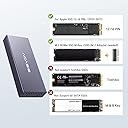
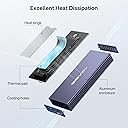
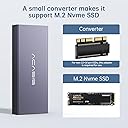
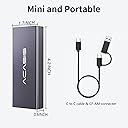
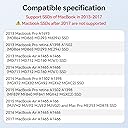
The Freegene Acasis USB C 3.2 SSD Enclosure is a precision-engineered aluminum case designed for Apple’s 12+16 pin SSDs from 2013-2017 Mac models. Supporting blazing 10Gbps USB 3.2 Gen2 data transfer speeds (up to 20Gbps on Gen2x2), it also includes an M.2 NVMe adapter for versatile SSD compatibility. Its robust design ensures effective heat dissipation and stable connections, making it the ultimate portable storage upgrade for Mac professionals seeking fast, reliable, and stylish external SSD solutions.


| ASIN | B09PFQX277 |
| Best Sellers Rank | #38,664 in Computers ( See Top 100 in Computers ) #306 in Internal Solid State Drives |
| Brand | FREEGENE |
| Built-In Media | VHS |
| Color | silver |
| Colour | silver |
| Compatible Devices | Laptop |
| Connectivity Technology | USB |
| Customer Reviews | 4.2 out of 5 stars 275 Reviews |
| Data Transfer Rate | 5000 Megabytes Per Second |
| Enclosure Material | Aluminum |
| Hardware Interface | USB Type C |
| Hardware Platform | Mac |
| Hardware interface | USB Type C |
| Hardware platform | Mac |
| Item Dimensions L x W x H | 43L x 15W x 107H millimeters |
| Item Weight | 0.71 Ounces |
| Manufacturer | FREEGENE |
| Material | Aluminum |
| Memory Storage Capacity | 4 TB |
| Mfr Part Number | MAC3W |
| Model Number | MAC3W |
| Product dimensions | 43L x 15W x 107H millimeters |
| Supported Devices Quantity | 1 |
| UPC | 714216233588 |
M**S
Refund process
It should be 5 star if it works with my owc, however i think there is a compatibility issue with the owc that i have! Anyway i got the refund and the reseller is very helpful!!! Thanks
B**5
Runs Very hot with NVMe drive inside but works fine
Easy to set up, fast performance connected to an iMac USB Thunderbolt. Runs hot though although no Thermal Problems (Throttling etc) per se, definitely a cheaper alternative to the OWC enclosure but for Mac your limited wih choice with a spare drive on your hands. Nice touch the apapter being Thunderbolt 3 and Regular USB 3 running Bootcamp Windows at the moment can transfer from iMac to MacBook Pro and Boots equally well on both Machines. Not tested the enclosed converter however its handy to have if you wish to upgrade either internally or externally with a non proprietary drive at a later date.
L**T
Solid Product
Work great, the case is robust, a solid product.
A**T
Saved my bacon; Works perfect; Gets hot under pressure
TLDR: Worked 460% better and 33,600% faster and 43% cheaper than my computer repair man; Watch out for the heat while copying over all files. Details: my 2015 Macbook Pro motherboard died a month ago. Right in the middle of a project. (Thank goodness for backups on Dropbox.) I tried everything on my own. Replaced the battery. Watched YouTube. Reset memory. On and on. Nothing worked. Took to a local computer shop. He said he couldn't fix, that the YouTube solutions were bogus, but could back it up. Darn it. Okay. Do it. Said it would be ready in a couple of days. After checking in/calling every other day for two-three weeks, the back was finally ready. He charged $99. I was grateful for the backup but it was incomplete. 61 GB. I thought, "Oh well. Guess I learned a lesson." But ... on Prime Day this dropped to $56. So I finally bit the bullet, said, "Why not", and got this device. Easy to set up. Plugged it in. One hour later ... I had a full 264 GB backup. Wow. I feel bad for the repairman that he had to waste all that time. Maybe it copied slowly due to using an old USB. But this tool is PERFECT and copies over USB-C (or you can use the included adapter to an old USB). Now I have all my old files. Yes, it gets super hot, BUT only while I copied over the ENTIRE hard drive. After it was done copying, the drive cooled down and felt completely normal (not hot at all).
D**D
unit does the job I needed it to do with my upgraded mid-2015 15" MBP
Although there were initial thermal problems with their unit, since I had a Samsung 1 TB Apple SSD installed from my upgraded mid-2015 15" MacBook Pro (MBP) that apparently generated too much heat too quickly for their enclosure, which caused premature shutdowns by their unit due to their designed-in over-temperature protection for the SSD that would shut their unit down when a temperature limit was exceeded. I then contacted their technical support, who assigned a competent person that helped to properly diagnose the cause of the problems. As a result, ACASIS sent me thermal pads and heat sink to resolve the problem. Once I installed the additional thermal protection ACASIS sent me, the unit worked to my satisfaction. Otherwise, the unit is well made, has a very fast data interface, and now provides me with reliable performance for my needs, which is to sometimes boot from my previous 1 TB SSD that's installed in their enclosure to locate and transfer sometimes large folders of files, which are 100's of GB in size, to my upgraded MBP that I sometimes need for my work. I also use the their external enclosure to backup large folders of files to my previous SSD that I sometimes create on my updated MBP, which are no longer needed at the time, but which I want to have for the future. Thus, my use of their enclosure with my SSD is intermittent, but when used, involves intense data access and transfer use of their unit. I don't use it as an always on unit, which would probably need additional external cooling to properly dissipate the accumulating heat that continuous use of the SSD would generate, since there is no internal fan in the enclosure, which I don't need to do.
G**K
Works Perfectly
Had a friend with some files stuck on an old dead MacBook and was hesitant on spending the extra money for an external drive as the PC versions are 40% cheaper but took a chance anyway. The ACASIS adapter was well designed with plenty of ventilation and the best thing was the addition of an adapter to attach a standard M.2 Nvme SSD too. Other included items were a few screws, driver, heat shield and nice USB / USB-C cable. Removed old SSD from MacBook and installed into caddy without incident, fired up the new MacBook and plugged the ACASIS adapter into the USB-C slot which recognized right away. Copied all the files from the old drive to a folder on the desktop without any issues. External drive was a bit warm but nothing to be worried about. Everything worked perfectly and my friend is happy. My only complaint is the price but if you are under the Apple umbrella, you are used to paying more I guess.
Trustpilot
3 weeks ago
5 days ago