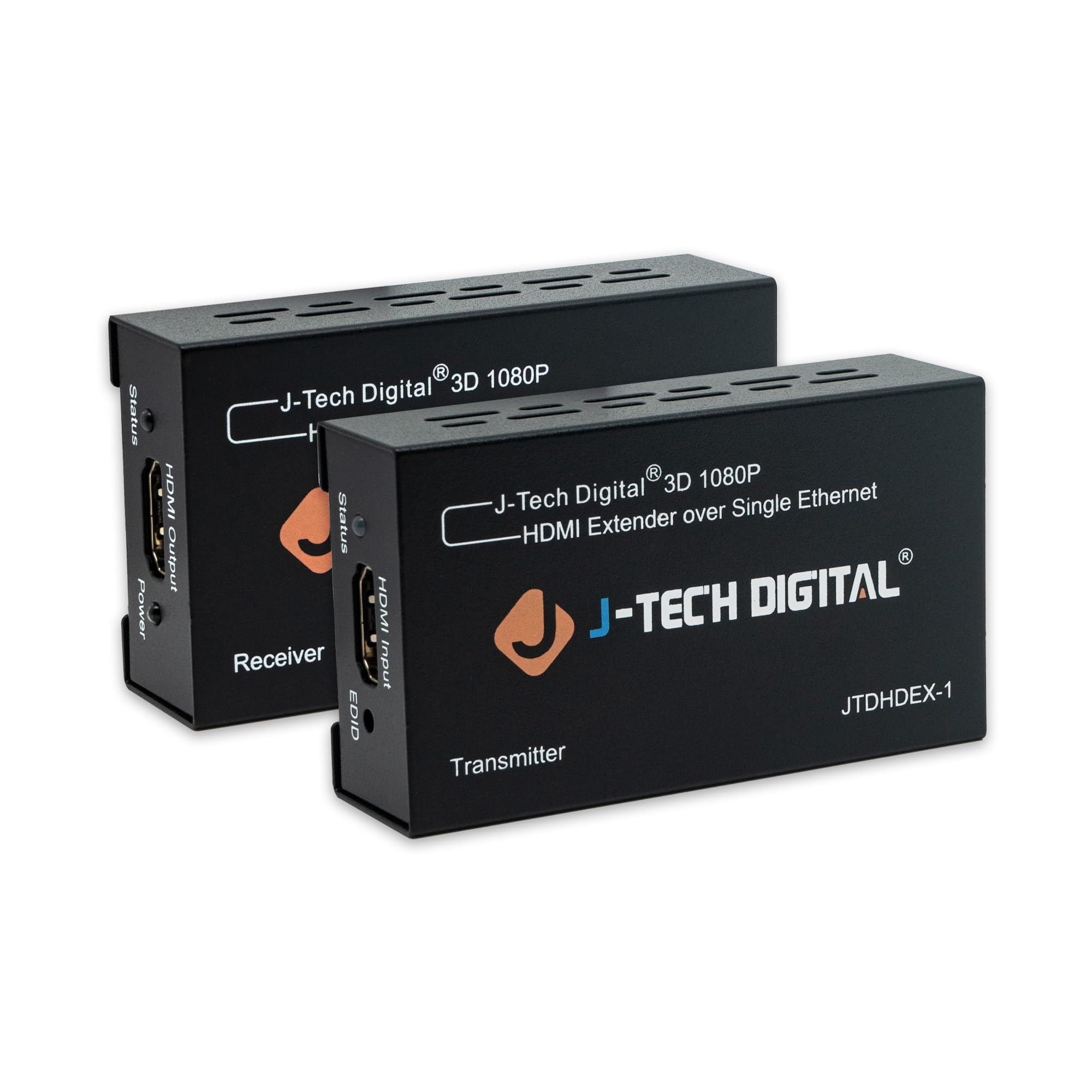
🚀 Elevate your AV game—extend beyond limits with J-Tech Digital!
The J-Tech Digital HDMI Extender transmits high-definition 1080p video and Dolby Digital/DTS audio up to 200 feet over a single Cat5e/6 Ethernet cable. Supporting HDMI 1.4/1.3 signals, HDCP compliance, and 3D video, it delivers zero latency and optimized performance when paired with quality cables. Ideal for multi-room setups, it ensures seamless, professional-grade AV distribution with easy installation and reliable customer support.









| ASIN | B00G5RBX2Q |
| Best Sellers Rank | #6,139 in Electronics ( See Top 100 in Electronics ) #6 in Remote Control Extenders |
| Customer Reviews | 4.2 4.2 out of 5 stars (2,128) |
| Date First Available | October 24, 2013 |
| Is Discontinued By Manufacturer | No |
| Item Weight | 9 ounces |
| Item model number | JTDHDEX-1 |
| Manufacturer | J-Tech Digital |
| Product Dimensions | 3 x 3 x 1 inches |
J**N
Great product and a solid company
I have been converting my home from standard TV to 1080P high resolution. The video source is in the garage (Roku), where the satellite and network feeds come in. All TV's (five different locations in the house) get the same video in my situation. Because there are spare Cat5e cables and coax cables in the walls of the house, finding J-Tech's HDMI extender products was a godsend. I have used them for HDMI - over - Cat5e (Cat6 and Cat7 would work too but my house is older than that) and for HDMI - over - Coax. Both work flawlessly. One of my endpoints is a projector that blocked the HDMI's audio (projector's fault), so I tried the J-Tech audio splitter prior to the projector and again, that works flawlessly. Three J-Tech product types, one happy customer, extremely easy setup all around. Here's another thing though: I had a few technical questions. J-Tech's customer support was awesome - they answered all my questions completely, clearly, and in less than a day. Thank you Jewel! My one suggestion to J-Tech is to upgrade their product manual to address questions like mine (specifically: can you swap transmitters or receivers? yes. Can you drive multiple receivers from a single transmitter? no. How should I interpret the status LEDS on the receivers and transmitters? transmitter: red is good; receiver: green is good) And whatever else comes to their minds to make the user's life easier. I think some of J-Tech's devices can work with 4k video, although as an engineer I have always been dubious that 4k is much more than a marketing ploy compared to 1080p; the human eye is not that discerning except under closely and continuously monitored conditions.
K**N
Saved my bacon at 300' distances!
To be fair, I have now used this device exactly 6 times. So long term reliability? I can't speak for, or against, that. But at a recent funeral for a relative, I needed to send an HDMI video from my Canon camcorder (Canon VIXIA HF G20) to a nearby building, where overflow crowd was being put, since the main building would be over capacity. Audio was handled via wireless mics, no problem, but sending a 1080p video feed was another story. I ran a 20' HDMI line from my camera to a projector, as a test, and everything worked perfectly. So I tried a quality manufactured Belkin CAT 5e 100' cable, using the extenders, and again, it worked perfectly. My concern, of course, was longer distances, since I would be operating near the maximum stated spec for the extenders... much more of a challenge than the best-case scenarios I had just tested. A couple of days later, when my box of cheap CAT 5e bulk cable arrived from Amazon, I dutifully measured out a 300' cable (the distance I needed the run to work) and crimped connectors on it. I coiled it all up, and plugged everything together, for a close-quarters test. Imagine my dismay when it did NOT work! But looking at the large coil of network cable, it occurred to me that "cable loops are bad" or so I've always been told. They just never seem to matter, to me ... at the short distances most normal people work with. But this was a relatively extreme setup, so perhaps one more test? I took the long cable on a long walk around my backyard, eliminating any loops in favor of a straight run, much like I would have in the final installation. Plugged it all in again, hey, it worked! There was much relief. On the day of the event, we set up the camera, and ran that same 300' cable over to the next building (all connected through hallways), taping it down and cleaning it all up neatly dressed. Plugged the camcorder into the transmitter one side (via 6' HDMI cable), plugged the projector in the receiver side (via another 6' HDMI cable), fired it all up in sequence, and what do you know! The picture came up perfectly, just like with the shorter, easier tests. The event came off flawlessly, without a single hitch, thanks to this little gem. So even if it dies at some point in the future, I'll always be grateful that this important event came off perfectly, and everyone in both buildings was able to see the ceremony easily.
M**S
Nice multi view monitor switch with one minor flaw
This is a multi view monitor switch. Its goal is to provide up to 4 devices connected via HDMI to appear in a few different modes and of course, switch to a specific device. It actually does a great job of doing that. I can also move around what devices show up where in the screen. It works with 2K, 2.5K and 4K display output, and it's quite easy to switch by cycling through the Scaler button. It even allows you to connect via the computer (this is not for the faint of heart or those who don't know how to use Terminal and screen on Mac or Putty on Windows) to look at and change the configuration. 4K is the only mode I can see clearly on the screen for multiple devices, and of course selecting one device, unless it cannot do 4K, you would want the switch to be in 4K. This is where the flaw is. Every time I start this switch, it defaults to 2K and I have to hit the Scaler switch a few times to get it to 4K. I wish that it would persist the setting that you last used. It actually does for the device you want to display, just not the resolution. Aside from that minor flaw, I really like the switch as it displays well, the remote control is easy to understand and use, you can even pass sound via HDMI, and output to HDMI (monitor), Toslink (Fiber) or analog (3.5mm stereo cable) to some speakers or stereo system. Pretty nice if you are connecting a gaming system or something. This is a nice switch that allows multi view (4 device monitor output on one screen). I just wish there was a way to update the firmware so whatever the last configuration was on the switch persists. Then, it would be a 5 star product. Hope this helps.
J**N
Need to buy HDMI to Ethernet converter and Ethernet to HDMI converter as a pair
A**T
Sadly this product does not appear to used standard IP data to comunicate between the transmitter and the receiver units and will not work on a standard home network as I was hoping it would. it does however, work well as an extender with good quality HD pictures & sound. I would be happier with the Amazon page listing this product if it were made clearer which protocol the extender used, so that the buyers would know exactly whether it could be used via an ethernet LAN system or not. Both transmitter & Receiver units feel solid and well made and work well provided you can run a single dedicated cable between them.
勘**太
距離は20m(LAN)+12m(HDMI)程度の延長でしたが、他の製品ではことごとくダメだったところ、本製品だけ正常に映像が出ています。 使用しているLANケーブルが諸事情によりCat7ということもあり、他製品は相性?だったのかもしれませんが、助かりました。 ノイズやチラつきも全くありません。
A**P
High quality, excellent product. Works as it should. Great build quality and very easy to use. I would buy this again without question.
L**J
Product arrived on time and so far has performed exactly as I anticipated it would. I'm very pleased with my purchase.
Trustpilot
2 months ago
1 month ago



