

Desertcart purchases this item on your behalf and handles shipping, customs, and support to EGYPT.
🚀 Elevate your Wi-Fi game — stream, work, and game without limits!
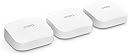
The Amazon eero Pro 6E 3-pack mesh Wi-Fi router delivers tri-band Wi-Fi 6E speeds up to 2.3 Gbps with 2.5 Gbps Ethernet, covering up to 560 m² and supporting over 100 devices. Featuring patented TrueMesh technology, it eliminates dead zones and optimizes traffic flow. It also functions as a smart home hub compatible with Thread and Zigbee devices, offers easy app-based setup and management, and includes advanced security options with a 30-day free eero Plus trial. Ideal for professionals seeking seamless streaming, gaming, and remote work connectivity.
| Wi-Fi coverage | 1-pack: Covers up to 190 m². 2-pack: Covers up to 380 m². 3-pack: Covers up to 560 m². |
| Type | Router (connects to modem as primary router). |
| Supported speeds | Supports network speeds of up to 2.3 Gbps (1 gigabit when wired and 1.6 Gbps when wireless). Ideal for gigabit+ internet plans (up to 2.5 Gbps using the 2.5 Gb Ethernet port). |
| Wi-Fi connectivity | Wi-Fi 6E tri-band concurrent 2:2:2 (802.11ax); compatible with older Wi-Fi standards. |
| Wired connectivity | One auto-sensing 2.5 gigabit Ethernet port and one auto-sensing 1 gigabit Ethernet port. |
| Speed rating | AX5400 |
| Smart home connectivity | Amazon Frustration-Free Setup, 802.15.4 radio (Zigbee, Thread), and Bluetooth Low Energy 5.0. |
| Electrical rating | 100–240 V AC, 50-60 Hz |
| Processor, memory and storage | 1 GHz dual-core processor, 1024 MB RAM and 4 GB flash storage. |
| Network security and services | Profiles, WPA3 (eero Labs feature), WPA2, TLS v1.2+, VPN pass-through, IPv6, NAT, UPnP, port forwarding, DHCP, static IP and cloud connectivity. |
| Required for setup | Supported iOS or Android device and internet service (with cable or DSL modem, if required). See eero.com/requirements. |
| Temperature rating | Operating: 0˚C to 40˚C Storage: −25˚C to 60˚C Operating humidity: 0% to 90%, non-condensing Operating altitude: <3000 m |
| Dimensions | 142 x 138 x 51 mm Actual size and weight may vary by manufacturing process. |
| Warranty and support | eero Pro 6E is sold with a limited warranty of one year provided by the manufacturer. If you are a consumer, the limited warranty is in addition to your consumer rights and does not jeopardise these rights in any way. This means you may still have additional rights by law even after the limited warranty has expired (see here for further information on your consumer rights). Use of eero is subject to the terms of service found here. |
| Software security updates | This device receives guaranteed software security updates until at least five years after the device is last available for purchase as a new unit on our websites. Learn more about these software security updates. |
| Subscription | Includes 30 days of eero Secure for new customers. Learn more about this here. |
| eero Built-in | eero Built-in is available in US, CA and UK only. Your wifi network must use a compatible eero router and your Echo device must stay in range of a compatible eero device. You will need to link your eero and Amazon accounts and manage eero Built-in from the eero mobile application to use this feature. eero Built-in compatible Echo devices support up to 1,000 square feet (92 square metres) of additional coverage, speeds up to 100 Mbps, and 10 or fewer connected devices in the 5 GHz band. Actual performance can vary and certain eero, Echo, or Alexa features may be incompatible with eero Built-in. Learn more about eero Built-in performance, availability and compatibility. Use of eero and eero-related products and services, including eero Built-in, requires creation of an eero account and agreement to eero’s Terms of Service. Review eero’s Privacy Notice. |
| Legal disclaimer | Some features require linking your Amazon account and downloading the Alexa application or using a compatible Alexa device. Internet connection speeds and availability depend on your internet service provider. If your internet service provider does not provide you with the maximum supported speed, you will not experience that maximum speed. Maximum network speeds, if applicable, reflect combined supported speeds across wired and wireless clients. Maximum wireless signal rates are derived from IEEE 802.11 standard. Specifications assume wired Ethernet connection; your experienced speed may vary when connected to an eero device that is configured as a wireless extender. Coverage estimates are based on normal use conditions. Actual range and performance can vary and maximum supported speeds may not be available to all customers due to factors such as local regulations (including power limits), network configuration, interference, connected devices, device usage, building materials and obstructions. Specifications are based on use of a Wi-Fi 6 or later generation client device that supports 160 MHz. For more information about eero performance, visit support.eero.com. Combining eero Pro 6E devices with older generation eero devices on the same network may result in reduced performance across the network. |
P**E
Excellent system with significantly faster speeds that the 6 Pro
I purchased the three router set to try and improve the speed I was getting from a BT Smart Hub 2 with four of their BT Complete WiFi Extension units linked to a 900Mbs fibre to the premises Openreach connection. I also wanted to achieve greater network stability and prevent various devices regularly dropping their WiFi connection. I have a lot of wifi enabled devices - close to 100 which connect to the network including Sky Q boxes, TVs, laptops and PCs, Alexa smart speakers, security cameras and more. I also have a lot of smart home tech that connects via a Philips Hue hub, a Yale Hub and a SmartThings hub. I suspect that the airwaves are rather crowded therefore. The existing BT system is fairly useless. The wired speed into the router is consistently around 950Mbs download and 100Mbs upload and a wired connection to the router replicates this speed pretty well. BTs WiFi technology simply isn’t capable of transmitting anything close to 900Mbs though which makes me wonder why they bundle it with the Smart Hub 2. Very close to the router I might get 350Mbs but typically around the house 150Mbs is standard with sometimes the speed dropping to 50 or less. My main Sky Q box, right beside an extender disc, continually drops its connection and needs to be reset and even when working has a slow speed. This has all changed with the Pro 6E. Before this I tried a Pro 6 eero system but sent it back as the network was more stable but speeds were disappointing. The 6E delivers stability but also speed. Close to the wired router I get around 800Mbs but around the house tend to get 400 to 500Mbs - a dramatic improvement. Surprisingly I don’t see a vast speed difference with the few 6E enabled devices I have compared with older hardware. The kit is expensive but is regularly discounted. It’s still expensive then though. However, BT sell the Complete WiFi discs for around £100 each and, although they provide the router, that would cost £200+. So in reality I had already invested a lot in WiFi infrastructure without the benefits of speeds that FTTP should deliver. I have not experienced any of the issues described concerning Sky Q connectivity. All my Sky boxes are connected, stable, and fast. Nor have I had any problems with setting the system up with BT Broadband. I would have disposed of the BT Smart Hub completely as the eero can be plugged directly into the broadband socket into the house but with BT as an ISP but as I have BTs Digital Voice phone service I have to plug one handset into the BT router. It’s irritating that the BT router can’t be put into bridge mode but I’ve simply disabled the wireless function of the BT box and a Ethernet cable connects the FTTP plug to the BT router and one of the Ethernet ports on that router is connected to an eero. Set up was very easy compared to BT, and a lot easier that a Netgear Mesh system I used to have. It simply works and I hate messing around with WiFi so all is good. I have one significant complaint about the eero system, and that is to maintain reasonable security and full functionality I have to pay £10 a month or £99 annually for the eero+ subscription. I really don’t want to do this and Amazon should make it a lot clearer that a subscription is more or less necessary. Amazon have also discontinued the ‘light’ subscription that I think was £30 a year. Overall though eero works well for me with lots of devices connected and a fairly challenging infrastructure linking everything together. Five stars.
J**N
Best mesh by far! Great if you have an old house with thick walls
OK, this is 300 quid, buuuut! You get what you pay for. Such a simple setup all through the eeso app and with no hiccoughs at all. The connectivity is robust and makes your home internet go a lot further as your devices are buffering through a mesh (3 routers), rather than a single device. I am connected to BT, and again, zero issues. The subscription service does offer a few handy tools/options which you may want to consider if you have kids and really want to screw down their internet access; however, in a house full of adults, the additional services really don’t offer any benefits, so save your cash. I’m super impressed. Our internet was constantly disconnecting and dropping out with black spots all over our house (its a 1600th century cottage with 3ft thick cobs walls) and have now eradicated all the black spots and have full coverage in all rooms with the 3 router setup, plus all devices are achieving max download/upload speeds throughout. This is a professional bit of gear at a 3rd of the cost for installing WAPs.
N**N
Not bad, still some bugs
I upgraded my home broadband with zen to 900mb and they supplied a new router which is one of these eero pro 6e which is the tri band . It was very easy to set up but only place I could put it was next to the BT ONT in a cupboard by the front door. The coverage wasn't great as it's a bungalow with thick walls so I looked at the eero mesh system. The eero 6 and 6+ only have dual band 2.4 and 5ghz so to make use of the 6ghz I decided to get a pack of 2 of the pro 6e, same as supplied by Zen. They can be the gateway and mesh exstenders. These were also very easy to set up and automatically connected to each other and added all the amazon echos etc without me needing to re add them. I have a fire stick max which is supposedly wifi 6e and it's right next to the eero I placed in the front room but is only connecting to the 5ghz using wpa2 and the 6ghz on the eero is locked to the wpa3 security protocol and can't be changed so that's really the only bummer. I am going to try and run cat6 from the gateway to the 2 mesh exstenders as they don't seem to be giving the full bandwidth, getting about 500mb which is plenty but I want to get the as much as I can out of them. LOL all on all fairly impressed so far.
G**K
These Eero 6E are very good, best I’ve tried yet
I had eero 6 pros already but needed to extend to my garage and a shed. I bought the pack of 3 eero 6E to replace my 6 pros throughout the house and used 2 of the pros for garage and shed. They were easy to install but I did a fresh install and that was a mistake as it created a new network! I then couldn’t get the pros to join the new network until I realised that they were on different networks with the same name! My mistake as I should have asked eero app to replace the old ones rather than add new! However once I realised what the app had done I removed each of the Eeros from the original network then deleted it. Each one took a few minutes to disconnect before the blue light showed but I got there! The pros then readily connected to the new network and voila, I now have internet to the garage and work shed. The network is very stable and very seldom drops out but to be honest I’ve not really seen a major speed change with the 6E units. Maybe if I hardwired them but that would be more hassle than it’s worth. I live in a 1930s bungalow with solid walls and the pack of 3 eeros gives me coverage throughout. I’ve got FTTP and a package that gives me 450/100 and throughout the house get around 200/90 so not worth hardwiring. The great benefit I find is the seamless handover between units when walking around the house, especially when using Wi-Fi calling. Result is everything I wanted. Sure they are expensive but they are very easy to install and operate. Even after a power cut they handle the startup flawlessly, which was one of the issues I had with my old system.
D**N
Upgraded to these from Eero 6 - These are powerful Tri-band routers
Following a home upgrade to 1Gbps Fibre service I upgraded to these Eero Pro 6E for Tri-band functionality to extend the new much higher speeds across the house and garden areas. The Tri-band Wi-Fi6 makes a noticeable difference where the backhaul beetween the three devices is not being contended with and choked by other Wi-Fi items. Signal strength of the Wi-Fi 6 is good, within its own limitations. The compatibility with the older Eero 6 kit has been successful where I had to re-deploy one of the Eero 6 to fill in a signal hole in this old building. Setting up Eero is very easy and quick. The Eero app is essential to maximising the functionality of these devices which is providing a coherent mesh across 2.4GHz, 5GHz (low and high bands) and 6GHz. Not cheap but good value for the money given that they work very well indeed. Although new my experience with other Eero kit suggests that I can expect good reliability over time, and obviously compatibility has already been clearly demonstrated.
A**Y
AVOID. Works like a charm, until it doesnt!!
eero Pro 6E worked like a charm for around 6 months then it was nothing but issues - you call Eero support and they 'patch' issues one at a time...A nightmare when half your house isnt wanting to connect or you are outside of support hours. The issues started around 2 months ago, about 4 months into owning the eero Pro 6E. We had them set up into MESH, one downstairs and one upstairs using the ethernet backhaul. Worked like a dream to start with, 500mb speeds with virgin, LAN speeds up to 1300mb...fantastic. However, it all went downhill one afternoon when devices started to show "no internet", ok - quick call to eero..they wanted to assign each device an IP on their end and changed some settings (they wont tell you what they change, they just go ahead and do it...) after 2 devices, I said - surely there is a better fix? I dont want to have to call you at times when a device decides not to connect...their reply "You could reset the network".....which as you all know means setting everything up in the house again - no easy feat. This patched things for around a week, then devices started to play up again, reset the network - worked again for a week.... after around 5 network resets im done. These are going back - its a shame as when they work - its brilliant. However do some research and I am not alone in connection issues. Back to Asus I go. AVOID IF YOU LIKE YOUR SANITY.
G**N
Great setup for home WiFi
Super easy to setup and the units themselves are discreet enough to not be too obtrusive sat on a couple of cabinets and one on my kitchen worktop. This has taken me from really poor performing WiFi on the newer white Sky Max Hub (was barely getting 250mbps down on WiFi) to now getting 550+ mbps consistently. The app is simple and, while the premium subscription isn’t necessary for most things, for me the backup/failover option and VPN are great. I can understand people’s criticisms about the parental controls being behind the subscription though - it just doesn’t affect me. Overall, it’s a 5 stars for me. One gripe, the 1Password Family license included with the Premium subscription isn’t compatible with my current 1Password Individual account. I’ll have to revisit that when my current 1Password subscription is closer to renewal.
J**G
Set and forget
I’ve got a compact 4 bed, trouble I’ve found with the property is that the walls are made with brick and reinforced concrete. It seems the people who had built the house 80 years ago cared little for future proofing and Wi-Fi signals. they may have unintentionally built a faraday cage. I had previously (10 years ago) ran cat5e cable around the house for 3 HP access points run off a POE switch. It had always worked well. I payed a little extra for enterprise equipment as I thought the features that it came with would allow me many happy hours of tinkering. however, since each change usually meant a full reboot and a minute or two when the Wi-Fi went down, it was difficult to justify to three angry teenagers that each of them having their own Vlan is worth the loss in connection to whoever they were shouting at on the latest shooting game. As I was getting 1gb FTTP installed, I thought that I should upgrade my old equipment to match, I wanted something simple to stop my fiddling temptation, and something reliable to stop the kids moaning. I was a little skeptical with the Amazon Eero’s but they have not yet let me down in the first month of use. all but one has a Ethernet back haul and are in a wall mount as close to the ceilings as I could get. The minor annoyance of having to provide a power cable to the access points withstanding, I’ve been pleasantly surprised by these devices. I bought three 6e pros, as another concern was future proofing. The devices are really well built and reassuring heavy. I connected one eero to the fibre termination box, and a separate switch, within two minutes of automatic configuration, all was up and running. I removed the crappy supplied mesh system that the ISP provided and haven’t looked back. The 2.5 gbe Ethernet ports are a nice touch, I will one day have to buy a suitable switch to make use of the speeds from my media server. The 3 units have been working really well, I like the app interface and even found a few little options for tinkering purposes. I’ve enjoyed seeing who in the house is the biggest bandwidth hog, I was surprised to find that with the kids consoles, phones and 4 k tv’s we are usually download over half a terabyte a week. I hope that it’ll be another 10 years before I start looking for an upgrade.
R**H
Worth the money
Super easy setup, old house with thick walls and previously spotty signal is operating at close to max download speed in every room
Trustpilot
3 weeks ago
2 days ago