


Buy anything from 5,000+ international stores. One checkout price. No surprise fees. Join 2M+ shoppers on Desertcart.
Desertcart purchases this item on your behalf and handles shipping, customs, and support to EGYPT.
🎛️ Elevate your studio game with pro control that fits in your palm!
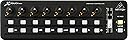
The Behringer X-TOUCH MINI is an ultra-compact, USB-powered MIDI controller designed for PC and Mac users. Featuring a long-lasting 60mm master fader, dual-layer mode for quick switching between DAW and instrument control, and Mackie Control emulation for seamless integration with popular music production software, it delivers professional-grade control in a portable footprint. Pre-configured for instant use, this controller is perfect for millennial producers seeking efficient, reliable, and versatile studio gear.


| ASIN | B012CSKTYY |
| Best Sellers Rank | 1,619 in Musical Instruments & DJ ( See Top 100 in Musical Instruments & DJ ) 12 in MIDI Controller |
| Brand | Behringer |
| Brand Name | Behringer |
| Colour | Black |
| Compatible Devices | Computers running compatible operating systems |
| Connectivity Technology | USB |
| Connectivity technology | USB |
| Connector Type | USB |
| Control Method | Touch |
| Control Type | MIDI Controller |
| Customer Reviews | 4.5 out of 5 stars 717 Reviews |
| Global Trade Identification Number | 00748252139641, 04033653140454 |
| Hardware Interface | USB |
| Hardware Platform | PC/Mac |
| Human Interface Input | Buttons |
| Included Components | Ultra Compact Universal Usb Controller |
| Instrument | MIDI-compatible instruments |
| Instrument Key | Any |
| Item Dimensions D x W x H | 10.2D x 32.5W x 4.7H centimetres |
| Item Type Name | USB Controller |
| Item Weight | 520 g |
| Keyboard Description | Compact 16-key keyboard |
| Manufacturer | Behringer |
| Manufacturer Part Number | X-TOUCH MINI |
| Material Type | Acrylonitrile Butadiene Styrene or Polycarbonate |
| Mixer Channel Quantity | 1 |
| Model Name | X-TOUCH MINI |
| Model Number | 000-B3M00-00010 |
| Model name | X-TOUCH MINI |
| Noise Control | None |
| Platform | Mac, Windows 10, Windows 7 |
| Product Style | X-TOUCH MINI |
| Product dimensions | 10.2D x 32.5W x 4.7H centimetres |
| Size | Einheitsgröße |
| Special Features | Compact |
| Special feature | Compact |
| Supported Software | Ableton Live |
| Total USB 2.0 Ports | 1 |
| Total USB Ports | 1 |
| UPC | 748252139641 |
| Unit Count | 1.0 count |
C**M
Perfect for a home studio with space limitations.
The benefit of home studios these days is that you can near enough have everything you need on a PC. The downside is that it loses that hands-on tactile feel that a professional studio offers. If like me, you’re a bit old school and like to physically push buttons but are also limited with space, this lovely little midi controller is perfect. Using USB it plugs straight into your PC and the buttons and knobs are fully assignable to actions within your DAW. The price point is spot on and it’s super easy to set up. Definitely gives you a semi-pro fee in your home studio.
W**M
Great little controller
Well built, works perfectly on PC win10. Easy to edit with Behringer software. One thing to note although controllers are endless the light ring is 0-127 so relative MIDI pickup is odd. I can't get it to work with pro tools to pick up an existing MIDI value even in relative mode but less confusing for me if it always shows real midi value anyway. Good size and feel.
A**-
Good, but I'm suspicious of durability.
I bought this to use with my growing collection of MIDI controllers for music production/performance. Whilst I suspect it would be good for production, I am not sure of the durability of the rotary dials for performance purposes. I also have two M-Audio keyboards, an Akai pad controller and two Akai MIDIMIX units, all of which feel far more sturdy. Next to these the X-Touch Mini looks and feels more like a toy. I am sure it has its place and I believe for static production work it is probably fine. But for live music work where your attention is not on fine detail work, I suspect it mihht be easy to break the rotary dials. With that said, it is weighty. The buttons have a very positive, resistive feel. The "click" of the endless rotary encoders is deliberate, the knobs for which are also easy to grip and difficult to accidentally turn. The fader also feels good. Just not really confident in it for my purposes, so I have returned it and bought an alternative product.
M**Z
lightning fast video editing! programable midi controller for editing with Premiere Pro...
So, let's talk about the Behringer X-TOUCH MINI MIDI USB Interface and how it's been rocking my Premiere Pro video editing world. First off, the best feature of this controller is the customization. I can assign all my go-to shortcut commands to the buttons and knobs, making my editing process way smoother and SO FAST. But firstly lets get the biggest catch out of the way – programming these shortcuts isn't exactly plug-and-play. You'll need some third-party software to make it happen. Once you're set up, though, it's pretty straightforward, and software and tutorials are easy to find. once that is done, assigning shortcuts is a breeze and the settings can be found in the preferences tab. What's cool is that it doesn't stop there. combined with some simple midi editing software, this allows you to store multiple banks of shortcuts, which is handy for different phases of editing. Whether I'm trimming clips or adding effects, everything's just a button press away. The ergonomic design is another plus. I can edit for hours without feeling like my hand's gonna fall off. It's surprisingly comfy, and I am much less inclined to be hunched over the whole time. the buttons are large, clicky and responsive, and the layout is very easy to remember. O.K, onto the cons. Well, besides needing that extra software, there's not much to complain about. It's not the flashiest tool, but it gets the job done so well. Overall, if you're serious about really speeding up your editing process in Premiere Pro, the MIDI Interface is defiantly worth checking out. it has made a night and day difference to my editing workflow for me, and I'm pretty sure the Behringer X-TOUCH MINI will make your editing life a whole lot easier and faster too.
S**E
It's fun to play with knobs.
I purchased this to do use with Reaper, as someone who had spent decades away from a mixing desk. This gave back a better sense of control and tactile feeling. Compact as it sounds. Straight forward to connect. There's an editor you can download from the Behringer website. I will suggest that if you're intending to use this with Reaper, that you consider looking into ReaLearn. It can take a bit of time to setup, but is the best way to go. You can tweak the encoders/knobs and buttons as well as fader to act however you want, better than the editor software. Worth every £1 for improving your workflow.
K**R
Great little controller
I got this for two reasons. Cubase and Flight simulation. Maps really well with Cubase and is great with vst synths. Turning actual knobs is so much better than using the mouse. Similarly with Msfs. Look for a piece of software called ‘axis and ohs’. Mapping this to the various knobs and switches in the cockpit is pretty easy. Gives you a total of 16 rotaries and 48 push switches.
A**I
Pretty great for the money
It does feel plasticy and quite cheap, and it would be nice if there was more than 2 layers available. Also the editor is PC only which isn’t ideal. That said, it’s so cheap and definitely worth the money if you know what you’re getting. Works perfectly.
R**N
Amazing Piece of Kit
Bought this piece of kit to use with the windows application "Midi-Mixer", which allows me to utilize my midi controller in place of my windows volume mixer, I can change individual applications' volumes up and down with ease. Now I've done it, i can't go back. One thing I love is that these are knobs, and not potentiometers, so they can be turned infinitely, so if i bind a new app to the knob then I don't need to worry about what volume it was previously at. One flaw I find with this device is its cable (Annoyingly a mini-USB), which seems to come undone quite often, but it's a deal-breaker and nothing that an after market cable could fix.
T**S
Perfect for MS Flight Sim and a relatively cheap way to add cockpit buttons
I use this with SpadNext software to program it to work with MSFS 2020. It works perfectly, but does require you to program it, which is the tricky part and can take some time (good tutorials in YT). I now have 2 of these as part of my 787 setup.
M**Y
Eccellente controller Midi
Economico ma robusto e molto preciso. Utilizzo con ligthroom per sviluppo file RAW ed il mio flusso di lavoro si è velocizzato a beneficio anche della creatività. Consigliatissimo.
T**R
Excellent, useful, and feature-rich, without any nonsense!
This is my first "real" MIDI controller, I bought it because I develop video games and wanted to use it as an input device to tweak values, and maybe even for some games themselves. Since it is MIDI, it is very easy to use and doesn't need any special drivers. I have seen people use this for Photoshop Lightroom, and I use it for Fairlight / Davinci Resolve, haven't tried it for Audacity and other softwares yet, because as I said my main use is to bind it to data in Unity 3D. Build & Tech: Solid construction, The black plastic is pretty decent, but it is plastic. It doesn't have any of the soft-touch plastic nonsense, but the buttons are rubbery and translucent (I like them). The Encoders are fully digital (no start/end, other than a logical one in software), have nice LEDs and value ranges that you can configure. You can even load values into them by sending back the midi message you would have expected from them. This is THE KILLER FEATURE for me, because it means unlike the Korg NanoKontrol, the device has only logical state, not physical state. The encoders themselves are also buttons, which is amazing if you wan to save snapshots of your values etc. I need to try this with Mixxx next, I use Mixxx for live soundtrack and effects mixing in storyteller games and pen and paper RPGs The keys (that can also be freely configured) are pretty decent, a little mushy, but have a very good and haptic, but quiet, pressure point. You can also send values to them to make them light up, if I am not mistaken. The main fader is great, but I would have loved a faint detent at the 0 db point. You get a bunch of free VST plugins etc. with this controller, you can download all of this at the Behringer website. I have no use for this. I also don't understand the MC feature at all, but I think that is for some special software. Room for improvement: The programming software is pretty shit (and I am convinced they all are shit), but it gets the job done. Unfortunately, it is very easy to overwrite the wrong layer on the controller, and you cannot get your defaults back. With 24 controls per layer, that is a lot of manual configuration you may have to do. The manual says NOTHING about how to use this device, or even about the write back feature (I just tried it because I hoped it would work that way). The manual is literally a sheet of paper that tells you how to plug the USB in and then some warning and regulatory messagesa. This should come with a travel bag, and I have seen one, but it is not part of the default package. The size makes it fairly transportable already. Overall: Very happy with what I bought here. In this price class and with this feature set, Behringer gives the Korg a serious run for its money!
D**K
Flight sim instruments
Use 2 of these for my flight sim program (XP12). Work well, thanks to Mark's software. Reasonable price, good quality, should have a long life.
S**.
Werkt niet op Mac
OPGEPAST Werkt NIET op Mac! Je moet dit configureren op Windows om te kunnen gebruiken op Mac.
Trustpilot
3 weeks ago
2 weeks ago