Desertcart purchases this item on your behalf and handles shipping, customs, and support to EGYPT.
🚀 Elevate your Raspberry Pi projects with touch precision and vibrant visuals!
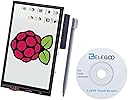
The ELEGOO 3.5 Inch LCD Touch Screen is a compact, 480x320 TFT display designed for full compatibility across all Raspberry Pi models. Featuring a responsive resistive touchscreen with an included stylus, it offers precise control for DIY, educational, and multimedia applications. Powered directly via GPIO and SPI interfaces, it requires no additional power supply and comes with driver support and tutorials to ensure seamless integration and quick setup.


| ASIN | B01MRQTMTD |
| Aspect Ratio | 5:3 |
| Aspect ratio | 5:3 |
| Best Sellers Rank | 12,839 in Business, Industry & Science ( See Top 100 in Business, Industry & Science ) 10 in LCD Touch Panels |
| Box Contents | 1 x 3.5 inch TFT LCD display for Raspberry, 1 x CD with tutorial, 1 x Input pen |
| Brand | ELEGOO |
| Brand Name | ELEGOO |
| Compatible Devices | Raspberry Pi A, A+, B, B+, 2B, 3B, 3B+,3A+,4B, 5B, Zero, Zero W, and Zero 2 W |
| Contrast Ratio | 2000:1 |
| Country of Origin | China |
| Customer Reviews | 4.0 out of 5 stars 224 Reviews |
| Display Technology | TFT |
| Display Type | TFT |
| Hardware Connectivity | Unknown |
| Has Color Screen | Yes |
| Image contrast ratio | 2000:1 |
| Item Weight | 50 g |
| Manufacturer | ELEGOO |
| Maximum Display Resolution | 320 x 480 Pixels |
| Model Name | UK-EL-EB-007 |
| Model Number | UK-EL-EB-007 |
| Mounting Type | Wall Mount |
| Native Resolution | 480*320 Pixels |
| Network Connectivity Technology | GPIO |
| Picture Quality Enhancement Technology | Color and Contrast Enhancement |
| Pixel Pitch | 0.2 |
| Power Consumption Size | 0.65 Watts |
| Product Features | Come with Stylus, Touchscreen |
| Refresh Rate | 12 hertz |
| Resolution | 480 x 320 |
| Screen Finish Type | Glossy |
| Screen Size | 3.5 Inches |
| Screen size | 3.5 Inches |
| Screen surface description | Glossy |
| Shape | Rectangular prism |
| Specific Uses For Product | DIY Projects, Educational Tool, Portable Display, User Interface, Real-time Monitoring, Multimedia Playback |
| Total HDMI Port | 1 |
| Total USB Ports | 1 |
| Total Video Out Ports | 1 |
| Unit Count | 1.0 count |
P**O
fantastic value for money
The screen was easy to install, I needed it away from the raspberry pi so I added a 40cm ribbon cable and it still works great. Touch screen didn't even require calibration. My only complaint would be the viewing angle, standing straight in front of it... perfect, but seen at a 45 degree angle from a side it looks all black. but... again... cheap screen, does the job, very satisfied with it. Fits perfectly my anycubic i3 mega printer.
R**Y
great case and screen, needs carful fit for the heatsink and fan on pi4b
screen works well and case fits but is a bit tight , firm pressure needed the heat sink on processor is very close to fan
G**N
Good resolution and functionality.
Brilliant!! Absolutely brilliant product. Thanks.
M**N
Touchscreen not function on Rasbian bookworm
Easy product to use. Works fine with RPI4 Installation process simple enough but missing dependencies in programming library support needed fixing using Sudo apt-get --fix-broken install before fbcp driver loads without error (using LCD35). Touchscreen still not functioning. Needs code fix or will be returned. Would also like screen brightness control. Functions supplied for screen rotation work easily but require a reboot. Touchscreen calibration tool installed but doesn't respond to touch events.
S**R
Very happy with this purchase.
Superb value for money. Arrived quickly and was well packaged. I set it up by downloading a pre made image from lcdwiki dot com and flashing it to a micro SD card. inserted it into the Pi and Voila, up and running. The refresh rate is slow but usable, at least for my use case it is. Very happy with Elegoo, less so with Amazon who said my original review did not meet their guidelines, I guess that's the way the world is going with AI
M**E
It just doesn't work!
This screen doesn't work, and I don't mean to say that it's broken, it just doesn't do what it's supposed to do, because it isn't capable of it. I have tried for days to get it working with my Pi Zero WH. I have some experience with Pi's, I have 5 of them serving various different purposes across my network. I found numerous forum posts across the internet posted by users in the exact same boat, and tried everything suggested. The closest I've been able to this screen actually doing the job it's supposed to is with the 2017 image recommended by the installation instructions, and even that will only display the startup code sequence, and goes blank and unresponsive once the GUI's loaded, and that's with the image the manufacturer says should work with the screen out of the box!. This will not work with up-to-date versions of the OS. I've tried various versions of the OS, various drivers and various suggested fixes. Nothing works! I see that some people state they have been able to get it working, but I've committed as much time as I'm willing to and will have to find another screen for the project. If you are willing to put in the time, and have the required level of expertise, then you might be able get it working, it might work on other hardware. But I bought this as a neat little easy to use touch screen to pair with a Pi Zero for a simple project, and it just isn't!
J**N
not tee bad
Its not too bad got it running on ubuntu mate on the pi3 i found playing video works best in chromium it doesn't look great but it works the frame rate is not spectacular I wouldn't play any games with it but it dose for general use the touch screen works quite well and the low resolution doesn't look bad on a screen that small but dose make using some programs tedious like not being able to see the bottom of the window but most things work quite well. If you need drivers use the good tft drivers i followed the read me on the git hub to get up and running.
S**Y
Easy to setup
Setup was easy when using online resource.
Trustpilot
2 weeks ago
1 month ago