Desertcart purchases this item on your behalf and handles shipping, customs, and support to EGYPT.
⌨️ Elevate your desk game with ergonomic brilliance and vibrant style!
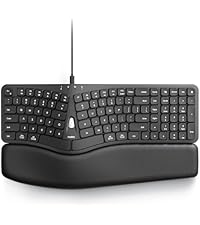
The Nulea Ergonomic Split Keyboard is a wireless, rechargeable mechanical keyboard featuring a split design to reduce strain, 7-color adjustable backlighting, and the ability to switch seamlessly between three devices via Bluetooth and 2.4G USB. It includes USB-C quick charging with a 2000mAh battery and adjustable tilt legs for personalized comfort, compatible with Windows and Mac systems.


| ASIN | B0BFVYYYN7 |
| Additional Features | Backlit, Rechargeable, Split Keyset Design |
| Antenna Location | Office |
| Best Sellers Rank | #188 in Computer Keyboards |
| Brand | Nulea |
| Built-In Media | Ergonomic Keyboard x1, USB Cable, User Manual |
| Button Quantity | 78 |
| Color | Black |
| Compatible Amazon Tablet Models | Amazon Fire 5th Generation, Amazon Fire 7 12th Generation, Amazon Fire 7 5th Generation, Amazon Fire 7 7th Generation, Amazon Fire 7 9th Generation, Amazon Fire HD 10 11th Generation, Amazon Fire HD 10 13th Generation, Amazon Fire HD 10 5th Generation, Amazon Fire HD 10 7th Generation, Amazon Fire HD 10 9th Generation, Amazon Fire HD 8 10th Generation, Amazon Fire HD 8 11th Generation, Amazon Fire… |
| Compatible Devices | Laptop, PC, Smartphone, Tablet |
| Compatible Operating System Family | Windows |
| Compatible Tablet Computer Models | Amazon Fire 5th Generation |
| Connectivity Technology | 2.4G USB, Bluetooth |
| Customer Reviews | 4.2 out of 5 stars 1,517 Reviews |
| Enclosure Material | natural |
| Hand Orientation | Ambidextrous |
| Item Dimensions L x W x H | 16.5"L x 9.6"W x 1.3"H |
| Keyboard Backlighting Color Support | Single Color |
| Keyboard Description | Wireless |
| Keyboard Layout | QWERTY |
| Manufacturer | Nulea |
| Mfr Part Number | RT05 |
| Model Name | Ergonomic Keyboard |
| Model Number | RT05 |
| Number of Items | 1 |
| Number of Keys | 101 |
| Number of Packs | 1 |
| Number of Sections | 1 |
| Recommended Uses For Product | Office |
| Special Feature | Backlit, Rechargeable, Split Keyset Design |
| Style Name | Contemporary |
| Switch Type | Mechanical |
| Theme | ergonomic keyboard |
| Unit Count | 1 Count |
| Warranty Description | 2 year |
| Water Resistance Level | Not Water Resistant |
B**E
Really happy with this keyboard
My Microsoft keyboard decided to start randomly inserting multiple characters, so it was time to replace it. My keyboard lives in a tray under my desk, which leaves it in the dark. I've had a motion-activated strip light adhered to the inside top of the drawer and used it that way for several years. The problem was the light was just too much and bothered my eyes. This keyboard has solved the light issue! I love it that the lights turn themselves off when the keyboard goes idle and immediately comes on when you start typing. You don't have to turn them on and off, but you can if you want to since they added a key just for that purpose. The length of time it takes the lights to go off is very reasonable. I read complaints from people on other lighted keyboards that the lights went off really fast. This definitely doesn't do that. Also, the keys are not just backlit, it actually shines through the keys so you see the letters on the keys as well. I really like the feel of the action on the keys. The space bars might be a little louder than some other keyboards, but not by a whole lot. I just don't have much negative to say about this. Battery life is pretty good. I think I had it a month before I had to recharge it. I noticed that the lights weren't coming on anymore and realized it probably needed to be charged. Didn't take long to charge it up. I don't notice any lag or hesitation at all using this on Bluetooth. If you're thinking about getting this keyboard, I would just do it. The layout is a little different than the ones with the space between the keys and the number pad, but it didn't take me long at all to adjust to it. The arrow keys took a little longer, but all-in-all, the adjustment period was worth it. Since I've only had it for a couple months, I can't say anything on the longevity of it's lifespan, but I'm sincerely hoping it will last a long time. As a matter of fact, I thought about buying another one and keeping it in reserve. I'm not familiar with the manufacturer of this keyboard and hope they will be around for a long time. They're building a quality device and I plan on using it for the foreseeable future.
A**W
Good keyboard, good price
I needed a new keyboard for work. I was using a Microsoft Sculpt. I LOVE that keyboard and how comfortable it is. However, after only a year of use it started disconnecting randomly and it was super annoying. I tried new batteries, making sure drivers are updated, etc. I am on a computer for work 40+ hours a week and need my keyboard to be reliable. So, I begin searching. I wanted something that was split again, had options for tilting, backlit and not too expensive. This one came up in my search and after reading several reviews I decided to give it a try. Unboxing and getting it connected was super easy. It can connect by blue tooth of USB piece. I also love that I can set it up to be connected to my laptop, and to my phone and can toggle between the two. The color options for the backlight are a nice touch. You can also adjust how bright they are. There was a bit of a learning curve in getting used to typing again as my sculpt had a lifter on it that made the keyboard angle down in the back more. I liked that, and the feet on this keyboard do not give me quite the same angle. I may use the old riser from my sculpt on this one somehow, but for now its not super uncomfortable or anything. My typing speed is just as fast. The keys feel nice when pressing them and they are not super loud. Battery life seems pretty good so far. I do like that there is an off/on switch so that I can turn the keyboard off when I go to lunch and when I leave for the day. Time will tell, but so far I am impressed with this keyboard.
K**R
Ergonomic, easy to use, multi-computer support is great, company backs their product
Got one of these about a year and a half ago. Great connectivity, easy to use, keys feel comfortable. Very good design, ergonomic layout means I'm never feeling any wrist or finger soreness even after a full day of typing (I use this every day at work and home). I love the switching function (to switch between 2 computers) - it's easy and fast to do. Also means I only need 1 keyboard to work with 2 machines. It had a shift key that started coming up - I contacted them with images of the problem and after basic troubleshooting, they shipped me a new one with no hassle. It's rare to find a company that will stand behind its product. Highly recommended - sounds like they're in it for the long run and are dedicated to making a quality product!
Y**K
The keyboard Volume is too high... :S
Feb 29 2024: This is an initial review. I have just received this keyboard, fully charged it, then attempted to connect via Bluetooth. It is likely my PC and the lack of a BT antenna but BT connectivity was not good. I'll try again at some point, once I put an antenna on it (run wired LAN and just never needed the BT for the game PC). I'm migrating from an MS Natural (the 4000 series) so the layout is a bit of a change. I've seen some complaints that this keyboard is large. It's about 4 inches shorter, width wise and about 4 times less massive overall than the MS Natural. This saves me a TON of desktop real estate. The keys are flat and have very little travel; as previously stated, will take some adjustment, but I'm adaptable :). Pros so far : - it looks great - key layout is somewhat different but adaptable - its not a crazy layout with a tiny backspace key and a delete key where the home key should be or anything like that, just different. - the backlighting is subtle and not overwhelming; while I could have tolerated a little brighter (the max brightness is maybe 20-30 lumens max) it does not overshadow the letters on the keys. Its adjustable as well and has a timely sleep function. - Connection via wifi dongle is seamless. No synch was needed and the keyboard is very responsive (tried a bit of gaming and it'll work for me just fine) - It has a quality feel to it - not flimsy and the ergonomics are pretty good (better for me than Logitech but not as good as Microsoft (why they quit producing the Natural, I will never know). Cons so far: - the yellow ESC and Space bar look great if you set the backlighting to yellow. Otherwise it clashes with the backlighting. - the center of the keyboard could be raised more to provide more ergonomic relief by maybe 0.5" - The backlighting could have one more brightness level, but I understand battery life concerns. Thats it. As for the Headline of this review: one of the feature rating selections was "Volume Control" so... Update 03/17/2024: Battery life: the LED backlighting stopped working on this day due to the battery level, but the keyboard itself was still working fine and the battery indicator light had not yet come on. This was still running off the first charge from out of box. Not shabby - and it DOES let you keep using the keyboard while it charges. The Bluetooth connection is flawless now that I have an antenna connected to my wifi out from the PC; however, since BIOS and safe mode don't work with BT, I just kept using the 2.4mhz dongle.
D**E
Perfect - but not for Windows
I'm really at a loss as to how to rate this keyboard. I'm a professional programmer and I use Windows OS. There is a lot to like about this keyboard and not much to dislike. The keys are perfect - just the right spread and feel. The keys are concave and fit the fingers well. The ergonomic split is perfect. The keyboard slant and the wrist rest are perfect. The weight and feel are perfect. (Do you notice a trend yet?). The battery is rechargeable, which I really like. There are a couple of things that I dislike - so much so that I am returning the keyboard. First, the home, end, page up, and page down keys are just sort of stuck at the top of the rest of the keys - there is no dedicated key block for this. Same for the arrow keys - just sort of smooshed in with the rest of the keys. The backspace key is where it is supposed to be but the delete key is in an unusual position (think MacOS). As a professional programmer, I am used to having the keys in separate blocks. This way, I can just feel for the key positions without having to take my eyes off the screen to hunt for them. This is a huge downer for me. Second, the function keys are all dual-purpose. This would be OK but the dual purpose function is active by default. To use a function key (F1, F5, etc.) it is necessary to press the Fn button. This is completely unacceptable. It would be nice to have a button that would flip the key layout from normal to alt function keys and leave it there so that I could set it for the most common use. These two things are show stoppers for me. I still rated the keyboard as a 5 overall because it is so well implemented. But it is not a traditional Windows keyboard. Windows users use the backspace *and* the delete key a lot so it's nice to have them findable by feel. Also, Windows users use function keys (F1-F10) a lot so it's nice to have them accessible by default. If Nulea were to put out a Windows style keyboard with Bluetooth I would buy it in a minute. In fact, I'd probably buy 3 or 4. I wound up buying a competitor's keyboard that I don't like nearly as much but it fits my coding style better. Sigh.
J**S
Work good but remember to manually switch between USB & BT modes with Fn key combo.
I would not buy again because from now on when I buy Bluetooth keyboards they must have mouse controls. Also because of the backlight - I only want backlighting so I can use it in the dark and I want the light to shine through the actual letters and on this keyboard the light shines around the keys and actually makes it more difficult for me to see the letters and I can't type without looking at the letters due to missing fingers. However, it would seem worth it for anyone without my specific preferences to try it because the seller offered a refund without my even asking for one and assuming that they would do it if accepted, there would seem to be no downside to trying it. I cannot accept a refund as I have vented my frustration upon it and discovered that it is durable! I have since made use of my handy dandy labelmaker and from now on when I grab this keyboard, I won't have to remember any shortcuts and everybody's happy. After those things, I will say that it is a very nice keyboard and very comfortable to use and is much quieter than my others. If backlighting is just for fun for you, than you will probably love it. I was going to just delete my review because I don't know a fair number of stars to assign in this instance, but since I'm not finding that option at the moment, I am posting a new review.
S**N
Been searching for a good replacement for : Microsoft natural keyboard 4000 - this is it IMO
I'm a software developer and have been using the "Microsoft natural keyboard 4000" for many many years, which they have now discontinued. I hate the replacements they have so offer. I've been searching for a good alternative for a while as I only have 2 aging MS keyboards left. I work on both Windows and MacOS environments in my job... and this keyboard is fantastic so far. I'm going to order another for my Mac soon likely. Positives - 2.4 ghz wireless connectivity - this is SO much better than Bluetooth which is often spotty and glitchy. I have headphones similarly that use 2.4 ghz which are always solid vs. other headphones I have that use Bluetooth and seem glitchy and annoying. - Great tactile feel - I love the backlighting, its just right - and now some whacky gaming keyboard that'll make your eyes spin - I am right now typing on this almost as well as w/ the MS keyboard I have used for probably 20 years - Mac and Windows notation on the keys which I absolutely love. I've been using an MS keyboard on Mac w/ key re-mappings but sometimes when you see the Mac symbol and look down at the keyboard it's easy to forget what is what since often you don't think about these things and it just comes natural - but sometimes there are key combos you need to think about for a sec in say code editing environments Negatives - to me the placement of home/end/page up/down is a little weird but maybe I just need to get used to it - it's a little on the small size, I wish there was just a little more width / wrist support on the left side as I'm typing right now feeling it out - the up-down arrow keys are compressed to 1/2 size which is weird since the side to side are full sized so odd tactile feel w/ arrow movement I think at this point this is my go to replacement keyboard and I'm going order another and just get used to them fully. My only hope is they keep adding new products and offer some larger keyboard options as I'm a big 6'2" guy w/ large hands. a "XXL" keyboard option would be amazing lol
A**R
I wish I loved it.
I so very much wanted this keyboard to work for me. It's gorgeous, setup and switching from wi-fi to either of two different Bluetooth connections is absurdly simple, and the backlight, something I never thought I'd care about, was beautiful. The keyboard feels solid, like it has been crafted with quality and attention to detail in mind. Unfortunately, all of that wasn't enough to offset the huge negatives here. I purchased this keyboard because I have carpal tunnel and need a divided, angled, arched keyboard to type without pain. (I'm a long-time user of split keyboards, not new to using them, so my frustration does not lie with the keyboard layout or the division of hands on the keyboard.) While this keyboard is indeed split, with each side at an angle, the sides are positioned just close enough to each other that my wrists are just a little bit too close together. The rise of the arch in the middle is negligible, definitely not enough to allow for a natural hand position when typing. These two factors combined to result in significant pain after just a few minutes of typing, not something I experience when using other, truly ergonomic keyboards. If ergonomics isn't as much of a factor for you, you may like this keyboard (although please see my update below). Unfortunately, it didn't work for my needs, and I'll have to keep searching for the right fit. It really is a gorgeous keyboard, though, and I really do wish I liked it more. Updating after another attempt to use this prior to returning it: This keyboard is actually worse than I initially thought. Not only does it cause exceptional pain to type on it, some keys are clunkier and noisier than others, which makes for an uneven, frustrating typing experience. I also noticed periodic skipping of letters when using the wi-fi connection. I can't recommend this one at all. I did contact the seller with feedback about my experience and received a general form letter back. I didn't feel like my experience was truly considered, so my confidence in this brand was reduced after that interaction.
A**.
Excelente producto
Excelente producto
R**U
Not worth for many reasons
1. The price is too much when compared with the quality of the product, I paid almost 12k. 2. The plastic was smelling when I opened the keyboard from box. 3. The control buttons are not at the right position, right control button is missing which makes harder to work. 4. The Pam rester cushion was coming out. 5. Left arrow button was almost coming out as well.
T**A
great keyboard and confortable
I have been using this keyboard for about 4 months. The design is great and helps to relieve some of the pain in my hands from typing. The wrist support that is attached is confortable also. The backlit keypad is great especially in low lght places. The internal battery ast forever. I think i have only charged it 2 or 3 times. The CTRL key came off so I emailed the company. They responded within a couple hours, we emailed back and forth about a replacement and what options I had once. Within 24 hours they are sending out a replacement at no charge. I would 100% recommend this keyboard.
R**W
Absolutely the Best Keyboard I’ve Ever Used (and I've had quite a few)
I’ve been using the black version of this keyboard for over a year, my best keyboard ever. The light grey version feels exactly the same, only somehow better. It feels more premium, more refined. I cannot overstate how great this keyboard is. Just wish the light gray version was as cheap as the black version, they charge a major premium for it. But IMHO well worth it. The keyboard has a separate number pad but not all the extra keys of a full-size keyboard, ideal for me (I like the smaller size). And the 7-color backlighting is a nice touch.
R**S
Best ergonomic keyboard with everything you could want
This keyboard is fabulous! The wrist pad is soft and comfortable, the keys are spaced well and make typing (for a touch typist) easy… only a few hours in and I’m hitting the right keys 95% of the time… in a couple of days it will be hard to go back to a ‘normal’ keyboard! The lights are an added bonus and the key strokes are clear. Delivery from USA was pretty quick and set up simple. Particularly like the ability to toggle between laptops meaning you only need 1 keyboard on your desk
Trustpilot
4 days ago
2 weeks ago