Desert Online General Trading LLC
Dubai, United Arab Emirates
Desert Online General Trading LLC
Dubai, United Arab Emirates


Type Your Way to Greatness! ⌨️
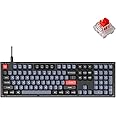
The Keychron V6 is a full-sized, customizable mechanical keyboard featuring 108 keys, QMK/VIA programmability, and hot-swappable Keychron K Pro Red switches. Designed for both Mac and Windows users, it boasts double-shot PBT keycaps, RGB backlighting, and a robust build for an exceptional typing experience.


| Hand Orientation | Ambidextrous |
| Button Quantity | 84 |
| Number of Sections | 8 |
| Is Electric | Yes |
| Keyboard Backlighting Color Support | RGB |
| Power Source | Corded Electric |
| Switch Type | Linear |
| Compatible Devices | Laptop, PC, Mac |
| Connectivity Technology | USB-C |
| Special Features | QMK/VIA, Fully Customizable, Hot-swappable, RGB, Wired |
| Number of Keys | 108 |
| Style | Modern |
| Theme | Customizable Keyboard |
| Color | Hot-swap Keychron K Pro Red Switch |
| Material | Polybutylene Terephthalate, Silicone |
| Item Dimensions L x W x H | 17.63"L x 5.53"W x 1.06"H |
S**E
What A Great Keyboard
My other keyboard has Cherry MX Brown switches, and it's a great keyboard. The switches are soldered though, and I wanted one that's how hot-swappable. I've also been wanting to try red switches. This keyboard is exactly I've been looking for. Red switches, hot-swappable, wired with no wireless options and programmable keys .Compared to the browns, these switches are so smooth that it almost feels weird. But that's not a bad thing at all. They have a nice clicky sound when they bottom out.This weighs 3 pounds, so it stays where you put it.The keycaps are double-shot so they should last forever. They also look and feel great. They're not translucent so you can see what's on them without the LED's on. Thankfully the LED lights can be turned off. I don't go for that flashy stuff.The programmable keys are great. I've only assigned 3, but that's all I need. I made one for the calculator, and the other 2 are for Power and Sleep. I don't know why they stopped having those on keyboards, but I'm really glad to have them back.This comes with the tools you need to pull off the keycaps and switches, plus a small screwdriver and Allen wrench so you can take the back off if you need to.The only thing I don't like is where the power cord plugs in. It's in the back left corner. I would have preferred the right side, or at least the middle. I guess that's just personal preference. I've added a right angle USB-C adapter to it so the cord now goes down along the back to keep it out of the way.10/10 would recommend.
E**S
Best Affordable Keyboard
This keyboard set the bar and I could not have picked a better keyboard. I use this for my office job and it has been a joy typing on this. The brown switches offer great balance of being in between linear and clicky. It’s not too loud and not too quiet. Just right. I especially enjoy the customization of the backlight and abundance of RGB options. Strongly recommend this if your looking for a keyboard within budget and enjoy the customization options available.
F**X
Fantastic keyboard!
Had this keyboard for a long time and love it. The fact it doesn't need software but can be configured or programmed using a website is really cool, and the semi retro and futuristic styling is perfect for my vibe. Love this board.
K**E
Solid keyboard BUT with some ISSUES.
Although the Full-sized V6 (with cherry red switches) keyboard's overall construction and key action are quite excellent for the price, I was very disappointed to encounter a NON-FUNCTIONAL key (specifically, the "/?" key did not work). However, I was able to disassemble the keyboard and found the cause of the problem. One side of the corresponding "switch pin mating interface component" on the back side of the PCB assembly was not soldered. Fortunately, I was able to solder it and everything works OK now.I thought a USB-C to USB-A adapter would be included since the included USB cable has two USB-C connectors. The documentation appears to indicate an adapter should have been included.The keys do *NOT* allow any backlighting to shine through the key's letter/symbol/name.There appears to be *NO* method to enable and disable the "Win" keys without running the VIA software. i.e., it does *NOT* appear to have the ability to disable and enable the "Win" keys by pressing a key (or key sequence) on the keyboard. So if you like to disable the "Win" keys while gaming but want the ability to quickly enable them, it will take more effort/time than pressing a single key, key sequence, or activating some sort of toggle switch/button.The CAPS LOCK active indicator is too subtle in my opinion. If your hands are in the normal home typing position, the change in back-lighting of the CAPS LOCK key can be easily missed. It would be much better to have a CAPS LOCK indicator light located either at the keyboard's top section, or perhaps in the area in between the arrow keys and "DEL, END, PAGE DOWN" keys. The NUM LOCK indicator is also subtle, but is more noticeable due to not being obscured by one's own hands.Additionally, if there is a current method, or a method is added to allow the enabling/disabling of the "Win" keys without needing to run the VIA software in a web browser, then an additional "Win key disabled" indicator light should be provided as well.The documentation provided (as well as that accessible online) needs to be improved. My recommendation is that someone not familiar with Keychron keyboards, and who is actually fluent in written English, be hired to check the documentation for completeness and correctness. I just found the documentation to be lacking for such a quality product.Other than the aforementioned issues, the keyboard provides quite a bit of "bang for the buck".
M**E
Awesome!
Coding for 40+ years and my ten year old D3LL keyboard finally started sticking on the left shift so after failing my password for the fifth time I decided to toss it in the trash. Spent a few weeks researching keyboards and it lead me to this and as I type this I am amazed it took me so long! I decided on a KeyCron mainly since it doesn't require loading any probably-infected Chin3s3 software like r3DraG0nz and works with open source VIA software for config.I went with the dookie colored switches since I want a little tactile feel. I did purchase a key switch sampler to test them out and ruled out the real clicky ones and the mushy ones. The black and brown switches felt the best to me. Actually the Unicorn switch was completely silent and I might give that one a try one day... and since this V6 keyboard is fully customizable, I have that option!I did not want the wireless since my keyboard never leaves it's desk spot. The LED backlight is cool but the keycaps that it comes with do not shine through so that limits the coolness factor out of the box but, since it is fully customizable, I can change them!! I also went with a full 100% since I do not feel like retraining my fingers when hunting for the keypad and arrows.I am not a gamer so I cannot speak to that but as a daily coder, it is awesome and a great first keyboard in the giant realm of customizable keyboards that I had no idea existed.
Trustpilot
1 week ago
1 month ago
3 weeks ago
2 weeks ago