Buy anything from 5,000+ international stores. One checkout price. No surprise fees. Join 2M+ shoppers on Desertcart.
Desertcart purchases this item on your behalf and handles shipping, customs, and support to EGYPT.
🎯 Master your workspace with ELECOM HUGE — where precision meets power!
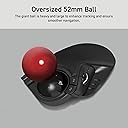
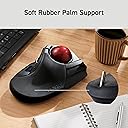
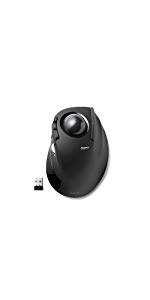
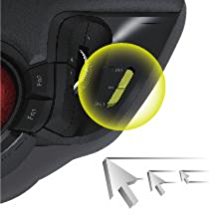
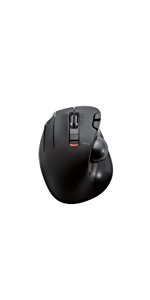
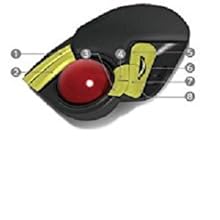
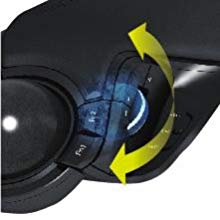
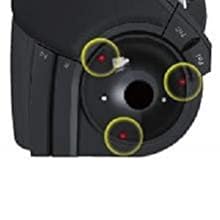
The ELECOM HUGE Trackball Mouse features a large 52mm red ball for ultra-precise cursor control, 8 customizable buttons including scroll wheel tilt, and adjustable DPI settings (500/1000/1500) for tailored speed. Its 2.4GHz wireless connection with battery indicator ensures uninterrupted workflow, while the ergonomic palm rest and durable artificial ruby bearings provide comfort and longevity. Compatible with Windows and macOS, this award-winning Japanese-designed device is engineered for professionals seeking superior accuracy and customizable efficiency.


| ASIN | B0735584RM |
| Antenna Location | Office, Personal, School |
| Are Batteries Included? | Yes |
| Are Batteries Required | Yes |
| Best Sellers Rank | 8,449 in Computers & Accessories ( See Top 100 in Computers & Accessories ) 5 in Trackballs |
| Box Contents | 2 AA alkaline batteries for operation control |
| Brand | ELECOM |
| Brand Name | ELECOM |
| Button Quantity | 8 |
| Colour | Black |
| Compatible Devices | Desktop, Notebook |
| Connectivity technology | USB |
| Country of Origin | China |
| Customer Reviews | 4.2 out of 5 stars 7,256 Reviews |
| Enclosure Material | Plastic |
| Global Trade Identification Number | 04953103308152 |
| Hand Orientation | Right |
| Hardware Platform | Laptop, PC |
| Item Dimensions L x W | 18.2L x 11.5W centimetres |
| Item Type Name | ELECOM 2.4GHz Wireless Finger-operated Large size Trackball Mouse 8-Button Function with Smooth Tracking, Precision Optical Gaming Sensor (M-HT1DRBK) |
| Item Weight | 0.57 Pounds |
| Manufacturer | ELECOM |
| Manufacturer Part Number | M-HT1DRBK |
| Model Name | M-HT1DRBK |
| Model Number | M-HT1DRBK |
| Mouse Maximum Sensitivity | 1500 Dots per Inch |
| Movement Detection | Optical |
| Movement detection technology | Optical |
| Network Connectivity Technology | USB |
| Number of Batteries | 1 AAA batteries required. (included) |
| Number of buttons | 8 |
| Operating System | Windows 10, Windows 7, Windows 8.1, Windows XP, macOS 10.12 Sierra |
| Power Source | Battery Powered |
| Product Features | 4 Way Scrolling, Ergonomic Design, Programmable Buttons, Wireless |
| Product Warranty | 1 year manufacturer |
| Range | 10 meters |
| Special feature | 4 Way Scrolling , Ergonomic Design, Programmable Buttons, Wireless |
| Style Name | Wireless Trackball Mouse |
| Theme | Efficient Productivity & Ergonomic Design |
| Unit Count | 1.0 count |
G**S
Brilliant trackball for Mac, great software and button customisation (tiny learning curve)
I used to have a trackball years ago and loved it, so I ordered this one mainly for the programmable buttons and the fact it’s finger-controlled rather than thumb-controlled. That works much better for me because it lets me keep my fingers on the ball while using my thumb and little finger for the buttons, without having to take my hand off the trackball. It worked straight out of the box on my Mac, even plugged into an unpowered USB hub. After installing the ELECOM software, I was able to set up the buttons exactly how I wanted for my workflow, and it has genuinely made my day-to-day use much easier, exactly as I hoped it would. One thing worth noting: when I first started using it, the cursor movement seemed a bit sporadic and I spent ages trying to work out what was wrong. In the end, it turned out my touch was too light on the ball so it wasn’t always registering movement. This was only temporary, because with a bit of use it “bedded in” and now even the lightest touch registers properly. It’s now very accurate and feels great. Overall, I absolutely love this trackball and highly recommend it. If you’re brand new to trackballs there is a short adjustment period, but it’s well worth it. I honestly wouldn’t go back to a normal mouse. Tip: every so often, pop the ball out and give it a quick wipe (and wipe inside the cradle too). Dust does build up and it will affect sensitivity if you leave it too long.
H**R
With replacement bearings fitted, it's a brilliant trackball. As stock though? not so much
It's called the Huge. It probably is huge to an 8 year old, but not for an adult. It would be better named the biggish. I've used trackballs for years as a personal preference over mice. My last two were logitech and were obviously designed with my hand size in mind. My first logitech eventually wore out. My second, the marble was near perfect for me, apart from nor having a scroll wheel and logitechs way of dealing with page scrolling because if that omission simply doesn't work in a lot of things, like cad software for example, I don't know why they see fit to change the way a standard thing works and break it in the process. So a new trackball was needed. I chose the huge because it had the red ball. Not for aesthetics, but because the black ball versions get a lot of reports of issues sue to the device missing ball movements. Its a nice sized finger ball. I prefer finger control to thumb and this is definitely a finger control ball with the left mouse button being under your thumb. That mouse button is one of the failings on the huge. Its fine for clicks and double clicks, but bad when holding it to drag things around in CAD. More often than not, while dragging, the button moves slightly in the enclosure and 'feels' like it just clicked making you pause to check you didn't accidentally let go of the button. Even though you can see it on screen is still moving the thing you grabbed, it still causes you to inwardly pause as sometimes it does un click. In a quiet room you are also aware that there are large voids inside as sometimes you get a 'boing' effect as you release a button. Basically the sound of release is almost spring like in sound. It's unpleasant when you hear it though inconsistent in its appearances. It's a different shape than my last trackball so caused hand and wrist ache for me, but that's a given when changing to a different design, it goes against muscle memory. After a week of use it's becoming more natural. The plethora of buttons is a welcome improvement over the logitechs minimal offerings. The software for the huge is, let's say functional. It works but somehow feels clunky. But it does give a lot of options. The right mouse button has another near identical button alongside. I can't tell you how many times I pressed the wrong one by accident. Again that's user error, but I can't help wishing they had done something different with that buttons shape or force required, something to make it feel different, but it's identical when used by feel alone. The thumbwheel for me is a little too far back and I find I keep moving my hand back to use it. 2 or 3 centimeters forward would be perfect for me, as it is I feel I have to change my hand position to use it better. The thumb wheel has a side to side option that so far I have never found worked in its default settings on any app. The ball feel is OK. By that I mean it's general control aspect, it's a shiny ball so actual tactile feel is like any other. But it does occasionally stick. There are numerous complaints about this issue that is apparently caused by the faux Ruby bearings. I only notice it when trying to do pin-point accuracy things. In general use its fine, but those moments where you need the pointer to move a tiny amount are fraught with potential overshoots as it sticks then suddenly frees. It's not a major stick, just enough to be a problem when it happens. Replacing the bearings is possible and is something I will be looking to do sooner than later. Does all this make it a bad trackball though? No. It doesn't. For a general user it's actually pretty good. I am overly critical of it primarily because it's failings affect me in a couple of my daily interactions with certain software. Without those particular things the sticking ball and mouse click issues would likely never have been spotted. At the price it's a good option and better than many including the logitech it replaced as the gamut of buttons brings functionality the logitech marble didn't have. In the built down to a price aspect though, those bearings suck, the cable is also as cheap as cheap can be, being as thin as it is I wonder how long it will last. All in though, 'for the price' it's an acceptable device. I forgot to mention that it also has an adjustable dpi switch that is useful for switching on the fly depending on current use and easily accessible by your thumb. I wouldn't use this for gaming, maybe command and Conquer zero hour, but definitely not for first person shooters. It is so close to being a great device, but just enough niggles to stop it getting there. I'm not looking for a replacement though so it must be good enough. UPDATE:- After a week I had adapted to the buttons just fine, but that sticking issue was getting tiresome. I bought some Zirconia/ceramic G5 2.5mm bearings and did the bearing swap (lenty of videos on youtube about how to do it and it really is easy). It is 100 percent worth doing this bearing swap with the huge. It is a difference you can feel instantly and not a small difference, it really is game changing. Before doing the swap, try moving the ball left to right then up and down slowly with just one finger for a full rotation. Do that same movement after doing the bearing swap. The difference is there straight away and is smooth as silk. If Elecom had shipped it with these new bearings I would happily recommend it all day long. Those ruby bearings it comes with though? they must be egg shaped to be as bad as they are. If you are planning on getting one of these trackballs, factor in another 5 pounds sterling to get the better bearings to make this a really good trackball.
A**E
Elecom M-HT1DRBK “HUGE” — creamy-smooth, ultra-customisable multifunction ergonomic trackball
Don’t be put off by the reviews on this page, which at first sight are horrifying news for anyone considering buying the Elecom M-HT1DRBK “HUGE” wireless trackball. A third of the purchasers found it unsatisfactory or barely good enough (up to three stars). There clearly is or was once a quality control problem with the artificial ruby bearings for the trackball. On the other hand, two thirds of the buyers are extremely satisfied or even ecstatic, and there is no problem returning an item to Amazon. Besides, the cure for the bearing problem is known, cheap, safe and quick, a ten minute job with a screwdriver and instructions freely available on YouTube. In addition, the choice of solid large, multifunctional trackball mice is basically this Elecom or its sister, the Elecom EX-G Pro, which is built with the same upmarket components, including the ruby bearings. I decided to take the small risk. My Elecom HUGE is one of the good ones (or later ones, if it was a batch problem, now solved), with a creamy-smooth action on the trackball, feather light switches, one heavier switch just where I want it, and a slight stiction on the scroll-wheel which adds to the precision. You’ll see I gave five stars, so count me among the happy customers. If a finer grading were available, my rating would be 4-3/4 stars because one of the switches is too light for it to be ergonomic in that position — for me. Also, the mostly plain black styling with just the big metallic red trackball (diameter 52mm!) and a smidgin of chrome on the scroll-wheel, while intricate and extravagantly curved, in the eyes of an artist like me should have been further relieved of its blackness. So the quarter-star deduction is for personal ergonomic preferences and to mark an overdose of Japanese “professional” styling, a.k.a. too much bloody matt black, not fundamental faults. Obviously, I consider the Elecom HUGE good value for money; the nearest comparable Kensington costs twice as much and offers less. The HUGE is solidly built and feels like quality in the hand. I wonder, however, whether the self-skinned soft polypad which adds so much to the comfort of operating the HUGE will last the decade or more of hard use the rest of the trackball seems good for. (If the memory foam skin does wear while the trackball survives, I’ll glue on tan leather cut to shape.) The ergonomics are excellent, with large, huge and massive buttons, and would suit a hand of any size, including very large hands. The hand is spread across the big expanse of the aptly-named HUGE, with the thumb operating three of the buttons plus the four-function scroll wheel, including yet another button function, which I instantly allocated to the left click because it is heavier and louder than the other switches, in the instance of the left click a very good thing. An ergonomic error — for me anyway — was making one of the assignable buttons, the piano key under my little finger, as light as the others. The little finger is just not as controllable as the other fingers. In fairness, it must be said that the designer apparently intended the ring finger to operate this button, with the little finger being unallocated. I therefore assigned no function to this button. As a result I control the ball with my two middle fingers, which is another big win in precision, especially since the HUGE offers three resolutions (500, 1000, 1500dpi) selectable on-the-fly with a slider button under the thumb, so that you can make pixel-perfect adjustments on any size of screen, useful in making fine art or graphic design, indispensable in engineering work, and even in typing or editing when the cursor needs to be placed precisely but quickly every few seconds. I’ve also reassigned the default left-click thumb button to the Mac’s COMMAND modifier key (the propeller) because it is too easy to press such a large, responsive switch and get unwanted results if a direct action is assigned to it. This trackball is so customisable and feature-rich, it reminds me of nothing so much as a puppy eager to please. A word about the control assignment software: The earlier software has been rewritten and repackaged, including into English, and is now excellent, regardless of what you may read in the reviews here. It is easy to make the basic button assignments, and you can even use the trackball for gestures, similar to gestures on Apple’s Magic Mouse or Magic Trackpad. Counting the scroll-wheel’s click and tilt functions as buttons, there are ten buttons, which with the variations and the gesture programmer give no fewer than 160 possible functions. It is well worth spending some time reading the help files for the function allocation software accessible through the software dialogue box. For those with much more intricate needs (games players, perhaps?) I’ve also tested the HUGE with USB-Overdrive aftermarket peripheral management software (free with advertising, $20 without), which is potentially more powerful than Elecom’s free software, but only if you know what you’re doing. On the whole, I think most buyers of the HUGE will find Elecom’s layman-friendly software serves them well. So who is the Elecom M-HT1DRBK “HUGE” wireless trackball recommended for? I’m a writer, an editor, a typographer, an industrial designer, and a painter both in traditional media and digitally. In each of those avocations by itself Elecom’s HUGE would be worth the money and considerably more to me, so for each of them the trackball adds far more convenience than the trivial cost per job. Music and video editing, which I occasionally do, also uses the same facilities and speedy precision. The question isn’t really whether the HUGE is great value for money, but whether each individual buyer would get on better with the HUGE layout of the trackball on top and the scroll-wheel at the side, or with the reverse layout of the sister EX-G PRO, which has the scroll-wheel on top and the trackball at the side, which when you change over to the trackball is a straight transition from the common Microsoft-style mice with a consequent shorter learning curve. Personally, I think the trackball on top with the scroll-wheel on the side, as in the HUGE, offers the best ergonomics — and the learning curve was anyway pretty short. The Elecom M-HT1DRBK “HUGE” is definitely recommended.
H**Y
Feels somewhat rough compared to better devices
Having recently wanted to get another trackball, having used one for 3D work in the stone age, I asked some fellow nerds for opinions. The Kensington Expert Mouse and Elecom Huge both kept coming up. The wired versions were strongly recommended due to problems with flaky polling rates on both over wireless. I accordingly picked up both to try. The Elecom Huge, despite the name, is anything but. It is a smaller ball than the Kensington, and comparing the two when the Kensington's included wrist rest is fitted, the Huge is much smaller. If you have large hands, the heel will come off the end of the trackball's hand rest, if you're a fingertip user. This can be mitigated by using a beanbag (which trackballs types should accumulate anyway, they help with ergonomics). The other notable thing about the Huge is that it just feels quite cheaply-made. Mine arrived warped, it rocks on the desk. The scroll wheel feels cheap, like a £10 mouse. The buttons have a piercing microswitch click, but also don't feel great or instill confidence. The movement of the ball, arguably the most important factor, was unpleasant out-of-the-box on my unit. It suffered from tons of stiction. This makes small movements all but impossible, even with a careful fingertip grip. The Kensington Expert is night and day in smoothness and precision. This is probably partly because Elecom use cheaply-finished bearings, i.e. not terribly round/smooth. They're made of synthetic ruby, so they're hard and durable, but that doesn't matter if they're wonky. I replaced the bearings with g5-specced 2.5mm ceramic bearings. It's a cheaper material but better finishing has improved things somewhat. It has reduced the sticktion to an extent. However, I think the bearings aren't the whole story, the cup in which the ball sits has a nasty seam in it too- which might not be helping matters. It could well improve mechanically with some use, and the new bearings are a worthwhile and easy upgrade. Yes, this trackball has loads of buttons, which is handy if you need them. As a sidenote, the official software for mapping them is not very good. It has an ugly UI and actually uses a surprising amount of CPU in the background on Windows. I am using hid-remapper (you can google for that, find a github site) running on a microcontroller to replace the software, which is a marked improvement. I added an RMB mapping to Fn3 as it felt more natural for my hands, as well as a ball scroll toggle to one of the forwards/back buttons, which I never use as they tend to cause disasters in web interfaces by mistake. I suspect that I wouldn't have been as negative about this device if I didn't have a much better-made Kensington Expert Mouse on the same desk to compare it to. It might be easier to remain content without an easy basis for comparison! It's also worth noting that ergonomics of trackballs are surprisingly personal, you might find that you have to try a few different models until one suits you. I don't regret trying the Huge (even though ironically, it's not huge at all). It's worth trying for the experience, but the Kensington Expert Mouse trackball feels far smoother and better-made to me. Also, it actually sits flat on the desk and doesn't rock when you use it. However, if you're prepared to do a little DIY to replace the bearings and potentially put some tape on a foot/use a sheet of padded drawer liner to prevent noisy rocking on a hard surface, there's a perfectly usable trackball waiting to be discovered. Bring beanbags!
J**R
Better than a Microsoft Trackball???
So you are prob like myself. a firm lover of the Microsoft Trackball Explorer's. Having owned both versions of the MS trackball, i have always been a firm believer in them. in fact i have 4 at home. one in the workshop. the rest used for my normal PC. the thing is. they arent cheap.. even when brand new they were almost £80. and now because of the rarity of them, you find Brand new ones or 2nd hand but almost perfect ones for almost £200. Scary prices for a device.. Logitech made an alternative. personally i never like them. they were always the lesser of the brands out there. there was a couple of others, but they didnt last long in the scheme of things.. so when my last trackball was wearing out, i went on ebay and then Amazon looking for a new one. By Luck i found this Beasty.. Size wise its almost the same. the Ball is almost in the same place. but it looked really nice.. Programmable buttons, soft padding, Wireless. and CHEAP... well almost £40.. but for a trackball thats Cheap. SO ordered it. turned up today.. First thoughts.. Wow.. everything is in Chinese/japanese (made in China but i think its japanese branding) that matters not. has the dongle, has batteries.. 10 mins later its on the PC and running. right away its smooth.. like fluid smooth.. the ball is like nothing is there. it floats within the housing. the mouse icon glides effortless across the screen. i start flicking buttons.. its got some interesting defaults.. downloaded the latest software for it. so easy to program the extra options. first thing was to go and play some games on steam. which it handled without issues. flicking from screen to screen, was a breeze.. i think the Microsoft one has met its match. whilst i will keep my old ones. im going to buy a couple of these new HUGE ones. not just for spares, i have systems in the workshop and else where that i need one for.. So if you are looking at this, wondering if its worth getting hold of seeing as the Microsoft one has worn the bearings out, or the buttons have jammed up.. Go for it.. Well worth it
J**S
Brilliant!
I have used several wireless trackball devices over the years, in search of one that ticks all the boxes for me and this is by far the best one I've used. I love it. It is actually massive, so the embossed 'HUGE' is very apt! My hands are big and it's perfect for me. Extremely comfortable, and the default button functions are great. I haven't tried the app to assign the f buttons and don't think I need to, but good to know the option is there if I need it or want to try a different layout. Only improvements would be to make it a rechargeable device, but I'm being picky! Highly recommended!
S**R
A seriously good trackball mouse 👍
I do not normally do reviews, but for this item it is different, so please excuse the essay.. I previously used, quite happily for a number of years a trackball moise that was "thumb driven". I was very happy with it until it decided to expire a few weeks ago. Having seen that there were now index finger driven trackball mice, i thought this is a good idea, may also be more accurate as well. I did my research, and purchased highly recommended and reviewed mouse from a competing manufacturer, and after a couple of days returned it as it was huge, and I mean "huge", and button placement for left and right mouse buttons was not great. So, did some more reseach and came across the Deft Pro from Elecom. All the reviews i saw said great mouse but bad instructions, so i thought how bad can they be? and ordered one. The box arrived next day, Iook the mouse out, looked at the manual and saw it was in Japanese. I also noticed a very small slip of paper tucked in the box, in English advising go to Elecom's website to download the manual in pdf format in English, as well as other languages. I did so, read the manual and the setup was nice and easy, with no additional drivers needed, unless you need to use the additional software, which I do not need at present. So, mouse connected to laptop, and on use found left and right button placement is near perfect. Scrolling the ball is precise and tight, also is very smooth. Would i buy one again? Hopefully the build quality, which feels lightweight but sturdy, will last a few years, so at the time I may need to replace it, I would definately purchase it again. A quick note to the Manufacturer..... Please add a non Japanese manual in the box or a larger note in other languages advising where the instructions can be found, which is the only reason this is a 4 star review and not a 5 star review. I look forward to (hopefully) using this for many years to come.
P**R
Great trackball if you have big hands
I've been using this trackball a lot for the last 12 months and it's been great. Accurate, easy to use, scroll wheel works fine. Basically, it's faded into the background as a bit of equipment that works every time I put my hand on it. I have big hands and this trackball is well built for me, if you've got small hands it might be annoyingly large, maybe have a look at the Logitech trackballs as I find them a little small. For those really researching this, my hand is 20cm (just under 8") from the tip of my finger to the bottom of my palm. Maintenance-wise, about once a month or so I pop the ball out (very easy to do) and clean the little ball bearings that hold it in place. We live in quite a dusty house as we have cats so if you have less dust, you might not need to do it as much. I've had to do the same with the Logitech and Kensington trackballs I've owned previously. This is enough to keep the ball moving smoothly. All in all, a big thumbs up.
Trustpilot
4 days ago
2 months ago