Desertcart purchases this item on your behalf and handles shipping, customs, and support to EGYPT.
🚀 Upgrade your desktop to Wi-Fi 6 power — because buffering is so last decade!
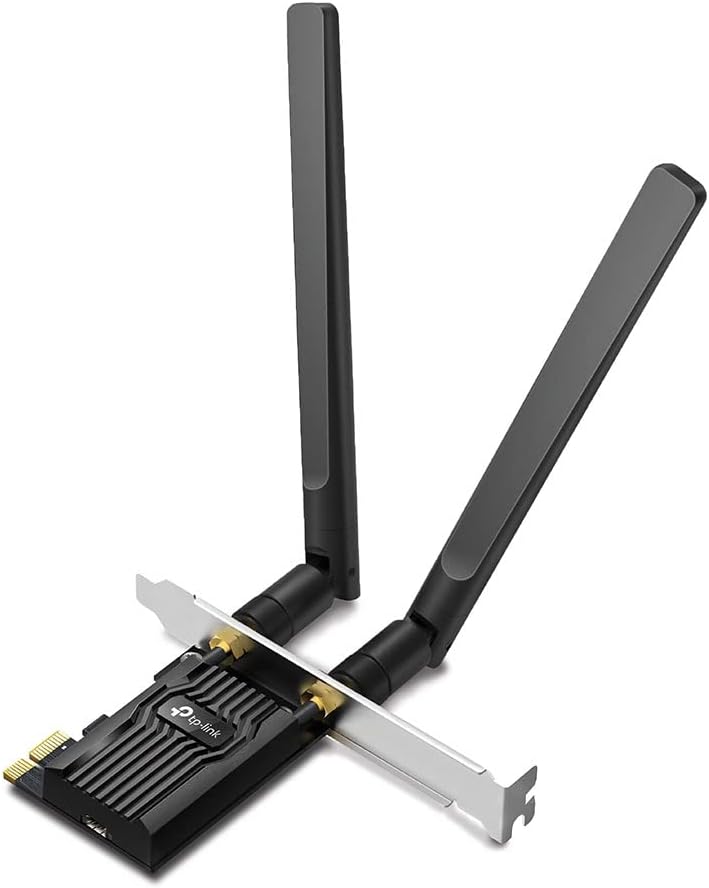
The TP-Link AX1800 PCI Express Adapter (Archer TX20E) delivers ultra-fast Wi-Fi 6 speeds up to 1800 Mbps and Bluetooth 5.2 connectivity via a PCIe x16 interface. Designed for Windows 10/11 (64-bit), it features easy installation with dual bracket options and magnetic high-gain antennas for stable, high-performance wireless networking. Ideal for professionals seeking reliable, next-gen wireless performance for streaming, gaming, and multitasking.
| ASIN | B0BWRXZZC8 |
| Best Sellers Rank | 3,815 in Computers & Accessories ( See Top 100 in Computers & Accessories ) 7 in Network Cards |
| Box Contents | Archer TX20E, Low Profile Bracket, Quick installation guide, Two dual band high gain antennas, bluetooth header cable |
| Brand | TP-Link |
| Brand Name | TP-Link |
| Color | black |
| Colour | black |
| Compatible Devices | Desktop, Laptop |
| Compatible Operating System Family | Windows |
| Compatible devices | Desktop, Laptop |
| Customer Reviews | 4.6 out of 5 stars 4,660 Reviews |
| Data Link Protocol | IEEE 802.11a |
| Data Transfer Rate | 1800 Megabits Per Second |
| Data link protocol | IEEE 802.11a |
| External Testing Certification | Não aplicável |
| Global Trade Identification Number | 04897098688809 |
| Hardware Interface | Bluetooth, PCI Express x16 |
| Hardware interface | Bluetooth, PCI Express x16 |
| Item Dimensions L x W x H | 7.9L x 12W x 2.1H centimetres |
| Item Type Name | Wi-Fi 6 Bluetooth 5.2 PCIe Adapter |
| Item Weight | 100 Grams |
| Manufacturer | TP-LINK |
| Manufacturer Part Number | Archer TX20E |
| Minimum Required Operating System Version | Windows 10 |
| Model Number | Archer TX20E |
| Product dimensions | 7.9L x 12W x 2.1H centimetres |
| Unit Count | 1.0 count |
V**E
Easy to install and solid TP-Link adapter
I can recommend this item! After many hours wrestling with another brand of adapter which failed to be detected even after much troubleshooting and which I had to send back as non-functioning, this TP-Link Archer TX3000E was a breath of fresh air in comparison! Fitting was quick and easy and the new Wi-Fi capability made itself known to the OS straight away, though, of course, proper driver installation was necessary for best results (downloaded from TP-Link website beforehand). Following the BT driver install the Bluetooth side of things similarly works perfectly as well, picking up my BT headphones and pairing very quickly. Wi-Fi performance is pretty good and seems solid and reliable, though not as fast as a wired connection which I will soon be losing when my broadband provider changes. For my needs, however, it will do just fine; mainly light internet use with some streaming and the occasional multi-gigabyte game file download. Overall I'm very pleased with the quality of the adapter and the simplicity of installation. The strong magnet on the base of the antenna means it stays put on either the PC case or (as in my case) a handy nearby radiator. I have a few other TP-Link Wi-Fi and range extender devices in my home now and they have always proved to be solid performers. I should have gone with this adapter from the get-go!
M**I
Yup, that's speed and reliability!
Yup, I'll take that over the previous pcie with 2 antenas screwed in on the back, check the photo. Easy setup, came with supplementary usb connection to motherboard pins, blietooth controller and headphones work like a charm and the wifi6 capability perfectly paired with a tp link wifi 6 router. No more lag! Jump of download speeds from 80-100 mbps to 635... Upload from 50 to 100, almost to the max of the advertised fibre speeds by VM. (Not using their hub/router of course!!!)
G**E
“Reliable Wi‑Fi 6 and Bluetooth Adapter”
5 Stars “The TP‑Link Archer TX3000E arrived in excellent condition and works exactly as expected. Installation was straightforward, the build quality is solid, and both Wi‑Fi 6 and Bluetooth perform reliably. The included antennas and low‑profile bracket were useful additions. A very good PCIe adapter at a fair price.”
E**C
Rock solid Wifi6 connection for fast fibre broadband connection
I bought this as I found my USB dongle couldn't handle the throughput when I changed to faster FTTP fibre broadband. Although it is a little more difficult to install as it not just a case of plugging it in, you need to check you have a free PCIE slot 1x 2x 4x 16x it will work in any of these but no performance gained using faster slots as it a 1x device. but once installed with supplied drivers (you can update to latest as necessary) it gives a rock solid connection and seems to be faster than USB dongle, lower latency? And as a bonus if you have free USB header on motherboard a simple wired connection and driver install you get a bonus of Bluetooth 5.3. And being a TP-link its clearly a quality product.
O**D
Almost maximum download speed
I upgraded broadband to 500 MB fibre i needed a better wifi card. I made the mistake of getting a cheaper card with antennas on the back of the card and got terrible results around 120Mb download. As a result returned that and got this --- incredible results 492.8 Mb latest speed test! Easy install as expected. My router is downstairs and a fair bit away as well.
C**E
Very Fast
Absolutely superb. I've been having trouble with my wifi adapter so I thought I would buy this after I had seen all the good reviews. I'm not dissapointed. Well worth the money. It runs very stable with a great wifi signal. The speed is incredible. Great antenna. Well recommended. Would buy again.
B**H
Don't forget to disable your antivirus and firewall FIRST, otherwise the driver will not load!
I am very pleased with the performance of this AC1300 (Archer T6E). It thrashed the speed of my previous wifi card. There are two vital points to bear in mind before you start: 1. Go to TP-Link’s website and download the appropriate driver file. In my case for W10, the driver file was: Archer T6E_V2_200508_Win10.zip. You will need to download this file on another computer if the current one has no internet access. Then copy this file to a USB drive and copy it to the current computer. I recommend creating a folder called “TPL” on the Desktop and putting the file in there. Then right click on the file and click on “Extract All”. 2. The second point to bear in mind is that BOTH your antivirus and firewall must be temporarily disconnected otherwise the driver installation will fail! If you use Kaspersky or similar, you need to disable it first and then go to Windows Defender and also disable that. This is because as soon as you disable Kasperky (or Norton or McAfee etc), Windows Defender will automatically replace the main security system. I recommend searching for “TP-Link How to Manually Install Adapters on Windows 10” and follow the instructions. Also search for “Turn off Defender antivirus protection in Windows Security”. I installed the AC1300 and screwed on the 2 antennae and switched on the PC. As per the above instructions, I browsed to: “Archer T6E(EU)_V1&V2_200508_Win10” and clicked on “Update driver software”. I rebooted the PC and then reactivated Kaspersky’s antivirus and firewall. Finally, I entered the wifi code for my network and my internet was restored. *****You may find that, contrary to the generally accepted wisdom of using the 2.4MHz frequency when you have thick walls and floors, that you actually achieve a higher speed using the 5MHz band. Accepted wisdom: “2.4 GHz networks cover a substantially larger range than 5 GHz wireless networks. 5 GHz networks do not penetrate solid objects such as walls and floors nearly as well as do 2.4 GHz signals”. I switched from 2.4MHz to 5MHz and my second (wifi) PC, which is 2 floors below, went from 11Mbps to 46 Mbps, matching the speed of my first PC which is connected via ethernet cable! It’s worth a try. .................................................................................................................................................................................................. EDIT No 5GHz signal on Linux? Then change a router setting. I recently bought this dual-channel TP-Link AC1300 Wireless Dual Band PCI Express Wi-Fi Adapter for a desktop PC that sits two floors below my router. The PC was originally using Windows 10 and the 5GHz signal was much stronger then the 2.4MHz one. I then decided to replace W10 with Linux Mint 21.1 MATE. The Broadcom BCM4360 was recognised by Mint and the appropriate driver installed. So far, so good. I then found that only the much weaker 2.4MHz signal was available. I used the excellent Wifi Analyzer (open-source) app on my mobile phone and this registered nothing for the 5GHz band. In contrast the 2.4GHz showed a strong signal. I tried connecting to a “Hidden network” and creating a new network, all to no avail. Finally after much research, I discovered that the Broadcom BCM4360 802.11ac Wireless Network Adapter [14e4:43a0] (rev 03) does not see 5GHz networks with a high channel number. See confirmed bug #1574196 at Launchpad. To rectify this, it is necessary to login to the router and change the channel for the 5GHz to a lower one. In my ASUS router I went to Advanced Settings > Wireless > Wireless General > select 5GHz band. Then clicked on Control Channel and reduced the figure from 140 maximum to say 36. Clicked on Apply and logged out. The Wifi Analyzer immediately picked up a very strong signal from the 5GHz. All is now well using Linux.
A**M
Good but not perfect
Incorporating Wi-Fi 6 and Bluetooth 5.0, this intel based PCIe card ticks all the right boxes but does it exceed and meet the high expectations we all have? In short, no, no it doesn't, well not for me anyway. Installation is easy, it's plug and play for both Wi-Fi and Bluetooth - only the drivers are manual (make sure to download prior to disconnecting from the web). The external antennas allow for easy movement and placement depending on signal availability and strength within a good radius or they can be mounted to the card directly if suitable. Bluetooth reliability has been superb in my testing with no drop outs suffered so top marks there. Wi-Fi, whilst reliable, was let down by the speeds it is achieving for my setup. Highs of 60mbs on a 300 line isn't quite reaching it's full potential in all honesty. I've tried messing around with the antenna configurations and locations but no luck thus far. Overall, not the quickest card on the market, but seems reliable enough for the time being. Would have preferred higher speeds but the consistent connection is much better than my previous spotty one with frequent disconnections. Would definitely recommend testing this in your setup before committing to a purchase (or ensure it can be returned) as it's not perfect.
J**N
Works great
I've moved on from this to an integrated chip on my board, but this is far superior to USB wifi adapters or anything of the like. I'd definitely recommend this, or anything of its likeness if your mobo doesn't have integrated wifi.
A**V
Great Wifi Card
Plugged into my AM4 motherboard, worked with no problems
L**Z
Dobry wybór dla Wi-Fi i BT 2w1
Łatwy montaż, bezproblemowe działanie zarówno Wi-Fi jak i BT, dobry zasięg, polecam.
U**1
المنتج قوي جدا جدا
المتج عطاني سرعت الانت كاملاً
J**L
Facil de instalar y buen resultado, la velocidad WIFI me aumento mucho.
El WIFI me llegaba con poca velocidad, tenia contratados 100 mb y apenas llebana 10 /20 Mb, creo que el problema erá la tarjeta que tenia mi ordenador, así que cambie por esta y pase a recibir entre los 100 mb, tambien cambie de 2.4 a 5 GHz y situe las antenas encima del PC. Creo que todo ayudo un poco, pero el resultado ha sido magnifico.
Trustpilot
3 weeks ago
1 week ago