Desertcart purchases this item on your behalf and handles shipping, customs, and support to EGYPT.
🖨️ Elevate your prints, impress your peers — the XP-15000 is your creative edge!
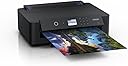
The Epson Expression Photo XP-15000 is a compact, stylish A3+ inkjet printer designed for professionals and creatives seeking gallery-quality photo prints at home or office. Featuring 6-color Claria Photo HD inks including red and grey, it delivers ultra-high 5760 x 1440 dpi resolution with vibrant, long-lasting colors. Wireless connectivity via Wi-Fi, Wi-Fi Direct, USB, and Ethernet enables seamless mobile printing. Its smart design includes dual front paper trays, rear feed for thick media, automatic duplex printing, and motorized output tray. Integrated Dash Replenishment ensures ink is reordered automatically without subscription fees, making it a hassle-free, versatile solution for photo enthusiasts and managers who demand premium print quality and convenience.


| ASIN | B0788VDMNB |
| Additional Printer Functions | All In One |
| B&W Pages per Minute | 29 ppm |
| Best Sellers Rank | 1,718 in Computers & Accessories ( See Top 100 in Computers & Accessories ) 8 in Photo Printers 37 in All-In-One Printers |
| Box Contents | Paper Tray, Print Cartridge |
| Brand | Epson |
| Brand Name | Epson |
| Color Depth | 24 bpp |
| Color Pages per Minute | 29 ppm |
| Colour | black |
| Compatible Cartridge | Epson 235 cm |
| Compatible Devices | Electronic Devices with Wi-Fi Connectivity |
| Connectivity technology | USB, Ethernet, Wireless LAN IEEE 802.11a/b/g/n, Wi-Fi Direct, Epson Easy Photo Print, Epson Print CD |
| Control Method | App |
| Controller Type | Wi-Fi Connected App |
| Country of Origin | Indonesia |
| Customer Reviews | 4.2 out of 5 stars 172 Reviews |
| Dual-sided printing | Yes |
| Duplex | Automatic |
| Hardware Interface | Ethernet, USB |
| Initial Page Print Time | <9.0 seconds |
| Ink Colour | Black |
| Item Dimensions D x W x H | 14.6D x 18.9W x 6.3H centimetres |
| Item Type Name | Epson Expression Photo HD XP-15000 Colour Inkjet Printer |
| Item Weight | 8.5 Kilograms |
| Manufacturer | Epson |
| Maximum Copies Per Run | Numerose |
| Maximum Copy Resolution Black and White | 5760 x 1400 dpi |
| Maximum Copy Resolution Color | 5760 x 1440 dpi |
| Maximum Copy Speed Black and White | 29 ppm |
| Maximum Print Resolution Black and White | 5760 dots_per_inch |
| Maximum Sheet Capacity | 250 |
| Maximum Supported Paper Size | A3 |
| Maximum print Resolution Color | 5760 dots_per_inch |
| Model Name | Eression Photo HD XP-15000 |
| Model Number | 235N207 |
| Model Series | Expression Photo HD XP |
| Model name | Eression Photo HD XP-15000 |
| Network Connectivity Technology | USB, Ethernet, Wireless LAN IEEE 802.11a/b/g/n, Wi-Fi Direct, Epson Easy Photo Print, Epson Print CD |
| Number of Drivers | 2 |
| Number of Ethernet Ports | 1 |
| Number of Trays | 1 |
| Other Special Features of the Product | Automatic duplex (A4, plain paper), Borderless print, CD/DVD print, Rear specialty media feed, Thick Media Support, Red eye removal, Photo Enhance, Wireless PictBridge |
| Output sheet capacity | 250 |
| Paper Size | 483 millimeters |
| Power Consumption Size | 21 Watts |
| Print media | Paper (plain) |
| Printer Output Type | Colour |
| Printer Resolution Horizontal in Black and White | 5760 Centimeters |
| Printer Type | Inkjet |
| Printing technology | Inkjet |
| Processor Count | 1 |
| Product Warranty | 12 months |
| Resolution | 5760 x 1440 |
| Scanner Type | Sheetfed |
| Special feature | Automatic duplex (A4, plain paper), Borderless print, CD/DVD print, Rear specialty media feed, Thick Media Support, Red eye removal, Photo Enhance, Wireless PictBridge Special feature Automatic duplex (A4, plain paper), Borderless print, CD/DVD print, Rear specialty media feed, Thick Media Support, Red eye removal, Photo Enhance, Wireless PictBridge See more |
| Specific Uses For Product | Photo Printing |
| Total USB 2.0 Ports | 1 |
| Total USB Ports | 1 |
| Unit Count | 1.0 count |
| Warranty Type | limited warranty |
| Wattage | 21 watts |
M**E
As near perfect as you'll get for low-volume A3+ photo/art printing
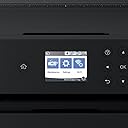
Oh wow, this is a fantastic printer. I'm the retired CEO of a hi-tech design studio. I needed a hi-res photo/graphics printer suitable for use in a home living environment and where printing volumes would not be particularly high. I also wanted a dedicated printer not one with integrated scanner and copier functions. This printer model is actually discontinued: I'll explain why you should buy it while it's still in stock. It looks like Epson has (understandably) changed its business model from selling complex hardware cheap and selling ink expensive. The replacement model for this printer uses 'cheap' ink by utilising refillable tanks. The downside is that it's a lot more expensive. Fair enough: if you need high-volume printing go for the more expensive model. OK, why is this printer so great? From the aesthetic point of view it's gorgeous and it's compact: ideal if it's on show in a living room. Everything about the design is thoughtful, ergonomic and well-engineered. The control panel is hinged: tilt it out to operate it, push it back to the neat vertical position when you're done. The control panel features a high res, back-lit LED screen. The excellent resolution means that small print is legible and a lot of information and graphics can be displayed. This makes for very intuitive operation with the well-coded UI that Epson provides. The screen isn't touch but navigation using the arrow keys makes it easy to use. All this makes for fast & easy set up, operation and maintenance/test tasks. The printer provides an integrated bottom slide-out tray for A4 paper. For media up to A3 + the back feeder is used. The pull-out paper holder/support at the back holds up to 20 or 30 sheets. This back feed is used for regular sheets, thick media, canvas etc of any size up to A3+. A great feature is that the output paper support is motorised: it pops out when printing is initiated and retracts when the printer is off. This feature contributes the beautiful design of the machine. Now the key question: quality. It's awesome. As a test, I printed a 300 dpi A3 image with solid colour, skin tones and subtle shadows (a 50MB TIFF file). The result was amazing: vibrant, solids immaculate, colour rendering excellent, blacks really black and excellent shadow detail. I wasn't seeing much difference between the image on my 27" Mac retina display and the image on paper. The colour rendering is helped by the 6 ink cartridges used: CMYK plus grey and red. Needless to say, the printing is super sharp – so regular mono printing on plain paper also looks good. For the application I've described, I reckon you'll not get better than this in terms of value for money, print quality, UI/UX, build quality, looks and compactness. If you have high volume requirement, ink cost would make this an expensive solution and you should spend more and go for the much more costly ink tank model. If you want archive printing (essentially max colour rendering fade resistance), spend even more money to get more print heads and a non-dye ink system. One last thing: I bought, also from Amazon, the flat-pack Devaise mobile 5-drawer file cabinet as the base for the printer. In black, it looks great and is the perfect base for the printer. At £67, the unit is a fraction of the cost of the Ikea equivalent and just as good in terms of looks and quality. As ever with Amazon, both these items arrived super fast and well packaged. For once, it's nice not to have to rant about design issues of a product: this printer is the "Dog's" if you know what I mean!
A**N
I love my Epson Expression Photo HD XP-15000 printer!!!!! Thankyou Amazon and Epson!!!!
I absolutely love the Epson Expression HD XP - 15000 - A dream to use, has so far done everything I wanted it to..I am an artist and I wanted to make my own art prints to sell..The first prints were from photograph and then manipulated in Photoshop, but did not come out right, it was just scruffy/pixellated and too saturated, I thought it was because I hadn't bought a good enough printer! but Im guessing I didn't have settings right in Photoshop and the quality of the photo was not good enough. I thought as I printed on Canson watercolour paper and not Epsons matte paper that might be the problem. Then I tried a scanned image at 1200 ppi and discovered printing in CMYK and a fair few other settings and 10 prints later I got the perfect print and i am thrilled!! As a complete beginner in Photoshop and using Printers it was a massive learning curve for me, watching lots of Youtube videos over 3 days and also studying everything I could on the internet all helped me achieve my desired outcome..I thought I had bitten off more than I could chew doing all this myself when most artists go to printers to do all of this and I thought it was actually going to be more like 3 months before I could print out a decent print, so I was thrilled to get it right within 3 days, a day before someone wanted to buy my first print! It took me about 50 minutes to unbox and completely set up and it even connected to wifi instantly, I didn't have to do anything, not even press any buttons on router! It was well packaged, it didn't come with any free paper, but the ink cartridges it came with seem to be full and not partially filled like is sometimes the case with new printers. It has taken 140lb Canson watercolour paper in rear feed and front feed tray with ease, surprisingly, I wasn't expecting that..I was worried it would only take certain papers, I have also read elsewhere that it does lots of other things too, like cd printing and stickers and t shirt transfer/iron ons, so I will be trying these other things too, along with seeing if it will take canvas paper to print photos on to make my own personalised photo canvas. So it sounds like this printer has endless possibilities and I am truly thrilled with it! I highly recommend this printer, I hope that I will still be just as happy with it in 6 months time or 3 years down the line! We shall see!! Thankyou Epson!! As a complete beginner in Photoshop and using Printers it was a massive learning curve for me, watching lots of Youtube videos over 3 days and also studying everything I could on the internet all helped me achieve my desired outcome..I thought I had bitten off more than I could chew doing all this myself when most artists go to printers to do all of this and I thought it was actually going to be more like 3 months before I could print out a decent print, so I was thrilled to get it right within 3 days, a day before someone wanted to buy my first print! It took me about 50 minutes to unbox and completely set up and it even connected to wifi instantly, I didn't have to do anything, not even press any buttons on router! It was well packaged, it didn't come with any free paper, but the ink cartridges it came with seem to be full and not partially filled like is sometimes the case with new printers. It has taken 140lb Canson watercolour paper rearfeed and front with ease, and from what I have read it can do t shirt transfer/iron on, stickers etc and I will be trying canvas to do my own photo/art canvas, we shall see how that goes, anyway I hope that I will still love my printer in the following years to come and it will always do a good job! The added photo is of my first sold art print done on this printer that I so far highly recommend! Thankyou!
C**S
BE CAREFUL!
Be careful with this purchase! Amazon claim that the Squirrel 378 pack with the light cyan and light magenta is compatible - it is NOT. Do not buy the bundle pack advertised for this product! Epson are just as bad not knowing what's what with their inks. Also, Epson only make Red and Grey XL. The only multi-pack that is compatible with this printer that I can find is the C13T379D4010 which is the pack that comes with Red and Grey and it's only XL! So the cost is £112!!! I don't understand why Amazon is still advertising the light cyan and light magenta as compatible! I purchased this printer on the fact the ink (£53 pack) was doable. I didn't purchase the advertised pack, thank god but I didn't know that I would have to spend £112 on bloody ink for this thing!!! Also, be careful with A3 prints. It cannot print on 80GSM. I tried everything and the print head just tears the paper. In the instruction manual it claims 75GSM but I think that's for A4 only. So, while the machine wasted all my ink trying to print on A3 at different settings, I had to purchase much thicker paper. It is a good printer with good quality prints and it is very easy to use, but it is a money hole when it comes to inks and with Amazon STILL advertising the INCORRECT ink bundle, which is bloody amazing to me, people are going to end up with inks they can't use! If you don't want to buy the horrendously priced XL pack at £112, you will have to purchase the advertised pack then purchase the XL red and grey separately because they only do XL which will leave you with Light Cyan and Light Magenta lying around doing nothing. This is mind boggling and Epson are also guilty of screwing people over here not just Amazon!
C**9
Good connectivity and quality prints from this A3+ printer but nozzles clog up if used infrequently
This printer has a lot of connectivity and produces good photo quality prints. We don't print very often and the heads need cleaning a few times before the first use in a while, which uses up a lot of ink. This is a common problem with Epson ink-jets (having had three over many years) but once cleared, the prints are quick and good quality - just make sure you set up the settings correctly, remembering the printer has two trays and photo paper goes in the rear feeder, which you need to set up as a printer settings preset. The printer itself is very good value and the inks are on the high side of reasonable. The downside is that it can use a lot of ink, so the consumables costs can mount up, particularly if you lose a lot of ink to the nozzle cleaning process.
M**R
Fails at the first hurdle. Printing...
I have been using the Epson XP-15000 for 1.5 months now and I can confidently say that the printer fails at its most basic function, which is printing and quality. Looking at the positives, the XP-15000 is easy to set up, use and operate remotely from a Macbook Pro. However, the XP-15000 fails on print quality. I use my printer on a daily basis to fulfil photo print orders for wedding clients. I cannot confidently leave this printer and trust it to deliver strong, consistent results without quality issues on every other photo. I recently had to fulfill an order of 170, borderless 5x7 images for a customer. I ended up using roughly an additional 50 - 75 sheets of paper due to consistent issues in quality where you'd have inaccurate colours, streaky lines across the image, the print being misaligned onto the paper which leaves white corners, and just all-round poor results. I would often have to reprint photos and it was always a gamble as to whether I would achieve the desired results, even after going through the XP-15000 printer cleaning operations within the menu settings. On one occasion, I had to print the same photo four times before achieving accurate skin tones and no streaky lines. For the price of this printer and the genuine Epson inks, I expected better, more consistent results. Unfortuantely, I have missed the window of opportunity to return this printer, however I will be putting it to one side to solely use for printing documents and I will switch brands and find a new printer.
S**T
Fantastic print quality
Bought this printer as I wanted to print a3 size photography images. Easy to set up and easy to make adjustments to get the print just right. Brilliant printer
B**E
Review aimed at watercolour artists
(Review for epson XP 15000 model) (Photo is a close up of the printed gray lines, the blue parts are my masking fluid) Working with 300gsm/130-140lb watercolour paper? (In my case, arches hot pressed) This printer will print on it! Needed a printer that would take arches hot pressed 300gsm paper, and after sifting through the net, i came across a post that stated this printers previous model printed on that exact paper, however it had been discontinued, but the link to this printer was there subtitled that this model was the 'upgraded latest version' of the printer i wanted. I wanted such a printer in order to print digital drawings I've made on my tablet to paint. I was previously drawing, then tracing using a light box onto my watercolour paper. Although the online manuals at epson say you should only use heavy epson paper, I bought it anyway after seeing in other places that this prints on up to 130lb/300gsm paper either way. And it certainly does. After going through the set up, to align the print heads correctly after all that shipping (dont rush that part, its REALLY important, so you dont get streaky print outs), i set the back feed to A3, paper type to thick in the printers settings, loaded up epson iprint on my tablet, set the feed to rear in the apps print settings, and test printed on a thicker standard a3 paper which i believe is 80gsm. So far so good. The print quality is fabulous. Then i placed my arches paper in the back feed (which i must add, epson say only add 1 sheet at a time if using 300gsm paper), And tapped print. I watched as the paper went through without a hitch, and have a wonderful printed image for me to paint on. Highly reccomend for those looking for a suitable printer for 300gsm paper all in all. The printers interface is simple for setting up, but a bit long winded when having to put in your wifi password,but thats okay as i cant imagine id be having to navigate the printers keyboard often if ever again! You can also use the quick connect to connect the wifi if your router has that button. It also has settings for different types of paper. I just have mine set for plain paper and paper type as thick. It prints on CDs and labels and envelopes, but i wont be doing that anytime soon and im confident it will be easy to set up should i ever need to. There are manuals online should i need to consult them. Really really happy with this purchase. And the price is phenomenal. Epson win again!
E**H
Doesn’t print black and white!
I first tried Canon IP8750 but it was too simplistic and didn’t print black and white without a red colour cast. I forked out a bit more for this one. I’m a semi-professional photographer, but I truly cannot afford to pay more though it’s quite obvious that you only get a really good result from a more expensive printer. I prefer that on the Epson printer, there’s a display that gives you all the instructions you need for calibration and maintenance. However, I did struggle a lot before I discovered the Epson iPrint app. There is no natural way of printing square photos from an iPhone. Though you can create a custom profile on the printer, you can’t seem to use it with an iPhone. I tried an app called Print to Size but it didn’t believe that the Epson printer could print on A3+... I only then discovered the Epson iPrint app and in the end figured out that you can pinch your photo into place so you do get whatever size photo you like even if like me, you only have A3+ size papers at hand. You can trick the system by pretending it’s on an A3 rather than A3+ So the resolution is more acceptable (iPhone 6 photos are pretty poor resolution and will only go up to about A3) AND you get a border (which I want). However, you end up having to cut the paper to size because the image won’t land in the middle. Please note that this printer also does NOT print black and white to satisfaction and has the same red colour cast as the Canon. I tried several apps that turn the photo into B/W. The printer tells me it’s a problem with the calibration of my screens, which is just rubbish. I got around the problem by adding a colour cast of my choice, so my art photo came out monochrome rather than pure B/W. Another problem is that the prints come out a lot darker than what you see on an LED screen (I’ve tested this on both my iMac and my iPhone) so you have to yank up the exposure. I bought the printer without ink tanks but the ones that did come with the printer seem to print quite a few large test prints so I can make my mind up before they run out. They actually seem to last a tad longer than the Canon ones did. I hope that when I change the inks, the printer will recognise the tanks. On the Canon, it didn’t!
R**H
CableStory
Imprimante livrée avec un raccordement électrique non conforme, pour le marché UK et entraînant une non utilisation immédiate. J'ai été obligé d'acheter ce câble moi-même avec les inconvénients inhérents(déplacement, essence, attente,...) avec la promesse d'un remboursement que je n'ai toujpours pas perçu... Je devais imprimer 30 dessins dans l'urgence, l'exposition a été différée.
Trustpilot
1 month ago
3 weeks ago