Desertcart purchases this item on your behalf and handles shipping, customs, and support to EGYPT.
⌨️ Elevate your desk game with Flow84 — where style meets precision.
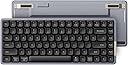
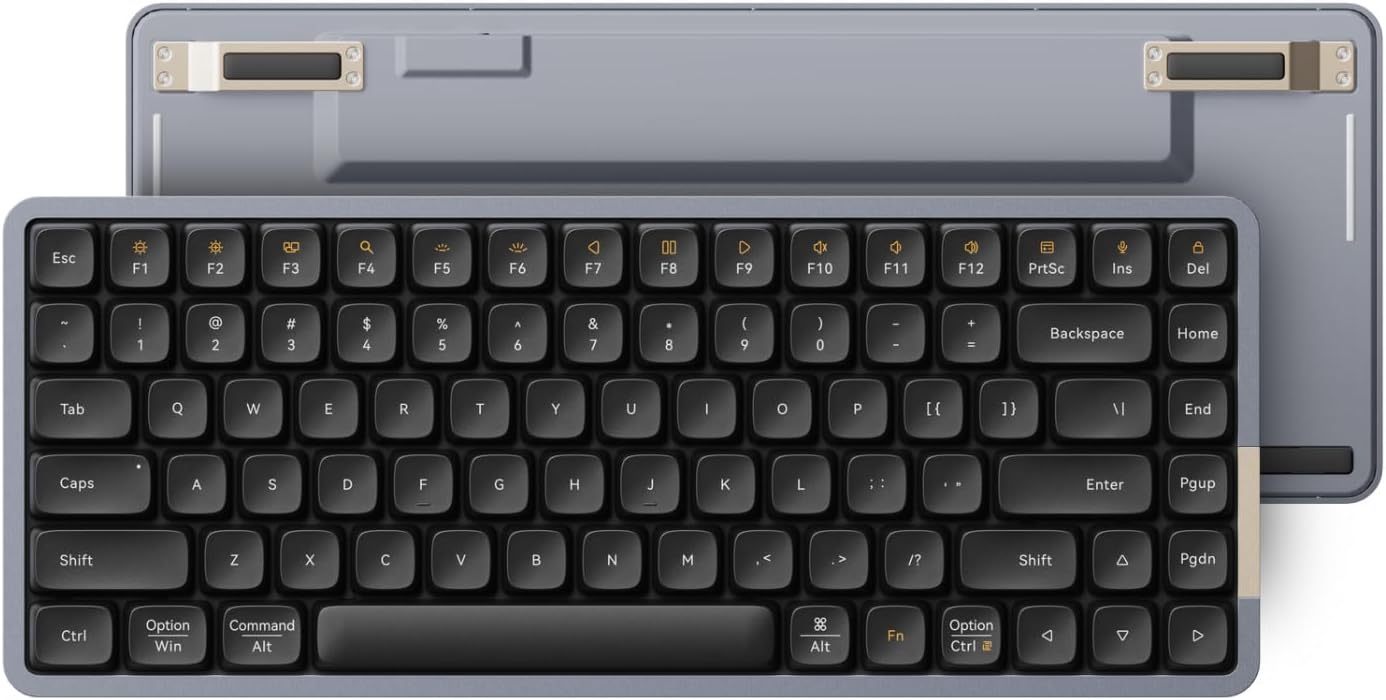
The LOFREE Flow84 is a 75% low-profile mechanical keyboard featuring Kailh Full POM tactile switches, an all-aluminum body, and hot-swappable keys. It supports both Bluetooth wireless and USB-C wired connections, offers vibrant RGB sidelit and backlit effects, and includes premium PBT low-profile keycaps for durability and style. Designed for Windows and Mac OS, it’s a sleek, rechargeable keyboard built for professionals who demand comfort, customization, and a modern aesthetic.


| ASIN | B0CJTTX3JH |
| Additional Features | Backlit, Hot-Swappable, Hotkeys and Media Keys, Low-Profile Key, Ultra Slim |
| Antenna Location | Business, Everyday Use, Gaming, Office |
| Best Sellers Rank | #643 in Computer Keyboards |
| Brand | LOFREE |
| Built-In Media | USB Cable |
| Button Quantity | 1 |
| Color | Black |
| Compatible Amazon Tablet Models | Amazon Fire 7 12th Generation, Amazon Fire 7 9th Generation, Amazon Fire 7 Kids 12th Generation, Amazon Fire 7 Kids 7th Generation, Amazon Fire 7 Kids 9th Generation, Amazon Fire 7 Kids Pro 9th Generation, Amazon Fire HD 10 11th Generation, Amazon Fire HD 10 5th Generation, Amazon Fire HD 10 7th Generation, Amazon Fire HD 10 Kids 11th Generation, Amazon Fire HD 10 Kids 13th Generation, Amazon Fire… |
| Compatible Devices | Laptop, PC, Tablet |
| Compatible Operating System Family | Windows |
| Connectivity Technology | Bluetooth, USB-C |
| Customer Reviews | 3.9 out of 5 stars 377 Reviews |
| Enclosure Material | Aluminum |
| Generation | 1st Generation |
| Hand Orientation | Right |
| Item Dimensions L x W x H | 12.44"L x 4.96"W x 0.96"H |
| Item Weight | 1.3 pounds |
| Keyboard Backlighting Color Support | Single Color |
| Keyboard Description | Mechanical |
| Keyboard Layout | QWERTY |
| Keyboard Plate Material | Aluminum |
| Manufacturer | LOFREE |
| Mfr Part Number | Flow84B |
| Model Name | Lofree Flow84B |
| Model Number | OE915 |
| Number of Batteries Required | 1 |
| Number of Items | 1 |
| Number of Keys | 84 |
| Number of Packs | 1 |
| Number of Sections | 1 |
| Power Source | Battery Powered |
| Processor Count | 1 |
| Recommended Uses For Product | Business, Everyday Use, Gaming, Office |
| Series Number | 1 |
| Special Feature | Backlit, Hot-Swappable , Hotkeys and Media Keys , Low-Profile Key, Ultra Slim |
| Style Name | Classic |
| Switch Type | Tactile |
| Theme | Smooth |
| Total USB 2.0 Ports | 1 |
| Warranty Description | 1 year warranty |
| Water Resistance Level | Not Water Resistant |
G**.
Pretty amazing keyboard.
As someone that owns/collects keyboards, this one stands out in the crowd. It has to do with the feel and sound of this very small keyboard, it has no right to feel and sound like it does for it's size. It sounds and feels like a bigger, more expensive keyboard. The sound and feel has been described as a "creamy" typing experience, and I have to agree. Very smooth, very quiet, and just feels amazing to type on. A rare achievement in a keyboard of this size. It reminds me a bit of some of the smaller Keychron K series, only smoother even. Now is it perfect? Nah. I didn't care for the tactile, or the linear switches. They do offer a clicky switch, but...not installed in the keyboard. So if you are a fan of clicky switches, you will have to do as I did, and purchase them separately. So once you add up the price of the keyboard (it is not cheap!) AND the additional 90 key pack of clicky key switches (it is hot swap!), you are talking about a pretty expensive venture into a small keyboard. Was it worth it? For me, yeah. For sure. It is a unique keyboard, that I have no keyboard that matches it for typing experience for it's size. Now, that said, if you are more mainstream, and like tactile or even silent linear switches, they have your number....IF you like the color choices they give you. By that, I mean you can get tactile switches, IF you like a black keycap keyboard. If you want linear switches, you have one choice; white keycaps. Why they limit the choices like this is a mystery to me. I even wrote them, and they say basically, that is what we offer. Period. I was looking into a full size, 100 key version, and if I wanted clicky (Wizard) switches, I'd have to buy TWO packs of switches, since they come only in packs of 90. Come on, Lofree, where are our options!? All this said, this is, in my opinion, the Rolls Royce of typing experience in this size keyboard, period. At least for stock keyboards. And they know it.
N**K
Elite Keyboard, Not for Everyone
This is an exceptional product, no doubt. Made for enthusiasts. Elite. Expensive. The size is perfect. Materials are premium. A few points — not necessarily cons, just notables: - The LED is basically non-existent. (I had the Redragon K662 Horus previously — that had real lighting.) - The keys (Phantom Black switches) are not silent at all. The sound is creamy and elegant (probably the best of low-profile keyboards), sure, but expect it to be relatively loud. Also, the actuation force is significant (despite the numbers) — you don’t just fly across the keys like on a laptop. You need to press with intent. - Make sure you know the key combination to change windows/mac keys layout. So it really depends on your preference. Personally, the typing feel is exactly what I wanted — and I enjoy it immensely.
G**T
Works great for a half-hour or so, then stops working completely. We've gone thru 3 of them now.
I LOVE the size, quality build, and feel of these keyboards. The keycap material feels somehow silky and high-quality, and the key action is likewise appealing. But all THREE of the examples we've tried stopped working in less than an hour. They've been connected to an M1 and an M2 Macbook Pro. We use our keyboards with the cable, but I also turned on Bluetooth on the first two and paired them, tried them that way for a minute or so to make sure they worked, then switched Bluetooth off and plugged them back in. Everything was fine for ten or twenty minutes, but after a period of inactivity, they just refused to function when we resumed typing. The lighting stayed on but keyboard input never got to the screen. Today I plugged in the third keyboard (I bought another pair, hoping the first two were not representative), used it ONLY with the cable, never switching to Bluetooth and pairing it to a computer, and got the same result: worked fine for a short while, then I left the room for maybe half an hour, and the keyboard no longer worked when I returned. VERY frustrating. Bad batch of keyboards? Our Keychron keyboards still work fine, and of course the built-in keyboards on our Macbooks are also working. I suspect a bad chip in the Lowfree units, but whatever the cause, the Lowfrees are paperweights now. I'm not even going to unbox the fourth keyboard.
D**H
Battery life mediocre, rubber feet falling off
Battery life is mediocre, requires charging just about everyday with constant use. Build: solid aluminum chasis. keys are nice and responsive. However, Rubber feet started falling off during first week of use. Called customer support for replacement feet and received 2 tiny rubber feet 6 weeks later and they we're not the same as original. Details matter and pieces of the keyboard falling off shows a lack of testing the finished product. Without the rubber feet the keyboard will scratch the surface it sits on.
F**O
Elegant, Satisfying, and Full of Character – Almost Perfect!
Honestly, I have mixed feelings about this almost perfect keyboard. First, the sound is just delicious. My wife, who was working in the next room, actually asked if I was cracking my knuckles—nope, it was just the new keyboard I had just bought! The layout feels mostly right, except for the right Shift key. It's shorter to make room for the Up arrow key, and that throws me off when I try to use key combos involving the right Alt—I end up hitting the Up key instead. But hey, it’s just day one. A few days of use will probably fix that. Now, about the switches: I’m torn. The tactile feedback is quite subtle, especially after weeks of typing on HyperX Alloy Origins with clicky blues. That said, the Phantom switch does have a gentle tactile bump—it’s there, just not very pronounced. Still, it’s not a bad feeling at all, just different. Where this keyboard really shines is the aesthetics. The finish, the elegance, the materials—this thing is a work of art. Not only does it look amazing, but it’s a real pleasure to work on. I’m giving it a solid 9/10—definitely one of the best keyboards I’ve ever used. P.S.: No keyboard is perfect. Perfection in keyboards doesn’t exist. And maybe that’s part of the fun.
D**S
One of my favorite keyboards except for....
Love the typing experience of this keyboard. It looks beautiful and the typing experience is nice. This would be a 5 star if it wasn't a wireless keyboard, but it is and I have an issue with that. The Bluetooth connection has one major issue that frustrates me. When the keyboard goes to sleep to conserve battery, the wake up time is sooo slow. I do wish it had a 2.4 gHz mode as well. The wake up delay is like 2-3 seconds though and it is noticeable when you just want to start typing. The backlighting for the keys could be better and would be nice to have some VIA or other support but I don't use that on the keyboards that do support it, so for me this issue is negligible.
G**I
Awesome keyboard
Excellent build quality & materials.
B**B
PERFECT!!
This is my go to keyboard! I love it. The sound is perfect, and the feel when typing is perfect as well. Keys are not too soft nor too stiff. The look of this keyboard is so nice. Has a decent weight to it, but nothing bothersome. The nice aluminum edges really make this keyboard stand out. If I had any complaint, it would be that I do wish the backlighting was a lot brighter. Also, I do wish that it would stay connected to my MacBook without timing out. It's not a deal breaker for me, but I do wish this was an option you can turn off. I'm assuming it's to help with batter life, but I do still feel it should be a user option. Other than that, if you like the way this keyboard looks, just watch some YouTube videos for the sound test, and if you're happy with that as well....BUY IT! You won't regret it!
H**R
Very good quality
Amazing
A**R
Music for the ears
Good quality. Amazing sound. The battery life is very good. I easily go over a week with heavy usage.
H**H
Great all round keyboard. Highly recommend
I’m a serial keyboard-switcher too (it’s basically a hobby at this point), and the **LOFREE Flow84 is one of the few that’s actually made me stop looking… for now. I originally bought the full-size version and honestly, I loved it — the low-profile feel is addictive and it just works for productivity. But the numpad layout felt a bit too cramped for my taste, and then the Bluetooth decided to fully betray me. Wouldn’t connect to anything. No drama, no “maybe it’ll fix itself.” Back it went. After returning it, I picked up the **LOFREE Flow84 instead… and this is where it got annoying (in a good way), because I’m normally not a compact keyboard daily-driver. I like my numpad. I use my numpad. But this keyboard is just so well balanced that I stopped caring. Typing feels properly satisfying — smooth, stable, and crisp without being harsh. The size is pretty much perfect for a desk setup: compact enough to free up space, but not so cramped that your hands feel like they’re playing Twister. Key travel feels spot-on for low-profile too — not mushy, not shallow, just comfortable and consistent. And thankfully: Bluetooth on the Flow84 has been solid. Connects quickly, stays connected, no random dropouts. The way it should’ve been the first time. I was also a bit concerned about the US layout (I’m UK-based), because switching layouts can be a real pain when muscle memory kicks in. But after a day or two, it stopped being an issue. I actually changed the layout on my computers to US and… yeah, it’s been completely fine. Surprisingly painless, and now it feels natural. Bonus points: when I can’t be bothered swapping over to my gaming keyboard, I’ve used this for casual gaming and it genuinely holds up. It’s not pretending to be an esports board, but it feels responsive, comfortable, and way better than you’d expect from something this sleek. Bottom line: If you want a premium low-profile mechanical keyboard that feels great for typing, behaves properly over Bluetooth, and doesn’t feel like a compromise even without a numpad — the Flow84 is a strong pick. The only real risk is that it might end your keyboard-buying streak… and honestly, that’s a bit tragic for the hobby.
T**D
Vraiment très bonne qualité, mais QWERTY
✔️ Ultra bonne qualité !! ✔️ Structure entièrement en métal. ✔️ Touches rétroéclairées ✔️ 2 petites bandes LED pour donner un effet lumineux sous le clavier (Couleur personnalisable et franchement design). ✔️ L'écriture avec est hyper agréable. ✔️ Switch type "linéaire silencieux" je décrirais le bruit comme proche d'un "Thock", mais étouffé. (assez agréable). ✔️ Câble USB-C fourni. ✔️ Le clavier peut être utilisé en filaire et en Bluetooth. ❌ QWERTY ➖ Une version 100 touches (avec le pavé numérique) est disponible, mais aussi en QWERTY. J'ai changé la disposition des touches A, Z, Q, et W pour que cela ressemble plus à un AZERTY, mais les touches 1, 2, 3,.. et les différents types de points ne correspondent quand même pas. C'est un excellement clavier, mais dommage qu'il n'y ait pas de version AZERTY à l'heure à l'heure actuelle.
N**K
Sounds and performs great. Premium quality.
Minor ergonomics issues with the shift bar being smaller on the right, but other than that, it's pretty close to perfection for a thin, mechanical, good sounding keyboard.
Trustpilot
3 weeks ago
5 days ago