We remain fully operational. Our teams are working around the clock to ensure your deliveries continue safely.

DOWNLOAD THE APP


Customer Services
Copyright © 2025 Desertcart Holdings Limited
DOWNLOAD THE APP
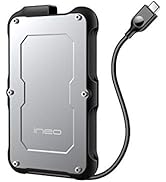
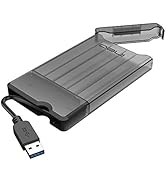
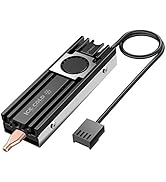
![ineo USB 4.0 M.2 NVMe SSD Enclosure with Built-in Cooling Fan - Compatible with Thunderbolt 3/4 & USB 4/3/2 [C2598-NVMe, 40Gbps]](https://m.media-amazon.com/images/I/61npzV5iBbL.jpg)


⚡ Keep your data cool and your speed hotter than ever!
The ineo USB 4.0 M.2 NVMe SSD Enclosure (C2598-NVMe) delivers ultra-fast 40Gbps data transfer speeds compatible with Thunderbolt 3/4 and USB 4/3/2. Crafted from full aluminum for superior heat absorption, it features a whisper-quiet PWM cooling fan and a silicone thermal pad to prevent overheating during high-speed transfers. Designed exclusively for M.2 NVMe PCIe SSDs, this enclosure offers easy installation and reliable thermal protection, making it the perfect choice for professionals demanding speed, durability, and silent operation.


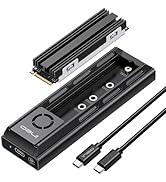


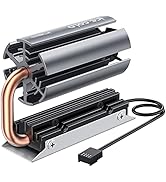
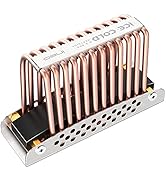


| ASIN | B0CMZJM6TH |
| Best Sellers Rank | #454 in Enclosures |
| Compatible Devices | Laptop |
| Customer Reviews | 4.2 4.2 out of 5 stars (518) |
| Data Transfer Rate | 40 Gigabits Per Second |
| Date First Available | November 9, 2023 |
| Item Weight | 9.9 ounces |
| Item model number | C2598NVME |
| Manufacturer | ineo |
| Material | Aluminum |
| Max Number of Supported Devices | 1 |
| Memory Storage Capacity | 40 GB |
| Product Dimensions | 4 x 1.7 x 1 inches |
B**B
Superb NVME Enclosure- Look No Further
This little Ineo NVME Enclosure is 1. Built like a tank, 2. Quality Materials and Craftsmanship, 3. Thoughtful Design. 4. Gets the Job Done. I opened the package and installed my drive with no need of reading directions, All within 10minutes, I probably could have finished sooner if I hadn't stopped so frequently to admire the engineering put into this enclosure. The aluminum chassis is the perfect balance size, weight and material. It absorbs any heat without feeling hot or warm. on the top or sides. The built in fan is whisper quiet. I had to hold the unit next to my ear to hear a pleasant whisper telling me it is there. I attached a 6ft. 20GB's USB C cord so I could sit the enclosure on my desk and connect it to my Mid Tower which sits on the floor beside my desk. AJA Speed Disk showed nearly 20 GB's on every file.1GB, 4GB and 64GB full size 4k 10bit video files. I installed the Lexar 790 4TB which is much faster than this enclosure can handle. However it's one of the better 4TB drives out there for the money if your doing an enclosure. (The Teamgroup MP44 is another great value). Other reviewers have had the same success with this little baby, I opted for it after doing my homework, Get this and you'll save yourself and your drive from being overheated with a cheap one that may have style but no function,
D**N
By far the best Nvme external drive Ive used
For context of what I'm doing all this on is a MacBook pro M3 max with max specs and attaching the drive to the Ivanky fusion dock max, with the OWC thunder bay flex 8 pluged directly into the mac and transferring from the Ineo usb 4.0 m.2 name enclosure. This external Nvme enclosure has some great features. High speed transfer, cooling fan, temperature safety, heat conduction silicone. The fan is silent enough that I can't tell it's running with some slight ambient noise in the room. The cooling system isn't perfect but it's a lot better than other external drives ive tried. In my testing I can transfer about 100-200 GB with out it being interrupted by the thermal protection. The thermal protection will disconnect the drive from your computer to protect the drive but it will reconnect immediately. For the speed of the transfers ive been experiencing the average size that i can transfer at once is 120 GB and it takes around 1-2 minutes to complete. There is a time that you need to pause so the drive can completely cool down. That can take a minute or two as well. For reliable transfers It is best to stay under the 100GB amount and keep 2 minutes space between transfers. I don't see some one transferring this much information constantly. So it's not really something to worry about, but good to be aware of.
R**R
Cool idea and it works if you know what to expect
So this enclosure works really well reading SSD's with full speed via thunderbolt 4 port. For most the fan is the biggest question. From my experience the fan does work but if you dont expect it to drop the temps at all. What it will do is once my SSD gets to about 50 degrees then the fan kicks on and IT STAYS THERE! So it is not going to hit 50 then turn on the fan and then bring down the temp to low 40's or anything. But the fan is very helpful as it will keep my external SSD from going higher then 50 degrees! Worth the purchase and glad I have it.
J**.
Solid, Well-Machined "Brick" Performs Great
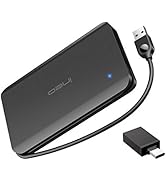
I have a fully-functional extra M.2 NVMe 1TB SSD drive left over from a "warrantee repair" that Dell did for my Precision 7510 laptop, so I thot it would be nice to convert it into an external drive for massive backups. The Dell supports the full USB-C 3.x Thunderbolt spec, and has a port for it. Summary: after assembly and finagled startup, the drive works GREAT ... I copied a folder that had 67.1 GB, in 77 folders and 13,237 files, in a bit less than 5 minutes. Whee! Try that with a typical USB stick, and you'll be waiting for an hour or two. I'm impressed with the housing (see snapshot). It is precision-machined metal, with deep fins for heat control ... important since if the SSD overheats, the transfer rate slows. It is small but heavy ... weighs about the same as my iPhone 7+ with case. My guess is that I could drive a car over it without damaging it. This beastie even has a (cool-looking) built in fan ... which didn't kick on during my initial tests (I'm assuming that it's not broken ... I would have been concerned if it activated for the brief time I tested it). There were NO other NVMe SSD housing options with a fan, and few with beefy fins. This guy is definitely the best in that department. Another nifty feature is a tiny switch to the left of the blue light, which allows you to "lock" the drive so that it is Read-Only vs Read-Write. Nice feature ... again, I didn't see it on other offerings. The connection-cord is "universal" ... for either USB-C (aka Thunderbolt) plug with rounded edges, or a traditional larger square-edged USB-A port. Of course, the speed of the USB-A depends on the guts of the computer. It's all one cable (handy) ... a small converter plug on the end converts from the cable's USB-A to a USB-C plug. The snapshot shows it in place. A thoughtful feature is the inclusion of a drawstring bag that has plenty of room to hold the enclosure, the cable, and maybe a few extra typical-size USB sticks. I like this attention to detail. ISSUES: all minor but just sayin' ... 1. there are five teeny-tiny machine-screws provided ... one is a bit larger than the others. The "large" screw is used to hold the SSD in place when you press it down; the other four are used to attach the top to the bottom of the case. I very nearly ordered a replacement, when I couldn't find the fifth "large" screw ... filled out the form, etc, then started to re-box it ... and behold! the screw came out of hiding. Friendly Amazon agent on the phone cancelled the return for me. 2. A screwdriver was provided ... and much to my pleasure, it was slightly magnetic at the tip, so it made it easy to "grab" the screws and get them positioned. I didn't realize this at first ... the screws are way too tiny to pick up with fingers ... I had gotten out my tweezers to do it - then I noticed the screwdriver was magnetic. 3. The "instructions" are minimal ... reasonable, since the install is really simple. But it would have been nice if they mentioned the magnetic feature. Also ... there is a "silicon pad" that they provide, to place between the top of the installed SSD, and the bottom of the big upper cover of the unit ... presumably to insulate the exposed traces on the SSD from the metal cover. The instructions do NOT mention that you're supposed to peel off a clear strip from one side, so adhesive holds it in place on the SSD. 4. Initial Operation was a bit bumpy. I booted the PC, and then plugged in the drive. Note that the PC already has another identical drive SSD as drive C, so I was 100% confident that it could "read" this new drive (as long as the enclosure was working). I plugged it in to the USB-C Thunderbolt port, and opened Explorer. At first, it didn't "see" the drive. I jiggled the plugs a little ... I think, though, that Windows was just mulling it over a bit. 5. When the drive (E) did finally appear in Explorer, a Windows popup suggested a scan of the drive. I selected the default and it appeared to complete, with a "1024" (GB) on the pane. However, when I tried to double-click open the drive, it said that it was not accessible. I unplugged it and re-plugged it (no Eject option in the tray). Still would not let me access. 6. So, I left it plugged in, and rebooted the computer. When I got back to Windows and checked the drive, it was fully accessible. I did a couple of copies from PC>external, using big folders with lots of nesting. Lickety-split! Exactly what I was hoping for. 67.1 GB in less than 5 min! 7. Then, while Windows was open, I used the taskbar "Eject" option (which did appear after the reboot) to disconnect the drive. Then I plugged it back in. Immediately, a popup asked me if I wanted to scan it ... I skipped that and immediately the Explorer window appeared. Perfect. Ejected it again. 8. This time, I removed the USB-C adaptor, and plugged it in to one of the USB-A ports that I *think* supports full-speed 3.x protocol. I deleted the 67.1 GB folder, and then re-copied it from the PC (using this alternate port). Apparently the PC supported similar speed thru this port, since the copy again only took about 5 min. Interesting note ... the PC's internal fan kicked on for a little while at this point (Xeon processor apparently working hard) ... but the external enclosure fan never did. 9. OK, now I repeated step 8, once again deleting the folder, ejecting, and then plugging in the USB-A plug into the other side of the Dell, where (if I recall correctly) the three additional USB-A ports are more conventional non-Thunderbolt spec. This is a three year old machine so I'm not sure what USB level they are. Certainly at least 2.x, maybe 3.0. The tiny "battery" icon on the side of the unit seems to indicate the USB-A port on the left that I just disconnected from, might offer higher power output for devices that draw a lot of current. 10. Once again, I copied the 67.1 GB folder. Apparently the USB-A ports on the right edge are a leetle bit slower ... but still, the entire folder copied in just 6 minutes. This would have taken well over an hour using a typical 256 GB flash drive. 11. Final test ... and the ONLY SURPRISE. While the drive was connected, after the big folder was copied, I flipped the tiny "lock" switch on the enclosure, which is supposed to make the drive READ-ONLY. After doing that, I tried copying a couple of files, and they DID copy without issues. So ... you can't activate the write-blocking feature *while* the drive is plugged in. When I tried to eject the drive (with the switch still "locked"), it refused to authorize ejection until I turned the switch back to unlocked position. Then it ejected just fine. 12. This time, I turned the switch to lock *before* plugging it back in to the machine. The Explorer window opened the same way. When I tried to copy a couple of files, Windows told me the disk is write protected (as it should be). And this time, when I used the Tray Eject feature, it worked fine (with switch in locked position). I hope this "beat it to death" review is helpful to enquiring minds. I'm VERY PLEASED with this product!
J**R
Crazy Fast and Solid
This thing rips. Bought the 40GB and was moving huge files in seconds. Stays cool. Doesn’t glitch. Feels heavy and well-made. Way better than the cheap ones I’ve tried. Worth it.
U**E
He estado durante 2 horas analizando el producto. La calidad de construcción es buena, pero cae demasiado el rendimiento debido a la controladora que lleva, a veves cae a los 200MBs y tengo serias dudas de si aguantará un rodaje entero en Prores a 1.6G. Construcción de calidad pero malas velocidades, no puedo recomendar su. compra
T**C
This is the first time I leave a 11/10 for an SSD enclosure. I would like to buy the 40gbps version of this one to maximalize my SSD performance but sadly that version does not ship to Czech Republic. Pros: - The case looks extremely cool, resembling a mini model version of a dedicated GPU. - Sturdiness. You can feel that your SSD is extremely safe by just by holding it in your hand. - The design dissipates heat extremely well. I copied 3TB of my data to the SSD, and it just warmed up a little bit during the whole operation. Other SSD enclosures that I have used usually heated up to an extreme when I transferred ~400GB. I know that this one has a fan, but hey, it only turns on when I have transferred 1.5TB of data, meaning that the cooling capability from the case itself is far superior to others. The fan is extremely quiet too; you cannot hear anything out of it unless you place your ear right next to it. Even then, you barely hear anything because the computer noise is usually louder than the fan. - Readonly switch; this is a must-have feature that I RARELY SEE in other hard drive enclosures. IT IS THE BEST WAY TO PROTECT YOUR DATA WHEN PLUGGED INTO A COMPUTER OTHER THAN YOURS. You don't know if your friend's computer is infected with a virus or not. - IT EVEN COMES WITH A BAG; I DID NOT EXPECT THIS. The bag fits the case and 2 cables perfectly. **Cons:** - Difficult to change SSDs as it requires tools, which is not good if you have multiple SSDs lying around and have this one as your only enclosure. - The connection is not stable on one of my computers. I'm not sure if this is a problem with the computer or the enclosure. On others, it performs very well even under pressure, but on that one, it just randomly disconnects and reconnects immediately (not having this problem like this before). Conclusion: This one is the best SSD enclosure out there that I have tried. The sturdiness, the cooling capability, the design, the features, all of them meet my requirements for a perfect SSD enclosure. But if you are planning to switch SSDs, this one is not for you.
Ç**️
İhtiyacımı fazlasıyla karşıladı çok teşekkürler
V**X
Lo uso para correr juegos en ps5 y ps4 hasta el momento es el mejor enclosure que he tenido la cantidad de aluminio en combinacion con el ventilador hace que una sesion de 3 horas solo termine a lo maximo tibio al tacto en lugar de caliente como sucede con otros enclosures mas delgados que solo sirven para transferir archivos mas no para correr programas como un disco duro externo, lo digo por ciertos modelos ureen y sabent que marcan error y se desconectan despues de 1 hora lo que me preocupa que puedan acortar el tiempo de vida del ssd nvme.
P**.
Fast and stable transfer speed. Fan spins automatically based on temps. Highly recommended!
Trustpilot
1 month ago
5 days ago