Buy anything from 5,000+ international stores. One checkout price. No surprise fees. Join 2M+ shoppers on Desertcart.
Desertcart purchases this item on your behalf and handles shipping, customs, and support to EGYPT.
📱 Upgrade Your iPhone XR Screen Like a Pro — Don’t Get Left Behind!
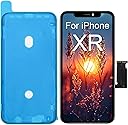
The EFAITHFIX iPhone XR LCD Screen Replacement offers a premium 6.1-inch Incell display with 550cd/㎡ brightness, true tone color accuracy, and 3D Touch support. Designed exclusively for iPhone XR models A1984, A2105, A2106, and A2108, it features waterproof adhesive and scratch-resistant glass for durability. This replacement kit includes a waterproof frame adhesive sticker and comes with a comprehensive installation video, ensuring a smooth DIY repair experience. Backed by rigorous quality control and a 1-year warranty, it restores your phone’s display to pristine condition with professional-grade performance.


| ASIN | B0B8J67GHD |
| Best Sellers Rank | #214,017 in Electronics ( See Top 100 in Electronics ) #201 in Mobile Repair Kits |
| Colour | for iPhone XR |
| Customer Reviews | 4.0 4.0 out of 5 stars (2,509) |
| Date First Available | 29 November 2023 |
| Item Dimensions LxWxH | 7.5 x 15.5 x 0.2 Centimeters |
| Item Weight | 63.5 g |
| Item model number | A1984/A2105/A2106/A2108 |
| Manufacturer | EFAITHFIX |
| Other display features | Wireless |
| Product Dimensions | 7.49 x 15.49 x 0.18 cm; 63.5 g |
| Whats in the box | 1*compatible with iPhone XR screen replacement+1*waterproof frame adhesive sticker |
M**N
Glue in Camera mounts were installed crooked
Really nice product however there is a clear plastic camera lens mount glued to the top of the screen and it was glued down so crooked so that the Face ID module wouldn’t line up with the screw holes and the screen wouldn’t close on the case. Fortunately we were able to break the glue bond on the mount without damaging the screen. Otherwise a very good product- just this one issue.
M**A
Amazing screen for iPhoneXR
This comes with everything needed for a total screen replacement. Tools, adhesive, screen protector and a nifty little flash reader and writer. The flash device plugs into your old screen, reads the numbers and info out of it, then re-flashes (applies) those numbers to the replacement screen allowing it to work with TrueTone and other features that are tied to the phones internal serial number. Without this, I would imagine the phone would not function properly after replacing the screen. For under $20 USD, its a heck of a deal. Its the best screen replacement I have seen in years; for the price. I used a hair dryer to loosen the screen adhesive, took about 5 minutes to soften it enough so the included suction cup could pull up a corner and the other tools were able to pry out the defective screen. Be careful when removing the light sensor from the old screen as this part is re-used. There is a small metal retainer clip that must be pulled to remove the top sensor array and earpiece assembly. Take extra care on this step. Don't forget to attach the included adhesive BEFORE you reconnect all the cables. If you forget this step, cut a slit in the right side and the middle out of the adhesive sheet to apply (this is the mistake I made). I didn't bother disconnecting the battery, only making sure the phone was off.
A**E
True tone tool is terrific
I've replaced screens on many iPhone models and try to transfer over original parts where possible but some come up with annoying Apple nag messages saying that 3rd party replacement screens don't support True tone or Face id for example. It's not the fact that they don't work that bothers me it's the constant nagging and my customers thinking I've done something wrong (which nevers happens!!). Anyway I thought I'd try doing an XR with this screen and tool combo and was impressed. It's about £5 more than I'd pay for the screen alone so a very good price. The tool is simple to use, it comes with a tiny micro USB cable which I didn't use as I had a proper micro USB charger with a decent length of cable. Plugged that in, clicked on the cable connector from the original XR screen, pressed Read, waited for the lights to stop as directed, unclipped the cable, connected new screen cable and pressed Write on the tool. Flickering lights, then stops with W light showing up brightly. This all has to be done while the tool is powered up so make sure to attach and detach the screen cables with a plastic spudger or guitar pick (Not a Metal Screwdriver!!). Completed fitting the new screen to the main board of the iPhone and tested. All worked great no nags and True Tone and Face id fine. It's a great package as you can pay more for a programmer on its own, the only slight downside is that this only works for the XR but I'll certainly consider getting a more universal iPhone programmer tool based on this. Very pleased as is my customer.
ا**ي
حلوه وجوده عالية
حلوووه
A**S
Good Quality Replacement — Installed Cleanly With No Issues Reported
This iPhone XR replacement screen arrived exactly as described. The frame alignment was accurate, the connectors seated properly, and the display powered on with no dead pixels or touch issues. I installed it for a customer, and the fact that I haven’t heard from them since is the best confirmation that everything is working as it should. In repair work, if something goes wrong, you hear about it right away — so the silence tells me the part is solid and performing reliably.
Trustpilot
1 week ago
1 month ago