Buy anything from 5,000+ international stores. One checkout price. No surprise fees. Join 2M+ shoppers on Desertcart.
Desertcart purchases this item on your behalf and handles shipping, customs, and support to EGYPT.
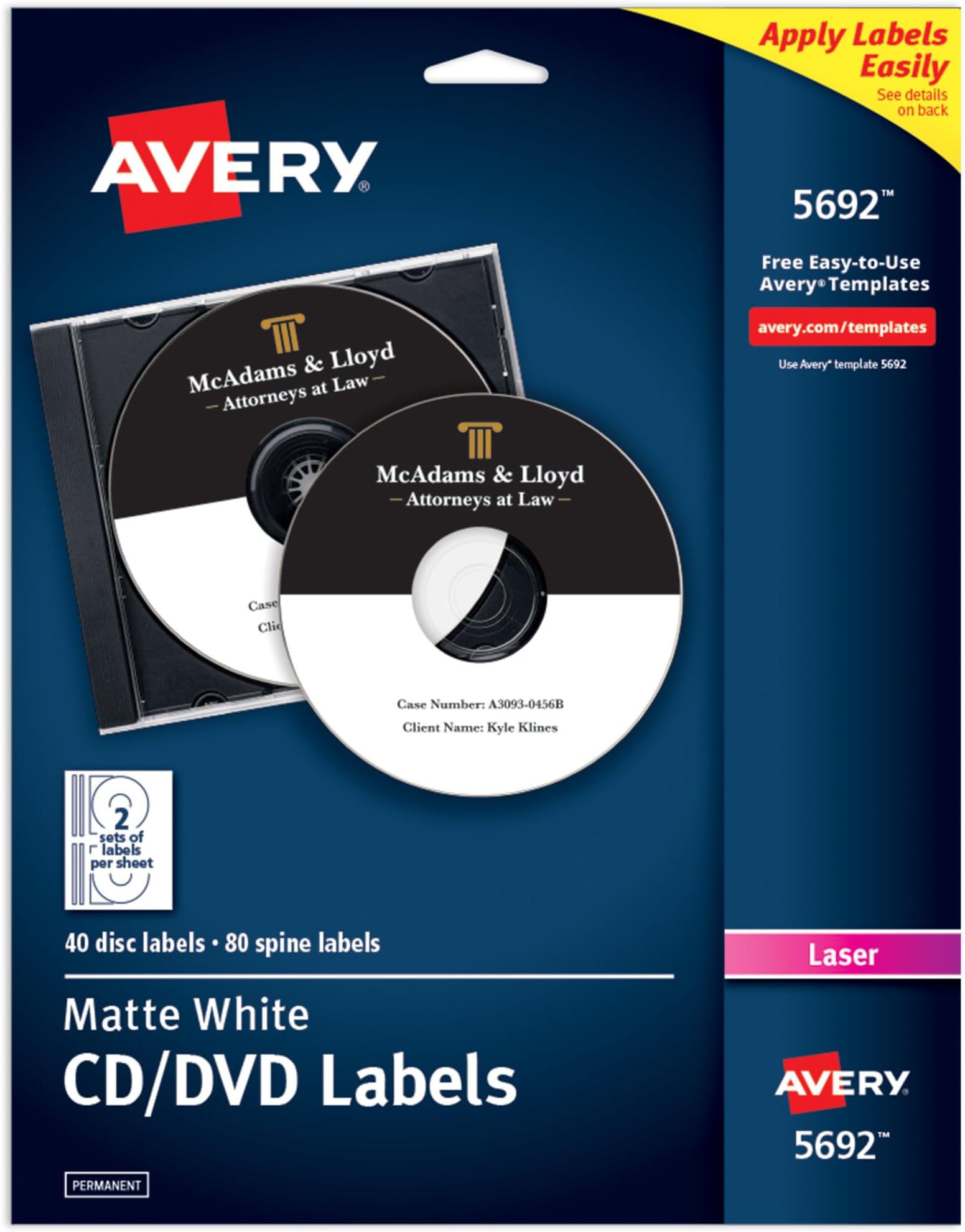
📀 Elevate your media game with flawless, custom CD labels!
Avery Printable CD Labels (5692) provide 40 disc and 80 spine labels designed for laser printers, featuring a matte white finish and permanent adhesive that prevents peeling or wrinkling. Perfect for organizing CDs, DVDs, and jewel cases with professional-grade, customizable designs using Avery’s free online tools.


| Asin | B00006B8G2 |
| Best Sellers Rank | #40,673 in Office Products (See Top 100 in Office Products) #447 in Laser & Inkjet Printer Labels |
| Brand Name | Avery |
| Customer Reviews | 4.6 4.6 out of 5 stars (361) 4.6 out of 5 stars |
| Finish Type | Uncoated |
| Global Trade Identification Number | 00072782056926 |
| Included Components | Laser Printer Toner Cartridge |
| Ink Color | White |
| Is Customizable | Yes |
| Item Shape | L-Shape |
| Item Type Name | Avery White CD Labels for Laser Printers (Includes 40 Disc Labels and 80 Jewel Case Spine Inserts) |
| Item Weight | 0.52 Pounds |
| Line Size | Small |
| Manufacturer | Avery |
| Manufacturer Part Number | 5692 |
| Material Type | Paper |
| Model Number | 5692 |
| Number Of Items | 1 |
| Number Of Labels | 40 |
| Pattern | Solid |
| Style | 20 sheets |
| Unit Count | 40.0 Count |
| Upc | 072782056926 |
| Warranty Description | No |
User
Would recommend.
Great quality. Easy to follow directions, great print quality and durability. I make music CD’s for local bands and use these labels they look nice and professional.
User
Great stickers, but also great editing software!
Why did you pick this product vs others?:I just got this brand to try out first because it was the Amazon choice. I was not disappointed! The stickers work and printed with a color laser printer superbly, but the main reason I think Avery is so awesome is because of their website! The templates are perfect, but the app to edit images on is made so well! I have photoshop but I thought I'd just try their software first. I used photoshop to make some better fonts and png titles, and then just drag/drop to the Avery creator. To my surprise, the program works flawlessly with plenty of options! And no bugs! AND you can save your designs to print somewhere else if you don't have a printer at home. Here's an example of some dvd backups I made (I have an old school dvd player in my car I like to make separate copies to keep in a hot car). The only thing with the software is I think they should add an outline and color option for font... that's it really.
User
Very Nice Quality
Very nice product. Exactly as described. Very fast shipping. A+A+A+ seller.
User
Great disc labels !
They work Great !
User
Great product; application instructions could be improved
I think this is an excellent product, and I took a star off only because I think the instructions for applying the label could be improved (more on this later). It works very well with my laser printer. I haven't tested photos, but text works well.Here's the technique I use for applying the label:1. Detach the Slimline label guide along perforations. (The label guide will remain attached to the CD label until the very end.)2. While holding onto the label guide, peel the rest of the label off the main sheet. (You will now have 2/3 of the label curling back and exposed as sticky.)3. Put the CD in an open slimline case.4. Hover the label over the CD and align the label guide with the non hinged edge.5. Push the label down, starting from the label guide and smoothing it with your finger towards the hinged edge.6. Peel back the label guide and push the rest of the label down by smoothing it with your finger towards the non-hinged edge.
User
Good Label
I like these CD labels. They were easy to print and design on. The print came out nice and didn't smudge. The label was made on a good quality paper, and sticks nicely on a cd.
User
Good CD Labels
Don't get much call for labeling CDs anymore, but these labels work great when I do. They take ink or toner well, and haven't jammed in any of my printers.
User
BEWARE: NO "DesignPro" Software !!!!
I purchased this product based mainly upon the downloadable label design software; says so in ad and on package. However, this software has been "DISCONTINUED". There is an online label designer, but I found it limited (no color text?) and quirky to use. The labels themselves are no better or worse than the plethora of other brands available.
User
Share your Art
Create your favourite pictures on a label when you create your own slideshows. Love the product. A little pricey but worth it.
User
Great quality
Excellent product ! They stick very well to the CDs. User friendly also . Highly recommended
User
Worked well
I haven't needed to burn a CD in a few years, but this let me make it look a lot nicer.
User
Four Stars
Good price
User
amazon.ca
excellent product
Trustpilot
1 month ago
2 weeks ago