Desertcart purchases this item on your behalf and handles shipping, customs, and support to EGYPT.
❄️ Stay cool, stay ahead — the ultimate silent liquid cooler for pros who demand more
The ARCTIC Liquid Freezer III 360 is a premium water cooling solution featuring a large 360mm radiator, advanced Intel and AMD mounting systems for optimal heat transfer, and an integrated VRM fan for enhanced motherboard cooling. Delivering 56.3 CFM airflow at a whisper-quiet 1800 RPM, it maintains CPU temperatures below 75°C even under extreme workloads. Its sleek cable management and durable build make it a top choice for gamers, content creators, and professionals seeking reliable, silent, and efficient cooling with a 6-year warranty.


| ASIN | B09VH1T1C2 |
| Air Flow Capacity | 56.3 cfm |
| Best Sellers Rank | #2 in Water Cooling Systems |
| Brand | ARCTIC |
| Brand Name | ARCTIC |
| Compatible Devices | 1851, 1700; AMD, AM5, AM4, Intel |
| Cooling Method | Water |
| Customer Reviews | 4.6 out of 5 stars 1,673 Reviews |
| Global Trade Identification Number | 04895213704489 |
| Included Components | ARCTIC Liquid Freezer III 360 (Black) |
| Item Dimensions L x W x H | 15.67"L x 4.72"W x 2.48"H |
| Item Weight | 1840 g |
| Manufacturer | ARCTIC |
| Material Type | Aluminium (Radiator), Copper, Micro Skived Fins (Cold Plate) |
| Maximum Rotational Speed | 1800 rpm |
| Model | ACFRE00136A |
| Number of Items | 1 |
| Part Number | ACFRE00136A |
| Power Connector Type | 4-Pin |
| Product Dimensions | 15.67"L x 4.72"W x 2.48"H |
| UPC | 840033402255 |
| Unit Count | 1 Count |
| Voltage | 12 volts |
| Warranty Description | 6 years |
| Wattage | 1.2 watts |
J**H
excellent cooling, quiet operation, and reliable build quality
I recently upgraded to the Arctic Liquid Freezer III 360mm AIO, and it’s easily one of the best cooling solutions I’ve used. Right away, I noticed the build quality—everything feels sturdy and well thought out. The pump design is unique compared to other AIOs, and I like that it comes with a small VRM fan built into the pump housing. It’s a smart addition that helps keep temps balanced across the board. Performance-wise, it’s been excellent. My CPU temps dropped significantly compared to my previous cooler, even under heavy gaming and rendering loads. The 360mm radiator with Arctic’s fans moves a ton of air while staying surprisingly quiet. Even when the fans ramp up, the noise is way lower than I expected for this level of cooling. Installation was pretty straightforward too. Arctic’s mounting system is simple, the tubing feels durable but flexible enough to work with, and I never felt like I had to force anything into place. A big plus for me is how clean it looks inside the case. The all-black design is sleek and minimal, so it doesn’t overpower the rest of my build. It feels like a performance-first product that doesn’t need flashy extras to stand out. Overall, the Liquid Freezer III 360 delivers on everything I wanted—excellent cooling, quiet operation, and reliable build quality. Arctic has a reputation for efficiency and value, and this AIO definitely lives up to that.
H**S
The most cooling at a budget price.
I have had my Arctic for 10 months now, purchased in May 2024. The Arctic Liquid Freezer III 360mm AIO is one of the best closed-loop coolers available today, offering excellent thermal performance, quiet operation, and a well-designed pump block with an integrated VRM fan. When paired with PTM7950 phase-change thermal paste, this AIO delivers outstanding results, keeping even high-power CPUs well within safe temperatures under extreme workloads. Performance & Thermal Efficiency • Idle Temps: 30-36°C • Gaming Load (Discord, Spotify, Brave Browser open): 50s-60s°C • Extreme Heavy Load: Never exceeds 75°C The PTM7950 thermal interface material enhances heat transfer significantly, allowing for stable and efficient cooling even under sustained heavy workloads. During gaming, where multiple applications are running simultaneously, the Arctic Liquid Freezer III keeps CPU temperatures impressively low, maintaining efficiency without thermal throttling. Noise & Build Quality One of Arctic’s strengths has always been silent performance, and this AIO doesn’t disappoint. The pump is quiet, and the 360mm radiator with Arctic’s high-quality fans ensures excellent airflow without excessive noise. The integrated VRM fan is a nice touch, helping to cool surrounding motherboard components. Verdict: Top-Tier Cooling Solution The Arctic Liquid Freezer III 360mm AIO is an excellent choice for those looking for high-performance cooling without breaking the bank. When combined with PTM7950, it outperforms many competitors, keeping temperatures low even under extreme conditions. Whether you’re a gamer, content creator, or enthusiast pushing your system to the limits, this AIO delivers exceptional cooling while remaining quiet and reliable. ✅ Pros: ✔ Excellent cooling performance (even under extreme loads) ✔ Quiet operation ✔ Integrated VRM fan for additional motherboard cooling ✔ Great value compared to premium competitors ❌ Cons: ✖ Slightly thicker tubing may require careful installation in smaller cases ✖ VRM fan isn’t necessary for all builds Final Rating: ⭐⭐⭐⭐⭐ (5/5) If you’re in the market for a 360mm AIO that offers exceptional performance, low noise, and unbeatable value, the Arctic Liquid Freezer III is a top-tier choice—especially when paired with PTM7950 for maximum thermal efficiency.
B**.
Amazing Cooling, Quiet, and a Great Price
About 2 years ago, I upgraded my CPU to an AMD 5800x3d. This chip runs really hot, and my fan cooler wasn't cutting it. I got an MSI Mag 280 (thankfully with store credit from a different store). The MSI AIO was better than the fan cooler... but not by much. Recently, I was experiencing hard crashing in-game and finally sussed out that it was the CPU overheating. I decided to buy a new AIO. I was surprised this ARCTIC AIO was actually cheaper than the MSI AIO, and the good reviews (on Amazon and 3rd party experts) pushed me towards purchasing it. Fingers crossed, right? The results have been outstanding. The MSI AIO would maintain idle temperatures in the high 40s. This ARCTIC cooler maintains it in the high 20s. When I stress tested the cooler, it maintained the temperature in the low 80s. In game, it's now topping out in the 70s. What's more, this AIO is quiet. When idling, I can barely tell the computer is on. Even when the fans are running at 100%, it is significantly quieter than the MSI AIO. Install was not complicated, and took about 15 minutes. Some have complained about the difficulty of attaching the AMD bracket to the motherboard, but I didn't have much trouble. You just have to apply some pressure. There are also very good step-by-step directions and a video when installing, which was quite helpful. The product itself seems very sturdy and well constructed, and I appreciated that I could purchase a model without RGB, which I something I don't care about. TLDR: This is an amazing AIO and an exceptional price. I highly recommend it. Just make sure you have room in your case because it's quite long.
S**.
Great performance for the price
The Arctic Liquid Freezer iii AIO is extremely efficient when it comes to cooling during high CPU utilization. At 100% CPU utilization, my 7800X3D's temperature doesn't even go beyond 80 C. The highest temp recorded was 78 C during high utilization and the lowest idle temperature was 41 C. Installation Process I personally had little to no difficulty installing this AIO on AM5. I'm not sure about why people are complaining about the mounting system since I got it screwed in pretty easily. For the leaf spring screws, I put equal amount of force while screwing them in. My advice to those installing this AIO is to NOT install it with force. Putting too much pressure will brick your motherboard. The most difficult part of the installation was probably fitting the AIO into my case. It was a very tight fit in my case, but eventually got it in there. My case is the NZXT H6 Flow fyi. I've read many posts saying how it wouldn't fit, but it will fit inside. Once again, DON'T USE TOO MUCH FORCE!! Overall installation process: 8/10 Overall performance: 9/10 Satisfaction for the money: 10/10 Highly recommend this AIO
J**N
Great for AMD X3D CPUs
Using this with an AMD 5800X3D, have tried to use Noctua NH-D15, Corsair H150i 360mm AIO, and this Arctic Liquid Freezer3 360mm has been the best performer. Previously on air and using the Corsair core temps would get to 91c under full load and throttle to 4.0Ghz. With this peak temp under full load is 81c, a 10c delta and also able to maintain 4450Mhz within games. Watch the Gamer's Nexus video on the tube to see how to mount this as it can be a little tricky, one adjustment to the mounting would be instead of trying to install from the bottom of the case. Turn the case so that you are belly to top of case on it's side and mount the block that way. Since I am right handed holding the block from the bottom I couldn't get a good grip on it to keep it steady. Going from the top allowed for a better grip on the block and far less sliding around the IHS. Keep it center and apply slight pressure then thread right screw like 1 full turn then rotate left and thread, back to right, so and so forth. Another thing to keep in mind is that the AMD offset mounting bracket will not cover the full IHS so when applying thermal paste I applied pea size method slighter lower than usual. This gives great coverage and doesn't leak out the top or bottom of the block contact. Highly recommend this over any other 360mm AIO for AMD the L3 cache is now constantly in the mid 50c range and the cores maintaining clock speed over 4.3ghz really gets the full performance out of the CPU. The VRM fan also actually helped as well went from 50c to 45c. After reading some other reviewers on here does seem like there might be some QA issues, happy with to report that the pump noise is non existent even when it shows running at over 4k rpm, fans running at 2000rpm are audible but not nearly as loud as the corsair fans. Using the 3 way cable, CPU header, Pump header, and sys fan header make sure to set all to PWM and enable Smart Control with the CPU temp as the monitor method in your motherboard BIOS. Others report using the single cable as well, seems dependent on mobo. I am using the MSI X570 Unify. Didn't see it listed on the compatibility chart here in the description but the tubes and fittings clear the top M.2 heatsink with room to spare. This is installed inside of a Lian Li 011D Mini with the radiator offset kit and it clears my RAM and fits snug at the top of the chassis.
D**2
An afternoon of frustration to install but years of enjoying it to follow.
ARCTIC Liquid Freezer III 360 AIO - I installed this on my nephews new PC we were building with a Ryzen 7900X. It works great and runs very quiet compare to the Thermalright Peerless Assassin 120 SE that I recently installed in my sons PC it was also a lot more delicate and difficult to install. The instructions are a guided website that is mostly pictures which as fine for 90% but in my opinion really needed a note to explain what to do with the VRM cable. It turns out it was for a VRM cooling fan and plugged into a standard fan header. The instructions for mounting the water block look as simple as put it in place and screw it down. It took us 45 minutes and smeared the thermal paste all over the place (I highly recommend a thermal paste guard/contact frame). The issue is the screws barely protrude and the spring mechanism points the slightly outward so getting 1 of them to just catch was hard enough but getting the 2nd 1 to catch took an uncomfortable amount of force pushing down on the block and screw to angle it correctly coupled with a lot of luck. I know this is to get even force on the block once it is installed but was so much more difficult than simple spring loaded screws like the Peerless Assassin had. The radiator took time due to a fan direction and getting around the case limitations but over all installed easily enough. the problem is the radiator fins are as soft as clay and get dinged up if ANYTHING even looked at them funny. I think the dings were mostly cosmetic and invisible behind the fans the front grill of the case but I was still annoyed and the Peerless Assassin finds were not nearly as fragile. in summary, the price was great (I payed $90 - wish I had spent another $20 for RGB), the installation was frustrating, but now that it is done I am quite happy because this thing is really quiet and the CPU stays cool. I expect my nephews PC will keep him gaming for years.
A**D
quiet and impressive
Just installed today after my nzxt x73 just stopped circulating the water. already rma'd that thing once before as well. Installing this with the included mx-6 paste has my 5950x running at less than 60c on a full multicore cinebench run @ 3.8-3.9ghz all core, and around 68c on single threaded cinebench. These are both with reasonable curves set for the fans and pump, erring on the side of it being quiet. I'm sure it would be even better at with a more aggressive curve. This is the first time I've seen my processor hit 4.9ghz on a single core since I got it in 2021, and that's without undervolting. I have never had temps this reasonable, I honestly chocked it up to the 5950x just being hot. I think the offset mounting really makes a difference, and the vrm cooler is a nice touch. My only complaint is that it is a little bit tricky to mount by yourself. It's very easy to push the backplate off when adding the bracket, and the spring tensioned two screw design isn't the simplest, but I did get it on without making a mess of the paste. The pump is essentially inaudible at 50% speed, and the fans at full speed are so much quieter than my x73 was. They do hit a lower peak rpm, but they are clearly moving the heat through the rad, which is also like twice as thick as the x73. I do sort of miss having a coolant temp reading, but hey, the less software the better.
C**E
The best AIO on the market, with a catch
This is a really high performer. It also looks fantastic. There's even a fill port so you can top it up over time. The rad is a bit thicker than the usual AIO, too, helping with the heat load. I love the vrm fan, however, I've had to replace it once due to the fan whining, and it's beginning to whine again. The first time I had a really great experience with customer support. They sent me a new fan (they're magnetic and just slide on) and they didn't even want the old one back. No questions asked, no fuss, no delay. Just immediately put me a new fan in the mail. I did have to show proof of purchase, of course, which is completely reasonable. I haven't put in a ticket for the second fan yet as it's only just beginning to make the sound, and I'm lazy. I still give this thing five stars since the support is as good as the AIO, and I can always tune the fan to an rpm range that minimizes or eliminates the sound.
M**H
Best cooler for ryzen processor
I upgraded from a 240mm Cooler Master to the Arctic Liquid Freezer III 360. With this new cooler installed, my Ryzen 9 5900X now runs 10 degrees lower and has a more stable idle temperature.
E**R
Bueno pero no hace milagros.
Tengo un Ryzen 7 5800x procesador bastante calientito, lo enfriaba con aire con un DeepCool AK620 y la verdad no iba mal, la temperatura en juegos se mantenía en 80 grados celcius y en sesiones de trabajo si llegaba a los 90 grados, entonces vi que este enfriador líquido acababa de salir y que su antigua versión había sido muy buena y decidí probarlo. Y pues la verdad no hubo mucho cambio, las temperaturas bajaron entre 3 y 5 grados ya con la curva de enfriamiento ajustada, el ruido cambio eso si no tiene comparación esta madre es mucho más silenciosa qué un enfriador de aire. Una cosa que no tome en cuenta fueron las medidas, me confíe por que tengo un Corsair 5000D y pensé que me sobraria espacio y no fue así, el radiador no entro en la parte de arriba, choca con los disipadores de la MB entonces tube qué colocarlo en la parte frontal usando métodos de ajuste a la Mexicana y quedo perfecto, tons el consejo es que revises bien las medidas sino quieres tener problemas de instalación. Cha-chauu...
Y**N
impressive product works very well and very low noise
ح**ي
ممتازه وتبريده على معالج من رايزن 98003D
ممتاز سعر مقابل أداء
E**R
Handles a HOT i7-14700K with ease.
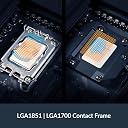
Handles my extremly HOT i7-14700K with about max 92c with stress-tests. And with gaming, video/music "rendering" and more, it never goes that high. Great is also the intel 1700 attach system with a built in "CPU Contact Frame". That fixes the "bending CPU heatspreader over time with intel original CPU retainer" problem. That leads to higher CPU temps. Coz of less contact/futher away, in the middle of CPU heatspreader to the cooler. This freezer III attachment replaces intels original "CPU holder frame". And thus fixes the problem. When you screw down the cooler/pumphead on CPU, the screws and springs has a VERY HIGH pressure onto the cpu, to give it even closer contact with cpu, less thermalpaste in between and even better cooling/heat-transfer. Also LOVE IT that you can buy this "clean" no-RGB version, coz i do not have any RGB lights on in my PC. Super Great Priced! And STILL 6 year warranty. They made they own pump-design instead of the "usual" ASETek. And this seams a good thing, coz they sure made the cooling capacity even better. To NOTE! the Radiator is VERY thick AND big!. So probably with only fit "bigger" PC Cases. I have Phanteks P500A. And radiator fits in the top with just a few milimeters to spare forward and backwards. AND only 4 screwholes are "aligning" (the middle ones). But that is enough to keep radiator firmly in place. And i do not think radiator is prone to bend/twist. Its is a VERY beefy "frame". DO be careful and mindful of the two(2) CPU 12v 8-pin cables comming up and down and plugged into motherboard. Them cables gets pushed on a little by the radiator. So just make sure after you screwed radiator in place, that both (2) CPU 12v 8 pin are fully connected/seated into motherboard, AND that they are'nt putting "sideways" pressure on the motherboard connectors. And thanks to freezer III built-in fan ontop of cooling"head" the VRM etc are more then 10c less temps after hours and hours of heavy cpu usages. from over 70c down to mid 50s. I am SO happy with this. (using breakout cable, to separatly control PWM curve of pump, radiatorfans AND "fan on head" rpms. For almost silent noise with light PC use. And when gaming, processing/rendring etc it ramps up pump right away. and slowly raise radiatorfan rpm. AND keep fan-head (VRM) at a lower almost silent RPM at around 2000. yes its still very quiet on that rpm.
Trustpilot
1 month ago
1 month ago