Desertcart purchases this item on your behalf and handles shipping, customs, and support to EGYPT.
🖨️ Elevate your office game with vibrant A3 prints and smart savings!
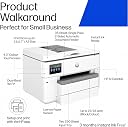
The HP OfficeJet Pro 9730e is a powerful all-in-one inkjet printer designed for small to medium offices, offering fast 22 ppm black-and-white and 18 ppm colour printing up to A3 size. Featuring dual 250-sheet trays, a 35-sheet duplex ADF, and advanced P3 colour gamut technology, it ensures vibrant, true-to-screen prints. With seamless cloud integration via the HP Smart app, dual-band self-healing Wi-Fi, and 3 months of free Instant Ink, it combines productivity, connectivity, and cost-efficiency. Built with sustainability in mind using recycled plastics and secured by HP Wolf Pro Security, it’s a future-ready solution for professional environments.
| ASIN | B0CJY237QY |
| Additional Printer Functions | All In One |
| B&W Pages per Minute | 22 ppm |
| Best Sellers Rank | 19,439 in Computers & Accessories ( See Top 100 in Computers & Accessories ) 63 in All-In-One Printers |
| Box Contents | 9730e |
| Brand | HP |
| Brand Name | HP |
| Color Depth | 24 bits_per_pixel |
| Color Pages per Minute | 18 ppm |
| Colour | Black/White |
| Compatible Devices | Tablets |
| Connectivity technology | Ethernet, USB |
| Control Method | Touch |
| Controller Type | Android, iOS |
| Country of Origin | China |
| Customer Reviews | 3.8 out of 5 stars 115 Reviews |
| Display Type | LCD or LED |
| Dual-sided printing | Yes |
| Duplex | Automatic |
| EU Spare Part Availability Duration | 3 Months |
| Hardware Interface | Ethernet, USB, USB 2.0 |
| Ink Colour | cyan, magenta, yellow, black |
| Item Dimensions D x W x H | 4.67D x 5.81W x 3.86H metres |
| Item Type Name | Multifunction Printer |
| Item Weight | 19500 Grams |
| Manufacturer | HP |
| Maximum Copy Resolution Black and White | 600 dpi |
| Maximum Copy Resolution Color | 600 dpi |
| Maximum Copy Speed Black and White | 22 ppm |
| Maximum Print Resolution Black and White | 600 dpi |
| Maximum Sheet Capacity | 250 |
| Maximum Supported Paper Size | A3 |
| Maximum print Resolution Color | 600 dpi |
| Model Name | 537P6B#687 |
| Model Number | 537P6B#687 |
| Model Series | Officejet Pro |
| Model name | 537P6B#687 |
| Network Connectivity Technology | Ethernet, USB |
| Number of Ethernet Ports | 1 |
| Number of Trays | 2 |
| Other Special Features of the Product | Auto-Duplex |
| Output sheet capacity | 250 |
| Paper Size | 297 millimeters |
| Print media | Glossy photo paper |
| Printer Output Type | Colour |
| Printer Type | Inkjet |
| Printing technology | Inkjet |
| Processor Count | 1 |
| Product Warranty | One-year limited hardware warranty with option to extend to 2 years with HP+ Offer. For more info please visit us at http://support.hp.com . [9] |
| Resolution | 600 x 600 |
| Scanner Type | Flatbed |
| Special feature | Auto-Duplex |
| Specific Uses For Product | Office |
| Total USB Ports | 1 |
| UPC | 196337487963 196337487956 |
| Unit Count | 1.0 count |
| Warranty Type | limited warranty |
P**R
Good stuff as a home office printer
I received the big box this morning, and my first impression was that it's quite huge and heavy (around 20KG) --- understandable given its ability to scan and print A3 documents double-sided! The setup was straightforward: after removing all the protective films, I simply plugged it in and followed the instructions via the LCD touchscreen. It supports 5GHz Wi-Fi, so an Ethernet connection is not mandatory. HP kindly includes a nice bonus: several free months of ink and packs of premium papers, provided you sign up for the instant ink plan using the promo code gbdzc4. Last time I got 6 packs of 80 gsm A4 papers, 500 sheets per pack, hopefully they could give me the same this time. xD. You're free to cancel after the trial period and switch to more affordable third-party cartridges, it is totally up to you. As for user experience, it is solid, but there are a few points to note: 1. The official manuals are quite vague, especially for advanced features. For example, if you want to scan directly to cloud services like OneDrive or Dropbox, you will need to use the HP Smart app. You will create cloud scan configuration profiles (so-called Shortcuts in HP's dictionary) within the app, which then sync to the printer. The sync to network folder (Samba/SMB/CIFS) is an amazing feature, you can simply scan documents and save to your network share (NAS like Synology or QNAP or whatever you have) in one click. 2. For scan to email, you must configure an email account as the sender- that's quite intuitive for people with such a tech background, but not for normal people. 3. When it comes to the paper trays, only Tray 1 supports various media types (like envelops and glossy photo paper). Tray 2 is limited to plain paper only. Unfortunately, HP doesn't clearly mention this in their product description, which I found frustrating---and apparently, so have other users, that's why this machine got so many low ratings online. 4. The ADF (Automatic Document Feeder) works well, but there is a slight skew (about 1 degree) shown in the scanning outputs. It's not a dealbreaker, but I was hoping for perfect alignment. For scanning based on ADF, it only supports up to 300 DPI, however, it could be 1200 DPI using the scanner glass (flatbed). The Scan to Network Folder/USB feature can only do up to 600 DPI. 5. The print quality is good as usual, 1200 DPI under "Colour - Best Quality" profile looks fabulous as long as you use good papers (>= 80 gsm). I used HP Premium A4 (90 gsm). Don't buy those cheap 70g stuff from Tesco---they are affordable but lead to a poor print quality. So overall, this is a powerful all-in-one printer with great functionality, especially for those who do need A3 capabilities. I couldn't judge HP more as they offered free ink, tons of papers and £50 cash rewards (limited event if you purchase it from Amazon). Just be prepared for a bit learning curve with the more advanced features and limitations in paper handling of the trays.
A**R
Avoid like the plague… horrendous printer (HP)
Purchased as I needed an A3 printer. This was one of only a couple available on Amazon Prime. Had I have known the issues I would suffer, I would have avoided this like the plague. It came with “up to three months” HP subscription which ended up being two months because I didn’t use the service all that much (surprisingly with all these warnings of reducing the amount you print, we are near a paperless office)… nevertheless, upon the initial registration, I received a set of HP inks via the post within a few days. Everything was OK to start with, however, it didn’t last. The wireless connection seemed fine but had a few issues because it doesn’t like 5GHz connections. The touchscreen has been invented by someone that is heavy handed, so feels like you’re pushing the screen through the other side when making selections. The menus and buttons are not very responsive… The ease of use is kind of OK, inserting paper in the paper trays is normally fine but prepare yourself that Everytime you do, it’s university challenge trying to select the correct paper size while pushing the screen to select the paper size. Ink life is standard HP, but the print quality is touch and go, namely because we don’t print very often so the heads dry up and start creating streaky prints. The printer does fail very badly with picking up paper of any size or thickness. So I find that we have to help it by feeding it manually a lot of the time to ensure it doesn’t pick up two or three sheets (or more) then report a paper jam… which normally occupies about 15 minutes for a one page document. Value for money - it’s a very expensive paperweight and is now listed on Vinted to sell for a new printer with another manufacturer as I feel that HO are far removed from their other models, the more reliable Office Jet 8600 series which this replaced only went faulty because of a firmware update due to the Ink subscription on this printer. The printer is far from compact in size but is helpful as it holds a few sheets of paper down as a paper weight. To describe this printer in one word would require an explicit word…
M**C
Excellent printer, I highly recommend it.
This is a wonderful printer, the quality is amazing, I love it. Just one thing, use Microsoft Edge to set up your account with HP Chrome caused me few problems, Edge took me straight into my account.
T**S
Good Printer, But AirPrint Issues and Poor Support
The HP OfficeJet Pro 9730e is a solid printer that performs well for Windows printing, and the build quality is impressive. However, I've had an ongoing issue with AirPrint, which has been a constant frustration. Despite spending days discussing the issue with HP support via WhatsApp, there's still no resolution. The lack of proper support has been extremely disappointing, and it leaves me unsure whether I should return the printer. If you rely on AirPrint, be aware that my experience suggests you might encounter significant issues.
B**D
A3 Printerand scanner
It arrived a day earlier than anticipated but, unfortunately, I had to be away from home for a few days due to a family bereavement. I have finished setting it up today - not always an intuitive process, though seems fine so far. Time will tell.
G**O
stampante ideal for small office
This is a high-quality printer that delivers excellent performance. It connects easily via Wi-Fi and is very quick and intuitive to use once the password is entered. The printing speed is impressive, and the overall setup is straightforward. Another great feature is the two paper trays, one for A3 and one for A4, which makes it ideal for printing larger formats without having to constantly switch paper. Overall, it’s a reliable, efficient, and user-friendly printer, perfect for both everyday tasks and professional use.
R**R
Extra 2 Months Ink Offer Expired!
Printer is OK, setup easy. The extra 2 months ink offer is not honoured, as HP says the offer has expired!
G**N
Software not yet ready for UK market
Purchased for small office with 3 desktop computers and 2 laptops, all connected by ethernet apart from 1 laptop that doesn't have a port. Be aware that this printer can only be ethernet or wireless, not both at the same time. Direct printing works from a phone but not that laptop. The main issue is that the pre - installed software is American and defaults to letter paper size. Changing the defaults in printer properties does not save. I have spent many hours on the phone to HP support with Ron from the Phillipines who has been incredibly helpful over many hours. We have had to delete the printer and reinstall it direct using its IP address on each computer. We then manually altered the settings again for all trays and manual feed. As we had loaded the driver manually, the changes were saved. HOWEVER - the next morning the laptop, on Windows 11 pro, could still print normally but the desktops had reverted to letter setting for Word. PDF and Excel could be printed. Ron tried to help again, but his only solution was to ask me to ring Microsoft. In short we bought this printer to save money on ink by going on instant Ink as our ever reliable Epson was obsolete and we could not move onto their Ink plan. It has cost me over a week's productivity in trying to solve the problems it has created. We are on the verge of sending it back but it was the only one at its price point that offered simple A3 printing and we need this. We intend to persevere and make a decision just before the 30 days are up.
Trustpilot
4 days ago
2 months ago