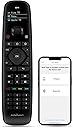
🎮 One remote to rule them all!
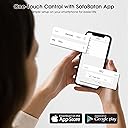
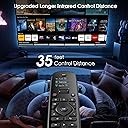
The SofaBaton U2 Universal Remote Control is a versatile device that simplifies your home entertainment experience by replacing over 15 remotes. With a real-time updated code database supporting 6,000+ brands and 500,000+ devices, it features a Macro Button for one-touch control, an intuitive app for easy setup, customizable buttons, and an extended infrared range of 35 feet. Its ergonomic design ensures comfort during use, making it the ultimate solution for managing your entertainment devices.


| Color | Black |
| Button Quantity | 38 |
| Controller Type | APP Control, Button Control |
| Number of Batteries | 2 AA batteries required. |
| Supported Battery Types | Alkaline |
| Maximum Range | 35 Feet |
| Compatible Devices | Projector, Stereo System, Television, Streaming Device, DVD/Blu-ray Player, Home Theater, Soundbar, Streaming Device, Home Theater |
| Connectivity Technology | Bluetooth, Infrared |
| Special Features | Digital Display, Ergonomic, Lightweight, Customized APP, Universal Remote |
| Maximum Number of Supported Devices | 15 |
D**D
A fantastic Universal Remote Controller
I recently purchased the Sofabaton U2 Universal Remote Controller, and it has been a fantastic addition to my home entertainment setup. The sleek and ergonomic design fits comfortably in my hand, and the buttons are well-spaced and responsive. Setting it up was a breeze, thanks to the intuitive programming guide. I was able to sync it with all my devices in minutes!What truly sets this remote apart is its versatility. It can seamlessly control my TV, sound system, and even my smart lights. The range is impressive too; I can adjust settings from across the room without any lag. The backlit keys are a thoughtful touch, making it easy to use in dim lighting.Overall, the Sofabaton U2 Remote Controller is a game-changer for simplifying and enhancing my home entertainment experience. I highly recommend it to anyone looking to consolidate multiple remotes into one powerful, user-friendly device.
D**S
BAD REMOTE
Sofabaton is a poorly designed remote. Logitech made the best remote. So easy and had activities button that turned on all your devices needed and put everything to the correct input. So if you have many devices that’s the way to go if you can find one. Sofa remotes on the other hand suck to program and the activity buttons never work correctly. BUY THE LOGITECH if you can. So easy. If I owned sofabaton I would be embarrassed I put such a bad product on the market
F**E
Very good but with flaws
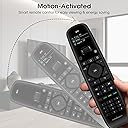
The good features outnumber the bad, but it's nowhere near the Logitech Harmony controls in usability. To begin with, you must have a smartphone with the Sofabaton app to set up the control. If you're one of the few who have a PC but no smartphone, you're out of luck. The control has a small scrollable screen at the top where the configured device names appear. The screen has two selectable brightness levels, bright and medium. The reality: the two levels turn out to be DIM and UNREADABLE. The display is supposed to turn off if you haven't moved it in a user-selectable time. That doesn't work - it's on all the time. Affect on battery life is unknown at the time of this writing. The entire face of the control is shiny black plastic - great for reflections and fingerprints that make the exceptionally dim display hard to read. There's a good selection of buttons available, with one glaring omission: In today's streaming world, a good control has two sets of buttons for forward/back. One set to incrementally move through the program, and another to go to the start or end of the program. This control has only one of those, so you'll have to decide which function you want and then program some other buttons for the other function.Softbaton advertises their device database has over 500,000 devices in it. In my case, three of my five devices were not in their database and I had to use the Learning function to add those devices. The provided Learning function works very well but if you don't have the original remotes you'll be sending this one back.Another thing missing from this control that Logitech used to offer is the concept of Activities. For example, an activity might be watching a movie and for that activity the TV, DVD player, audio amplifier or receiver must be turned on and the TV set to the right input for the DVD player. On this control, you'll have to create a macro to make that happen and that's not difficult to do, but, there is ZERO information on exactly how to do that. You'll have to watch a couple of Youtube videos to see exactly how that works. If your devices happen to have been in the Sofabaton database, you'll be able to see all the possible commands that you can add to your macro. If you had to use the Learning function, you're out of luck on that point. Next, you'll need to associate the macros you created with a button the remote. You'll have to remember which button does which activity. The Logitech Harmony (out of production) gave you a list of activities to choose from and had special buttons dedicated to popular activities.If you can live with the shortcomings of this remote, it will probably serve you well. I've tried several other "Universal remotes" and none of them were up to the task. The Sofabaton seems to be the only show in town right now, now that Logitech is out of the game. There are a couple of high-end universal controls that cost more than my TV that may be better, but...
S**Y
Perfect
I have a Tv (50” Sony) and a Sound System (RME ADI2 DAC based system). Always 2 separate remotes. One to work the TV and another to work the volume/mute on the DAC. Looked through universals and found this. Now I have 1 remote that turns the TV/DAC on/off with the push of a single button, and all of the buttons work the tv except for the volume/mute buttons that work the DAC (without using the scroll wheel). Does exactly what I hoped it would using the “macro” feature.It’s pretty easy to sync multiple remotes to this thing with the app. And it is very easy to switch between all of your remotes on this single remote with the scroll wheel. But it does require a bit more technologilical knowledge to use the “macro” function to set it up like mine (power everything on by pushing one button and assign macros to individual keys to not have to use the scroll wheel). If you know what a “macro” is you can figure it out easy. If you don’t.. the scroll wheel works great.
D**E
NOTHING LIKE THE ORIGINAL LOGITECH HARMONY
I read many reviews that compared this with the Logitech Harmony, I owned an original Harmony. I could program ANY button to ANY command. Not so with SofaBaton. I really wanted to like this, but, I needed a learning remote that could be configured the way I want. This is not it. Unlike the original Harmony remote, this does not let you program any button you want as certain buttons (It varies with type) are prohibited from programming. Not what I wanted at all. Also, I discovered the remote for my DirecTV Stream remote seems to use I.R. AND BT to work, this only works with the I.R. side ONLY.The SofaBaton has a shiny, slick surface, looks really nice, but, no texture or 'soft plastic' to provide any kind of grip. Also, I.R. strength is seemingly weak for such purported range.It's a nice remote, just not for me. It looks like I'm still stuck with multiple remotes since I'm not willing to spend hundreds to try something else.
Trustpilot
3 weeks ago
2 months ago