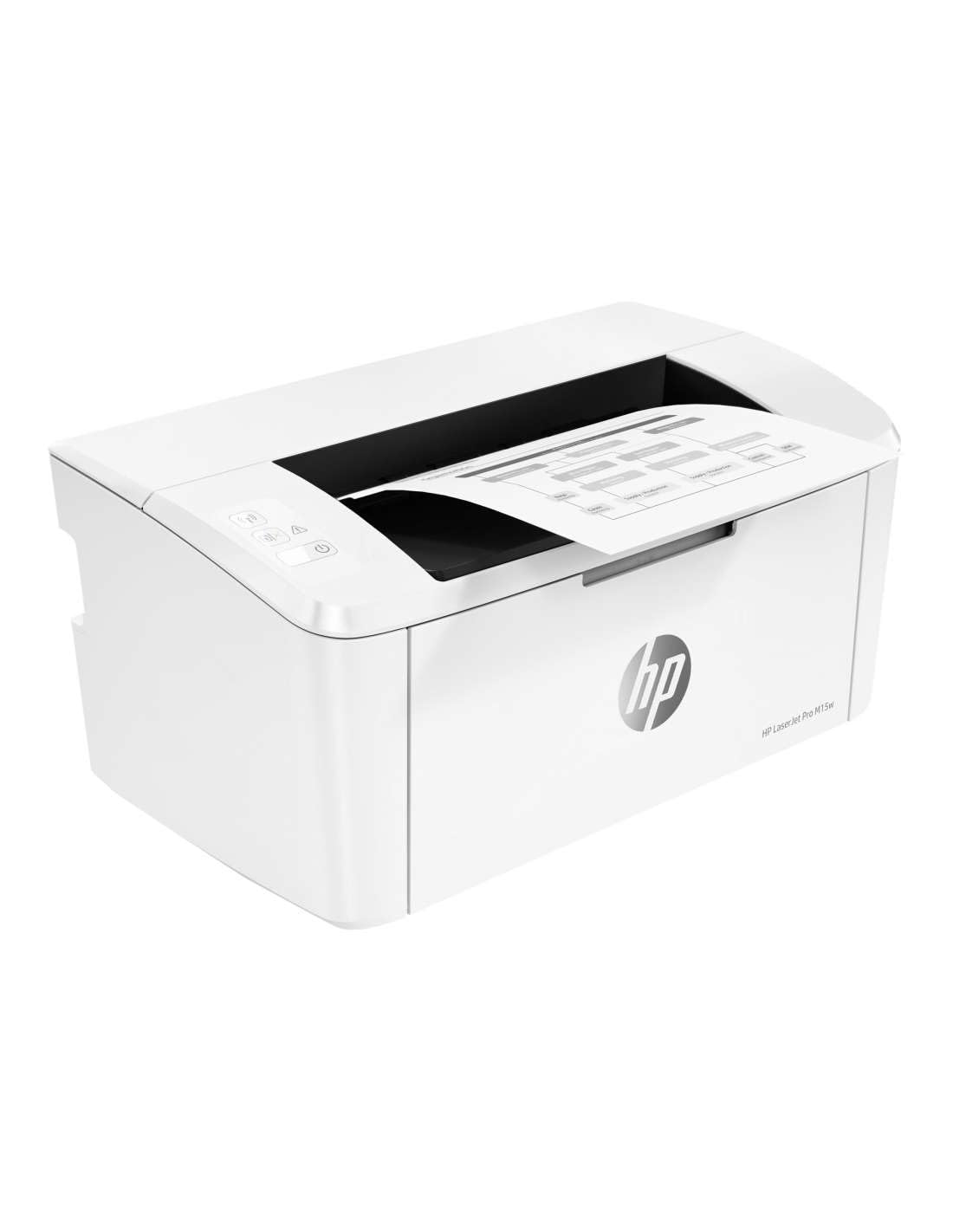
🚀 Small size, big impact — print smarter, not harder!
The HP LaserJet Pro M15w is one of the world’s smallest laser printers, delivering fast, high-quality black-and-white prints at up to 19 pages per minute. Designed for professionals who value space and efficiency, it offers wireless connectivity and mobile printing via the HP Smart app. Energy-efficient and easy to set up, it comes with a pre-installed original HP toner cartridge for reliable performance, making it the perfect compact printing solution for busy workspaces.




| ASIN | B079Z44VZ7 |
| Are Batteries Included | No |
| Best Sellers Rank | 80,113 in Computers & Accessories ( See Top 100 in Computers & Accessories ) 113 in Laser Printers |
| Colour depth | 1 bpp |
| Compatible devices | Smartphones |
| Computer Memory Type | DDR DRAM |
| Connectivity Type | Wi-Fi |
| Controller type | Touchscreen |
| Customer Reviews | 4.3 4.3 out of 5 stars (20,625) |
| Date First Available | 14 Feb. 2018 |
| Dual-sided printing | No |
| EU Spare Part Availability Duration | 2 Years |
| Form Factor | Print Only |
| Graphics Card Interface | Integrated |
| Graphics Chipset Brand | Apple |
| Graphics RAM Type | DDR DRAM |
| Guaranteed software updates until | unknown |
| Hardware Platform | Smartphone |
| Included components | Power Cable, USB Cable |
| Item Weight | 3.8 kg |
| Item model number | M15W |
| Manufacturer | HP |
| Max copy speed (black and white) | 18 ppm |
| Max input sheet capacity | 150 |
| Maximum Supported Paper Size | 8.5 x 11 inch |
| Maximum black and white print resolution | 600 x 600 dpi |
| Maximum colour print resolution | 600 dpi |
| Maximum copies per run | 250 |
| Number of USB 2.0 Ports | 1 |
| Operating System | Windows |
| Power Source | 210 watts (active printing), 2.2 watts (ready), 0.4 watts (sleep), 0.1 watts (manual-off), 0.1 watts (auto-off/manual-on), 0.4watts (auto-off/wake on USB) |
| Power consumption | 10 |
| Print media | Glossy photo paper |
| Processor Brand | Apple |
| Processor Count | 1 |
| Product Dimensions | 0.78 x 1.49 x 0.87 cm; 3.8 kg |
| Scanner type | Flatbed |
| Screen Resolution | 1280 x 800 pixel |
| Sheet size | Letter inches |
| Standing screen display size | 15.6 |
| Voltage | 240 Volts |
| Warranty type | Limited |
| Wattage | 210 watts |
V**I
Fantastic little black and white printer
Had this printer for 3 years and it is still going strong. It's a great, compact size so doesn't take up too much space on the desk. Printing quality is high, and it does the job quickly and quietly. Ink seems to last ages which is a great bonus. Never had any issues with jams or dodgy prints. Think the info leaflet suggests one cartridge lasts 1000 pages and that does seem true. Official toner replacements cost about £40 or you can buy alternatives for about half that. It is very easy to use - can either connect via a cable or wirelessly. Quick set-up and I have successfully printed from my phone as well as hard-wired to the pc. All in all this has been a great buy. It has worked seamlessly for a number of years, with weekly use. Would not hesitate to recommend or buy again.
K**K
Fab little laser printer for home!
Bought to replace old multi function inkjet that had seldom use and print head finally nackered. Laser is the way forward for home printing if mostly documents and tickets being printed - toner won't give you all the headaches of ink and will always be ready to go. "cannot print b&w doc without magenta" (&@!!*@£)! Delivered in sturdy box with no damage - few tapes to remove and toner cartridge to reinsert no problem. Printer itself is very neat and fits well on a shelf requiring only a power cable. Paper input tray maybe a bit flimsy but time will tell. Setting up WiFi was a bit hit and miss - you can use WPS which probably most straightforward but my router doesn't support!! I tried with Android HP smart app to no avail despite connecting to the printer's own WiFi direct network - simply hung and kept timing out when using the app. Used Win 10 laptop add printer menu which found the WiFi direct printer then somehow added my WiFi login to the printer adding it to the network through some witchcraft. Also benefit of no need to download and install the HP crapware. Could have also used a USB cable which is included. Following this fairly quick setup I had a test page printed from PC and mobile also picking up no problem. Decent quality for text, so so on gray-scale graphics but you're not buying this to print images. PC driver usefully lets you manually print double sided and prompts with instruction - works flawlessly and beats a full on auto duplex printer for space saving when only using seldom (only bug bear is can't use this functionality when printing from a mobile). Toner (1000 pages) reasonably priced around £40-50 on Amazon or cheaper if using an off brand product. Toner cartridges include the imaging drum which suits as no other consumables to think about. The printer won't stop printing just because it thinks the toner is low - you have to option to continue until the quality is no longer acceptable. Overall a good price for a tiny LaserJet that connects well to all devices and accessible for the entire household with little friction. Would 100% recommend this for people only needing b&w docs printed, don't mind lack of auto duplex and don't want something taking up an entire desk/shelf.
R**N
An office essential for more traditional computers
I've had one of these for a little over a year now. It's well priced, printing is fast enough and of decent quality, toner cartridges are economical and I've found the scanning and copying features useful for my basic purposes. It's a device full of compromises, but if you want a basic office printer and scanner for use with Windows or Mac and don't care very much about duplex printing it could be for you. Unlike other reviewers I found the wireless setup to be fine, I simply turned on WPS on my router, pressed the button on the printer and waited a minute or two. I have also not suffered any of the overheating problems reported in other reviews, although it's worth mentioning that I did go to the trouble of updating the firmware, which may have helped with this. As for it's limitations, these come down to poor support for Android and Linux, poor duplex printing, and fairly basic scanner hardware. As a network device I would like to be able to scan from phone, chromebook or linux devices, as it is the operation of the scanner seems to only function using the version of HP Smart on my windows computer. There is no support for scanning via a web interface like some more expensive HP devices. I can live with this, but it's annoying and may be a very serious limitation for some. Double sided printing here is just flat out disappointing. Firstly, it's manual, so you'll need to move the paper yourself half way through the process. Second, the printing of the first side tends to make the paper curl a little, this can result in the paper not being pulled in a stright line resulting in a wonky print or a paper jam. I try my best to pat the curly paper down before I tell it to start printing the other side, it has mixed results. Third, not all platforms support double sided printing at all. Printing from Android or Linux? No double sided printing for you. The scanning is absolutely fine for my purposes, mostly scanning signed documents. At 300dpi it's fine, at 600dpi it is slow, and even then detail is a little poor. If you want to scan beautiful high res copies of photos you should look elsewhere. Ultimately this is an entry level device for a particular kind of user. It's been an absolute pandemic essential for me, and i've been able to work around limitations that would have been a deal breaker for others. It is what it is.
C**8
Great printer easy set up
Printer arrived today and was really easy to set up. I was a bit concerned after reading other reviews but I had no issues. I’m running a MacBook Pro 2019 on Big Sur and an iPhone. I installed the HP app on my phone using the QR code and it took under 5 minutes to fully install it. The app then provided a link for my laptop and again, under 5 minutes for a full installation. I had no need to use a USB or even to do a WPS connection from the router. The print quality is as you would expect, very clear and decent quality. The prints come out quickly and no issues with WiFi. The printer is really small, much smaller than I was expecting and fits easily on a bookshelf. I rarely leave reviews but this is a cracking printer for the money and I haven’t encountered any of the issues other reviewers have.
M**I
مطابق للمواصفات شكرا لجميع العاملين والبائعين بامازون
L**I
Cumple con el objetivo y es muy facil usarla von la app, un poco complicado para conectarla a la red pero nada del otro mundo con mucha atención se logra conectar! Imprime solo en negro y el escaner tiene buena calidad de acuerdo al precio! 👌🏽👌🏽👌🏽
M**D
There is no data cable inside the box.
M**9
Als ich den HP LaserJet Pro M28w vor zwei Jahren gekauft habe, war ich auf der Suche nach einem kompakten und zuverlässigen Multifunktionsgerät. Besonders in meinem Homeoffice sollte es nicht nur drucken, sondern auch scannen und kopieren können – und all das ohne viel Platz zu beanspruchen. Zwei Jahre später kann ich sagen: Der Drucker hat meine Erwartungen voll erfüllt. Was mich von Anfang an beeindruckt hat, ist die kompakte Größe des Geräts. Er passt perfekt in mein Arbeitszimmer, ohne dass er viel Raum einnimmt. Trotz seiner geringen Größe wirkt er keineswegs billig oder instabil. Die weiße Farbe gibt ihm ein modernes, unaufdringliches Design, das sich gut in die Umgebung einfügt. Eines der größten Highlights ist für mich der **Druckvorgang**. Mit einer Geschwindigkeit von 18 Seiten pro Minute ist der Drucker schnell genug für meinen Bedarf. Ich drucke hauptsächlich Dokumente in Schwarzweiß, und die Druckqualität ist dabei durchweg klar und scharf. Selbst bei feinem Text oder kleinen Details gibt es keine Unschärfen. Der **Laserdruck** sorgt dafür, dass die Ausdrucke auch nach längerem Archivieren nicht verblassen oder verschmieren – ein wichtiger Punkt, da ich viele Dokumente langfristig aufbewahren muss. Neben dem Drucken nutze ich auch regelmäßig die **Scan- und Kopierfunktion**. Besonders das Scannen über die WLAN-Funktion erleichtert mir die Arbeit ungemein. Ich kann Dokumente direkt von meinem Smartphone oder Laptop aus scannen und auf dem Gerät abspeichern, ohne erst umständlich Kabel anschließen zu müssen. Die Qualität der Scans ist für meine Zwecke mehr als ausreichend. Ein kleines Manko ist allerdings, dass der Scanner nur in Schwarzweiß arbeitet – für farbige Dokumente muss ich auf andere Geräte zurückgreifen. Für ein Gerät in dieser Preisklasse finde ich das jedoch verschmerzbar. Ein weiterer Pluspunkt ist die **WLAN-Funktionalität**. Dank **AirPrint** kann ich problemlos von all meinen Apple-Geräten drucken, ohne extra Treiber installieren zu müssen. Auch von meinem Android-Tablet funktioniert der Druck per WLAN einwandfrei. Die Verbindung ist stabil, und bislang hatte ich keine Aussetzer oder Probleme, den Drucker im Netzwerk zu finden. Besonders in Zeiten von Homeoffice, wo man oft zwischen verschiedenen Geräten wechselt, ist diese Flexibilität ein echter Gewinn. Natürlich gibt es auch ein paar Kleinigkeiten, die optimiert werden könnten. Der **Papierfach** fasst nicht allzu viele Blätter, und gerade wenn man öfter größere Druckaufträge hat, muss man häufiger Papier nachlegen. Für den normalen Alltagsgebrauch ist das jedoch kein großes Problem, und ich habe mich schnell daran gewöhnt. Was mich wirklich positiv überrascht hat, sind die **Unterhaltskosten**. Trotz regelmäßiger Nutzung hält der Toner erstaunlich lange, und selbst der Wechsel ist unkompliziert und ohne große Sauerei möglich. Auch wenn die Original-Toner von HP etwas teurer sind, lohnt es sich in meinen Augen, diese zu verwenden, da die Druckqualität konstant gut bleibt. Rückblickend bin ich sehr zufrieden mit meiner Entscheidung, den HP LaserJet Pro M28w zu kaufen. Er hat mich in den letzten zwei Jahren zuverlässig begleitet und ist ein unverzichtbarer Bestandteil meines Arbeitsalltags geworden. Besonders die Kombination aus kompakter Größe, schneller Druckgeschwindigkeit und den Multifunktionsmöglichkeiten überzeugt mich nach wie vor. Wenn man einen erschwinglichen, langlebigen und leistungsfähigen Schwarzweiß-Laserdrucker sucht, der dazu noch scannen und kopieren kann, ist dieses Modell eine hervorragende Wahl.
A**J
Me he decidido por una impresora laser porque estaba cansado de lidiar con los cabezales atascados de las impresoras de inyección. Espero no encontrarme con otras sorpresas con estas impresoras. Por ahora voy a jubilar una Epson XP-322 Sacarla de la caja, quitar todas las pegatinas y colocar el toner de nuevo es de lo más sencillo. Trae un cable con enchufe europeo y otro cable para enchufes de UK, además de un cable USB, que en principio, al haber comprado el modelo con WiFi, pensaba que no iba a utilizar. He usado el CD que trae para hacer la instalación y tengo que decir que es un error, debe venir equivocado, porque cuando hago la instalación, me pide que enchufe con el cable USB la impresora al PC. Bueno, como es solo la instalación, pues lo hago, ya que la impresora estará en otra ubicación donde no puedo poner el cable USB. La instalación finaliza y me llevo la impresora a su sitio y empiezo a hacer las pruebas con el escaner y a imprimir. El escaner no funciona, me dice que no está conectado, sin embargo, puedo imprimir. Vuelvo a instalar los drivers por si acaso y vuelve a pasar lo mismo. Me bajo la utilidad de diagnostico de HP y me dice que vuelva a instalar los drivers y obtengo el mismo resultado. Al final, desinstalé los drivers y resto de software, me fui a la web de HP y descargué los drivers. Curiosamente ya no hacía falta conectar la impresora con el cable USB, ahora me ofrece si quiero que lo haga automático o seleccionar manualmente la impresora inhalámbrica. Continúo con el proceso y ya por fin funciona el escaner. En resumen, no useis el CD que viene, descargaos los drivers directamente de la web de HP La calidad de impresión parece buena y el escaner va bien. El software del escaner podría ser más sencillo de utilizar y a la vez con más intuitivo. El acceso directo del escaner no funciona, hay que acceder directamente a través de la aplicación principal de la impresora. La previsualización no sale directamente, hay que hacer doble click en el cuadro pequeño de previsualización para verlo en grande y poder elegir la zona que quieres escanear. Solo permite escanear a 200, 300 y 600ppp, pero es más que suficiente para casa y oficina. Si eliges guardar el archivo como JPG, no deja ajustar la compresión, no se ve mal en las cuatro cosas que he escaneado, pero me gustaría tener ese control. A 600ppp tarda mucho tiempo en escanear, pero la calidad es bastante buena. La impresora trae un toner (CF244A) para imprimir unas 500 hojas normales. Está muy bien para empezar. La calidad de impresión es bastante buena también, así que para las cuatro cosas que se imprimen en casa, diría que está genial. Son 3,33 páginas por minuto, creo que está bien de velocidad. El ruido que hace es bastante flojo, nada escandaloso. Es una buena máquina por lo que he probado en el día de hoy, recomendaría su compra.
Trustpilot
3 days ago
1 day ago



