Desertcart purchases this item on your behalf and handles shipping, customs, and support to EGYPT.
🖱️ Elevate your workflow—connect, click, and conquer in style!
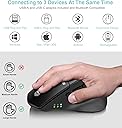
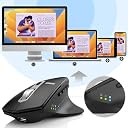
The Arteck MD172 Wireless Mouse combines ergonomic design with advanced multi-device connectivity, supporting USB-A, USB-C, and Bluetooth simultaneously. Featuring a whisper-quiet click mechanism and a rechargeable battery lasting up to 4 months per charge, it’s engineered for professionals who demand comfort, versatility, and long-lasting performance across Windows, Mac, iPad, and Android platforms.


| ASIN | B0BKL8VT9M |
| Additional Features | Ergonomic Design, Large Hand, Rechargeable, Wireless USB-A USB-C Bluetooth |
| Antenna Location | Office |
| Are Batteries Included | Yes |
| Are Batteries Required | Yes |
| Battery Average Life | 4 months |
| Best Sellers Rank | #75,874 in Computers ( See Top 100 in Computers ) #2,040 in Computer Mice |
| Brand | Arteck |
| Button Quantity | 6 |
| Color | Black |
| Colour | Black |
| Compatible Devices | Personal Computer, PC, Laptop, Tablet, Mac, iPad |
| Connectivity Technology | USB-C Wireless, Bluetooth, USB-A Wireless |
| Connectivity technology | USB-C Wireless, Bluetooth, USB-A Wireless |
| Customer Reviews | 4.5 out of 5 stars 857 Reviews |
| Enclosure Material | Plastic |
| Hand Orientation | Right |
| Hardware Platform | Laptop, Personal Computer |
| Included Components | USB-A Receiver, USB-C Receiver, USB Charging Cable |
| Item Dimensions L x W | 12.4L x 8.4W centimeters |
| Manufacturer | Arteck |
| Mfr Part Number | MD172 |
| Minimum Required Operating System Version | Windows 7 |
| Model Name | Computer Mice |
| Model Number | MD172 |
| Mouse Maximum Sensitivity | 2400 Dots per Inch |
| Movement Detection | Optical |
| Movement detection technology | Optical |
| Number of Batteries | 1 AAA batteries required. (included) |
| Number of buttons | 6 |
| Operating System | Windows 11, Windows 7 |
| Power Source | Battery Powered,Corded Electric,Rechargeable |
| Range | 33 feet |
| Special features | Ergonomic Design, Large Hand, Rechargeable, Wireless USB-A USB-C Bluetooth |
| Style Name | Modern |
| Theme | Modern |
| Unit Count | 1.0 Count |
B**I
Not useful
Not useful
J**T
Nice mouse at a great price
I needed a cheap wireless mouse for my work computer, and this one seemed to have the features I was looking for (silent click and scroll and back/forward buttons), so I ordered it. I've only used it for a couple of days, so far I'm very pleased with it! I can't comment too much on battery longevity, but here's what I can say: Ergonomics - I have big hands, and the mouse feels fantastic. The little thumb rest is in the perfect place, and not too small for my hand. Some cheaper wireless mice feel like hollow toys. This one feels well-made and has decent weight to it without being tiresome to use all day. It glides smoothly on my mouse pad and it's equally smooth across a bare desk surface. Features - the quiet click and quiet scroll wheel are completely silent in my office setting. The back and forward buttons are placed well, but could honestly be a little bit further forward on the mouse for my bigger hands. I've gone to hit the forward button and accidentally hit the "mode switch" button that's in front of them a few times and switched to dongle mode instead of Bluetooth. I'm sure over time my hand will get used to the button position and it won't be a big deal, but I would prefer that mode button be elsewhere. It's nice that the mouse includes both a USB-A and USB-C dongle. I haven't tried using them yet, since I'm using Bluetooth, but it will be nice if I ever use the mouse on a device without BT. The adjustable DPI settings allow you to dial in the tracking of the mouse for your own preference. I like mine pretty quick, so being able to turn it up was nice. Charging - I like that the charging port is USB-C so I can charge with the same cable I charge my phone, earbuds, etc with, which means less clutter and no need for a special cable just for one device. Additionally, with the port coming out the front of the mouse, I assume I can charge while still using the mouse, if need be.
L**Y
Another excellent product from Arteck!
I recently purchased a mouse and keyboard combo from Arteck and was very impressed with it, so I decided to purchase another product from them as I needed a wireless mouse for my laptop. The mouse I required had to have multiple ways of connecting to a computer or laptop, in particular a usb c receiver and bluetooth (I try to stay away from dongle town where possible). The mouse can also be connected to a pc using a usb a receiver. This mouse ticked all of those boxes. Please note I am writing a day one review, so the only thing I cannot comment on is battery life thus far. However, what I can say is, just buy it! Fantastic product for a steal of a price, £18 at the time of writing the review. Build quality is excellent and represents products that are charged for much more. The mouse is weighted well and feels comfortable to maneuver. As mentioned above, it can be connected in 4 ways! It has a usb a receiver, a usb c receiver, bluetooth connectivity and the option to wire it in with usb c. It really is plug and play. The mouse is silent but provides good tactile feedback through clicks and the scroll wheel. There is a dpi button on top with different presets if you need the mouse to be more or less sensitive. There are 3 LED's on the side which you can cycle through via a button so you know how the mouse is connected to a device i.e. bluetooth or usb a. I literally cannot think of any negatives and am shocked that this mouse is this cheap. I've gone through much more expensive products, but for the price, you can't beat it!
L**M
Amazing Mouse for the Price! Compares surprisingly well to the MX Master 3! You CAN program it!
Found this mouse by accident. Every day I use the MX Master 3 which is the KING of mice, IMO- this mouse -for a fraction of the price- feels and performs surprisingly well in comparison. In the hand, they feel very similar- the MX is more weighted and a bit better build quality. But for the price, the ARTECK holds its own. The only major function the ARTECK is missing is a side scroll function. (The mouse wheel has a feel like it would side scroll when pushed side to side- but sadly it doesn't.) If it feels like its sliding funny on a surface, make sure you take off the 3 plastic protection covers on the bottom! Connection options are solid- USB-A, USB-C via dongles stored in the base, and Bluetooth. So you can use 3 different devices via those options at once, switching between them. Only one BT device can be connected at a time, but with PCs, just holding down the BT button pops up a nearly instant connection prompt in Windows- you can easily switch between multiple BT enabled PCs. Connecting to Android was seamless as well. Several levels of DPI to select from will get you the feel you prefer. SOFTWARE- don't let the lack of mouse software for the ARTECK discourage you. You can use readily available mouse software for Mac or PC to assign the buttons function, both globally and application specific. For Mac, I recommend SteerMouse. It recognizes as "Device" and you can assign the middle click wheel button and two side buttons to do anything you like. Unfortunately, SteerMouse isn't free. For Windows, get the absolutely excellent (and free!) X-Mouse Button Control. The ARTECK uses Middle-click and Buttons 4 and 5. You can assign globally or application specifically. For example, I use this mouse in Adobe Premiere to call up frequently used shortcuts. Everywhere else it just does the global forward/back. Using either of these on Mac and PC I was able to make the ARTECK perform for my needs almost as good as the MX Master 3- the only major function missing is side-scroll. This is a pretty big mouse, so if you have small hands you may not like it. If you're used to a mouse like the MX-M3 or have wanted one but balk at paying so much for a mouse- the ARTECK is an absolute NO BRAINER! For this price you're getting a really good mouse.
A**S
Versatile and Comfortable Multi-Device Mouse with USB-C Charging
I recently purchased the Arteck Multi-Device Wireless Bluetooth Mouse, and it has significantly enhanced my productivity and comfort. Here's a detailed overview of its features: Multi-Device Connectivity: This mouse allows seamless switching between three devices—two via Bluetooth and one through a 2.4GHz USB receiver. The side button facilitates effortless toggling, streamlining my workflow across multiple devices. Ergonomic Design: Designed for comfort, the mouse features an ergonomic shape with a soft thumb rest, promoting a natural hand and wrist position. This design reduces strain during extended use. Silent Clicking: The mouse utilizes silent-clicking technology, allowing for quiet operation. This feature is particularly beneficial in shared or quiet environments, such as offices, libraries, or cafes. Rechargeable Battery: Equipped with a built-in rechargeable battery, the mouse offers up to four months of use on a single charge, based on two hours of non-stop use per day. This long battery life reduces the need for frequent charging. USB-C Charging: The inclusion of USB-C charging is a significant advantage, providing faster and more convenient charging compared to older micro-USB ports. This modern charging solution ensures compatibility with a wide range of devices and reduces the need for multiple cables. Compatibility: The mouse is compatible with a wide range of devices, including computers, desktops, laptops, Macs, iPads, and more. It supports operating systems such as Windows 10/8/7, macOS, iPadOS, and Android, providing versatility across different platforms. Final Thoughts: The Arteck Multi-Device Wireless Bluetooth Mouse offers a blend of functionality, comfort, and convenience. Its ability to connect to multiple devices, ergonomic design, silent-clicking feature, long battery life, and modern USB-C charging make it a valuable tool for users seeking an efficient and comfortable multi-device experience.
C**S
Great product and support from Arteck
Excellent mouse, fits my hand perfectly and works as well as any mouse I've had before, including models up to triple the price of this one. I use it with my laptop for work as well as my home PC for browsing and gaming, alongside the multi device Arteck keyboard. Being able to switch instantly between dongle/bluetooth saves me from having a second keyboard and mouse and faffing around with cables. The programmable function keys have also been very useful for speeding up workflow and gaming and I miss them now when I have to use a basic mouse. Arteck customer support were quick and very helpful when I reached out to them.
Trustpilot
1 month ago
3 weeks ago