
🚀 Print Big, Print Fast, Print Smart — Own the Future of 3D Creation!
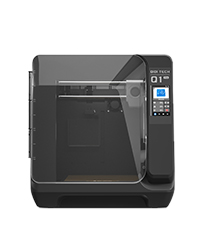
The QIDI PLUS4 3D Printer is a professional-grade, high-speed Core XY machine featuring a large 12"x12"x11" build volume, a 65℃ heated chamber with advanced insulation, and a 370°C direct extruder supporting high-temp filaments like PPS-CF. Designed for both beginners and pros, it offers fully auto-leveling, remote monitoring with an HD camera, and intelligent filament management. Its rugged build with dual Z-axis motors and thick aluminum bed ensures precision and durability, while upcoming multi-filament upgrades promise vibrant multi-color prints. Ideal for fast, reliable, and versatile 3D printing workflows.


| ASIN | B0DBQ8MZX6 |
| Best Sellers Rank | #26,746 in Industrial & Scientific ( See Top 100 in Industrial & Scientific ) #47 in 3D Printers |
| Customer Reviews | 4.2 4.2 out of 5 stars (610) |
| Date First Available | July 31, 2024 |
| Item Weight | 59.4 pounds |
| Item model number | AU-PLUS4 |
| Manufacturer | Zhejiang QIDI TECHNOLOGY CO.,LTD |
| Product Dimensions | 19.29 x 20.07 x 22.24 inches |
E**N
Solid and reliable printer
Far from new into 3d printing. I've had my Plus4 for about 6 months now, gone through probably 20-30 rolls of filament at this point printing everything from household items, car parts and accessories, to wargaming terrain and toys. I've primarily run PLA, but some ABS and some CF Nylon through it. Setup was fairly easy, as was updating firmware. I'm not new to Klipper either, and Qidi is running a much more recent version of Klipper than my previous XY machine from TwoTrees. I was very happy to see that. So far the only issues I have had was that my printer was one of the models affected by the older solid state relays for the chamber heater. I had not used the heater at that point and was advised by a friend to contact Qidi customer support. They sent me the upgrade kit quickly and with coherent and easy to follow instructions. I'm no stranger to working inside a printer, so it was a straight forward and easy swap to complete. I have since used the heated chamber, and other than taking a long time to heat up it works fine. I found the cooling fan for the mainboard to be a bit noisy and not as effective as I would like, so I swapped that out for a 120mm Noctua 24v industrial fan. I run that at 60% and it keeps my drivers and mainboard cool at a much lower volume. Otherwise I have had no major issues with this printer. My goal when purchasing this printer was to have the ease of use and speed of a bambulabs, with the open source and customizable nature of Klipper, and this printer has not disappointed. It has by far been the most reliable printer I have owned. It runs at the full rated speed without issue and the stock slicer profiles have all worked extremely well for me. I am anxiously awaiting the Qidi Box multi-filament upgrade. I would have liked it just a little bit better if it had a 320x320 like my SP5 turned Voron, and the Z height is slightly lacking, but this has not really been a limitation for me as of yet. Most print files out there are designed for a more "standard" 256x256 build platform, so the 305x305 has fit everything I've thrown at it. I've been extremely pleased with this printer so far, it's been a reliable tool which is what I was looking for. On final notes, the community, wiki, and github for this printer is quite active and helpful, and Qidi employees are active commentors and posters in those communities. Generally seen to be actively helping people problem solve, which I love to see. Excellent printer if you want speed and reliability without being locked into proprietary BS firmware and slicer software. It's reliable enough to be a solid and useful tool out of the box, but still gives you the freedom to modify and make it your own.
C**7
Great Durable Printer with Outstanding Support – Minor UI Annoyances
TLDR: Great printer with great customer service Pro's Built like a tank Great customer service Prints tons of materials smooth and fast Doesn't need much maintenance Con's Screen is laggy No UI button to delete prior prints Good luck adjusting Z-offset while printing I ran this printer for 3-4 months without doing much upkeep. Finally I had a clog of TPU because I forgot to change the temp settings. When I was fixing it I remembered I wanted to delete some prior prints. Well the onboard screen doesn't have an option delete it. I contacted customer support and they told me to delete it from the computer side. I guess I screwed that up and deleted the firmware. They ran me through several firmware reset/replacement steps with files. None of them ended up working so they sent me a free replacement motherboard with instructions. Whole thing took 30 minutes to set up and it fixed the issue. Overall it's a nice reliable unit, though I do have some qualms. I should be able to delete print history from the actual printer in case I want to sell it. The Z-offset on screen doesn't actually register your adjustments unless the print is actively printing, and it often delays. This causes problems when your z is 0.1 too close and the only way to correct it is to let the printer grind the nozzle against the metal plate for a few seconds while it registers. This also causes overcorrections. Say you are at 0.1 and go to adjust it by 0.1. It doesn't register, so you click it a few more times, well don't worry, it will all at once apply those corrections so now it jumps by 0.5. The screen is needlessly laggy when going through prior prints. It loads the thumbnail which for some reason takes 6 seconds per screen of 6 prints. Though you can disable thumbnails and reduce this to 2 seconds per page it should have the CPU to just be faster. These are minor issues once you get dialed in and printing. This beast will print for months with minimal upkeep. Special thanks to Evelyn at customer service for helping me out with the replacement motherboard and patience.
T**N
While there was a problem, thanks to Andy at Qidi, the problem was resolved quickly and all is now working well. Thank you Qidi and Andy.
J**E
Gran impresora excelente calidad de impresión a alta velocidad ningun problema imprimiendo con ABS Un especial agradecimiento a Andy de soporte técnico de QIDI por la excelente atención
G**E
Very happy with this purchase works very well
R**Y
Absolute lemon of a product. Bed leveling doesn't work. MCU over heats. Start gcode breaks the nozzle. PTFE tube rubbing and breaking away. Tool head board overheats. Klipper version is dirty. I wish I returned this before trying to fix anything because now I've just spent money on this hot garbage
Y**Y
Estoy escribiendo esta reseña con 1 mes de uso, planeo volver en un año para actualizarla. El hecho de que sea una impresora con cámara cerrada ayuda bastante con la impresión de ABS y PETG, sin mencionar que la forma de usarla es bastante cómoda y sencilla, además de que es bastante rápida para imprimir. La cama por lo general es bastante adhesiva pero en algunos casos es necesario usar pegamento (viene uno incluido en la caja). Además, viene con dos tipos de boquillas, una de latón para los filamentos sencillos y una de acero negro para los filamentos abrasivos. Algunas de las cosas negativas que he visto de momento es que no tiene un "reinicio seguro" cuando se va la energía o la desconectas por accidente, entonces si estabas imprimiendo algo tendrás que iniciar desde el principio; la caja para guardar el filamento está en la parte de atrás, por lo que puede ser algo incómodo si cambias de filamentos constantemente.
Trustpilot
2 days ago
2 weeks ago



