


🔒 Unlock the future of PC security with a touch—fast, flawless, and foolproof.
The Benss USB Fingerprint Reader is a compact, aluminum-finished biometric scanner designed for Windows 10 Hello. It offers ultra-fast 0.15-second fingerprint recognition with 360-degree touch capability, supports up to 10 fingerprint IDs for multi-user access, and requires no additional drivers for genuine Windows 10 systems. This device enhances PC security by using advanced biometric algorithms to detect real fingerprints, providing a seamless and password-free login experience.
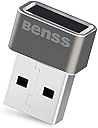


| ASIN | B078WTZJL3 |
| Additional Features | Easy to Install |
| Brand | Benss |
| Brand Name | Benss |
| Color | Gray |
| Customer Package Type | FFP |
| Customer Reviews | 4.3 out of 5 stars 484 Reviews |
| Exterior Finish | Aluminum |
| Finish Types | Unfinished |
| Hand Orientation | Ambidextrous |
| Handle Attachment Mechanism | USB |
| Handle Material | Aluminum |
| Handle Type | Touch Handle |
| Included Components | Instruction Manual |
| Indoor Outdoor Usage | Indoor |
| Item Dimensions L x W | 0.83"L x 0.6"W |
| Item Weight | 18.14 g |
| Lock Type | Biometric |
| Manufacturer | Benss |
| Manufacturer Part Number | BSSLU01G010 |
| Model Number | BSSLU01G010 |
| Number of Items | 1 |
| Product Dimensions | 0.83"L x 0.6"W |
| Shape | Rectangular |
| Style | Traditional |
| Style Name | Traditional |
| UPC | 712492204216 |
| Unit Count | 1 Count |
F**D
Great little device, easy installation.
I initially thought this little fingerprint reader was a great idea but unpleasant thoughts of past issues of "Plug and Pray" came to mind. Reasonably priced I threw caution to the wind and jumped in. Delivery was prompt and I was surprised at the small size of the device, thinking it would have been larger but the lack of detailed installation instructions was I thought going to be problematic. Surprisingly I plugged it into a USB port and Windows did the rest. Configuration took all of five minutes and it was up and running in no time. It works as advertised, reads fingerprints immediately and the Windows' interface is seamless. If you're a tech/gadget kind of person it's a must have. You don't need it but it'll be a pretty slick addition to your system
E**Y
Perfect for Windows Hello
Passwords are so old school these days, not to mention not very secure. Being able to log into your computer using biometric data is ideal. This device makes it easy, at least on Windows 8 and 10. I opened Windows Hello setup within Settings, then plugged in the device. A minute later, Windows Hello told me I could use the device, and walked me through a setup very similar to the fingerprint setup on the older iPhone and some Android devices. Now, logging in is a breeze. I just touch the device and BOOM, I'm in. I never let my PC auto-lock before because I disliked typing in my password every time. Even using the PIN feature in Windows Hello became cumbersome. Now my PC is set to auto-lock after two minutes of inactivity because logging in is so darned easy! The device itself is just a tad larger than the USB dongle that comes with most wireless mice/keyboards. I use it on a desktop PC, so it's not a big deal. On some laptops, it might stick out a bit more than some people like. I don't have a Windows laptop, so I couldn't tell you. I do have a Chromebook and Linux laptop. Sadly, this device does not work on either of those. It would be awesome if it did, but it doesn't. It doesn't claim to, either, so I wasn't surprised when I tried it and nothing happened. Maybe someday. Anyway, love it, love it, LOVE IT! Highly recommend getting one, especially if you dislike passwords as much as I do.
G**N
Works like a charm
If you know how to install, it's much like plug and play. I've had this product for less than a day and love it already. Much better price point than all the others for what you're getting as well. Why pay $60-80 when you can pay no more than $20 for the same, if not better product. Unfortunately, it's very confusing at first due to miscommunication on the product page, lacking with confusing instruction on installation. Some Q&A's say you need to visit this shady website, or have this odd "extension". All very wrong... All you need to do is follow basic "Windows Hello" instructions, as it's a built in fingerprint recognition software by Microsoft which is probably already installed onto your device. A simple Google search explains how to set it up in minutes. Once done, it's honestly almost as fast as an iPhone's fingerprint scanner as far as speedy unlocking goes. Like I said, it's really great, just a bit of confusion on the seller's side. The packaging is also very strange, had me confused when I received it in the mail. It's in another language with a ton of typos; probably has to do with the outsourced manufacturer. I could be wrong, but it looks very alike other USB fingerprint scanners I've seen on Amazon, just a different branding. My guess is that this is just a reseller with their own branding and a lower price. Hey, if it's working great, I'm happy. I only wish the seller could get that sorted out and have a more "proper" packaging and better product description on Amazon. I want to give it a 5-star rating, though due to these miscellaneous problems, I can't. I understand why customers think it's fake, even I was skeptical when I first unboxed the product. But yes, it's all legitimate and everything and is making me very happy with my purchase. If I ever see these corrected, I will update my review. That said, I think it's really great!!
D**T
Great product! Works with Windows 11. Easiest way to unlock your PC
It was getting annoying to type my password all the time after locking my PC, and the cost of a webcam that specifically works with Windows Hello facial recognition was too costly, but this small, USB fingerprint scanner is an awesome solution that works incredibly well. I had to add a desktop USB port to have this easily accessible, but that was easy, and this scanner works perfectly all the time. Installation was incredibly easy, and so was registering a few fingerprints. Now, I simply touch the scanner and in a second my PC is unlocked and ready to go. Best little PC gadget I've purchased in a long time. If you hate typing your password all the time like I do, this fingerprint scanner is the best. I loved it so much; I bought two more for my laptop and secondary PC.
J**E
Windows 11 Does Work but Requires Updating the Driver
Unlike on Windows 10 where the computer automatically recognizes and enables this fingerprint reader, Windows 11 does not recognize the unit. I downloaded the USB driver to my desktop, found the device in Device Manager, and updated the driver. I found the unit in Device Manager under "Trusted Security Device", updated the driver, and NOW IT WORKS PERFECTLY!
C**E
Warning! You will have to go to the manufacturers website and download software...still didn't work
I purchased this product thinking it would be AWESOME! It was a nightmare! After learning that the reader was unrecognized by my "state of the art" Windows 10 pc I searched online for a solution. Many people were reporting that they had to go to the manufacturers website to download "updated" software. I did that... Guess what? Still not working... And, of course I waited till after the return window to install...my bad! Do not purchase this item... Consider yourself warned!!!
J**1
Works Great!
I know that it uses existing technology on Windows 10 (Windows Hello), but the actual device reading my thumb/finger print has been without issue. I plugged it in, Windows immediately recognized it, and I had the prints set up in minutes. It reads my prints quickly and rarely misses recognition on the first try (obviously user error is a factor). It does better than the built in reader on my HP 2-in-1. If you want to use this for Chrome or other apps, there are free extensions and apps available. Before doing so, take the time to research and ensure the software is safe and your download source is reputable before installing it on your computer.
R**S
It Works!!!
I installed it on my HP Spectre x360 with Win 10, Ver.1903. It's almost plug and play. I plugged it in and it installed itself. Then I opened the settings menu to scan my fingerprints for Windows Hello. It up and running very quickly. The packaging does not come with any instructions. It does have a QR code which will send to the Benss website with links for install instructions. Based on that website, this fingerprint reader will work on Win 7, 8, 8.1 and 10 (32/64 bit.) I can also open my Hotmail and Microsoft account with it. However, you have to chose "Sign-in with Windows Hello or Security key first." It's small, about the size of a mini USB flash drive. It doesn't look like it will easily pop out of the USB port. Works for me. Recommended.
S**E
Je recommande!
Plug and play sur Windows 10 Pro Français. Je l'ai simplement branché puis j'ai configuré mes empreintes dans Windows Hello facilement. La détection de l'empreinte est instantané et fonctionne très bien. Pas besoin de s'y reprendre plusieurs fois pour faire détecter le doigt. Je recommande!
R**S
It just plain didn’twork.
Tried on my PC. Downloaded software. It didn't’ work and I gave up after hours of trying. Might work for someone else. Didn’t work for me,
R**I
this is junk
a complete waste of money, it is recognised by windows, no driver updates with windows or the supplier, and when I click the link with the error message it takes me to a windows 10 page just as helpful as the message.
Trustpilot
2 months ago
1 month ago