

desertcart.com: Happy Hacking Keyboard Professional2 (White) : Electronics Review: Odd layout, amazing keyboard. - I've been using mechanical keyboards and drinking the mechanical keyboard Kool Aid since the Model M. After Model Ms faded from fashion and Cherry MX boards cropped up everywhere, I've enjoyed Cherry Blue and Brown switches for over a decade, and have always been happy to use them. I had a highly customized Filco Majestouch 2 TKL before I ordered this. So, I kept hearing about how great Topre switches were, and how awesome HHKBs were, and finally, I bit the bullet and ordered one. Literally two days later, sold the Filco. NO RAGRATS. Since most people looking at these are probably familiar with Cherry, Gateron, or Alps switches (I guess it's possible someone without the MKB addiction may be looking at this... maybe?), if you've never used Topre, here's what I can say by way of comparison. 1) The keys feel much more uniform than any of the other switches. Every key on the board feels precisely the same. I thought every key on my Filco felt the same until I used this keyboard, though, so you may not notice this unless you have a basis of comparison. 2) The sound is very different than the other switches listed above. It's much deeper and plonkier. It's not a high pitched snapping noise. It almost sounds wooden. It's quite nice, and a lot quieter than Cherry Browns. 3) Yes, the layout is weird. Yes you will adjust. Yes, you will miss the backspace key every single time you try to hit it for three days. Yes, you will become immediately convinced that the HHKB layout makes a lot more sense. I do still miss the arrow keys, but I'm getting better with the Fn button, and I'm realizing I didn't really ever use them that much. I would certainly consider the Japanese layout. All in all, this keyboard is fantastic. It's the best keyboard I've ever used, and unless someone beats Topre at the switch game, I can't imagine myself changing. I definitely don't miss the feel of the Cherry switches I was using at all. My WPM has increased on 10fastfingers, and my accuracy is up. Two thumbs up. Review: Expensive, quiet, comfortable - As a person who suffered from RSI due to always bottoming out on Apple Mac scissor switches (those found in their laptop and desktop aluminum keyboards) I have been on an ongoing journey to find a better keyboard. I switched to Cherry MX Blue switches 6 years ago and been dabbling with Greens, but they are too heavy for me. I heard so many good things about the PFU Happy Hacking Keyboard Professional 2 keyboard which sports Topre switches. Now there are those people who swear Topre are the best switches available and those who think they are just overpriced glorified rubber dome switches. This discussion reminds me much of the discussion about the Apple product line. As I have experienced by using Apple computers for a few years as well, I was suspecting that the truth lies somewhere in between, but I like to make up my mind myself instead of relying on hearsay. I picked the HHKB Pro 2 over the Realforce products because of two things: 1. the white color (because it has almost a retro look to it) and the layout. I should point out that I am a software developer who heavily relies on Emacs and vim, so the fact that there is a keyboard that gets rid of the dreaded "shout" key (Caps Lock) and replaces it with one of my most used keys (Control) justifies taking a closer look at it. Since this is the most expensive keyboard I have I bought it pre-owned from a US seller, so I paid significantly less than 200 USD and arrived in 2 days. As to my experience this keyboard is as good as any keyboard I have used so far, and the 45g are light enough to be comfortable and they have a nice tactile bump. Since all of the keys except the Space bar are made out of PBT plastic, they feel very nice while typing, ABS can have that flimsy type of feeling to them. The Space bar is ABS, but it feels good and most important it does not wiggle. In a lot of keyboards you wiggle the Space bar and it feels and sounds just wrong, so yes, I love the build quality of the keyboard. It is pleasantly quiet as well (and I am using the non-silenced version) More about the layout, as I said the layout is very good for a Unix/Linux/BSD/Mac using software developer who rarely uses the mouse, especially the left hand side. As for the right hand side, that definitely needs some time getting used to. The cursor keys, the Home and End keys are all reached by a Function key combination, which needs some adjustment time, on top of that Tilde/backquote and Pipe/backslash are in different positions, if you use them a lot, you will probably make a lot of typos in the beginning. Another useful thing I should note: I use an alternative keyboard layout, namely the Colemak layout which rearranges more frequent keys to the home row. I had worries that the HHKB layout would cause problems with that, but it works just fine as expected. In conclusion, would I recommend this keyboard ? Yes it's a fine keyboard, especially if you are a console-and-editor user, but I have to say that I personally think the price point is too much, and I don't really agree with people who say Topre switches are so much better than Cherry MX. To me they feel like really good rubber domes, like the ones I used in the Amiga 2000 keyboard which is one of my favorite keyboards. It's a matter of preference and both MX Blue and Topre 45g work well for me. But whereas I paid roughly 100 USD for my tenkeyless Cherry MX, the HHKB costs more than twice, for me the difference is too much, 150 USD would seem like a fairer price point to me.
| ASIN | B000EXZ0V2 |
| Brand | PFU |
| Color | White |
| Customer Reviews | 4.1 4.1 out of 5 stars (159) |
| Date First Available | July 16, 2009 |
| Is Discontinued By Manufacturer | No |
| Item Dimensions LxWxH | 12.83 x 5.91 x 2.13 inches |
| Item Weight | 1.72 pounds |
| Item model number | PD-KB400W |
| Manufacturer | Happy Hacking Keyboard |
| Power Source | USB Powered |
| Product Dimensions | 12.83 x 5.91 x 2.13 inches |
J**F
Odd layout, amazing keyboard.
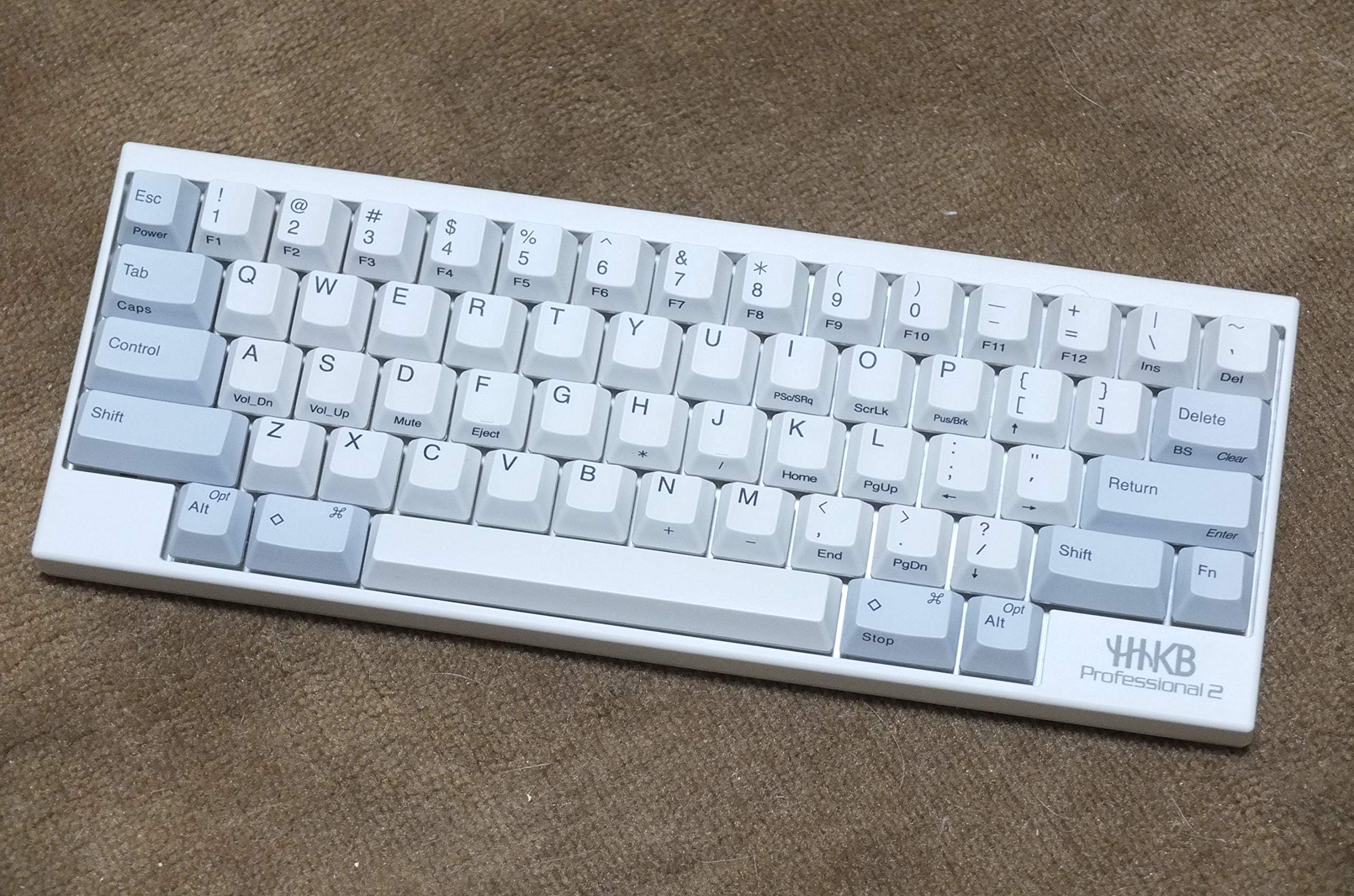
I've been using mechanical keyboards and drinking the mechanical keyboard Kool Aid since the Model M. After Model Ms faded from fashion and Cherry MX boards cropped up everywhere, I've enjoyed Cherry Blue and Brown switches for over a decade, and have always been happy to use them. I had a highly customized Filco Majestouch 2 TKL before I ordered this. So, I kept hearing about how great Topre switches were, and how awesome HHKBs were, and finally, I bit the bullet and ordered one. Literally two days later, sold the Filco. NO RAGRATS. Since most people looking at these are probably familiar with Cherry, Gateron, or Alps switches (I guess it's possible someone without the MKB addiction may be looking at this... maybe?), if you've never used Topre, here's what I can say by way of comparison. 1) The keys feel much more uniform than any of the other switches. Every key on the board feels precisely the same. I thought every key on my Filco felt the same until I used this keyboard, though, so you may not notice this unless you have a basis of comparison. 2) The sound is very different than the other switches listed above. It's much deeper and plonkier. It's not a high pitched snapping noise. It almost sounds wooden. It's quite nice, and a lot quieter than Cherry Browns. 3) Yes, the layout is weird. Yes you will adjust. Yes, you will miss the backspace key every single time you try to hit it for three days. Yes, you will become immediately convinced that the HHKB layout makes a lot more sense. I do still miss the arrow keys, but I'm getting better with the Fn button, and I'm realizing I didn't really ever use them that much. I would certainly consider the Japanese layout. All in all, this keyboard is fantastic. It's the best keyboard I've ever used, and unless someone beats Topre at the switch game, I can't imagine myself changing. I definitely don't miss the feel of the Cherry switches I was using at all. My WPM has increased on 10fastfingers, and my accuracy is up. Two thumbs up.
W**U
Expensive, quiet, comfortable
As a person who suffered from RSI due to always bottoming out on Apple Mac scissor switches (those found in their laptop and desktop aluminum keyboards) I have been on an ongoing journey to find a better keyboard. I switched to Cherry MX Blue switches 6 years ago and been dabbling with Greens, but they are too heavy for me. I heard so many good things about the PFU Happy Hacking Keyboard Professional 2 keyboard which sports Topre switches. Now there are those people who swear Topre are the best switches available and those who think they are just overpriced glorified rubber dome switches. This discussion reminds me much of the discussion about the Apple product line. As I have experienced by using Apple computers for a few years as well, I was suspecting that the truth lies somewhere in between, but I like to make up my mind myself instead of relying on hearsay. I picked the HHKB Pro 2 over the Realforce products because of two things: 1. the white color (because it has almost a retro look to it) and the layout. I should point out that I am a software developer who heavily relies on Emacs and vim, so the fact that there is a keyboard that gets rid of the dreaded "shout" key (Caps Lock) and replaces it with one of my most used keys (Control) justifies taking a closer look at it. Since this is the most expensive keyboard I have I bought it pre-owned from a US seller, so I paid significantly less than 200 USD and arrived in 2 days. As to my experience this keyboard is as good as any keyboard I have used so far, and the 45g are light enough to be comfortable and they have a nice tactile bump. Since all of the keys except the Space bar are made out of PBT plastic, they feel very nice while typing, ABS can have that flimsy type of feeling to them. The Space bar is ABS, but it feels good and most important it does not wiggle. In a lot of keyboards you wiggle the Space bar and it feels and sounds just wrong, so yes, I love the build quality of the keyboard. It is pleasantly quiet as well (and I am using the non-silenced version) More about the layout, as I said the layout is very good for a Unix/Linux/BSD/Mac using software developer who rarely uses the mouse, especially the left hand side. As for the right hand side, that definitely needs some time getting used to. The cursor keys, the Home and End keys are all reached by a Function key combination, which needs some adjustment time, on top of that Tilde/backquote and Pipe/backslash are in different positions, if you use them a lot, you will probably make a lot of typos in the beginning. Another useful thing I should note: I use an alternative keyboard layout, namely the Colemak layout which rearranges more frequent keys to the home row. I had worries that the HHKB layout would cause problems with that, but it works just fine as expected. In conclusion, would I recommend this keyboard ? Yes it's a fine keyboard, especially if you are a console-and-editor user, but I have to say that I personally think the price point is too much, and I don't really agree with people who say Topre switches are so much better than Cherry MX. To me they feel like really good rubber domes, like the ones I used in the Amiga 2000 keyboard which is one of my favorite keyboards. It's a matter of preference and both MX Blue and Topre 45g work well for me. But whereas I paid roughly 100 USD for my tenkeyless Cherry MX, the HHKB costs more than twice, for me the difference is too much, 150 USD would seem like a fairer price point to me.
Z**R
Best keyboard ever
On my desk sits a Coolermaster MK750, and an Anne Pro 2. There is a Das Keyboard on the shelf, and a Corsair K95 platinum. None of these keyboards are being used any more because of the HHKB. I'm a writer and I bang out about 750K words a year, so I need a great keyboard. After 2 months of use I'm please to say that this is the best keyboard I have ever used. It's light, feels a bit cheap, but man oh man, are the keys magical. It sounds like a dream, and the keys fire off with a whisper touch. I did add some sticky tape to the bottom to keep it from sliding around. I also picked up a nicer USB cord that is looped. Yes this keyboard is expensive and it takes a few days to get used to typing on it, but the experience is worth it. If this broke tomorrow, I would sell a kidney to purchase another. How's that for an endorsement?
K**D
Make sure you like the layout
First of all, it is a good keyboard if you can get used to it. I have friends who absolutely love their HHKBs. But I really couldn't get use to the super non-standard layout. Lack of some important keys and obscure layout of some other keys is a big issue for me. I tried to get used to it for two weeks, and it seems I'm making some progress. But the other day I plugged in my old WASD code keyboard, I immediately don't want to go back to HHKB any more. So I'm returning it. The keyboard actually feels quite light and build quality does not look very solid -- maybe it is just the way it looks. The key is definitely quieter than the other mechanic keyboard that I tried. But the layout...
S**Y
Much as I love this keyboard, and its something I won't be switching from anytime soon, I will have to say there are some differences that new users will have to adjust to. For instance: there are no arrow keys, and it you're avid user of them you'll have to learn to press FN before hand. Or the fact that Control is now where the caps lock key is, so you'll become used to the new key placement after a while that you'll hop over to a regular keyboard only to find yourself accidentally turning on Caps Lock instead. Its good overall tho, the key feel is nice, and the sounds of them as you're typing along is grand. Just know that there is quite a bit of irritation at first when you're first using this keyboard.
H**O
Kurz zusammengefasst: Einfach die beste Tastatur auf dem Markt. Wer sich zur Elite der Coder zaehlt, kann einfach nicht um dieses Keyboard herum. Die Topre Switches machen diese Tastatur zu einem einzigartigen Tipperlebnis und der elitaere UNIX-Formfaktor ohne nervige und unnoetige Zusatztasten wie F1-F12 oder Cursor macht die Arbeit mit dieser Tastatur zum hochelitaeren Genuss. Wer ueber die neuerdings immer zahlenmaessiger werdenden Cherry MX-Hippster die Nase ruempfen will, kann es eigentlnich nur als HHKB Besitzer tun. Denn diese Tastatur ist eine der wenigen auf dem Markt, die jeden "Mechaboard"-Hippster vor Neid blass werden laesst. Verglichen mit den ueberlegenen Topre-Schalten fuehlen sich herkoemmliche MX Schalter an als ob sie Sand im Getriebe haetten. Auf den Topres hingegen tippt man wie auf Wolken. Achtung: Diese Tastatur ist aufgrund ihres gehobenen Standards nicht fuer die Programmierung mit "Sprachen" wie JavaScript, Python oder Haskell geeignet. Am besten laesst sie sich mit C und C++ benutzen. Als Editor ist VIM oder Emacs zu benutzen, da herkoemmliche Editoren oder sogenannte IDEs unbrauchbar sind. Achtung: Zum sogenannten "Gaming" ist diese Tastatur natuerlich auch nicht geeignet, da sie fuer schaffende Menschen (Programmierer, Wissenschaftler, Autoren) konzipiert wurde und nicht fuer die Benutzung durch die breite Konsumentenmasse. Fazit: Eine Top-Tastatur mit superber Verarbeitung fuer die Elite der digitalen Gesellschaft! Unbedingte Kaufempfehlung!
P**R
価格以上の打鍵感!打ち易いの一言です。USキーボード、カーソルキー無しも慣れると快適!最新版で無くともHHKBの虜です。
A**W
At first you might be a bit underwhelmed with the look of it but it absolutely grows on you. The feeling of typing on this thing makes you just want to find things type instead of playing games only pressing the same 6 keys. Its just buttery smooth and sounds amazing. The only issue with going with topre switches is the fact that you might have a hard time finding different coloured keys, artisans and things like that (they do exist if you look hard enough), so if you want to heavily customise the look of this keyboard be prepared to wait for custom runs of keys that meet your expectations. The keys that come with keyboard itself are of super high quality (you can actually dye them crazy colours and it doesn't affect the legends on them) so you might be keen on staying with them anyway. There is loads of options with the dipswitches round the back of it that lets you choose different functions for certain keys which is really cool as well. And for gaming itself this keyboard is super nice because of how small it is. You can have both of your hands super close to each other so that it is really comfortable rather than having them spread out with a full size keyboard. You may miss having a numb pad or arrow keys so make sure you're ready for abandoning that. I especially miss the arrow keys for moving back and forth through text to correct mistakes but I guess it's not really an issue at the moment because it gives me an excuse to delete it all and type it all out again with this amazing keyboard.
G**H
If you spend any large portion of your time typing, get this. Yeah, it is expensive for a mechanical keyboard but it feels so much better than the competition and you never have to actually tell anyone how much it cost.
Trustpilot
4 days ago
2 weeks ago