We remain fully operational. Our teams are working around the clock to ensure your deliveries continue safely.

DOWNLOAD THE APP


Customer Services
Copyright © 2025 Desertcart Holdings Limited
DOWNLOAD THE APP
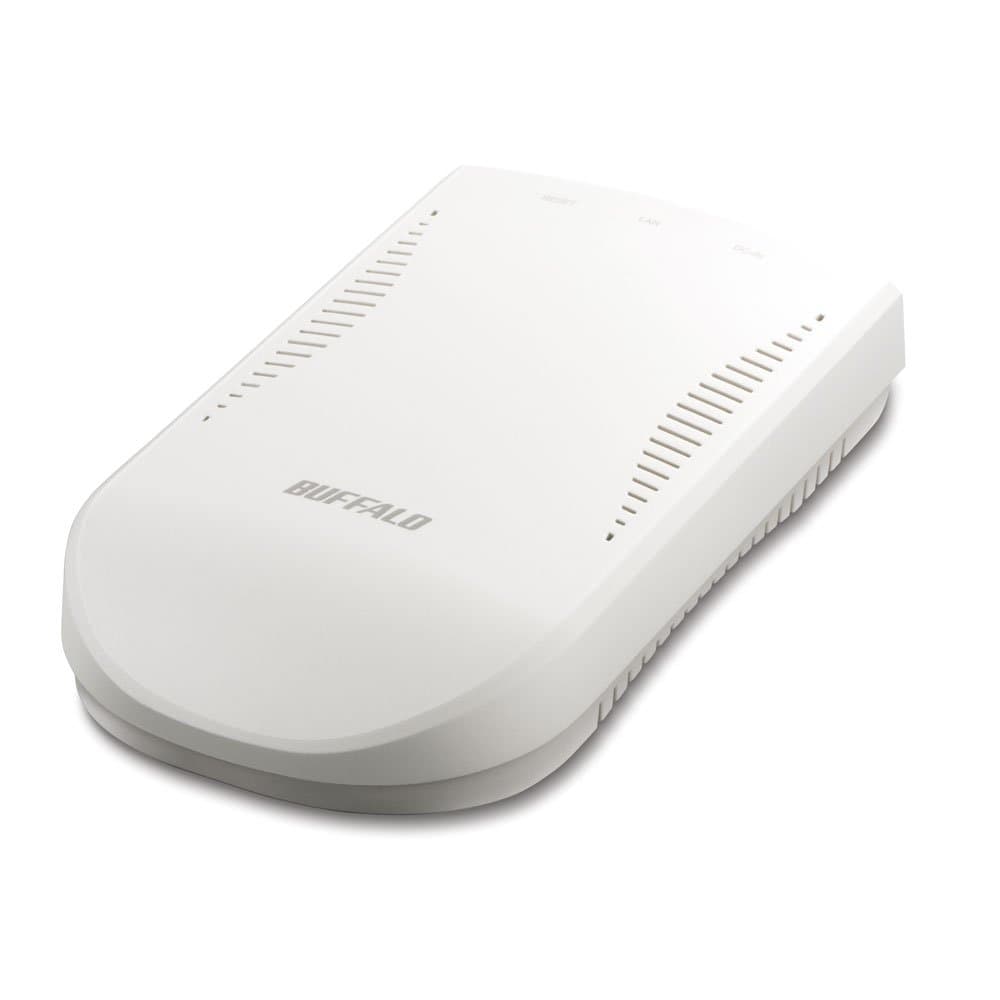
📡 Print Smart, Live Free!
The Buffalo Wireless USB Print Server (LPV4-U2-300S) allows you to share a USB printer over your wireless network with ease. Featuring 802.11n technology for speeds up to 300 Mbps, it supports multifunction printers and offers simple installation. With ePrint App support for mobile devices and round-the-clock US-based tech support, this device is designed for seamless printing in any modern workspace.
| Brand | BUFFALO |
| Item model number | LPV4-U2-300S |
| Item Weight | 12.8 ounces |
| Product Dimensions | 6.7 x 2.36 x 5.2 inches |
| Item Dimensions LxWxH | 6.7 x 2.36 x 5.2 inches |
| Color | White |
| Manufacturer | BUFFALO |
| ASIN | B00GUC4B1Q |
| Is Discontinued By Manufacturer | No |
| Date First Available | December 9, 2013 |
B**E
Works good, but I can use the scanner only when ...
Works good, but I can use the scanner only when I install the USB Navigator but the printer does not work unless I turn the USB Navigator off. I will give it a 5 star rating when I can use both.
J**Y
Needs better instructions with the unit.
I installed the unit on a system using a Windows 7 Pro and printing to a Canon 6700D. Looked simple, sounded simple... Never could make it work. I suspect a driver problem. When trying to find a driver I "found" a lot of Malware! Still won"t work.
D**D
Great tool to add a second IP address to a single printer.
Great device for my wireless printer. Adds the option of public WiFi printing to my printer that's on the private WiFi as well. The device stays inactive thru several power outages and month of no use then comes alive when needed.
F**R
Works, but a pain to set up, and only allows one computer to connect at a time on the network.
As other reviewers noted, this device is not easy to attach to the wireless network. I finally connected it directly to my modem-router with a cable, and then the router recognized it fine.Then I attached the print server to my Xerox Phaser 6500 printer, I installed the two software items that came with the print server: the LPV4 Print Server software provides the device interface accessed through the IP address of the device, and the Network USB Navigator software provides a local PC interface. Then I began the struggle to install the printer. This task was not so easy.The print server does not broadcast its availability, which surprised me a little. In both Windows 7 and Windows 10, I ran the Install Printer wizard, which did not find the printer. Then I selected the option to configure it myself, entered the IP address for the print server (which is found in the USB Navigator interface), and finally got the computer to find the print server and printer.There are two ways of printing: RAW and LPR. The LPR type is preferred if you want to allow more than one computer to be connected to the printer, but I was only able to select RAW printing.I want to print from two computers, one running Windows 7 and the other running Windows 10. Both computers have the Xerox printer installed, using this Buffalo print server. But once one computer (Computer A) is connected to the printer, the other computer (Computer B) reports that the printer is in use. Only when I disconnect the USB connection on Computer A can Computer B print. At that point, Computer A reports that the printer is in use. See the attached images.Because of this problem, I am unhappy with the Buffalo USB Print Server and give it two stars, which Amazon defines as "I Don't Like It" (actually, I hate it, but I reserve 1 star for something that does not work at all).Pictures of the interface for the USB Navigator and the Buffalo web interface are attached.To add insult to this process, I also hoped to print through this device from my Android phone. Although this is possible, it costs something like $5 to buy the Android app for printing. I think it should be free.
M**9
Great but not perfect - 3.5 stars
Great but not perfect. probably more like 3.5 stars. Setup deserves a 1 star (do like others say and setup via a wired connection first). I had no issues with my drivers installed first. Performance (handling of large jobs), I give it a 5 star. But I think there are some odd issues. After several days of light use, print server was showing unavailable. I reset it, same thing. It would show available then randomly not available. I even changed the refresh setting. I tried connecting wireless to the admin page and it was SLooooowww...even let me connect without password. I then reset router and print server. Now the not available went away but computer still showed it offline. I then reran setup util and changed from LPR mode to raw mode. that worked! BUT...why now? It worked perfectly for several days now. And I don't think it's my new router either (new as in weeks before I got the print server). Plus, all my browsing worked fine, and speedtest.net / ping all showed good connection to net. Will give one more week. if still working without issues, I'll keep. Otherwise it's going back.Update 11/3/2014: After setting to "RAW," things are much better--not one issue so far, and even after changing over to a new TwC cable modem, and many reboots, it worked right away. Will likely be keeping now.
D**S
Difficult to install and old wireless security
Low rating because it's old technology. I had few security options with my router.This is one of the most difficult installations I've ever had to do. The instruction sheets were for Windows 7. The drivers cannot be viewed with Windows 10. Even when I found the drivers online with a Win 8.1 machine, they had no effect on the print server. You must connect via wired LAN before you can use WEP. You cannot use WPA-2 at all. The LED's did not appear to be giving the proper indication, but I had to find the online manual to very my suspicion. After 2 factory resets of the print server, the LAN LED finally started to light. The downloaded software was not finding the print server on the network, and no other IP software could see it, either. I found a suggestion to plug the print server into port one of my WRT1900AC Router. As soon as I did that, the software saw it on the network and printer software started to update. In summary, I had to do the factory reset (hold button on print server while plugging it into power) and I had to plug it into port one of my router to make it work. Also, I had to use a computer with Windows 8.1 (or below) to see the driver on the internet because Windows 10 only shows the manuals.
G**R
One Star
It does not work with my system.
A**B
Best print server money can buy
Best print server money can buy. It works perfectly as it should. Linksys model we had before was the worst, it did not work but it was only a few bucks. Buffalo makes amazing products, especially this one. A+++++
Trustpilot
1 week ago
1 month ago