🛰️ Navigate smarter, not harder — GPS that keeps you ahead of the curve!
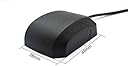
The VK-162 USB GPS Dongle is a versatile, plug-and-play external GPS receiver featuring a precision u-blox 7 WAAS-capable chipset. With a 7-foot remote mount cord and magnetic base, it offers flexible installation options. Designed for multi-platform compatibility including Stratux, Raspberry Pi, Windows, Linux, and Google Earth, it delivers reliable, accurate navigation in a durable IPX6 waterproof and dust-tight housing.

| ASIN | B01EROIUEW |
| Best Sellers Rank | #77 in GPS Vehicle Mounts |
| Customer Reviews | 4.6 4.6 out of 5 stars (431) |
| Date First Available | March 20, 2016 |
| Is Discontinued By Manufacturer | No |
| Item Weight | 2.5 ounces |
| Item model number | Vk-162 |
| Product Dimensions | 4.8 x 2.8 x 0.4 inches |
| Voice command | Buttons |
L**E
Works with Windows PC
Works great for PC mapping project
M**G
An excellent computer peripheral
I'm using this with a Raspberry Pi in a ham radio application, keeping the Pi on schedule for FT8. After you set it up properly (Google for the obscure procedure to add a hardware clock), it does the job perfectly well.
D**R
Great for home use; not so great for remote use on Microsoft Surface toblet.
This works flawlessly on my HP desktop computer running Windows 11. It manages to spot and sync with satellites immediately after turning on the computer. In under a minute, I was able to set up the device and get the software to synchronize my computer's time with the circling GPS satellites. However, I am disappointed that I have been unable to get it to work on my Microsoft Surface Tablet computer running Windows 11. While the device driver does install, the GPS puck is unable to get a lock on any satellites, so does not synchronize my laptop's time with the many overhead GPS satellites.
W**S
Works perfectly under Linux, but no PPS output
I bought this to use on a Linux NTP server as a local GPS time source. It works perfectly, no special drivers required, just plug in and it works on a modern kernel. Just be aware that there is no PPS output. Generally this is hard to find on USB connected GPS units, so not a huge surprise. Time is still very accurate (compared to another system with a PPS), extremely good enough for any non-scentitic use like managing home or small business network time.
J**J
Buying a backup for my Stratux
The original one that I bought is still working and works every time with no issues. I just bought this second one to carry as a backup as the first one is now 5 years old. My only comment that is negative is that this unit should have a symbol on the bottom that indicates that there is a magnet inside. I understand why some would want a magnet if they are using this for an non-aviation purpose but if you are using this with a stratux or as a GPS for your tablet, be warned, there is a magnet in the bottom of it and needs to be removed. If you put this on your glareshield, it has a very strong potential to alter your magetic compass readings.... the magetic compass is your baseline compass indicator and you should avoid putting any magnets even close to it. The magnet is easy to remove. Peel up the label and it pops right out.
K**N
Works Great for PC Time Sync
I'm just a PC hobbyist with an irrational interest in network and device time synchronization. All the other GPS time gadgets I've looked up were complicated and very expensive. I plugged this in and used BktTimeSync (Windows) but soon discovered I needed to set the proper COM port. Since Widows decides that, you either need to pay attention to the initial Windows device setup notification or look in Device Manager for "Ports (COM & LPT)" and under that, "USB Serial Device (COMX)". The proper COM port will be displayed there in place of the "X". Once I set the COM port in BktTimeSync it immediately synced the PC's time with GPS. I was surprised since I was testing it in the basement which was dumb, but instructional since it worked. So, curiosity has been rewarded. It's quite redundant since NTP is so reliable (called "Internet Time" in Windows) but it's calming to know that my PC network will have accurate time during the inevitable zombie apocalypse (at least until all the satellites die).
D**D
Good at first
Worked good at first for my Direwolf/APRS set up on a Linux box running Ubuntu. Plug and play but after a couple days started losing connections frequently. Not a 100% sure it’s the gps or my computer but don’t seem to have this problem with other things plugged into my usb port.
D**.
Nice product. Works and keeps on working.
I found it functional and sufficiently sturdy. I liked it enough to buy a second one. The magnetic base is both nice, and worrisome around my computer. (and it showed me just how little iron I've got.) It appears to be able to read and use a signal with an SNR of 15dB, and I've seen it read one at 7dB. It needs no particular drivers for any computer, as it shows up as a USB serial device. They aren't consistent about seeing and reporting WAAS satellites. This may be a result of how far north I am. One thing I haven't been able to get from this is DOP values I suspect these are dropped as low value. The only downsides: no obvious way to do a PPS; and the marine interface all GPS units are stuck with.
A**I
You don't need any driver.. But its good to download U-center to check your device.. OR Any application that retrieve the coordinates from this device. I wish it has a led light to indicate GPS fix or something tells you it catches the satellites. Very happy and sure I recommended.
Y**E
Plugged it into a linux laptop, made sure I had gpsd installed, and then checked with gpsmon. It quickly fixed to a few satellites and the location was correct.
L**D
Works with openCPN. Not very intuitive to use if you're not tech savy. I had to fumble a while online and watch video to understand how to set it up. No explanation come with it.
N**A
Works as intended. No problems.
A**R
Works as advertised, quick GPS lock.
Trustpilot
3 weeks ago
2 weeks ago