Buy anything from 5,000+ international stores. One checkout price. No surprise fees. Join 2M+ shoppers on Desertcart.
Desertcart purchases this item on your behalf and handles shipping, customs, and support to EGYPT.
🎯 Master your day with the Stream Deck Mini — productivity at your fingertips!
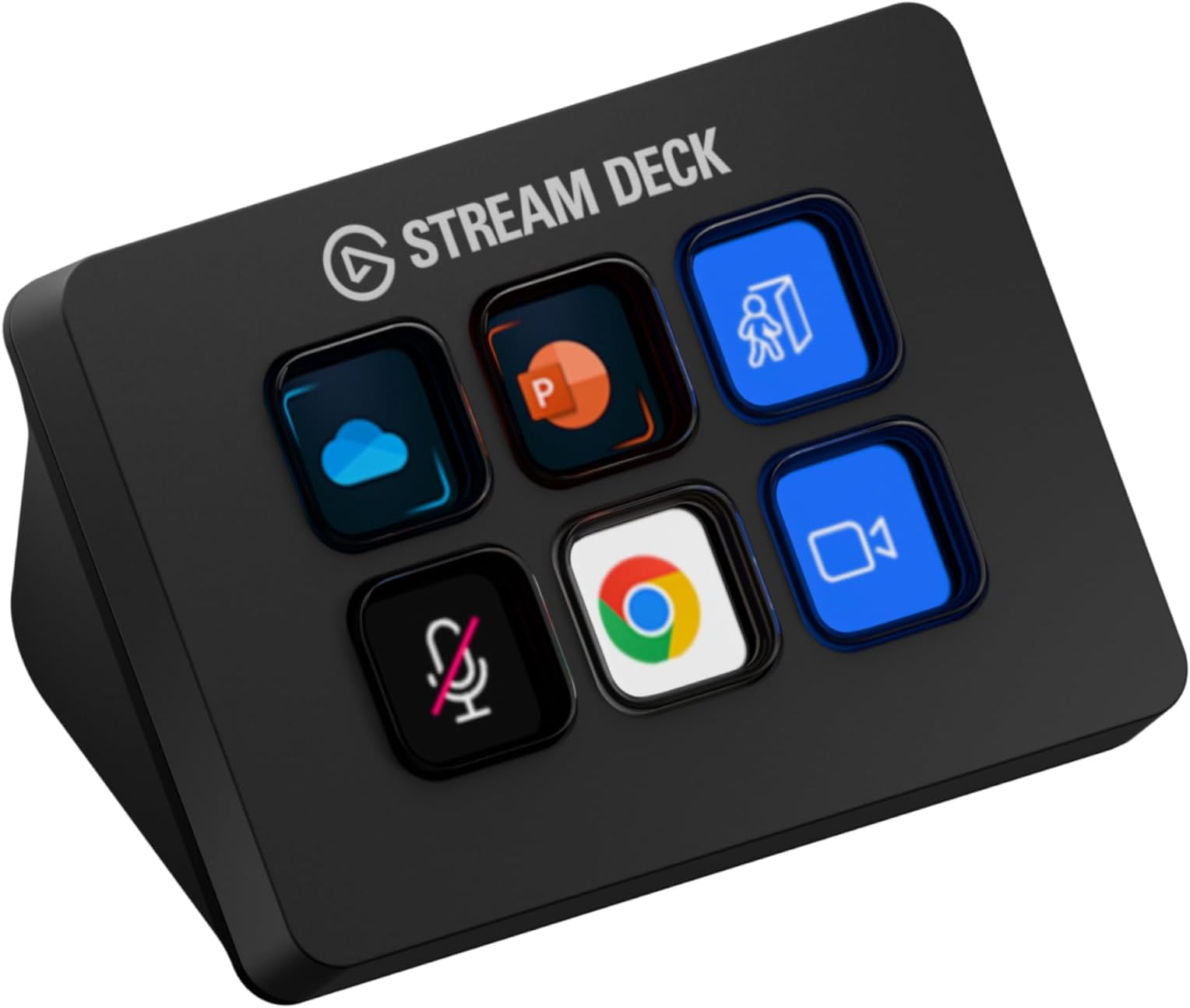
The Elgato Stream Deck Mini is a compact, professional-grade control pad featuring 6 customizable LCD keys that enable instant access to unlimited actions across popular apps like Zoom, Teams, PowerPoint, and Adobe Creative Suite. With plug-and-play USB 2.0 connectivity and user-friendly software, it empowers millennial managers to boost productivity by simplifying complex workflows into single taps, all while maintaining a sleek, space-saving design compatible with both Mac and PC.


| ASIN | B07DYRS1WH |
| Best Sellers Rank | #246 in Video Games ( See Top 100 in Video Games ) #18 in PC Gaming Keyboards #23 in Computer Keyboards |
| Brand | Elgato |
| Built-In Media | Stream Deck Mini, Quick Start Guide |
| Color | Black |
| Compatible Devices | Personal Computer |
| Connectivity Technology | USB |
| Connector Type | Micro USB |
| Controller Type | App Control |
| Customer Reviews | 4.8 out of 5 stars 7,829 Reviews |
| External Testing Certification | Não Aplicável |
| Form Factor | TV Box |
| Global Trade Identification Number | 00813180020658 |
| Item Dimensions L x W x H | 2.4"L x 2.3"W x 3.3"H |
| Item Type Name | Elgato Mini Stream Deck Live Content Creation Controller with 6 customizable LCD keys, for Windows 10 and macOS 10.11 or later, Black (10GAI9901) |
| Item Weight | 6.17 Ounces |
| Manufacturer | Elgato |
| Memory Storage Capacity | 12 GB |
| Mfr Part Number | 10GAI9901 |
| Model Name | stream deck mini |
| Model Number | 10GAI9901 |
| Other Special Features of the Product | Compact |
| RAM Memory Installed | 3 GB |
| Resolution | 1080p |
| Smart Home Compatibility | Not Smart Home Compatible |
| Special Feature | Compact |
| Supported Internet Services | YouTube |
| UPC | 813180020658 |
| Unit Count | 1.0 Count |
| Video Codec | H.264, H.265/HEVC |
| Video Output Resolution | 1920 Pixels |
| Warranty Description | 12 months |
J**W
Perfect for my use.
I've already own a couple of 32-button Stream Deck XL's for several years and really like them. That said, I have a situation on one of my pc's where I wanted the macro functionality on only a few buttons and an XL was overkill with its 32 buttons as well as taking up more desk space that I wanted to give up. The question for me was, would this mini support the functionality I wanted like its big brother? The answer was a resounding YES. As soon as I plugged the mini in, the Elgato Stream Deck software recognized it and all the familiar programming options showed as usual. In short order I had the macro I needed programmed and the button graphics set the way I wanted. The only real differences I've seen so far between the 32-button XL and this 6-button mini are the number of buttons and the price tag. Build quality is exactly the same - excellent. Functionality is as good as the XL. Its compatible with the software. What's not to love? As far as other comments about it sliding around on the desk, there was a clear plastic sticker covering its rubber base. Peeled that off and no sliding. Not even on my glass mouse pad. As long as you don't pound on it like a gaming keyboard, it's not going anywhere. It's NOT a keyboard. It has buttons. Those buttons don't take much effort to push down. They are slower than keys on a gaming keyboard, which should be fine since they were never intended for typing. They are all individual little displays that you can make look like pretty much anything you want within the limitations of how many pixels are available. No more stick on labels or swapping key caps. There is nothing entry level about this mini. It just has fewer buttons than its bigger brothers and cost less. For me it fits a particular niche I had and does so perfectly.
U**I
Love this Stream Deck
Awesome mini stream deck. Super convenient, easy to setup, and works great. Use this for work daily.
S**R
This is a great "nice to have" solution for working from home
I did not buy this for streaming, and instead use this for working from home at my desk. Reasons why I enjoy it * Zoom - I was able to program shortcuts and just have a nice little gadget to mute, raise hand, camera on/off, and leave calls. I felt more engaged in the meeting vs using my mouse to move all over the screen and getting distracted by other things going on * Elgato Key Light - I received this as part of a work from home package and at first I wasn't sure if I cared but it ended up being a very useful and needed light source for my needs. Having a simple button at my fingertips made this a nice add. * Pomodoro Timer - I was able to use this to trigger multi-actions. So I had a pomodoro timer turn on and also a white noise track from spotify play at the same time. This allowed me to get my focus work done. * Calendar - I had set up separate buttons specifically to pull up my calendar on a specific area of my screen (used with moom) to have a good glance at my day. I use this feature often since my day is filled with zoom meetings. * World clock - I was able to display a world clock which is useful since I have teams across the world I work with * Spotify - nice to have controls at my finger tips. * App Launcher - it works just like cmd-tab, but I could toggle thru my apps by using a button. So... to be fair, none of this *required* a stream deck, but it definitely did make things a lot more simple, and I really liked this experience that I didn't realize I would benefit from, especially working from home. However, I have decided to return the mini. I was going to buy the 15key one because while the mini does allow for folders and menus, I find that I would be willing to pay a little extra to not have to dig thru menu items. However, before I buy the 15key, I am going to try the mobile app version on a stand first. One day with the mobile version definitely means it is not as tactile (the buttons on the stream deck feel great) but it does provide the same functionality as the 15key at a fraction of the cost. I think this is a great product for those working from home and taking video calls with teams often. This can be programmed to do a lot of things and I feel like I haven't scratched the surface. The mini definitely did everything I mentioned above, but I have the desk space and disposable income to maybe take it a step further. Highly recommend, but not needed. It's like wired vs wireless headphones. Wired was fine, wireless is better.
R**T
Your Compact Control Center for Streamlined Content Creation
The Elgato Stream Deck Mini is a compact and powerful tool that revolutionizes content creation for streamers, video editors, and creative enthusiasts alike. Despite its smaller size compared to the standard Stream Deck, this mini version proves to be a game-changer with its intuitive design and seamless integration with various applications. First and foremost, the Stream Deck Mini's key feature is its six customizable LCD keys, each displaying icons of your choice. The key configurations are a breeze to set up using the user-friendly Stream Deck software, which allows you to assign a wide range of actions, hotkeys, and macros to the keys. From launching applications and switching scenes to triggering sound effects and social media commands, the possibilities are virtually limitless. The compact form factor of the Stream Deck Mini is a major advantage, as it easily fits into any workspace without occupying much real estate. Its portability makes it ideal for content creators who are always on the move or have limited desk space. Despite its smaller size, the keys remain responsive and provide satisfying tactile feedback, ensuring quick and precise actions with every press. The integration with popular software and streaming platforms is seamless, making the Stream Deck Mini an indispensable companion for streamers. Whether you're using OBS Studio, Streamlabs, or even Adobe applications like Photoshop and Premiere Pro, the Stream Deck Mini significantly streamlines your workflow and enhances productivity. In addition to its practicality for live streaming, the Stream Deck Mini is also an asset for video editing enthusiasts. Customizing keys with various editing commands and shortcuts expedites the editing process, saving valuable time and effort. One minor aspect to consider is the limitation of six keys, which may be insufficient for users with a wide array of commands and actions to manage. However, for those who don't require an extensive number of buttons or prefer a minimalistic setup, the Stream Deck Mini offers the perfect balance of functionality and simplicity. In conclusion, the Elgato Stream Deck Mini is a must-have tool for streamers, content creators, and video editors seeking to optimize their workflow and take their production quality to the next level. Its compact size, user-friendly software, and seamless integration with various applications make it a standout product in its category. If you're looking to enhance your content creation process and gain more control over your tasks, the Stream Deck Mini is an investment that will undoubtedly pay off.
I**K
can cut out at time but still very function able
this was a good product i love using it for streaming it has a few problems here and there like moving around when i press the buttons but the sound of the buttons make up for that with a very satisfying deep click sound it looks really good especially the little screens it can easy connect to my pc had it running in like 5 minutes the buttons are responsive but u have to press down a little hard and that can be a little frustrating the as i said it can coonect to my pc easy but sometimes the keyboard will cut out and not be responsive at all but that's all i have to really say about the elgateo stream deck mini
S**Z
Love it, love it, love it.
I received this for Father’s Day and it’s the best gift I received from my kids. Great software that makes it seamless to navigate and configure all the apps, tasks, launchers etc. the images for the buttons can even be customized with GIFs and that makes it visually appealing.
J**C
Awesome productivity tool!
I got the mini one because this is my first Stream Deck and I didn't have the budget for the bigger ones. The six buttons I've programed are: 1) switch between main monitors 2) show/hide desktop icons 3) switch between speakers and headphones 4) increase volume 5) decrease volume 6) mute. Being able to do all of these commands with the push of a button is amazing. Next week I'm going to add a folder with some multi-action commands to use for work. The possibilities are almost endless. I purchased a few icon packs from the elgato store and there are a lot of great free ones too. The device itself is small but doesn't feel cheap. I did add small pieces of double sided tape so it sticks better to my desk top. I love this little thing. To echo some of the other reviewers here, if you can afford it, buy a bigger model. I will upgrade at some point but for now the six button one suits my needs and with folders I'll have way more options. I didn't have any issues installing, no technical issues, the little screens are bright and the animated icons are awesome. All in all this is a fantastic device for multimedia, productivity uses and I'm sure it's incredible for streaming and gaming as well. Highly recommended!
L**D
Great for spiffing up your Zoom/Google Meet/Discord presentations
I have the 6 button version of the stream deck (and may upgrade at some point to the 15). I use it with OBS for switching between multiple sources for online presentations. I have a narrow field close up webcam for my face, a wider field webcam for when I need to gesture or demonstrate something, and a retired cell phone mounted on a lamp-style stand as a document camera for focusing on close up work. I can also switch to or overlay Powerpoint slides or even my full screen if there is a question about something that I didn't prepare for. Google for "spiffing up online presentations on the cheap" to find an article and video on my approach. The stream deck is very easy to use and integrates trivially with OBS to make this switching much easier. It can easily switch between scenes, toggle a source on/off, etc. You can easily drop custom images onto your buttons to make them even easier to use. For instance, I pulled a google searched image of a stage and curtains into a button that switches to my "stage" camera (a.k.a. a downward facing document camera). All of these cameras plus the stream deck and an external microphone means you need lots of USB ports! My latest computer build had a lot, but I still had to add a usb hub that connects to a usb-c port on my motherboard backplane to have enough. The stream deck works fine for me plugged into that hub. It also works fine when plugged into the docking station for my wife's laptop. My wife is a little less technical than I am but can use the setup when she does online presentations and likes the buttons much better than clicking on scenes or sources in OBS. This setup also makes window management on a computer with a single monitor much easier since you don't have to switch back to OBS to change your view - you can stay on your presentation. (update) I picked up a used 15 button stream deck to enable me to do more tricks in OBS. It's stand is separate from the buttons and adjustable. I find the stand a little tricky to use as it can collapse when I move the buttons to another spot on my desk. This apparently is enough of a problem that a variety of after market stands and clips are available.
H**S
Rapidement devenu indispensable!
Nom de l'item à l'achat fait le 04 juin 2019: Elgato 10 Gai9901 Stream Deck Mini contrôleur de création de contenu Live avec 6 personnalisables LCD touches, Noir Prix lors de l'achat en date du 04 juin 2019: 99.99$ Commande reçue le 07 juin 2019 via Amazon Prime. Évaluation générale de 5 étoiles. 2019-06-29 Livraison avec Prime, donc assez rapide. Livraison en 3 jours. Je suis complètement en amour avec Stream Deck. Je ne suis pas un "Streameur", mais un artiste numérique. J'utilise le mini pour mon centre Multimédia (Netflix, Prime Video, VLC, YouTube) branché à ma télé. J'ai tellement adoré la machine que j'ai fini par commander la version XL que j'utilise avec mon système de montage Media Composer d'Avid, Photoshop, After FX, Resolve et plus. Les possibilités avec cette appareil sont illimitées. Je peux développer des macros avec des logiciels externes (comme AutoHotKey, que j'ai découvert grâce aux usagers), des commandes aussi préprogrammées via le logiciel qui est mis à jour au moins une demi-douzaine de fois par année. Pas des mises à jours de corrections de fautes d'orthographes, des VRAIES mises à jour! Des améliorations utiles et parfois même indispenssables. Elgato semble être à l'écoute de ses usagers. Mais ne vous fiez pas qu'à mes commentaires, allez voir sur YouTube, les "reviews", les tutoriaux et autres, les critiques sont assez unanimes, cette machine et son logiciel sont du bonbon. J'ai tellement de plaisir avec mon ordi depuis que j'ai ces petits, mais puissants, gadgets. WoW!! J'ai préféré prendre la garantie prolongée de 4 ans proposée par Asurion sur Amazon, parce que les 1es générations de ces appareils ont reçu des critiques négatives quant à du "flicker", "ghosting" et interférences au niveau des boutons avec le temps. Ce sont quand même de petits écrans. Il semblerait que des améliorations aient été apportées mais pour une quarantaine de dollars, j'ai préféré ne pas prendre de chance. p.s.: J'ai maintenant décidé de toujours introduire mes commentaires par les 5 premières lignes ci-haut et de toujours joindre des photos de l'item. J'ai découvert à mes dépens que certains revendeurs changent carrément le produit affiché à la page de vente mais conservent les commentaires de l'ancien produit. Ce qui induit en erreur, les consommateurs. Grâce à ces premières lignes, les gens qui liront mes commentaires sauront que mon évaluation vise le produit que je décris. Mon souhait est que cette méthode soit contagieuse et que nous soyons beaucoup à procéder de la sorte.
S**N
An excellent external keypad with near unlimited programmable macro keys
The Stream Deck Mini is ideal for folks who require only minimal programmable macros in their setup. The functionality, build quality and convenience are near identical to the bigger models. With a well integrated store to find macros & profiles, this device will improve your productivity and gaming setup many fold. Plus there's a very well supported online community that can teach you to integrate the deck with just about any software that's out there, while working on Windows, Mac & Linux! Highly recommended.
R**O
Perfeito!
Excelente, perfeitamente integrado ao Windows e software da Elgato. No começo fiquei na dúvida se teria utilidade, menos de um mês da compra não vivo mais sem ele. Como gostei muito e comprei o mk2 com mais botões, o mini deixei exclusivamente para funções de jogos.
A**B
Great even for non-streamers
I don't stream but I got this product due to the convince it brings. I use it for daily tasks and it is really useful for particular people and specific use cases. I will outline some of my use cases in detail for people who might want it for the same application. Some of these features have to be enables by enabling the plugins that are extra and not enabled by default. Headphones and Mics: I use it to switch between headphones and microphones. The stream deck is great as it allows you to switch between microphones and playback devices. For example if I want to use one pair of headphones and want to switch my playback to that then i can by setting a key to do that functionality. However if i want to switch back or switch to another pair i can then click a button. But you have switch the mic and the playback separately. So for example say your headphones have a mic in them and you want to use a separate mic you can do that by selecting the mic you want through the stream deck instead of going through all the settings and then changing that one to default. For example you can have Headphone1 Mic and Headphones2 Mic and Webcam Mic as buttons and switch between them. Same situation with headphones. So that makes it really convenient as it changes the default one and then that means software's will automatically change to. Voicemod: This is a cool little extra feature that was added my Elgato to the stream deck and it is for a little fun. As mentioned before you can set a button to change to the voice mod output however it wont change the mic selected on the software you have to change that manually. You can do funny things like change your voice and censor words with a beep button and you can pick random voices but you if you want a particular one you have to buy the pro version. You can also hear yourself and can turn on and off through the elgato stream deck which is really convenient. Zoom: The elgato stream deck can be used in zoom calls and be used for a full list of things that i will list: Mute toggle, Video Toggle, Share Toggle, Focus, Leave Meeting, Cloud Record Toggle, Local record Toggle, Ask all to Unmute, Mute all Participants, Custom Shortcut. This is good for zoom calls an there is not much to add as it works seamlessly. YouTube: You can use it to control YouTube. I don't use it for this however it does allow you to chat a message through a click of a button and you also have another option of viewers. That is all you can do with YouTube as of default. Mute and Unmute: When in any call or meeting you can use the elgato stream deck to mute and unmute and it will work with any program and call because it mutes the mics internally and not through that software so if you are in 2 calls and want to mute on one then you cant through this unless that other one is a zoom call, that is where you can mute using the zoom mute button that is enables through the elgato stream deck. Games: This is useful for games as you can function it to do specific binds or to do things in games instead of binding things to using keyboard binds. It is not built to control games exactly but is useful and you have to find your own use in what games you play and what you want it for. This is too universal to gives any examples on. OBS: Whatever you could image you can do on here. You can change scenes. You can also mute your mic and also desktop audio. There are so many options that there is no limit here and you can do anything you can image through obs. There are YouTube videos that cover all the combinations as it would take too long to cover in a minor review. Twitter: You can tweet a specific tweet on that you have binded to a button and will automatically do that. This is mainly towards streams but you can bind anything you want here really. Also you can change name on here to. System: This is what you would expect that this should be able to do like open a website, hotkey switch, act as a hotkey, open something like a program, type text, and uses as multimedia controller. Spotify: There is a plugin that you can enable that allows you integrate and control Spotify from your stream deck. Lighting: You can control Philips hue with this as there is a plug in that can be enables and controls Philips hue lights and same with corsair icue. Build: The build of the elgato stream deck is great and it does not come with a stand but it does have a rubber button to stop it from being pushed back then being uses however it can be a bit annoying but nothing major. Also when you lock your computer you can keep any screen saver on the stream deck. In conclusion, there are a lot more functions that one can use this for streamers and non streamers.
F**W
Simple and functional
What a great little device to make life a little easier. Super easy to customise and with the option of multiple profiles it extends the functionality even further. Working from home I am on Zoom/Teams all day. Just the eas of having a mute mic on/off and camera on/off toggle alone make this device worth it. I also have some go-to documents that are open frequently. The press of a button and no more navigating networks or SharePoint. I also have a profile set-up for shortcuts when not working. The device itself is a good size and can be easily stashed conveniently on the desk. the buttons are a good size and have that satisfying tasctility of a real button rather than the touch-screen style of some other products. Very simple to set-up. The plug-and-play nature of a single USB cable makes it quick and easy to start using straight out of the box. Plus there is no fuss of additional AC plugs or the like which is a blessing in a world of cable-nightmares behind the scenes. The button customisation application is intuitive and simle. Instant responsiviness too. A change in the desktop app is immediately reflected on the device. No lag at all. No buyers remorse here. Very pleased with my purchase. Effective, efficient, and multi-functional.
Trustpilot
4 days ago
1 month ago