


🚀 Upgrade your MacBook’s speed and storage — don’t get left behind!
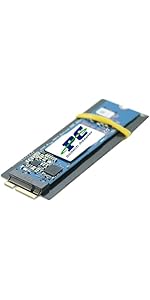
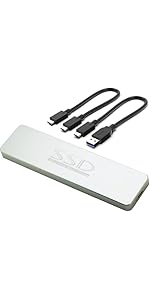
The Sintech NGFF M.2 NVMe SSD Adapter Card enables 2013-2015 MacBook users to replace their proprietary SSD with high-performance M.2 PCIe NVMe SSDs. Featuring a slim 3mm profile and a protective black film cover, it supports a wide range of popular SSD models including Samsung 960 EVO, Intel 600P, and Adata SX700. Designed for a precise fit and stable installation, this adapter revives older MacBooks with modern storage speeds and capacities, backed by an easy-to-follow installation guide to ensure a smooth upgrade experience.






| ASIN | B07FYY3H5F |
| Best Sellers Rank | 19,641 in Computers & Accessories ( See Top 100 in Computers & Accessories ) 17 in Computer Memory Card Adapters |
| Guaranteed software updates until | unknown |
| Item model number | ST-NGFF2013 |
| Manufacturer | Sintech Electronic |
| Product Dimensions | 2.54 x 0.1 x 0.03 cm; 10 g |
S**R
Good quality, converts Apple's own propriety SSD socket to allow M2 NVMe SSD's instead.
Upgrading and restoring a Mid 2014 Apple MacBook Pro. Before starting any such upgrading its important to get an understanding of the issues with Apple hardware and upgrading, is very important! I purchased this brand of adaptor card (Based on the excellent advice, gained from off related forums on the internet!) and purchased a 2TB NVMe SSD along with the other bits required and replaced the lot in an afternoon. Once all is installed, you will boot into recovery mode to create the required Partition Map on the NVMe SSD, In my case, I then installed macOS Big Sur via a bootable memory stick. Following up directly with restoring the system from my TimeMachine Backup on an external drive. Once completed, I now have my old machine now fully ship-shape and with a faster SSD with double the capacity. I understand there are cheaper adaptors out there, but this one has the backing of many others that have used them in this particular role. So I paid their price and happily I have had no issues with its fitting, or any compatibility issues. I own a Mid 2014 15" Retina MacBook Pro (11.3) that had been "Maxed Out" (2.8GHz Quad Core Intel i7, 16GB DDR, NVIDIA GeForce GT 750M 2GB & 1TB SSD). So it is still, a relatively capable machine and it even has 2 x USB, 2 x Thunderbolt 2 / DisplayPorts, an HDMI and even an SD card-reader. While, admittedly they are not the latest or greatest in data speeds, they at least, exist on it (Which can't be said for many of the later, Apple MacBooks (The new M1Pro/Max based models has just re-introduced them, at long last!). But then looking at the cost of upgrading to the latest model machine, which are great. But the price is just jaw dropping, to say the least! But also the total lack of any future internal upgrade path (Such as to internal memory or even the SSD, means you can't even improve on these two components after purchase! (Which is a real concern, as my machines original SSD is wearing out (SSD's have a finite, re-write limit)! So, I then looked at what I actually really needed, not just what I wanted! So as the original 1TB Apple SSD was fast reaching it's lifetime limit, so this was imperative (This, doesn't seem to hold great, for the longevity of these new MacBooks with their irreplaceable SSD's)! But otherwise, all I really needed was, yet another new battery (The Apple warranty replaced one, had recently, rapidly expanded (Much faster than any pregnancy!) and had forced open the laptops base cover, pushing out several of the screws!). Some new rubber feet and a full set of replacements for the cover screws (Apple's authorised repairers, had unbeknown to me until now, had previously mangled them all, making them impossible to remove without damaging them further and rendering them, useless. Oh, also a new 85W mains adaptor (The plug wiring was nearly through on the existing unit!). So for around £350, I now have a fully smartened up machine with a much larger (and faster) SSD, that ultimately looks very nearly, as good as the new model. It took me a whole afternoon, but all in all, I am impressed with my handiwork. In that: 1. It works, 2. It all went swimmingly (Due to doing a bit of online research in the first place, helped massively!). The MacBook Pro is now working well & is far better, than I expected! It will, I hope, give me an extra year or two, before I ultimately have to take the plunge and invest in a new machine. BTW: While also inside the machine, I also discovered that the display screen's lead to motherboard plug, was damaged! So I have also had to replace the whole lead and that also meant getting a new screen hinge cover, luckily both were inexpensive, but could have potentially, fried the machine! I also took the opportunity to clean out all the accumulated dust and also replaced the CPU & GPU heatsinks paste with new... NOTE: Before all the above, all previous work been undertaken by an Apple appointed, authorised repair workshop! The last work they undertook installing a complete new screen, including keyboard, trackpad & battery, while it was still under warranty! I had never even taken the cover of the machine, until now. So take what you will from that and the discoveries made! Just who else can you trust, but for yourselves?
R**M
Great product! Use this if you want a M.2 SSD in your Macbook
Purchased this after making the mistake of ordering a supposedly equivalent alternative - the alternative product wasn't recognised in my Mac and hours were wasted troubleshooting. The Sintech product worked immediately and the Macbook was upgraded to a 1TB SSD in less time than I spent troubleshooting the previous product.
M**E
It works perfectly
Next Day delivery as promised. I paired this Sintech adapter with a Samsung 980 Pro Nvme M2 blade and slotted it into a 2014 MacBook Pro - it just worked. I now have 1TB storage instead of the 256GB Original. The adaptor came with instructions advising firmly inserting both the blade into the adaptor and then the adaptor into the SSD slot in the computer - don't be timid! The combination fits perfectly when inserted properly. For Macs, make sure you have a bootable USB installer ready to add the OS. I am very pleased. This laptop has an extended lease of life which is environmentally friendly.
A**W
Perfect fit
The adapter worked perfectly, and enabled a Samsung 970 EVO Plus 1 TB PCIe NVMe card to be used in my A1502 MacBook Pro (Retina, 13-inch, Mid 2014), replacing the original SSD which was reporting SMART EOL. Very much faster than the original SSD, as well as twice the capacity. I also noticed MacOS 10.14 Mojave is claiming to run TRIM on the card at startup, although I don't know for sure if this really goes through all the driver layers to the NVMe card itself, even though the card supports TRIM. The only issue is MacOS has no power management support for NVMe cards, so it runs the card at full power, and the thermal management of this MBP doesn't take into account the SSD temperature, so it can get hot. Not a big issue for me as I normally run on the power adapter anyway. If this matters to you, you could look for a lower power NVMe card or maybe a SATA M.2 card (not something I've tried, but possibly more similar to the original card).
M**N
Offers simple upgrade of MacBook Pro 2014 original SSD to m2 nvme
MacBook Pro 2014 15". Still had plenty of life, but 512GB SSD was developing issues. Bought a 512GB M2 NVME, paired it with this converter, and was able to easily replace the original SSD. The converter provides a firm fit between the new SSD and the motherboard... and the result is the perfect length. I had no issue re-insalling macosx on the new SSD. I would have given it five stars if it wasn't so expensive compared to alternatives. But this one had so many positive reviews that I decided to play it safe and go with somethng well reviewed.
R**D
This is the one to get!
Avoid the cheaper ones, I wasted a whole day trying to get to work. This one worked immediately, with a Crucial P310 nVME 1 TB
A**R
Macbook early-mid 2015
I got my 13-inch MacBook pro retina in late 2016, just before the newer touch bar model came out. It had 125GB of SSD and needless to say this needed to be bigger, especially as a photographer and videographer. The hard drive options were pretty expensive ranging from 200-350£ for a 1TB SSD replacement, but, I found out you can use other SSD models and this adapter instead. I bought this along with a "Crucial P1 500 GB CT500P1SSD8 Internal Solid State Drive-up to 1900 MB/s (3D NAND, NVMe, PCIe, M.2)" and put them inside. They work amazingly, a few random shutdowns initially (you need to make sure you have a full backup and a way to reinstall OS off of a USB or SD). I've had it working for almost half a year now with 4x the storage and higher speeds than the original for much cheaper than other options. Great price and an awesome way to upgrade! Hope this helps
M**N
Den enda som funkar direkt. Värd varenda krona
E**L
No he tenido problemas graves hasta la fecha, por eso le puse 5 estrellas porque no se si los pequeños problemas que he tenido se deben al modelo de SSD que elegí o al adaptador: Yo lo empareje a un MP510 de corsair de 250 GB y una Macbook Pro early 2015. Pros: * Es estable. * Me permitio ejecutar bootcamp a pesar de que he leido comentarios de que no se puede, quizas se deba al ssd que elijas y no al adaptador como tal. * Tambien he leido que segun no se puede hibernar o cerrar la tapa pero yo lo hago e inclusive he dejado la mac con la tapa cerrada un dia o dos y sigue exactamente igual como la deje. Contras: * La rapidez es aceptable aunque varia un poco, a veces dice que tengo cierta velocidad a veces va un poco mas lento pero nunca tanto como para que se atore la pc o lo notes. * Lo he tenido durante meses yo diria que como un año y en contadas ocaciones (como 3 o 4) se me ha reiniciado de la nada la macbook, desconozco si quizas esto es por el ssd.
T**E
I could not be happier. Using this adapter, fit and alignment for a NVME SSD installed in a late 2012 iMac 27" 5k are absolutely perfect. The drive itself is functioning beautifully, and with a RAM upgrade at the same time, this has to be the most noticeable computer upgrade I've done. Thanks to this awesome, high quality, reasonably priced little adapter, I was able to choose the SSD I prefer, instead of being stuck with an overpriced unit from Out of Their Mind Computing. While I can only confirm for my model mac, I do believe you can well trust the manufacturer's claims for compatibility with this adapter. Excellent product, worthy of its many word of mouth recommendations, found in forums across the net. I did not have to upgrade the firmware on the 970 EVO Plus. Also, I did not have to use a MacOS installer disk. With the SSD in an enclosure (Plugable brand,) I booted into Internet Recovery by holding CMD + OPT + R while cold booting the computer. Used Disk Utility to format the SSD with APFS (whoops, just realized I forgot to over provision,) then chose to install MacOS, and selected the SSD as the target drive. After install, the computer booted from the SSD, and prompted me to restore files from one of three sources. I chose to use my Time Machine backup. Files, apps, etc. restored without issue, and I shut down the Mac. I tore down the Mac and found the drive bay/slot on the back of the logic board. The SSD clicked reassuringly into the quality adapter, which in turn, clicked nicely into the drive bay on the logic board. I immediately eyeballed the alignment with the screw hole. Absolutely perfect, and I mean perfect. After reassembling, the computer booted up from the SSD without issue, presenting me with my familiar setup, but now with startling speed, and snappiness. Boot time must be 1/6th the time of booting from the stock 1TB HDD system disk. Everything is astonishingly quicker. Wow. Not sure I would have done this upgrade if I could not choose the drive I wanted, so thanks a heap to the makers of the adapter. If you are using this in a similar iMac 27", be sure to get true OEM adhesive for reassembling the screen. You can find it on Ebay from seller tecknic-lee. Avoid all others, including OWC and ifixit. There are too many sad stories of screens falling and breaking, anywhere between one week, and 9 months after the reinstall. In only one case did I read of OWC taking responsibility, and making the user whole again. Even if they did it in every case, nobody wants to go through that. These were folks that properly prepped and applied the adhesive. The problem is that the adhesive strips are too thin. The good stuff has thin foam core, and does not stretch, just like the factory stuff you cut through to disassemble. Cheers
O**K
Utilizzato per aggiornare un SSD su MacBook Pro early 2015 con un WD black 2T dopo aver letto vari forum che consigliavano questo adattatore anziché le controparti più economiche. Operazione piuttosto semplice a patto di avere i giusti cacciaviti, hd riconosciuto subito, lo sto utilizzando da alcune settimane e funziona tutto perfettamente. Magari funzionano anche altri prodotti ma ho preferito non rischiare. Consigliato.
M**N
It works well with my MacBook Pro A1502
Trustpilot
1 month ago
2 weeks ago



