We remain fully operational. Our teams are working around the clock to ensure your deliveries continue safely.

DOWNLOAD THE APP


Customer Services
Copyright © 2025 Desertcart Holdings Limited
DOWNLOAD THE APP


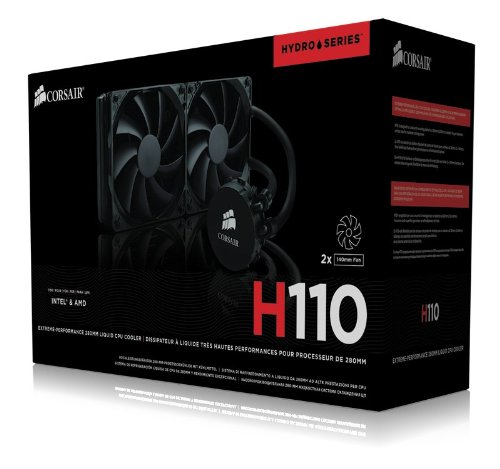

❄️ Stay cool, stay ahead — liquid cooling redefined for the discerning pro.
The Corsair Hydro Series H110 is a high-performance all-in-one liquid CPU cooler featuring a large 280mm radiator and dual 140mm fans that provide superior heat dissipation with minimal noise. Designed for broad Intel and AMD socket compatibility, it uses durable, leak-free tubing and a copper cold plate for efficient thermal transfer. Ideal for professionals and enthusiasts seeking quiet, reliable cooling that enhances both performance and aesthetics.


| ASIN | B00B4OCW7K |
| Air Flow Capacity | 94 Cubic Feet Per Minute |
| Best Sellers Rank | #5,255 in Water Cooling Systems #19,057 in Computer CPU Cooling Fans |
| Brand | Corsair |
| Color | Black |
| Compatible Devices | Desktop |
| Cooling Method | Water |
| Customer Reviews | 4.2 4.2 out of 5 stars (3,628) |
| Date First Available | July 28, 2017 |
| Department | cooling cpu |
| Global Trade Identification Number | 00843591037419 |
| Is Discontinued By Manufacturer | No |
| Item Dimensions LxWxH | 13.78 x 6.1 x 8.22 inches |
| Item Weight | 2.82 pounds |
| Item model number | CW-9060014-WW |
| Manufacturer | Corsair |
| Material | Copper |
| Maximum Rotational Speed | 1500 RPM |
| Noise Level | 35 Decibels |
| Number of Items | 1 |
| Power Connector Type | 3-Pin |
| Product Dimensions | 13.78"L x 13.78"W x 13.78"H |
| Series | CW-9060014-WW |
| Standing screen display size | 280 Millimeters |
| UPC | 843591037419 |
| Voltage | 12 Volts |
| Wattage | 5 |
R**.
Arctic cold and quiet
This baby cools. I installed this in my new Fractal Mid Tower case. You can see the review under my other posts. This cooler was the finishing touches to complete my build. I was running 50-60 celsius on my cpu under medium load. I have an ASUS motherboard with an AMD 8 core 4.0 ghz processor. The stock fan sounded like a blow dryer trying to keep it cool. The temp was in the 40 celsius range under idle. After installing the H110, I am at idle with as low as 7 celsius and usually no more than low 20's under medium load. The fans are large so they are very quiet. I have a very large case and barely fit this thing in. You will want to measure before purchasing. The reason for choosing the H110 over the H100. I have two sons who built awesome machines. One has the H100 the other has the H110. The H100, which is further from the door, can be heard as you enter the room. You have to get close to the computer with the H110 in order to hear it. I wanted quiet. They both work excellent for cooling. The larger fans on the H110 just make it better. Worth the extra few bucks. Just make sure you measure.
K**R
Impressive... Most Impressive
PROS: Performance, performance, performance. Dropped my idle temps by 3-5C and dropped my gaming load temps by 10-12C compared to my Noctua NH-D14 that I was using previously. That's absolutely amazing. I get the same temperature results now with my chip at 1.5V 5 GHz as my NH-D14 gave me at 1.4V 4.8 GHz. Aesthetics compared to a big air tower are nice too... looks much better than a giant heatsink in your case. 5 year warranty is fantastic! Fit in my Cooler Master Storm Trooper case with zero problems. ---------- CONS: Installation, while not particularly difficult, is not particularly easy either. Took me a little over an hour to replace my D14 with the H110, from the time the H110 arrived to when I had it booted up. The instruction manual is pretty minimalist. Again not bad, but not particularly helpful either. Corsair recommends you use the fans as intake, but I think that's really dumb. You don't want hot air exhausting into your case, since it fights the natural pattern of hot air rising up out of your case. MAKE SURE IT WILL FIT YOUR CASE ----------- OTHER I am using this cooler with 2 modifications. I am using a pair of Noctua NF-A14 FLX fans (as exhaust), instead of the corsair fans here. I also used Noctua's NT-H1 thermal compound instead of whatever stock compound this cooler comes with. I also have the fans on a fan controller for silence when the computer is at idle. Relevant system specs: ASRock z68 extreme7 gen3 i7-2600k @ 5 GHz (1.5V) 16GB DDR3 2133 c11 Storm Trooper case
D**T
Awesome cooler
Great cooling system! It's quiet as least compared to an actual CPU fan on a heatsink. Pretty easy to install. Just make sure you're getting the right size of the case and that it'll fit. It keeps my CPU really cool [around lower 20 degree celcius and no more than 25]. I wish the cold plate was square instead of a circle. It does cover the whole area of the CPU so that doesn't really matter. You more need a bit more of the thermal paste on the cold plate. It does come with some already applied on there, but I feel like it's not enough. The radiator is ok... the fins do bend really easy so be careful with them. The two fans than come with this are just two regular fans, so you can replace it with something else of the same size if you want [if you want something with LED lights, quieter, or provides more air flow]. The instructions tell you to aim the fan blowing into the case, however, I aimed the fans from underneath to blow out the case. It doesn't really matter which way you aim them.
S**L
Awesome!
This works awesome. I can overclock to the CPU's capability and don't have to worry about overheating. The highest I've been able to get the CPU to is 72c and that is cranking 4800MHz. Wasn't perfect stability at that speed though so I'm back down to 4700MHz and it is rocking along. I love this cooler. It is simple to install, stupid proof and incredibly quiet. The fans don't seem to move much air so I replaced them with the bgears 1800rpm versions. Now they make noise and move lots of air but I don't think it really did much for the temps so I might just go back to the stock ones that are pretty darn impossible to hear. I literally have to stick my head really close to the computer to even know it is on it is so quiet with the stock fans. So yes if you want to be able to run at the fastest possible stable speeds of your CPU then this cooler will do the trick.
C**S
Amazing Cooling
Ridiculously awesome AIO liquid cooling.With an FX6300 CPU, an h110 push/pull setup and stock fans on one side, SP140s on the other, my CPU runs under 10 deg Celsius @ idle, and only in the low teens for watching high quality movies. Under gaming load, the CPU never reaches above 25 degrees, and actually runs closer to 20 when OC'd and able to produce more power (rather than constantly going to turbo mode). This cooling unit is absolutely massive, but it does an amazing job. Id love to add one to my GPU as well, but my NZXT Source530 case cannot fit it in front. I didn't like how the fit was from the top either, so i used it for the CPU. Got an h90 for the GPU from a local PC shop. If u can fit this model though, you will not regret the upgrade. Unless you already have a larger/greeter setup obviously.
F**4
C'est ce que j'ai gagné en installant ce produit. Dans une pièce à 27° mon I7 950 à 3.3G qui tourne à 100% en permanence (ComputerGrid) a gagné 10°. Pourtant j'utilisais un Dark Rock Pro2 de BeQuiet. Installation facile. Et ce silence des ventilateurs !!! Cerise sur le gâteau : il est compatible avec mon boitier Corsair Graphite 600T. Les baies 5.25" sont vides et sans la cage à disque dur on peut clipper le radiateur (grâce à l'espace entre les deux ventilateurs 14") sur la cage des 5.25". Très bon produit.
P**O
Brilliant Liquid Cool system, I would say it is easy to install but I didn't realise that my PC Tower couldn't handle 140mm fans but that is my mistake. Got this installed in my NZXT Phantom 630 Gaming case with plenty of room and keeps my CPU whilst overclocked to 4300Ghz at a cool 39 degrees during a Torture Test. Only word of caution I will give to anyone is make sure you can fit 140mm fans to your computer and that if you don't have a raised outer case, (Some more basic ones do not) that you don't mind the fans sticking out.
M**N
It cools down my 5600x to around 60-70c in high load from the 90c with the stock cooler
J**S
Foi o primeiro item que chegou, porem os outras peças demoraram e quando montei o gabinete tinha passado o prazo de garantia..........e pior. a raiva de não poder testar antes de vencer afinal as peças não vieram todas juntas fica como um desabafo. e fazer o L quem sabe.
M**L
I purchased the H100X to replace a trusty Noctua NH-D14 tower-cooler. The Noctua had always performed well, but it is huge and obscured many other components within my system. For example, replacing the RAM, NVME drive and even the graphics-card required first removing the cooler. The H100X is pretty straight-forward to install. People used to building PC's or replacing air-coolers really shouldn't have any issues - just check that you have space to mount the radiator and fans. I managed to top-mount mine within a compact Meshify C case. Temperature-wise the H100X performs pretty-much identically to the Noctua NH-D14 when fans are set to silent (~800rpm). Turn them up and you'll shave a few degrees off of the Noctua but both items are closely-matched. Positives *Easy to install - not much different than installing a tower cooler. *No bloatware required. The H100X just does it's thing without need for separate software. *Allows full-view and access to your motherboard. RAM, fan headers, M.2 slots, graphics card release tab etc are all fully-accessible. . *Similar price and performance to to top-end air coolers. *6-year Corsair warranty. Negatives *Contains distilled water. There is a very-small risk of leaks, which may harm other components within your PC. *The water-pump is an additional point of failure. Summary *Great alternative to bulk air-coolers. These offer similar / slightly better cooling performance, look better, and allow easier access to other components.
Trustpilot
1 week ago
2 days ago