
DOWNLOAD THE APP


Customer Services
Copyright © 2025 Desertcart Holdings Limited
DOWNLOAD THE APP

🖱️ Elevate your game with lightning-fast precision and wireless freedom — because every click counts!
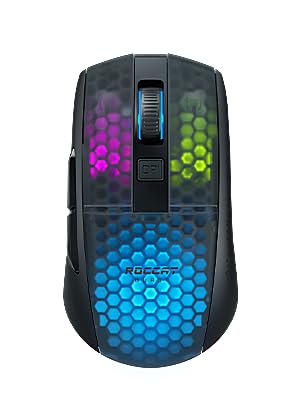
The ROCCAT Burst Pro Air is a premium wireless gaming mouse featuring a lightweight 81g ergonomic symmetrical design, ultra-responsive Titan Optical switches rated for 1 billion clicks, and a high-precision Owl-Eye sensor with 19,000 DPI. It offers dual wireless connectivity via 2.4GHz and Bluetooth 5.2, delivering up to 100 hours of battery life with rapid USB-C charging. Its durable Bionic Shell is water and dust resistant, complemented by customizable four-zone RGB lighting for a personalized pro-level gaming experience.


| ASIN | B09WX3MNYM |
| Amazon Bestseller | #73,168 in Computers ( See Top 100 in Computers ) #570 in PC Gaming Mice |
| Batteries Included | Yes |
| Batteries Required | Yes |
| Battery Average Life | 100 Hours |
| Brand | ROCCAT(ロキャット) |
| Color Name | Air Black |
| Compatible Devices | Personal Computer |
| Connectivity Technology | Bluetooth, Radio Frequency |
| Customer Reviews | 4.3 4.3 out of 5 stars (1,461) |
| Date First Available | May 24, 2022 |
| Item Model Number | ROC-11-430 |
| Item Weight | 0.18 Pounds |
| Item model number | ROC-11-430 |
| Manufacturer | TURTLE BEACH(タートル ビーチ) |
| Material | Plastic |
| Operating System | Windows 7 or later |
| Product Dimensions | 11.99 x 6.81 x 3.81 cm; 81.65 g |
| Release date | May 27, 2022 |
| Size | Pro Air(無線/19K/81g) |
| Special Features | Wireless |
K**R
Not ultra ultra light, but very comfy
Great grip, side buttons feel nice, as does the scroll wheel. It's not the lightest, compared to my old Aerox 3, but the shape of the hump is perfect to rest the palm when claw gripping. Using with WiFi, not Bluetooth. I've had no connectivity problems so far. The RGB through the frosted top is very pretty too, if that's a deciding factor.
ア**バ
今まで有線のマウスを使っていたのですが、擦り減りが激しくなってきたので、無線に切り替え。 こちらはUSBでの有線にも対応しているので、有線ゲーミングマウスからの乗り換えにもオススメ。 【無線の中では圧倒的軽さ】 恐らく、ゲーミングかどうかに関係なく、Logicoolの無線マウスを使っている人は多いことかと思いますが、こちらはそれより明らかに軽いです。 RockCutと言うだけありますね。六角にくり抜かれているところは穴ではなく、薄くしているだけです。なのでそこからゴミが入ったりはしません。 耐久も問題ありません。 【専用ソフトでカスタマイズ】 専用ソフトを使用すると、ライトの色や発光パターンのカスタマイズを5つまで保存することが出来ます。これはDPIのプロファイルのパターンにリンクしており、ライトのカスタマイズ1つにつき5つまでDPIを保存できます。 つまり、計25つDPIの保存ができます。 ライトはマウス下部のボタン、DPIは上部のDPIボタンで切り替えができます。 【滑りやすい接地面】 これは好みがわかれますが、接地面には滑りやすいプラスチック素材が使われており、滑らかな操作を可能としています。 【type-cでの充電で稼働】 これは書いてありますが、乾電池を使わないので楽です。また、充電が切れても有線ですぐ使えるので安心です。 【ゲームでの使用感】 自分はFPSをやっていて、eDPI1200のスーパーハイセンシです。また、持ち手の方にリストレストを敷いて、つかみ持ちで使っています。 これはかなり手に馴染みました。細かい動作をするのに引っ掛かりがあると、動かしづらいくらい弱い力でか動かしているため、やりづらかったのがこちらは滑らかに動かせるので、エイムがしやすくなりました。 ローセンシ、またはハイセンシかつかなり軽い力でマウスを動かす人にはオススメです。 2024/08/27追記 2年目ですが、ちょっと2.4ghzの方の接続がちょくちょく切れるようになりました。 少し衝撃を加えると途切れます。ネジを締め直したら改善されましたが、頻繁に持ち運んで落下が多い使い方で、寿命は3年ないくらいになるかなぁと。 一般的なマウスより耐久性がやや低いと思います。やはりLogicoolの方が総合的に優秀なのか。でも、軽量とリチウムイオンバッテリー、滑り重視という特徴は私に合っているようなので、次も似たようなマウスを使うと思います。
G**K
RCCATのキーボードを使っていたためためこちらを購入しました。 以前は普通の小型静音マウスを使っていました。 購入して2ヶ月程ち、毎日使っていますが問題はありません。 手が小さい女性でも違和感なく使えます。 RCCAT製品同士だと発光色やタイミングが同じにできる為気持ちいいです。 クリック音はうるさいわけではないです。
K**O
ザ・ゲーミングマウスといったデザインが気に入りセールということもあり購入してみました。 bluetoothではなく付属のUSBで無線接続して使用しています。 本体は大変軽く滑りも良いです。クリック感はロジクールのGシリーズよりストロークがやや深め ですが、特に何の違和感も無く快適に使用できています。 ROCCATの公式サイトからダウンロードできるROCCAT Swarmというソフトで DPIやボタン機能の変更、発光色やパターンなどを細かく変更できます。 発光部位は左右ボタンとホイール周り、胴体部分の計四箇所に分けられておりそれぞれ違った 色に発光させることができますが、発光パターンは4箇所一括でしか変更できません。 (左ボタンだけ点滅で他は常時点灯、といったことはできません) ソフトは日本語対応しているので簡単に設定を変更できました。 ワイヤレス状態の発光でどの程度バッテリーが持つか少し不安ではありますが、 大変柔らかなUSBケーブルも付属しているのでもしバッテリーが ダメになっても有線で使い続けられそうです。
A**者
思っていたより、イルミの照度が暗い。 当初はホワイトを購入しましたが、発送予定日が遅かったので、キャンセルさせていただいて、こちらを購入。 ホワイトが良かったかな?
吉**毅
買ってよかったです♪ LEDが虹色に光るのはとても綺麗で 充電も長持ちなので 使っていて困りません♪ 静音クリックタイプだったら更に最高だと思います。
ケ**ん
ワイヤレス接続ができない問題がありました。 何をしてもダメでした。 PCも3台で試しましたが接続できませんでした。 大きさ軽さ サイドボタンの押しやすさ全て最高なマウスなだけに残念です。
O**D
初めに買った商品がソフトウェアアップデートができず返品し二台目を購入しました。その辺の不良品があるのが少し心配です。 感想はマウスを何個か所有していますが重さも気になりません。掴み心地、ボタン押し心地はとても満足です。
P**E
Works fine now, but initially didn't work and needed to return it once. I've used it for gaming and work, feels smooth! Looks beautiful with my setup!
T**N
Loved the Kone pure so much I own two of them. When Roccat came out with something so feather light I just have to give it a go. The first impression is that it is really light weight and it gliiiiiides across my razer Goliathus extended just like that. Respond is superb and accurate. The cable is soft and does interfere with mouse movement. But since it’s an amorphous design and since I’m so used to the Pure, I’d accidentally change weapons in the heat of a fight more frequently than I like it. So when I found out Roccat has released the Kone Pro and Air, Indid not hesitate and ordered the Pro.
B**3
1. Dont worry online review about coating its grippy as hell 2. Y axis movement of mouse it slightly noticable x axis is fine by the way the feet is really smooth. 3. Amazon has charged this way more than msrp only negative
A**F
My hand is 16.5cmx9cm, depending on what I'm doing (gaming, surfing, work, etc) I'll switch up my grip between a palm, a very relaxed claw, or a fingertip grip. I'm able to do all 3 with this mouse. This is an almost perfect mouse. The buttons feel tactile and are satisfying to press, the switches are great. I've seen people complain about the click, describing it as "mushy" and idk what on earth those folks are on about. They feel nice and crisp to me. On-board memory works flawlessly which means you can terminate the Swarm software once you've configured stuff and it will persist in a plug-and-play fashion, locally stored in the mouse. There is no rubberized coating or padding which is a plus for me as it lasts longer this way and is easier to clean without ruining the material, though if you have sweaty hands perhaps that isn't a great thing. I find that the slight texturing on the plastic itself is good enough to give me a grip. Scroll wheel is easy to press and precise, unlike my Steelseries Rival 300 which would trigger the scroll function while trying to press m3 about 2/3 of the time. Whether it will loosen over time and give me a similar result remains to be seen but I'm guessing not since I haven't seen anybody complain about that in any forums with the Roccat wheel. The placement of the side buttons could be a bit closer to the front end of the mouse, as I find them a little cumbersome to press with my thumb when I palm grip but not a huge deal. LEDs are nice and vibrant, nothing much to say as I'm not opinionated on gamer aesthetics. I turn the LEDs off half the time tbh.
M**.
Da meine Roccat Kone Pure nach einigen Jahren nun auch das "Doppelklick" Problem hatte, habe ich mich nach einem Nachfolgemodell ausschaue gehalten. Die Entscheidung ist aufgrund der Specs auf diese Roccat Burst Pro gefallen. Die Roccat Burst Pro liegt perfekt in der Hand und ist für meine kleinen Hände optimal. Wichtig war mir nicht wieder in das gleiche "Doppelklick" Problem zu laufen. Dieses Modell besitzt einen TITAN SWITCH OPTICAL und hält damit sicher länger. Das Klickgefühl ist auch tatsächlich anders (besser) wie bei der mechanischen Roccat Kone Pure. Die Gleitpads sind optimal, die Maus schwebt förmlich über das Mauspad. Die Beleuchtung sieht super aus, gut gefällt mir die Beleuchtung von innen. Man sieht die Wabenstruktur des Gehäuses, was die Maus durch das weniger verwendete Material einfach leichter macht. Was ich schade finde, dass es nur noch einen DPI Button gibt. Vorher konnte ich mit zwei DPI Buttons (hoch und runter), schneller wechseln, jetzt muss ich die DPI durchschalten. Preis-Leistung ist unschlagbar und daher auch eine klare Kaufempfehlung von mir.
Trustpilot
1 month ago
3 weeks ago