We remain fully operational. Our teams are working around the clock to ensure your deliveries continue safely.

DOWNLOAD THE APP


Customer Services
Copyright © 2025 Desertcart Holdings Limited
DOWNLOAD THE APP


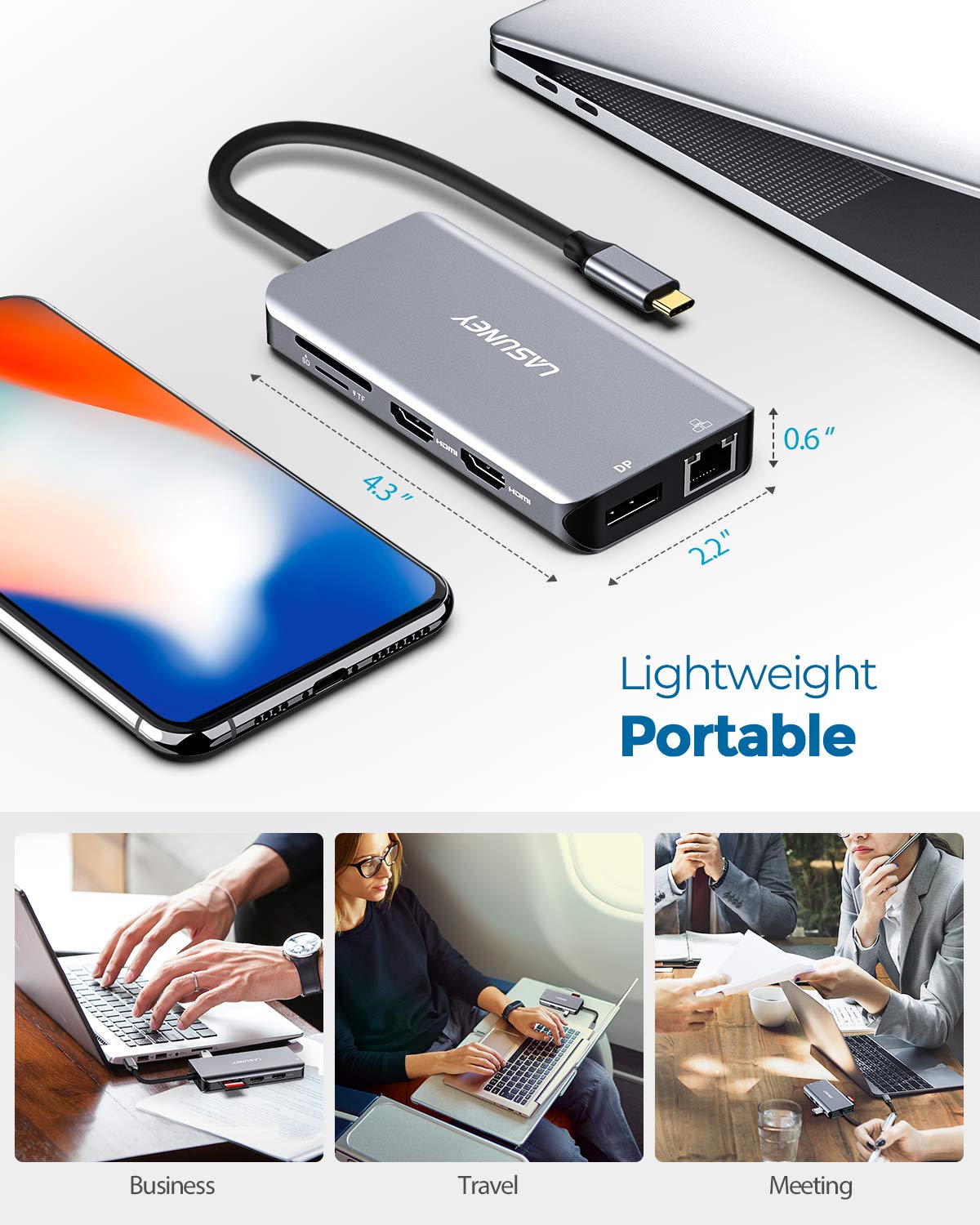


🚀 Triple your productivity, not your clutter!
The Lasuney 10-in-1 USB Type-C Hub is a premium multiport docking station designed for professionals seeking to maximize productivity. It supports triple 4K display output (2 HDMI + 1 DisplayPort), offers 100W Power Delivery 3.0 charging, and includes ultra-fast USB 3.0 ports alongside a 1Gbps Ethernet connection. Its sleek aircraft-grade aluminum build ensures durability and style, making it compatible with most USB-C laptops including MacBooks, Dell, HP, and Lenovo. Ideal for multitasking millennials who demand seamless connectivity and a clutter-free desk.



| ASIN | B082KMKQQX |
| Best Sellers Rank | #50,442 in Electronics ( See Top 100 in Electronics ) #700 in Laptop Docking Stations |
| Customer Reviews | 4.0 4.0 out of 5 stars (2,192) |
| Date First Available | December 10, 2019 |
| Item Weight | 4.2 ounces |
| Manufacturer | LASUNEY |
| Product Dimensions | 4.3 x 2.2 x 0.6 inches |
M**Y
Hands down the best 10Gb/s Docking Station if you have a USB C 3.1 Gen2 or higher
Setup & Compatibility: If you're equipped with a USB-C 3.1 Gen2 or higher (like USB-C 3.2 or Thunderbolt 4.0), this docking station is a dream come true. After two simple tweaks—installing the optional Realtek driver via Windows 11 and disabling "USB Battery Saver"—every port functions flawlessly, including consistent external monitor support. Performance & Features: This docking station delivers what premium $100+ models promise—at a fraction of the price. It supports three displays simultaneously (1 laptop + 2 monitors via DisplayPort), offering a game-changing upgrade for users transitioning from older setups. All ports perform with zero glitches. It functions without an attached power delivery source. Build Quality & Value: Don’t let the budget price fool you—this isn’t cheap junk. The design feels premium, and the all-Realtek chip architecture ensures stability and performance. Whether it’s branded LASUNEY or FALWEDI, the hardware inside makes this the best $20 you could spend on a docking station. Verdict: If you're retiring an old desktop and upgrading to a Windows 11 laptop, this dock offers unbeatable versatility, performance, and value. What a Joule, indeed.
R**R
Might overheat
Works well but needs additional cooling. Will get very hot.
R**N
You need an ADDITIONAL power source for it to stay connected
Update: Not for Surface Pro 11 use. So far works fine without an additional power source with another computer. Updated to 4 stars. After 1/2 a day being frustrated with this thing connecting & disconnecting every 2-3 seconds, FINALLY tried plugging in a USB-C power cable & adapter (NOT INCLUDED) to the rear of it & it’s finally stable enough to stay connected. Removed 2 stars because nothing in the instructions say you need to do that. Would have thought it could be powered by the included USB-C cable since that was the only cable provided. Time will tell how stable this thing is & how long it lasts.
J**E
Works as Intended, but DP doesn't work
It works exactly as intended, but displayport doesn't show anything when connected with another HDMI. I had to get another HDMI cable. For some reason, 2 HDMI works. I also tried single displayport and that works just fine. It's just when it's one displayport and one HDMI. Haven't tried all 3 ports simultaneously though. Other than that, it's great to have a hub with PD and the number of ports are great and convenient. Update: I bought two of these and for some reason, the PD stopped working. Reached out to the seller and it's impossible to get a resolution from them. They ask a few questions and after I answer them, they always reply with... more questions. For some reason, it's impossible for them to believe their product is faulty and they keep asking what I'm doing when PD isn't working, and I don't even know how to respond to that when it's only a two step process to do PD... plug and plug. regardless, the other ports work most of the time so I'll hang on to it, but I would not buy this again because of the seller.
A**W
USB-C Hub that actually works simply!
I needed USB-C peripherals for my 2016 15" Macbook Pro since all it has are USB-C ports, and my windows PC died on me. I wanted to keep my Plex server temporarily running using my laptop as my home machine. Mainly I needed USB 3.0 ports for speedy connection to my external drives, reliable Ethernet for a solid connection, ports for my monitors, and while not necessary, power delivery sounded convenient. I was very distrustful of USB-C hubs because I hear of their shoddy quality, unreliability, etc all around so I never really expected all the ports to work from the get-go. I'm happy to report this hub felt very durable and hefty -- even though its probably just another Chinese carbon copy, it seems well built. I tested all the ports: - connected 3 USB 3.0 devices and successfully streamed 4k movies to my Plex server. - tested Ethernet port vs. my wifi mainly for stability but also speed. I pay for 300/300 fiber but as you can see my 5GHz wireless was at 208/320. I plugged into Ethernet with my fingers crossed and the speedtest immediately shot to 358/365 (i guess 360/360 is what they're actually feeding me lol) and it had almost no fluctuations as you can see from the curve. - I used my Macbook's 87W charger to plug into the hub, and can just dock my laptop at my desk by plugging in the USB-C into the laptop and it automatically connects everything. Power seemed to stay charged even while doing most tasks, but I wasn't super extensive on power draw testing. - I didn't actually get to test monitors on HDMI or DisplayPort because it turns out I was using DVI-D and the monitor was too much hassle anyways for my temporary solution right now. I've tested for about a week now and it's all still working!
A**G
I purchased the 2021 Zephyrus G14 recently, but I knew that I would need to purchase a separate USB-C hub to connect my monitor and my devices to it. This is one of the few well-equipped hubs on the market which has a DisplayPort connection, and thankfully, everything works swimmingly. There were no drivers that needed to be installed; everything just works when plugged in.
Trustpilot
3 days ago
2 months ago