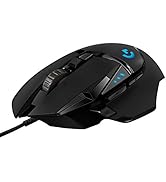
Desertcart purchases this item on your behalf and handles shipping, customs, and support to EGYPT.
🎮 Elevate your precision, power, and style — the G502 Hero is the ultimate gamechanger.
The Logitech G502 Hero Wired Gaming Mouse features the cutting-edge HERO 16K optical sensor with up to 25600 DPI for unparalleled precision. It offers 11 programmable buttons and a dual-mode hyper-fast scroll wheel for customizable control. Adjustable weights allow fine-tuning of balance and feel, while LIGHTSYNC RGB lighting synchronizes with your gaming environment. Built with mechanical switch button tensioning, this ergonomic mouse delivers crisp clicks and durability, making it a top choice for both gamers and professionals seeking performance and comfort.


| ASIN | B07GBZ4Q68 |
| Additional Features | LED Lights, Programmable Buttons, Touch Scroll |
| Antenna Location | Gaming |
| Best Sellers Rank | #16 in Video Games ( See Top 100 in Video Games ) #2 in PC Gaming Mice |
| Brand | Logitech G |
| Button Quantity | 11 |
| Color | Black |
| Compatible Devices | Personal Computer |
| Connectivity Technology | USB |
| Customer Reviews | 4.6 out of 5 stars 58,535 Reviews |
| Embellishment Feature | LED |
| Enclosure Material | Metal |
| Global Trade Identification Number | 00097855141996 |
| Hand Orientation | Right |
| Hardware Platform | PC |
| Included Components | mouse, quickstart guide, wireless receiver |
| Item Dimensions L x W | 2.95"L x 1.57"W |
| Item Type Name | Logitech G502 HERO High Performance Gaming Mouse |
| Item Weight | 4.32 ounces |
| Manufacturer | Logitech |
| Mfr Part Number | 910-005469 |
| Minimum Required Operating System Version | Windows 7 |
| Model Name | Logitech G502 HERO High Performance Gaming Mouse |
| Model Number | 910-005469 |
| Mouse Maximum Sensitivity | 25600 dots_per_inch |
| Movement Detection | Optical |
| Movement Detection Technology | Optical |
| Number of Batteries | 1 Lithium Polymer batteries required. (included) |
| Number of Buttons | 11 |
| Operating System | OS |
| Pattern | Mouse |
| Power Source | Corded Electric |
| Range | 1.0 meters |
| Special Feature | LED Lights, Programmable Buttons, Touch Scroll |
| Style Name | Wired |
| Theme | Gaming |
| UPC | 097855141996 |
| Unit Count | 1 Count |
| Warranty Description | 1 year hardware limited |
A**R
Absolute best mouse been using for years
The Logitech g502 has been my go to mouse for years. I have replaced it 3 times over the years do to wear and tear and will probably buy this mouse for the rest of my life. The weight and design of the mouse is perfect for me (I have a bit larger hands). The button placements are good and plenty of them. The Ghub app works well and makes it easy to keybind every button and set dpi. I have tried other mice such as razor and steel series but the g502 just has the best feeling, weight, and buttons. I use it for both gaming and work. Highly recommend this mouse.
Z**R
The Best Mouse I've Ever Used
This is the best mouse I've ever owned, hands down, and it's not even close. I would give this thing ten stars if I could. The buttons are easily programmable and the macros have transformed work life. I cannot recommend this highly enough. I recommend it to my coworkers as mapping all our main platform's (Relativity) keyboard shortcuts, as well as all the usernames, passwords and addresses we need to log into everything in the the morning, into the various buttons, which are also brilliantly placed, has made life that much easier, and work that more efficient. It's also extremely comfortable to use. I have awful wrist issues, and it's just as comfortable to use as a vertical mouse. The value of the wired version also can't be beat. The only thing I don't like is the new version of G-Hub, it's harder to use than the one I do, which is 2021.3.9025, and you should be able to find that version online. I don't endorse many things, but this mouse has been a complete gamechanger, and I'm not exaggerating. Do yourself a favor and get one, you will not be sorry.
S**T
Best mouse hands down!
There is a ton to like about this mouse from how it fits into your hand, the grip, and the competitive edge for gaming you will begin to notice immediately! 1) Daily use Not everything is about gaming, as this only takes up maybe 2-3 hours max of my time a day. The rest goes to programming, studying, etc. So, it is important for me that I have a mouse that I can use which is comfortable, useful, and fits my basic needs. Now, let's compare this to a normal run-of-the-mill mouse since this is probably the biggest competition. Why get this mouse Vs some other cheaper option? Well, for daily use I can list the following pros: - Fits incredibly well around your hand - Many different buttons that can be programmed for different use > Shortcut keys, Forward/back from a page, etc. - Great grip - Change the DPI with different Profiles using Logitech Software 2) Gaming When I am done working for the day, I simply press a button on the mouse and can quickly adjust from study mode to gaming mode. I even have the ability to change the LED lighting to provide verification that the Profile changed successfully. Following pros: - You can change the DPI for each account, and each profile can have an option for many DPI's. The DPI is especially useful for getting the accuracy you need in a mouse. When studying, I can move the mouse very little and move from monitor to monitor (about 1700 DPI), for gaming, I can put the setting at a lower amount (About 800 DPI) and now my accuracy is much better! - The buttons are programmable. This means that for every game you play you can set up the mouse buttons to however you want! Some of these buttons you want to remain the default, like the G9 which changes the profiles, it is up to you though on what you prefer! I personally like having important buttons be G8 and G9, then secondary buttons are the default forward/back. Then I use the target button your thumb rests on as a special (like a grenade wheel or something) - The back-end functionality, such as response time will give you a competitive edge compared to a normal mouse. Now, is this going to be in the 1-3 second range, probably not? With gaming, how quickly your respond to something will play a huge effect on your success as a gamer! Simply being a bit faster means a huge difference between success and failure. (Think if you and the enemy both are competing against each other, who will win? The difference on who wins isn't based 100% on speed, but rather the better strategy, the more powerful weapon, and whoever is in a more superior advantage. Many times, 1-3 seconds makes absolutely no difference, and you simply make a rookie mistake, or the opponent has such a clear opening that you can just punish them for it. Once you make fewer mistakes though, and you become a better gamer, speed really begins to make a huge difference! Simply put, if you and your opponent both have equally great strategies, aren't making rookie mistakes, and know what you are more or less doing, you have both successfully accomplished the basic fundamentals, good for you two! Once you get past fundamentals, the biggest challenges now are getting into placement, having consistency, and being able to get to a location as fast as possible while competing with many others who are doing that exact same thing. If you are doing everything right, and there is a latency issue, then this alone can be the root issue of failure. Again though, not many strategies require a 100% speed advantage. I can think of cases where I have say a 2-3 second gap where the opponent would have to run through a hallway, which in this case having latency wouldn't affect my strategy as much. Now, if I am pushing aggressively, and failure literally means an opponent attacking me before I attack them, or get into a position to dodge damage, then latency is extremely important! So, this is where the competitive edge of this mouse really begins to show. Overall, I am extremely happy with the quality of this mouse and will update in a few months after I have had some more time to break it in! *** Update *** The mouse is durable and has stood the test of time very well! The software setting up the mouse bindings has changed, so I am still getting used to that. Works very well in gaming, and enjoy the ability to transition from work 1,000 dpi and copy/paste, cut, etc., as bindings to gaming with 650 dpi jump, melee, etc.. Definitely good fit for someone with a big palm like myself.
D**Y
This mouse is PEAK
I bought this thinking, "Cool, a gaming mouse." Once I got everything customized, though? Ohhhh, I get the hype now. This mouse is ridiculously comfortable! It glides across my mouse pad like it's auditioning for Fast & Furious: Tokyo Drift, and the sensor is so accurate that now I can't blame my bad aim on my old mouse anymore. Unfortunately, my aiming skills are still a work in progress. Turns out the mouse can only do so much. The adjustable weights are also a nice touch. I spent way too long moving the little weights around like I was Gordon Ramsay seasoning a steak. "Hmm... needs 3 more grams." Did it actually make a huge difference? Maybe. Does it make me feel like a professional gamer? Absolutely. The build quality is fantastic, the clicks are satisfyingly crisp, and it's survived countless gaming sessions, graphic design projects, and those moments where I click a link 20 times because it won't load fast enough. At this point, this mouse has been with me through victories, defeats, deadlines, and at least 4,000 moments of aggressively highlighting the wrong text. Overall, this mouse is PEAK and unlike any other mouse I've owned previously. It did not just improve my setup. It walked in, took over my desk, and works like it pays rent.
D**N
Better Than Expected
Wanting to try this popular gaming mouse, I thought it looked a bit silly on the images and wasn't sure how comfortable it would be. However, upon receiving it, it looks and feels much better that what I expected from a gaming mouse. It still leaves a bit to be desired for me, as a taller mouse such as one from the Logitech MX Master series seems a bit more comfortable in my hands, but this one already does plenty in terms of comfortability. The scroll wheel is absolutely amazing, including a button to toggle between free and mechanical scrolling. The mouse provides 9 extra buttons; 2 above the thumb, 1 in front of the thumb, 2 next to the left click, and 1 behind the scroll wheel toggle. Some of the extra buttons are predisposed to switch between different DPI configurations. However, using G Hub this functionality can be removed, giving you more freedom to use these buttons elsewhere. G Hub itself looks nice and has onboard profiles, meaning I'm not forced to open the software unless I want to configure the mouse further. The weight of the mouse feels nice to me. It isn't lightweight, and it provides extra weights to make it slightly heavier. Overall, I'm satisfied with the mouse, and it feels nice to use for gaming and other purposes. However, I might go for a more ergonomic mouse next time.
G**.
Outstanding mouse once you get past the software
If you talk about this mouse, you really need to talk about the Logitech software, There are 3 different downloads at the Logitech website to change your 5 profile settings if you don't like the default settings on the G502. The one they will suggest first is G HUB and it is by far the worst and most convoluted to learn to setup and use. The second which they are phasing out is Logitech Gaming Software. (If you install both G HUB and Logitech Gaming Software, and you try to use Logitech Gaming Software, it will not allow you to use it, and it will tell you to use G HUB instead even though many FAQ's at the Logitech website still refer to Logitech Gaming Software.) However, the third, and the one you should download and use, is called Onboard Memory Manager. It is very simple and easy to figure out, does almost everything you want it to, and it doesn't also install a lot of other crap on your system. NOTE: If you do wind up installing G HUB or Logitech Gaming Software, the setting DPI LIGHTING for "ALWAYS ON" is unchecked by default and is not in Onboard Memory Manager. (By default, when you change profiles, the side DPI lights on the G502 briefly go on and then go off to indicate what profile you are on.) I suspect this setting is unchecked by default for a reason, because I could not get it to work properly when set to "ALWAYS ON". When this option is checked the side DPI lights would not stay on the proper profile indicator to indicate the current profile setting, and they would randomly change (such as when I used the scroll wheel.) What I did was to keep this setting in G HUB or Logitech Gaming Software unchecked. Then in Onboard Memory Manager I would select a fixed color for each profile so I would always know what profile I was currently on. (BTW, this is similar to what is on the wireless G305 mouse but they are only small dots of color, you can't change the default colors, and they only select up to 5 different DPI settings on only one available onboard profile as opposed to the 5 profiles each with 5 DPI settings on the G502.) Unless you have a desire to be frustrated, do yourself a favor and just download Onboard Memory Manager. On the G502, the only reason I can see for using G HUB or Logitech Gaming Software is if you want to change settings for mouse click one or two, which Onboard Memory Manager won't allow, or if you want to setup profiles for individual games and software on your computer, in which case I would lean in favor of Logitech Gaming Software which is much more intuitive and easy to use. All that being said, once you get past setting the G502 up, the mouse performance is outstanding. I didn't add the weights since the mouse felt fine to me. And even though the highest default DPI setting is at 6400, you can set it all the way up to 25,600 if you wish. Also, I have small hands, and even though some of the buttons I will never be able to push without really reaching, it's very comfortable using for long periods of time, and for the current price you can't beat it.
A**R
Still kicking 5+ year later... the unlockable scroll wheel is a fantastic feature
This is my main mouse. Ergonomically, it is comfortable and fits my hand well. The LED's are present and you can change their pattern and colors, but I do not go for all that LED stuff. The biggest feature for me with this mouse is the unlockable scroll wheel. Instead of of a soft click at each stop of the scroll wheel, you can unlock it and have the mouse scroll wheel free-spin. This was a huge selling feature for me which I have trouble finding in a lot of other devices. Also, 5+ years later, this mouse still works as new. A very great Logitech product!
D**T
Awesome mouse
So, instead of writing a review shortly after I recieved the G502 Hero, I decided to wait until now so I could get acclimated to the mouse and keep an eye out for any potential flaws or issues with it. First is the design: The design, while unusual, works fairly well. I have small hands, but I'm able to reach AND use almost all the buttons. Due to the placement, I do have issues reaching the G7 button without adjusting my hand to press it. It may be possible to reach it with your thumb, but it's not easy to do. The middle mouse button (MMB) is somewhat hard to press for me, mainly due to the required pressure needed. It's considerably more difficult to press than any of the other buttons, even the other mousewheel buttons. Though, all of the button functions can be swapped and changed, so it's definitely possible to assign MMB to a better-positioned button (like the DPI Shift button). As for the DPI Shift button, it's a little bit forward-placed for someone with small hands, but still easily reachable. If you don't really change your DPI or need to change it on-the-fly, it's very useful as a G-Shift button or G3/MMB. The G8 button is much easier to reach than G7, but it's not very efficient for some games. In order to use it, you have to take your finger off LMB to press it, which leaves you temporarily unable to attack if you have LMB set to do that in whatever game you play. Though, it can be used well to take screenshots with, provided you have a macro set up for it. Second is the software: The Logitech G-Hub software does have problems, but it seems like those problems are at random and they don't affect everyone the same. Though, unlike Razer Synapse 3, it will open at startup without automatically opening a tab for you. It's pretty much in the background unless there's an update of some kind. One of the big advantages over Razer is that the macro setup is much easier, as it's very simple to create a macro (for anyone not familiar with it, a macro is a programmed sequence of buttons/keys that can be assigned to another button and activate when that button is pressed, like Alt+Tab but assigned to a mouse button). All of the buttons can be reassigned via G-Hub, and drag-and-drop is the easiest way to do it. G-Shift also works well, being the same thing as Hypershift, just rebranded. (G-Shift is a feature of G-Hub/the mouse, which allows access to secondary button functions as long as you have G-Shift assigned to a button you have to hold down) Unlike Razer, RGB lighting profiles aren't available unless you're using a profile assigned to a specific game or program, so that's a downside. Another downside is that G-Hub has issues scanning and recognizing games, as it only recognized some of my games, and then found a few more after a couple software updates. Though, if you want to, you can add the games yourself, as that will work almost as well. Third is the delivery: It didn't take long for it to get here, but that could be different in your area. I ordered it on a Friday and it came the following Tuesday, on the exact day it was supposed to arrive. Though, they will deliver it to your address specifically, as it seems PO box delivery is unavailable for this type of thing. As you can tell, it did arrive in perfect condition, though that may be because of the short delivery time. If you're interested in the G502 Hero, I would suggest that you give it a try, as it seems to be a fantastic mouse for me so far. But, like I've mentioned, be aware of your hand size when buying this, as it may not fit your hands perfectly.
A**R
My favourite Mouse 🐁
Best mouse I've ever used I have one at work and bought one for my home setup Highly recomend it for this price point Doesn't make sence how cheap this is compared to other high teck mice I got it for around 160 aed in may 2026
A**Y
جيد للغاية
جيد جدا
P**A
Customizable 5 weights & 11 Buttons, Hyper Scroll and High DPI/RGB. But the best thing is G HUB!
Customization: 5/5 Buttons: 5/5 Features: 5/5 Control: 5/5 Durability: 5/5 Grip: 4/5 RGB: 5/5 Review: G502 Hero fills the gaps of the previous G502. Hero is the perfect companion for all of your gaming needs. Let me get into each of them one by one. Don't miss the G HUB! Programmable Buttons: It features 11 buttons that are fully programmable. These include Forward/Backward, DPI Up/Down, G-Shift, Middle Click, Left/Right Click, Profile Cycle and Left/Right Scroll. Refer my image for visualization. Holding G-Shift in the default mode changes DPI to a preset which you can customize. For example, I hold it while snipping to lower my DPI to 1200 in FPS games and increase accuracy. Besides lowering the DPI, G-Shift button can also make existing buttons perform other functionality than their defaults. This gives you another set of 10 new controls! Yes, it does have horizontal scroll that enables left/right scrolling. I use it to change tabs in Chrome. Profile Cycle button helps me to cycle between different profiles easily. Not to miss that all of these are fully customizable on a per-app basis! Hyper Scroll: The scroll features as a frictionless one. Just scroll it once on a long webpage, leave it and it will keep scrolling even after you reach the end. Don't worry, you have a toggle just under it that can disable this feature. RGB: The space allotted is less. You can customize RGB settings for the Logo and the profile indicator on per-app basis. Choose modes between Cycle, Breathing, Fixed, Music and Screen. Music mode works as visualizer based on the playing track. Screen mode changes colour according to what's on your screen. For example, I have made profile for GRIS that makes my G502 to change colour to white and red depending on what's on left and middle side of the screen. The profile indicator in default mode helps you see the profile or DPI level when you change among the max 5. Weights: You get 5 3.6 grams weight bars that you can align in the weight compartment of the mouse as per your convenience. You have options for left/right and forward/backward alignments. A single weight can be aligned in 13 different ways! I've made a weight adjustment video so that you can see how weights are adjusted in G502. Grip and Durability: The mouse looks rock solid. If you have not too large hands, yours can rest comfortably over the mouse. There is a thumb rest while the curvature of the mouse is a treat to your right hand. Beware, left-handers! G HUB: The best thing about this mouse is the software. Yes, you read it right. With G HUB, you can make custom profiles (or even download from the community) for each app. Thus, you can change RGB colours and mode, buttons mapping, DPI settings and G-Shift/DPI-Shift for a particular app. I have even set a profile for Chrome that enhances my productivity. You can find profiles made by me on G HUB by the name 'Baahubali'. What amazed me is that besides Macros (Keyboard key combinations), Shortcuts and Keyboard Keys, you can even build scripts in Lua programming language - now this is something really professional by team. This was my first purchase of a premium gaming mouse. Previously, I had been buying Dragonwar mice. I read somewhere that this mouse is a one-time investment and now I believe they are right. Experiencing the hyper frictionless scroll gives you an idea about how reliable the mouse promises to be! With a price tag on 4K, it's a steal. You may get as minimum as INR 3799 in Lightning Deals. Do check my detailed photos and unboxing videos. I had to follow Amazon Video Format Specs so do visit YouTube (Paras Lehana) to view highest quality video of Unboxing and Weight Adjustment.
A**R
Best mouse ever!
Love this mouse. Feels comfortable, looks nice and just works.
C**O
Excelente
Excelente mouse, bem resistente o material e durável em relação aos cliques (estou no meu terceiro)
Trustpilot
1 month ago
2 days ago