Desertcart purchases this item on your behalf and handles shipping, customs, and support to EGYPT.
🚀 Print smarter, faster, and wirelessly—because your office deserves the best!
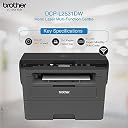
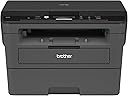
The Brother DCP-L2531DW is a compact monochrome laser multifunction printer delivering up to 30 pages per minute with 2400 x 600 dpi resolution. Featuring automatic duplex printing, a 250-sheet tray, and versatile connectivity options including USB, WiFi, and WiFi Direct, it’s designed for small office and home office environments. With 64 MB memory and an easy-to-use LCD display, it supports efficient print, scan, and copy tasks, backed by a 15,000 pages/month duty cycle and free installation for a hassle-free setup.
| ASIN | B07GLM8HDT |
| Additional Printer Functions | Copy, Scan |
| B&W Pages per Minute | 30 ppm |
| Best Sellers Rank | #85,586 in Computers & Accessories ( See Top 100 in Computers & Accessories ) #109 in Laser Printers |
| Box Contents | Printer, Installation CD, Power Cable and USB Cable,,,, |
| Brand | Brother |
| Brand Name | Brother |
| Colour | Black |
| Compatible Cartridge | TN-2465 Toner |
| Compatible Devices | Smartphones |
| Connectivity Technology | USB, Wi-Fi |
| Customer Reviews | 4.4 out of 5 stars 613 Reviews |
| Display Type | LCD |
| Dual-sided printing | Yes |
| Duplex | Automatic |
| Hardware Interface | USB |
| Importer Contact Information | BROTHER INTERNATIONAL (INDIA) PVT. LTD. UNIT NO. 801 AND 802, 8TH FLOOR, ALPHA BUILDING, HIRANANDANI GARDENS, POWAI, MUMBAI - 400 076, INDIA |
| Ink Color | Black |
| Item Dimensions D x W x H | 41D x 39.8W x 27.2H Centimeters |
| Item Type Name | Multifunction Printer |
| Item Weight | 10.3 Kilograms |
| Manufacturer | BROTHER, BROTHER INDUSTRIES (VIETNAM) LTD. Phuc Dien Industrial Zone Cam Phuc Commune, Cam Giang District Hai Duong Province, Vietnam - 174700 |
| Manufacturer Contact Information | BROTHER INDUSTRIES (VIETNAM) LTD. Phuc Dien Industrial Zone Cam Phuc Commune, Cam Giang District Hai Duong Province, Vietnam - 174700 |
| Max PrintSpeed BlackWhite | 2400 x 600 |
| Maximum Copy Resolution Black and White | 2400 x 600 dpi |
| Maximum Media Size | A4, Letter, A5, A5(Long Edge), A6, Executive, Legal, Folio, Mexico Legal, India Legal |
| Maximum Sheet Capacity | 250 |
| Model Name | DCP-L2531DW |
| Model Number | DCP-L2531DW |
| Model Series | DCP |
| Network Connectivity Technology | USB, Wi-Fi |
| Number Of Trays | 1 |
| Other Special Features of the Product | Auto-Duplex |
| Packer Contact Information | Brother |
| Paper Size | A4, Letter, A5, A5(Long Edge), A6, Executive, Legal, Folio, Mexico Legal, India Legal |
| Power Consumption | 230 Watts |
| Printer Output Type | Monochrome |
| Printer Type | Laser |
| Printing Media Type | Paper (plain) |
| Printing Technology | Laser |
| Resolution | 2400 x 600 |
| Scanner Type | Flatbed |
| Special Feature | Auto-Duplex |
| Specific Uses For Product | Office |
| Unit Count | 11.8 Kilograms |
| Warranty Description | 1 year from the date of purchase |
| Wattage | 70 Watt Hours |
J**R
Maximum features for a monochrome printer at this price
Packing and contents: Printer came very well packed in the original Brother box along with toner, CD and USB/power cables. Set-up: Installing the printer was a breeze. It supports both USB-based and wifi printing. I just had to install the appropriate drivers first, and then followed the on-screen instructions. Wifi set-up was straight-forward: the only painful part was entering my wifi password character by character on the printer but this is a one-time thing! Features: This printer comes with several impressive features. The highlights include automatic back to back printing (duplex printing in B&W), copying function (B&W), scanning function (B&W and color) and most importantly, an advanced 2-in-1 ID card copying function (where you can print two sides of an ID card on the same page). It supports wifi printing too. I am yet to install the brother app on my phone, but direct printing from phone (without the app) is very easy as long as the phone is connected to the same wifi IP as your router. The printer has a wonderful interface and allows you to change the density/contrast and several other settings for the copying function. Overall verdict: At this price range, this is the best monochrome laser jet printer with several advanced features.
S**N
Good, useful, valuable for money
I've been using this (for home purpose but involves a lot of printing) for the last 3 months and it's working very well. Smooth functioning, no problems at all. Very easy to use even for a person like me who's not an expert. I am able to use all the features they've mentioned in the ad. I found wifi feature very convenient and easy especially when you can take printout from your phone as well. It makes otherwise tiresome job easier. Duplex printing is the best feature for me as i need to take a lot of print. It saves money and time. So I would definitely recommend this printer which proves valuable for money. Print quality is also very good. I would like to add that after more than a year, I am giving the same rating & review for this. Printer is functioning very well.
A**K
Works great once fully set up
Have been using this for about 2 months now. I use a bunch of Linux machines at home (Ubuntu, Fedora). It was a pain to configure things on the Linux computers. Automatic printer detection via Wi-Fi doesn't work well, of even if it detects it doesn't print. Hence had to set a static IP for the printer and do manual configurations on the Linux computers. However, once that was done, printing works reasonably well. Non-technical users would have a hard time figuring things out themselves (but then again, I suspect non-technical users are unlikely to be using Linux computers). Don't know how easy/hard it is on Windows or Mac. Printing works seamlessly on Android and Apple iOS smartphones without any pre-configuration. Scanning sometimes fail on Linux computers, and always fails on Android, even with Brother's official app. Didn't try scanning on iOS. (Personally for me scanning isn't a frequent use-case.) Print quality is good. Automatic-duplex printing is convenient. Overall I'm satisfied, but I wish it was easier to set up. (Didn't try duplex copying).
B**H
Excellent product - Value for Money for Small office use
The Brother printer is in use in our office and the performance so far has been excellent. Unlike other printers which have small issues like paper jam is not encountered in this printer until now. The software to Scan and wireless connectivity is seamless.
M**H
Awesome one, Go for it
Very nice one in the price range, got it for 15k, the printer does the job. Very convenient for home usage. I had slight difficulty to install toner. YouTube Nd Brother videos helped. Print quality is very good, and the auto duplex is pretty fine. Would say it is better than other printers in the range. But the Amazon packaging was quite messed. Connectivity is seamless. Quickly connects and print gets done in an instant.
S**Y
Ok
It's good
S**O
Very decent performance
I have used it about couple of months. Installation require little bit of technical comform. Otherwise you can take support.Print quality and speed, both one sides as well as both sides are fast enough for non-industrial home purpose. Unless you have medium to high( more than 100/month) print requirement it may be an overkill. No color print option makes it dull for child's play. Wifi enabled printing is seamless and that is quite fast.Scanning quality is good but speed could have been improved. Overall for serious home users this is an optimum option.
D**I
Gud quality but Wi-Fi not works properly
Trustpilot
1 month ago
2 days ago