Buy anything from 5,000+ international stores. One checkout price. No surprise fees. Join 2M+ shoppers on Desertcart.
Desertcart purchases this item on your behalf and handles shipping, customs, and support to EGYPT.
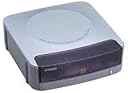
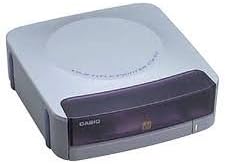
🎯 Print Perfect, Stand Apart – Your CDs Deserve the Spotlight!
The Casio CW-50 CD Title Printer delivers high-resolution 200 dpi thermal transfer printing with a rapid 9.0 mm/second speed. Supporting all PC fonts and featuring a 4-color printing system, it ensures professional, vibrant CD labels that elevate your media presentation.
| ASIN | B00007FGUS |
| Additional Printer Functions | All In One |
| B&W Pages per Minute | 21.3 ppm |
| Best Sellers Rank | #1,109,885 in Office Products ( See Top 100 in Office Products ) #1,757 in Laser Computer Printers |
| Brand | Casio |
| Built-In Media | AC adapter, USB cable, black ink ribbon cassette, practice CD-R, CD-R alignment guide, software on a CD-ROM |
| Color | White |
| Color Depth | 24 bpp |
| Color Pages per Minute | 15 ppm |
| Compatible Devices | PC |
| Connectivity Technology | USB |
| Control Method | App |
| Customer Reviews | 3.4 out of 5 stars 23 Reviews |
| Dual-sided printing | No |
| Duplex | Simplex |
| Global Trade Identification Number | 00079767139438, 00079767174149 |
| Hardware Interface | USB |
| Ink Color | Black, Red, Blue, Silver |
| Item Weight | 2.5 Pounds |
| Manufacturer | Casio Inc. |
| Maximum Copy Resolution Black and White | 200 dpi |
| Maximum Copy Resolution Color | 200 dpi |
| Maximum Copy Speed Black and White | 21.3 ppm |
| Maximum Media Size | 120mm diameter (CD/DVD label size) |
| Maximum Print Resolution Black and White | 200 dpi |
| Maximum Sheet Capacity | 50 |
| Maximum print Resolution Color | 200 x 200 DPI |
| Model Name | CW 50 |
| Model Number | CW-50 |
| Model Series | CW 50 |
| Number of Trays | 1 |
| Other Special Features of the Product | CD-Printing |
| Paper Size | 12 centimeters |
| Print media | Labels |
| Printer Connectivity Type | USB |
| Printer Output Type | Monochrome |
| Printer Type | Thermal |
| Printing Technology | Thermal |
| Processor Count | 1 |
| Resolution | 200 x 200 DPI |
| Special Feature | CD-Printing |
| Specific Uses For Product | CD/DVD Labeling |
| Total Usb Ports | 1 |
| UPC | 079767139438 |
| Warranty Type | limited warranty |
M**S
Great alternative to new 5k machines
UPDATE 9/14/15 I figured out the every other printing issue. If you save a project and reuse at another time,it will print every other print. BUT if you do a NEW project and not use the saved one, it will print every single time. But if you can't redo , then the update below is what to do. Also this WILL print on non-printable disc's as it burns onto and will not come off like ink. So you can save on disc's as well. UPDATE 5/30/15 This was printing nicely about 95% of all labels since I purchased, last cartridge and this one it seems every other one it makes a label. Starting to get mad. Are there bad cartridges ? or is the machine starting to go bad ? Just as thing pick up...dang it. UPDATE I FIGURED OUT HOW TO GET ALL THE PRINTING OUT OF A SINGLE CARTRIDGE. IT'S 2 X LONGER, BUT IT WORKS. STEP ONE: TAKE AN OLD CARTRIDGE AND TAKE OUT ALL THE TAP (WAS HOW I WAS COUNTING) AND MAKE SURE EVEN SILVER LEADS COME OUT AS WELL. PUT IN EMPTY CARTRIDGE, PASS 1 TIME, THEN TAKE EMPTY OUT AND PUT IN GOOD CARTRIDGE. PRINT AGAIN, IT COMES OUT PRINTED. DO THIS EVERY TIME YOU NEED A DISC PRINTED. IT KEEPS COUNT AND WILL TELL YOU REPLACE, JUST KEEP DOING THIS AND YOU CAN USE ALL PRINTING AREAS. (ONLY IF IT IS PRINTING EVERY SECOND ONE) (ORIGINAL WRITE - UP AND 4 STARS) This works nicely although they don't make anymore. If you unplug the power and use it when you need, it works pretty well with the cartridges at the highest boldness. Much cheaper than the full pro label for 5 grand, and better than the labels that I even cut to use in small form, but a small pieces of fellows label is far better than any full face label, but you have to make sure the full label is on the disc wicked good and that is time consuming.
J**H
Economical alternative
This is a nice product. Only slightly larger than an external CD-drive, this thermal transfer printer can directly label CD-type discs (-R, -RW, DVD -RAM, -R, and -RW). The print design is fairly limited and it will only do so in one color, although ribbons of various colors are available so you can choose which one color you wish. Unlike thermal transfer printers that cost 10X to 20X more, this printer will not put graphics and complicated designs on your disc. You are limited to several lines of print in whatever fonts are loaded on your computer. Although you can't produce truly professional looking discs, the results are drastically superior to those sticker labels that never seem to stay attached or writing on the disc with a marker. The print is crisp, easy to read, and doesn't scratch or flake off. To work well, you need to print on a blank area of the disc. It doesn't print well over either writing or slightly raised areas of design on the disc. This printer is well worth the money if want to label your discs neatly, but do not want to spend an exorbitant amount of money.
J**T
It Broke the first time I used it
It broke the first time I used it and the manufacturer would not replace it because I had used the wrong kind of disc to print on
J**L
Casio CW-50 CD Title Printer
Excellent addition to any system when you will be producing a large amount of CD/DVD's. Adds a real professional touch, plus makes labeling a lot more legible (sharpy just doesn't always cut i?!?!?).
J**C
Disappointing
Not easy to set-up. White printable surface CD just doesn't work. Besides broken text printing, the ribbon leaves black smudges on the white surface. I can't find many gauzy surface CD type ready available in store to print on this machine. Most CD with some printing already on and slightly textured surface does not work at all.
J**L
An easy fix if it doesn't print
I've had a Casio CW-50 for a few years now. Every so often over the years it would decide not to print. Then last week it finally said "I Quit!" I opened up the case, 5 screws, and wiggled the two flat wire plugs, suspecting a poor connection. That seems to have fixed the problem. Working perfectly now. Yes, it's expensive for what it is but it does a great job if simple printing in a single color is all that is needed. Plus, it's small! It doesn't appear to have a data buffer so if the computer is busy when it needs attention, it stops. I just make sure there is nothing power hungry running on the computer when I'm printing. Very reliable when I do that. I would buy it again.
A**R
Great disc title printer
I was having trouble with the disc labels getting caught in the dvd player. This is a pretty good alternative to labeling discs. The only thing I miss is the color and graphics that I was able to put on the labels. The machine works quite well and I would definately buy this again. Unfortunately I am having trouble locating additional printers. I hope that they did not discontiue making them.
K**R
Casio CW-50, better than the rest
For the money, I would stick with the CW-50 rather than spend almost double for the CW-75 or CW-100. As far as I can tell, the only thing the 75 has is the onboard keyboard...I guess if you dont have a computer this would be good, and the CW 100 has the automatic turn feature, which is nice, but Ill turn the disc myself and save $50. The CW-50 prints to almost professional standards...and even though it says it can print on only 2 areas, it can actually print on all four sides of the disc, you just have to spend some time placing your images and disc correctly. For the money, this labler cant be beat.
Trustpilot
3 weeks ago
1 month ago