


❄️ Stay cool, look cooler — the Hyper 212 PRO ARGB is your PC’s ultimate chill partner!
The Cooler Master Hyper 212 PRO ARGB is a high-performance CPU air cooler featuring four advanced heat pipes and a copper base for superior heat dissipation. Its 120mm PWM fan offers adjustable speeds from 690 to 2500 RPM, balancing airflow and noise at just 30 dB. The frosted blades enhance ARGB lighting effects, making it a stylish addition to any build. Compatible with AMD AM5/AM4 and Intel LGA1851/1700 sockets, it combines easy installation with reliable, quiet cooling for professional-grade desktop systems.




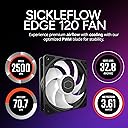
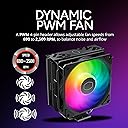


| ASIN | B07H22TC1N |
| Air Flow Capacity | 70.7 cubic_centimeters_per_minute |
| Best Sellers Rank | #8 in Computer CPU Cooling Fans |
| Brand | Cooler Master |
| Brand Name | Cooler Master |
| Compatible Devices | Desktop |
| Cooling Method | Air |
| Customer Reviews | 4.7 out of 5 stars 10,492 Reviews |
| Global Trade Identification Number | 00884102048661 |
| Included Components | Heat Sink, Fan |
| Item Dimensions L x W x H | 4.9"L x 2.9"W x 5.9"H |
| Item Highlight | AMD AM5/AM4 & Intel LGA1851/1700 Support Cooler, Quiet Cooling, 120mm PWM Fan, ARGB, 152mm, Easy Installation |
| Item Weight | 1.5 pounds |
| Manufacturer | Cooler Master |
| Material Type | Aluminum, Copper, Plastic |
| Maximum Rotational Speed | 2500 rpm |
| Model | RR-212S-25PZ-R1 |
| Noise Level | 30 db |
| Number of Items | 1 |
| Number of Packs | 1 |
| Part Number | RR-212S-25PZ-R1 |
| Power Connector Type | 4-Pin |
| Product Dimensions | 4.9"L x 2.9"W x 5.9"H |
| UPC | 884102048661 |
| Unit Count | 1 Count |
| Voltage | 12 volts |
| Warranty Description | 2 Year Manufacturer |
| Wattage | 2.4 watts |
A**R
The Legend Gets a Glow-Up
The Hyper 212 has been the go-to budget air cooler for years, and this RGB Black Edition is the version that finally looks the part too. The gunmetal anodized finish, brushed nickel fins, and RGB fan are a genuine upgrade over the original's industrial look. The SF120R fan runs between 650 and 2000 RPM with PWM control, so it stays whisper-quiet at idle and ramps up sensibly under load. Temperatures are excellent for the price class, easily keeping mainstream CPUs well within safe ranges under gaming loads. Installation takes more patience than a boxed cooler, mostly because the universal bracket system covers so many sockets. Read the included instructions once before starting and it goes smoothly. The fan snaps onto the tower after mounting, which is a nice touch. One heads up: the RGB controller works standalone or integrates with compatible ASUS, Gigabyte, MSI, or ASRock headers. If your board is not on that list, the included Molex controller still works fine. For mid-range builds where value and thermals matter more than a massive tower, this is hard to beat.
I**W
Works amazingly well, but mounting was confusing.
I've built several computers, and swapped parts in and out of each of them, so I consider myself fairly competent at working with these sorts of things. But this was an exercise in frustration getting it installed. The instructions have no text, and rely on very vague pictures to show you what to do. This made figuring out exactly which part to use somewhat annoying, but not overly difficult. The biggest difficulties I had where both while attempting to actually mount the cooler. First, the AMD mounting brackets you attach to the cooler itself gave no indication to which position for the screws is for AM3 and which is for AM4. I had to take the cooler back up to figure it out, which was annoying as I'd already put the thermal paste on. Even then, it was another inordinately long time of fighting with it, only getting 3/4 screws to go in tightly before I ended up taking it up yet again. That was when I realized I had one of the brackets on backwards, because there's no real indication of which way they're supposed to go. I was honestly surprised it even went on wrong, as on the other side the holes only lined up if it went the right way. Once that was sorted out, though, it did go on smoothly. The quality of the build is excellent, and it works great, it's really just a matter of having horrible instructions for installation. Final result, though, was a massive drop in temps over the stock cooler I was using, and an even bigger drop in noise. The stock cooler was using a 40mm fan, which sounded like a jet engine when it had to do anything. From an aesthetics standpoint, it works really well with my new P350X case, and the included RGB controller is very welcome. Overall, I'm supremely happy with the look, sound, and performance of this unit! The directions just need to be slightly more idiot-proof, or they should at least provide an installation video for reference.
A**N
I got these for $17 and they’re amazing for the price
Insanely quiet for the price and it keeps my computer Hella, cool and being in a case was really bad airflow powerful quiet and keeps your PC frigid while keeping your wallet full-ish in the lighting RGB doesn’t struggle at all on any colors perfect yellows and oranges perfect only reason it’s at 54 and 65 is cause it is like 90° in California right now so it’s a little bit hotter in my AC isn’t on but usually it gets 40 or 30 on just CPU
J**N
Great quiet affordable cooler
Keeps my 14400f at room temperature without making any noise whatsoever. Great product. It comes with cooling paste, so I had everything to install this in about 10 minutes.
D**W
The fan clips are impossibly stupid
The cooling performance on the Cooler Master Hyper 212 PRO ARGB is genuinely impressive for an air cooler. Combined with my front radiator, it keeps my processor very cold even under load. The 120mm PWM fan is quiet and the ARGB looks great once it's actually running. However, the installation of the fan onto the heatsink is incredibly frustrating. It uses thin metal wire clips that you have to snap into place. In a smaller case, trying to get these wires to seat correctly is a major headache. I would have much preferred a solid bracket or screws. If you have the patience for the clips, the cooling results are worth it, but be prepared for some frustration during the build.
B**E
Good replacement for the AMD cooler.
Was able to drastically lower my temps over using the stock amd cooler and the rug was a nice touch. 10/10
J**A
Good fan
Mounting the fan was a tiny bit confusing (I think I ended up turning it 90 degrees iirc) otherwise amazing price performance.
T**S
Sturdy and Effective Cooling with Appealing Aesthetics
This fan was selected for use in my new desktop computer, and my experience with it thus far has been positive. It looks good, with attractive color accents that enhance the overall appearance of my new desktop. Beyond aesthetics, the fan exhibits a robust and sturdy construction, instilling confidence in its long-term durability. Most importantly, it performs well, and moves a lot of air, which is crucial for maintaining optimal system performance. The fan's sturdy build is a notable advantage, suggesting resilience and longevity. Additionally, the appealing color scheme adds a welcome visual element to the computer's internal components. Its capacity to move a substantial amount of air is a critical pro, ensuring efficient cooling and contributing to the overall stability and performance of the system. At this time, no drawbacks have been identified. In conclusion, this fan proves to be a solid choice for a computer build, offering a combination of effective cooling performance, durable construction, and pleasing visual design. Its ability to move a significant volume of air, coupled with its sturdiness and attractive colors, makes it an excellent choice.
P**H
This is a legendary cooler for you RIG really.
My CPU temp above 95 with stock cooler. after installing this now it is contant 65-75 during game and stream. sometime spike 90 but this not any issue. on idle it cooled my PC at 38 ambient temp is 30.
H**A
Perfeito
Cumpri o que promete
K**A
Perfect cooler
It's really good cooler, yes it's not a good looking and it's not 100 quite but i really recommend everyone to buy this products temperature went from 87 to 60 on load
M**O
Brought down the temperature of my Ryzen 5 3500 from 95c to 82c on prime95 max power stress test!
On stock settings with the AMD Wraith Stealth that comes with the CPU, temperatures reach a maximum of 95c on the prime95 max power stress test. Idle temperatures are at 50c to 55c in an ambient of 30c. On gaming loads, temperatures hover around 60 to 70. With this cooler, the max temperatures are at most 82c on the same prime95 max power stress test and idle temps are down to around 43c to 45c. The cooler comes in a nice packaging and includes a tube of thermal paste for your convenience. Installation was easy but you do have to read the instructions carefully though as it was a little confusing for me at first. Installation did require the removal of my Gigabyte B450 AORUS M motherboard however. The heatsink itself is in a matte black finish and the fan has a nice RGB light which is vibrant. Also included are brackets to install a second fan behind the heatsink for a dual fan push-pull configuration. While pretty, the fan is slightly louder than the original Wraith Stealth, but it is not too bad. It really only becomes very audible at around 70% full speed. Overall, this is a great cooler at a great price. Definitely look into this if you want a cost effective upgrade from the original cooler that comes with your CPU. While there are other coolers that can perform better, it will be hard to beat this at its price point and don't forget, you can always add a second fan if you wish to on this one as the brackets are already provided.
K**Y
Works well
Dropped my AMD cpu from running at 60-70c to 40-50c. Easy to install, quiet, only issue? It is a little bulky but not an issue for my case had made sure it fit prior.
Trustpilot
2 days ago
1 month ago